
Decatur Electronics G3 Istruzioni per l'installazione e il funzionamento

G3™
User’s Manual &
Installation Guide
Canada Variant
Revision
7/October/2020
Copyright 2020 Decatur Electronics, Inc.


G3™
User’s Manual &
Installation Guide
CanadaVariant
Revision
7/October/2020

Table of Contents
WelcometoDecaturElectronics ...........................................7
G3™Features..........................................................8
AboutThisManual....................................................9
1.0 QuickStart ..........................................................11
2.0 Installation ..........................................................12
2.1 Separating the Computer/Display Unit (Optional) . . . . . . . . . . . . . . . . 12
2.2 Mounting and Connecting the Computer/Display Unit . . . . . . . . . . . . 14
2.3 Mounting and Connecting the Antenna . . . . . . . . . . . . . . . . . . . . . . . . . . 17
2.4 InstallationCheck................................................20
2.5 VIP™Installation(Optional).......................................21
2.5.1 Connecting to the Radar . . . . . . . . . . . . . . . . . . . . . . . . . . . . . . . . . . . . . . . 21
2.5.2 Connecting to the On-Board Diagnostic Port . . . . . . . . . . . . . . . . . . . 21
2.5.3 VIP™Activation................................................22
2.5.4 ConguringtheVIP™...........................................23
3.0 OperatingtheG3™...................................................24
3.1 Power...........................................................24
3.2 FrontandRearAntenna..........................................25
3.3 StationaryBothMode............................................26
3.3.1 UsingDirectionalAntennas.....................................26
3.4 Moving Mode Opposite Direction . . . . . . . . . . . . . . . . . . . . . . . . . . . . . . . . 30
3.5 MovingModeSameDirection....................................31
3.6 FastestMode.....................................................32
3.7 LockingaSpeed.................................................33
3.8 RangeSetting ...................................................34
3.9 StopwatchOperationMode......................................35
4.0 Computer/DisplayUnit...............................................37
4.1 DisplayWindows.................................................38
4.2 IndicatorLights..................................................39
5.0 Antenna.............................................................41
6.0 IRRemote............................................................42
6.1 IR Remote Battery Replacement . . . . . . . . . . . . . . . . . . . . . . . . . . . . . . . . . . 49
7.0 CommunicationSystemControls.....................................51

8.0 PerformanceTips.....................................................51
8.1 HowRadarWorks................................................51
8.2 Interference Sources and Remedies . . . . . . . . . . . . . . . . . . . . . . . . . . . . . . 51
8.2.1 Angular Interference (Cosine Eect) . . . . . . . . . . . . . . . . . . . . . . . . . . . . 52
8.2.2 FanInterference...............................................53
8.2.3 Batching ......................................................53
8.2.4 Electromagnetic Interference (EMI) . . . . . . . . . . . . . . . . . . . . . . . . . . . . . 54
8.2.5 FeedbackInterference.........................................54
8.2.6 Multi-Path Beam Cancellation . . . . . . . . . . . . . . . . . . . . . . . . . . . . . . . . . . 54
8.2.7 PatrolHarmonics ..............................................54
8.2.8 Radio Frequency Interference (RFI) . . . . . . . . . . . . . . . . . . . . . . . . . . . . . 55
8.2.9 Shadowing . . . . . . . . . . . . . . . . . . . . . . . . . . . . . . . . . . . . . . . . . . . . . . . . . . . . 55
8.2.10 Motor Vehicle Ignition Interference). . . . . . . . . . . . . . . . . . . . . . . . . . . . 56
9.0 FieldTests............................................................56
9.1 Operator-RequestedSelfTest.....................................56
9.2 RoadTest........................................................59
10.0 Care,Cleaning,andStorage ........................................60
11.0 Specications......................................................61
11.1 Mechanical.....................................................61
11.2 Antenna........................................................61
11.3 Environment....................................................61
11.4 PowerConsumption............................................62
11.5 SpeedRange ...................................................62
12.0 ISEDInformation...................................................63
13.0 RadiationExposureStatement......................................64
13.1 Canadian Industry Certicates of Technical Acceptability . . . . . . . . . 65
14 Frequently Asked Questions (FAQ) . . . . . . . . . . . . . . . . . . . . . . . . . . . . . . . . . . . . 67
15.0 Service .............................................................68
15.1 Warranty........................................................68
15.2 ServiceReturnProcedure .......................................69
16.0 How to Order Additional Products . . . . . . . . . . . . . . . . . . . . . . . . . . . . . . . . . . 70

AppendixA-CommunicationsPort.......................................71
Appendix B - Communications Port - Serial Protocols . . . . . . . . . . . . . . . . . . . . . . 72
AppendixC-MenuFeatures..............................................73
UserNotes:...............................................................74

G3™User’s & Installation Manual
7/October/2020
7
Welcome to Decatur Electronics, Inc.
Thank you for choosing the Decatur Electronics G3™ — A highly
advanced trac radar unit that will reward your department with
years of dependable service. The G3™ design incorporates high
performance and long range, with many leading features. We urge
you to study this manual before using the G3™, so you can optimize
the benets of this sophisticated radar device. We believe you will be
pleasantly surprised by the features and advantages.
The G3™ is small, dependable and features instant target acquisition.
If you are as pleased with its performance as we think you will be, ask
your Decatur sales representative about other Decatur products.
Trac ocers told us exactly what they wanted in a radar device -
and we built it. Try any one of our products and see if you don't agree
that it is the best-in-class!
—The Management and Sta at Decatur Electronics,
The Nation’s Oldest Radar Company

G3™User’s & Installation Manual
7/October/2020
8
G3™ Features
The G3™ is a modern trac radar device oering many advanced
capabilities. It includes 32-bit oating point digital signal processing
(DSP), a versatile detachable computer/display unit, a Ka band
directional antenna, and an easy-to-use Infrared (IR) remote control.
The G3™ provides instant target acquisition and speed lock as well
as more precise tracking and speed measurement. If space in your
motor vehicle is at a premium, you will appreciate the detachable
computer/display unit. For more safety conscious installation
options, you can separate the pieces and mount them wherever best
meets your specic needs.
The IR remote controls all of the functions of the radar unit. The
remote features convenient “eyes-o”raised buttons for use without
taking your eyes o the road, white backlighting for low light use
and ts comfortably in your hand, positioning all controls at your
ngertips.

G3™User’s & Installation Manual
7/October/2020
9
About This Manual
TThis manual contains valuable information to help you set up, use
and maintain your G3™, so you can extend its life and keep it at peak
performance. Please take a moment to read through it and keep it
handy for future reference.
Note the following symbols in this manual:
Indicates a warning message about safety
precautions. Please read it carefully.
Indicates a helpful tip or precaution to note.
G3™User’s & Installation Manual
7/October/2020
10
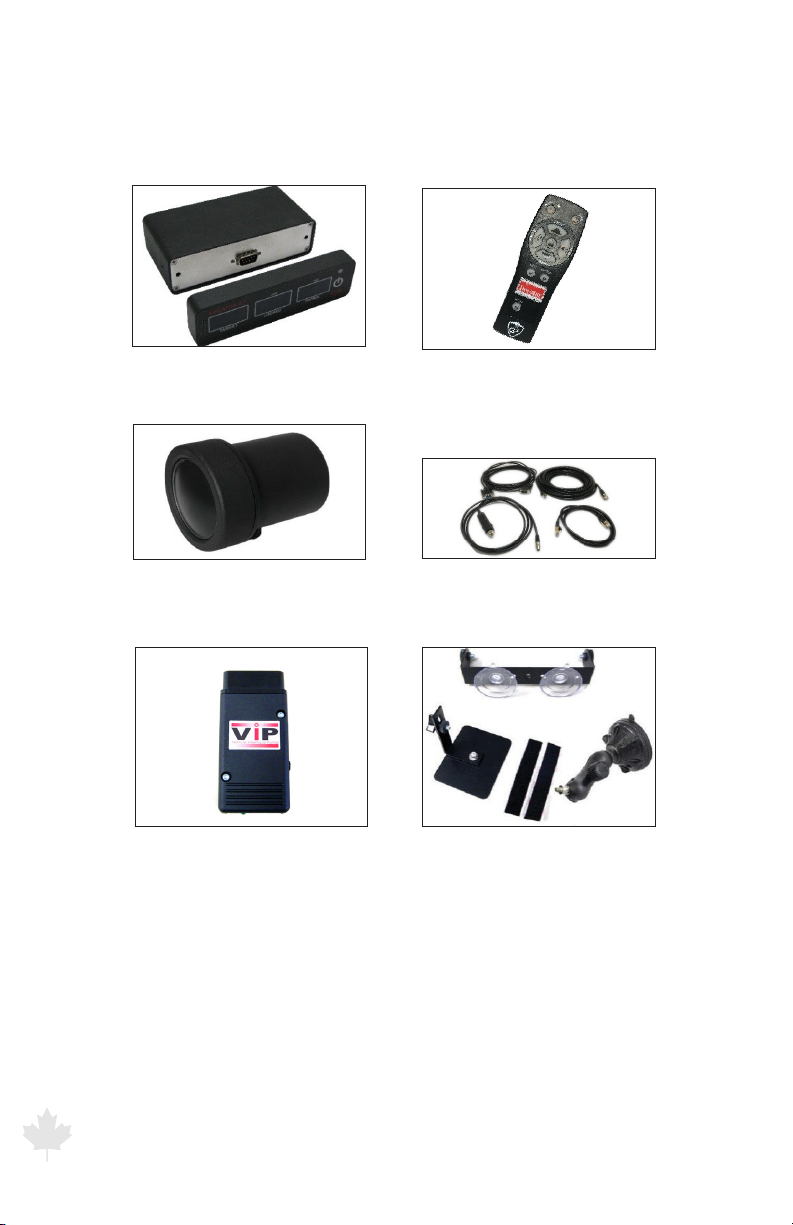
Your G3™ radar unit includes selections from the following
components:
Detachable Computer/
Display Unit
IR Hand Remote
Ka Band Directional Antenna Various Connector Cables
Optional VIP Various Mounting Brackets
Indice
Altri manuali Decatur Electronics Rilevatore radar


