CONNECTING MP3 TO THE RADIO
Time
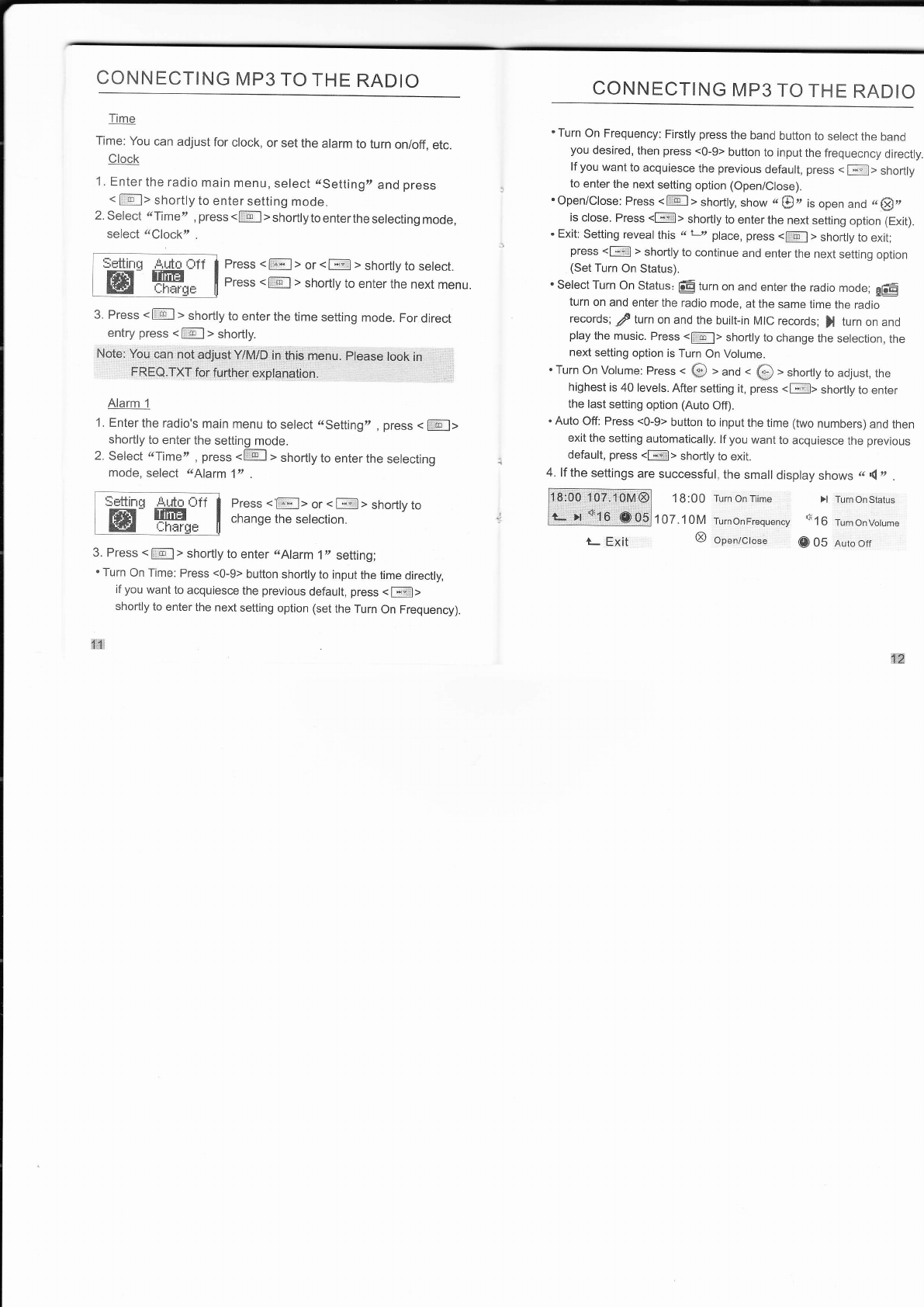
Time: You can adjust for clock, or set the alarm to turn on/off, etc.
Clock
1. Enter the radio main menu, select r.Setting, and press
< la6l> shortly to enter setting mode.
2. Select (Time,t, press <l:E-l> shorflytoenterthe selecting mode,
select &Clock" .
Press < lSrll > or < f;t > shorfly to select.
Press < 116.l > Shortly to enter the next menu
3. Press <llEl > shortly to enter the time setting mode. For direct
entry press <l ol > shortly.
Note: You can not adjust Y/M/D in this menu. please look in
FREO.TXT forÍùrther expÍadétion.
Alarm 1
1. Enter the radio's main menu to select ..Setting', , press < fI6-11
shortly to enter the setting mode.
2. Select (Timett , press <llFl > shorfly to enter the selecting
mode, select ,.Alarm 1" .
Ppsss < [I;l> or < f;;l > shortly to
change the selection.
3. Press < [:.El > shortly to enter íAlarm 1', setting;
. Turn On Time: Press <0-9> button shorfly to input the time direcfly,
if you want to acquiesce the prevrous default, press < l-;rrill>
shortly to enter the next setting option (set the Turn On Frequency).
1'1
CONNECTING MP3 TO THE RADIO
. Turn On Frequency: Firstly press the band button to select the band
you desired, then press <0-9> button to input the frequecncy direcily.
lf you want to acquiesce the previous default, press < Fl,l> shorfly
to enter the next setting option (Open/Close).
' Open/Close: Press < 116l > shortly, show c $ z 1, open and r3 qE,,
is close. Press <E> shorfly to enter the next setting option (Exit).
. Exit: Setting reveal this .( L,, place, press <Ll6-l > shorfly to exit;
press <F > shortly to continue and enter the next setting option
(Set Turn On Status).
. Select Turn On Status: É turn on and enter the radio mode; gÉE
turn on and enter the radio mode, at the same time the radio
records; / turn on and the buillin MIC records; ) turn on and
play the music. Press <fl6l> shorily to change the selection, the
next setting option is Turn On Vblume.
. Turn On Volume: Press < @ t and . O > shorfly to adjust, the
highest is 40 levels. After setting it, press <l-*-:liì> shorfly to enter
the last setting option (Auto Off).
. Auto Off: Press <0-9> button to input the time (two numbers) and then
exit the setting automatically. lf you want to acquiesce the previous
default, press <[4]> shorily to exit.
4. lf the settings are successful, the small display shows r '( n .
1 B:00 Turn On Tiime >l Turn On Status
107.10M TurnonFrequency (16 Turnonvotume
I open/ctose O 05 nutoott
-settrnq llrúnfÌ l
LELffi* I
nc