
DeLOCK 42635 Manuale utente
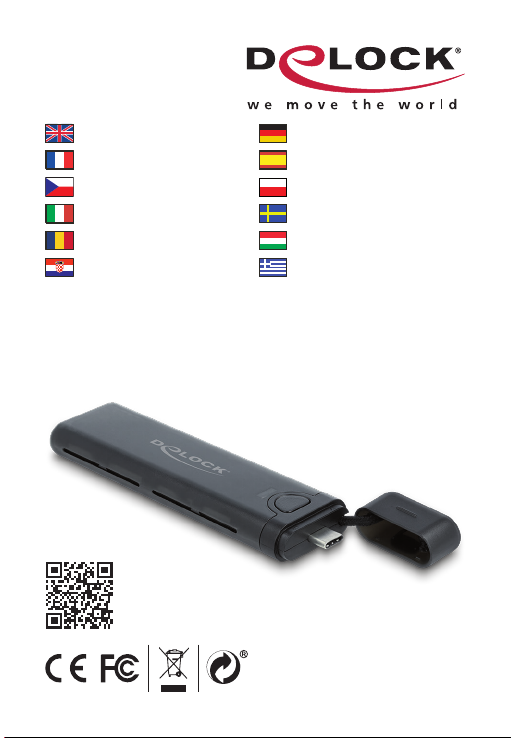
USB Type-C™ External Enclosure
for M.2 NVMe PCIe or SATA SSD -
tool free
Product-No: 42635
User manual no: 42635-a
www.delock.com
User manual
Mode d’emploi
Uživatelská příručka
Manuale utente
Manual de utilizare
Korisnički priručnik
Bedienungsanleitung
Manual del usuario
Instrukcja obsługi
Bruksanvisning
Használati utasítás
Εγχειρίδιο χρήστη

-2-
English
Description
This enclosure by Delock enables the installation of an M.2 PCIe
NVMe SSD or SATA M.2 SSD in 2280, 2260, 2242 and 2230
format. It can be connected directly via USB-C™ plug to the PC or
laptop.
Combo enclosure
The big advantage of this Delock M.2 enclosure is that both SATA
and PCIe (NVMe) M.2 SSDs can be inserted into the enclosure.
The memory is automatically recognized by the chipset and can
then be used.
SSD installation without tools
The special feature of this enclosure is that no tools are required
to install the M.2 SSD. The lid is pushed backwards and the SSD
is plugged into the slot, the SSD will be attached to the PCB with a
rubber nipple and then the lid is reattached until it locks.
Specication
• Connectors:
external: 1 x USB 10 Gbps USB Type-C™ male
internal: 1 x 67 pin M.2 key M slot
• Chipset: Realtek RTL9210B
• Supports M.2 modules in format 2280, 2260, 2242 and 2230 with
key M or key B+M based on SATA or PCIe (NVMe)
• Maximum height of the components on the module: 1.5 mm,
application of double-sided assembled modules supported
• Supports NVM Express (NVMe)
• Bootable
• Supports UASP
• Data transfer rate up to 10 Gbps
• LED indicator for power and access
• Lanyard strip for cap
• Dimensions (LxWxH): ca. 115 x 30 x 11 mm

-3-
English
• Hot Plug, Plug & Play
System requirements
• Chrome OS 83.0 or above
• Linux Kernel 3.18 or above
• Mac OS 10.15.5 or above
• Windows 8.1/8.1-64/10/10-64/11
• Device with a free USB Type-C™ port or with a free
Thunderbolt™ 3 port
Package content
• External enclosure M.2
• User manual
Safety instructions
• Protect the product against moisture
• Protect the product against direct sunlight
• Avoid anti-static electricity when installing the SSD
Hardware Installation
1. Open the housing.
2. To do this, press the button on the bottom.
3. Now you plug your M.2 SSD into the slot.
4. Fix the module with the help of the rubber nipple.
5. Close the enclosure.
Driver Installation
1. Switch on your computer.
2. The external drive will be recognized and you can start using
the device immediately.
Attention
There is no support for M.2 AHCI SSDs.

-4-
English
Support Delock
If you have further questions, please contact our customer support
You can nd current product information on our homepage:
www.delock.com
Final clause
Information and data contained in this manual are subject to change
without notice in advance. Errors and misprints excepted.
Copyright
No part of this user manual may be reproduced, or transmitted
for any purpose, regardless in which way or by any means,
electronically or mechanically, without explicit written approval of
Delock.
Edition: 12/2023

-5-
Deutsch
Systemvoraussetzungen
• Chrome OS 83.0 oder höher
• Linux Kernel 3.18 oder höher
• Mac OS 10.15.5 oder höher
• Windows 8.1/8.1-64/10/10-64/11
• Gerät mit einem freien USB Type-C™ Port oder mit einem freien
Thunderbolt™ 3 Port
Packungsinhalt
• Externes Gehäuse M.2
• Bedienungsanleitung
Sicherheitshinweise
• Produkt vor Feuchtigkeit schützen
• Produkt vor direkter Sonneneinstrahlung schützen
• Vermeiden Sie antistatische Auadung beim Einbau der SSD
Hardwareinstallation
1. Önen Sie das Gehäuse.
2. Drücken Sie dazu den Knopf auf der Unterseite.
3. Stecken Sie nun Ihre M.2 SSD in den Slot.
4. Befestigen Sie das Modul mit Hilfe des vorhandenen
Gumminippel.
5. Schließen Sie das Gehäuse wieder.
Treiberinstallation
1. Schalten Sie den Computer ein.
2. Das externe Laufwerk wird sofort erkannt und Sie können das
Gerät sofort verwenden.
Achtung
Es werden keine M.2 AHCI SSDs unterstützt.

-6-
Français
Conguration système requise
• Chrome OS 83.0 ou version ultérieure
• Linux Kernel 3.18 ou version ultérieure
• Mac OS 10.15.5 ou version ultérieure
• Windows 8.1/8.1-64/10/10-64/11
• Appareil avec un port USB Type-C™ libre ou avec un port
Thunderbolt™ 3 libre
Contenu de l’emballage
• Boîtier externe M.2
• Mode d’emploi
Instructions de sécurité
• Protéger le produit contre l’humidité
• Protéger le produit contre la lumière directe du soleil
• Eviter l’électricité statique au moment de l’installation de votre
SSD
Installation matérielle
1. Ouvrez le boîtier.
2. Pour cela, appuyer sur le bouton en bas.
3. Vous pouvez à présent brancher votre SSD M.2 dans
l'emplacement.
4. Fixe le module à l’aide de l’embout en caoutchouc.
5. Fermez le boîtier.
Installation du pilote
1. Allumez votre ordinateur.
2. Le lecteur externe est reconnu et vous pouvez immédiatement
commencer à l'utiliser.
Attention
Il n’y a pas de support pour les M.2 AHCI SSD.

-7-
Español
Requisitos del sistema
• Chrome OS 83.0 o superior
• Linux Kernel 3.18 o superior
• Mac OS 10.15.5 o superior
• Windows 8.1/8.1-64/10/10-64/11
• Dispositivo con un puerto USB Type-C™ o con un puerto
Thunderbolt™ 3 disponible
Contenido del paquete
• Carcasa externa de M.2
• Manual del usuario
Instrucciones de seguridad
• Proteja el producto contra el polvo
• Proteja el producto contra la luz solar directa
• Evite la electricidad estática cuando instale la unidad de estado
sólido
Hardware Instalación
1. Abra la carcasa.
2. Para hacerlo, pulse el botón de la parte inferior.
3. Ahora enchufe la unidad de estado sólido M.2 en la ranura.
4. Fije el módulo con la ayuda de la boquilla de goma.
5. Cierre la carcasa.
Instalación del controlador
1. Encienda su PC.
2. La unidad externa será reconocida y podrá comenzar a utilizar
el dispositivo inmediatamente.
Atención
No hay soporte para M.2 AHCI SSD.

-8-
České
Systémové požadavky
• Chrome OS 83.0 nebo vyšší
• Linux Kernel 3.18 nebo vyšší
• Mac OS 10.15.5 nebo vyšší
• Windows 8.1/8.1-64/10/10-64/11
• Zařízení s volným portem USB Type-C™ nebo volný port
Thunderbolt™ 3
Obsah balení
• Externí pouzdro M.2
• Uživatelská příručka
Bezpečnostní pokyny
• Chraňte produkt před vlhkostí
• Chraňte produkt před přímým slunečním světlem
• Vyhněte se anti-statické elektřině při instalaci SSD
Instalace hardware
1. Otevřte kryt PC.
2. Provedete to stiskem tlačítka na spodní straně.
3. Nyní připojte do slotu váš M.2 SSD.
4. Pomocí gumové špičky připevněte modul.
5. Zavřete pouzdro.
Instalace ovladače
1. Zapněte počítač.
2. Je rozpoznán externí disk a můžete jej začít používat.
Upozornění
Neexistuje žádná podpora pro M.2 AHCI SSD.

-9-
Polsku
Wymagania systemowe
• Chrome OS 83.0 lub nowszy
• Linux Kernel 3.18 lub nowszy
• Mac OS 10.15.5 lub nowszy
• Windows 8.1/8.1-64/10/10-64/11
• Urządzenie z wolnym portem USB Type-C™ bądź z wolnym
złączem Thunderbolt™ 3
Zawartość opakowania
• Kieszeń zewnętrzna M.2
• Instrukcja obsługi
Instrukcje bezpieczeństwa
• Produkt należy zabezpieczyć przed wilgocią
• Produkt należy zabezpieczyć przed bezpośrednim światłem
słonecznym
• Podczas instalowania SSD należy unikać elektryczności
statycznej
Instalacja sprzętu
1. Otwórz obudowę.
2. Aby to zrobić docisnąć przycisk w dnie
3. Podłącz dysk M.2 SSD do gniazda.
4. Montaż modułu dociskiem gumowym.
5. Zamknij obudowę.
Instalacja sterownika
1. Wyłącz komputer.
2. Napęd zewnętrzny zostanie wykryty automatycznie i od razu
można korzystać z urządzenia.
Uwaga
Nie obsługuje M.2 AHCI SSDs.

-10-
Italiano
Requisiti di sistema
• Chrome OS 83.0 o superiore
• Linux Kernel 3.18 o superiore
• Mac OS 10.15.5 o superiore
• Windows 8.1/8.1-64/10/10-64/11
• Dispositivo con una porta USB Type-C™ disponibile o con una
porta Thunderbolt™ 3 disponibile
Contenuto della confezione
• Alloggio esterno M.2
• Manuale utente
Istruzioni per la sicurezza
• Proteggere il prodotto dall'umidità
• Proteggere il prodotto dalla luce solare diretta
• Evitare l'elettricità antistatica durante l'installazione dell'SSD
Installazione dell'hardware
1. Aprire l'alloggiamento.
2. Per farlo, premere il pulsante sul fondo.
3. Collegare l'SSD M.2 nello slot.
4. Fissare il modulo con l'aiuto dell'ugello di gomma.
5. Chiudere l'alloggio.
Installazione del driver
1. Accendere il computer.
2. L'unità esterna viene riconosciuta ed è possibile iniziare ad
utilizzare immediatamente il dispositivo.
Attenzione
Non è previsto alcun supporto per SSD M.2 AHCI.
Indice
Lingue:
Altri manuali DeLOCK Allegato

DeLOCK
DeLOCK 42371 Manuale utente

DeLOCK
DeLOCK 42365 Manuale utente

DeLOCK
DeLOCK SuperSpeed 42013 Manuale utente

DeLOCK
DeLOCK 42606 Manuale utente

DeLOCK
DeLOCK 42638 Manuale utente

DeLOCK
DeLOCK 42593 Manuale utente

DeLOCK
DeLOCK 42595 Manuale utente

DeLOCK
DeLOCK SuperSpeed 42015 Manuale utente

DeLOCK
DeLOCK 42513 Manuale utente

DeLOCK
DeLOCK 42019 Manuale utente


