
DeLOCK 89243 Manuale utente
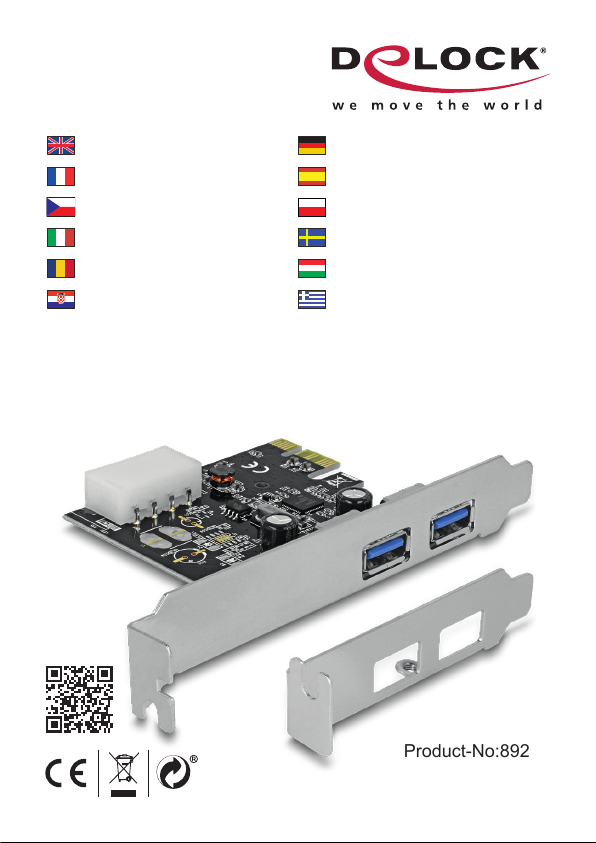
SuperSpeed USB 5 Gbps
PCI Express x1 Card
2 x USB Type-A
Product-No:89243
User manual no:89243-a
www.delock.com
User manual
Mode d’emploi
Uživatelská příručka
Manuale utente
Manual de utilizare
Korisnički priručnik
Bedienungsanleitung
Manual del usuario
Instrukcja obsługi
Bruksanvisning
Használati utasítás
Εγχειρίδιο χρήστη

-2-
English
Description
This PCI Express card by Delock expands the PC by two external SuperSpeed
USB 5 Gbps ports. Dierent USB devices, such as docking stations, card
readers, external enclosures etc., can be connected to the card.
Specication
• Connectors:
external:
2 x SuperSpeed USB 5 Gbps (USB 3.2 Gen 1) Type-A female
internal:
1 x 4 pin power connector
1 x PCI Express x1, V2.0
• Chipset: Renesas
• Data transfer rate up to:
SuperSpeed 5 Gbps,
Hi-Speed 480 Mbps,
Full-Speed 12 Mbps,
Low-Speed 1.5 Mbps
System requirements
• Linux Kernel 2.6 or above
• Windows 7/7-64/8.1/8.1-64/10/10-64/11
• PC with one free PCI Express slot
• Power supply with a free 4 pin power connector
Package content
• PCI Express card
• Low prole bracket
• Power cable
• Driver CD
• User manual
Safety instructions
• Protect the product against moisture
• Avoid anti-static electricity when installing the card

-3-
English
Hardware Installation
1. Turn o your PC and unplug the power cord.
2. Open the housing.
3. Remove the slot holder from the available PCI Express slot.
4. Insert the card straight and carefully into the free PCI Express slot, until it is
well seated.
5. Use a screw to attach the card to the housing.
6. Connect a power cable of your power supply to the PCI Express Card or
use the included power cable and connect this to the card and to your power
supply.
7. Reattach the housing and connect the power cord to the AC adapter.
Driver Installation
1. Switch on your computer.
2. Put the driver CD in the CD ROM drive.
3. Open Windows Explorer, select: CD-drive\Renesas\uPD72020x\Windows\
Setup.exe.
4. Follow the instructions of the driver installation.
5. Restart your system after the installation.
6. After restart you can start using the device immediately.
Support Delock
If you have further questions, please contact our customer support
You can nd current product information on our homepage: www.delock.com
Final clause
Information and data contained in this manual are subject to change without
notice in advance. Errors and misprints excepted.
Copyright
No part of this user manual may be reproduced, or transmitted for any purpose,
regardless in which way or by any means, electronically or mechanically, without
explicit written approval of Delock.
Edition: 07/2022

-4-
Deutsch
Kurzbeschreibung
Die PCI Express Karte von Delock erweitert den PC um zwei externe
SuperSpeed USB 5 Gbps Ports. An die Karte können verschiedene USB Geräte,
wie z. B. Docking Stationen, Card Reader, externe Gehäuse etc., angeschlossen
werden.
Spezikation
• Anschlüsse:
extern:
2 x SuperSpeed USB 5 Gbps (USB 3.2 Gen 1) Typ-A Buchse
intern:
1 x 4 Pin Stromanschluss
1 x PCI Express x1, V2.0
• Chipsatz: Renesas
• Datentransferraten bis zu:
SuperSpeed 5 Gbps,
Hi-Speed 480 Mbps,
Full-Speed 12 Mbps,
Low-Speed 1,5 Mbps
Systemvoraussetzungen
• Linux Kernel 2.6 oder höher
• Windows 7/7-64/8.1/8.1-64/10/10-64/11
• PC mit einem freien PCI Express Steckplatz
• Netzteil mit einem freien 4 Pin Stromanschluss
Packungsinhalt
• PCI Express Karte
• Low Prole Blende
• Stromkabel
• Treiber CD
• Bedienungsanleitung
Sicherheitshinweise
• Produkt vor Feuchtigkeit schützen
• Vermeiden Sie antistatische Auadung beim Einbau der Karte

-5-
Deutsch
Hardwareinstallation
1. Schalten Sie Ihren PC aus, ziehen Sie das Netzkabel.
2. Önen Sie das Gehäuse.
3. Entfernen Sie das Slotblech vom gewünschten freien PCI Express
Steckplatz.
4. Stecken Sie die Karte gerade und vorsichtig in den freien PCI Express Slot,
bis sie fest sitzt.
5. Befestigen Sie die Karte mit einer Schraube am Gehäuse.
6. Verbinden Sie ein Stromkabel Ihres Netzteils mit der PCI Express Karte oder
nutzen Sie das im Lieferumfang bendliche Stromkabel und schließen dieses
an die Karte und an Ihr Netzteil an.
7. Schließen Sie das Gehäuse wieder und verbinden Sie das Netzkabel mit
dem Netzteil.
Treiberinstallation
1. Schalten Sie den Computer ein.
2. Legen Sie die Treiber CD in Ihr Laufwerk ein.
3. Önen Sie mit dem Explorer folgendes Programm: CD-Laufwerk\Renesas\
uPD72020x\Windows\Setup.exe.
4. Folgen Sie nun den Anweisungen der Treiberinstallation.
5. Starten Sie nach der Installation Ihr System neu.
6. Nach dem Neustart können Sie das Gerät verwenden.
Support Delock
Bei weitergehenden Supportanfragen wenden Sie sich bitte an
Aktuelle Produktinformationen nden Sie auf unserer Homepage: www.delock.de
Schlussbestimmung
Die in diesem Handbuch enthaltenen Angaben und Daten können ohne vorherige
Ankündigung geändert werden. Irrtümer und Druckfehler vorbehalten.
Copyright
Ohne ausdrückliche schriftliche Erlaubnis von Delock darf kein Teil dieser
Bedienungsanleitung für irgendwelche Zwecke vervielfältigt oder übertragen
werden, unabhängig davon, auf welche Art und Weise oder mit welchen Mitteln,
elektronisch oder mechanisch, dies geschieht.
Stand: 07/2022

-6-
Français
Conguration système requise
• Linux Kernel 2.6 ou version ultérieure
• Windows 7/7-64/8.1/8.1-64/10/10-64/11
• PC avec un slot PCI Express libre
• Alimentation avec connecteur d’alimentation à 4 broches libre
Contenu de l’emballage
• PCI Express Carte
• Low prole slot arrière
• Câble d’alimentation
• CD d’installation des pilotes
• Mode d’emploi
Instructions de sécurité
• Protéger le produit contre l’humidité
• Éviter l’électricité statique lors de l’installation de la carte
Installation matérielle
1. Eteignez votre PC et débranchez le cordon d'alimentation.
2. Ouvrez le boîtier.
3. Enlevez le cache du slot PCI Express disponible.
4. Insérez la carte tout droit et avec précaution dans le slot PCI Express libre
jusqu'à ce qu'elle soit bien en place.
5. Utilisez une vis pour attacher la carte au boîtier.
6. Connectez un câble d'alimentation de votre bloc d'alimentation sur le carte
PCI Express ou utilisez le câble d'alimentation inclus et raccordez-le à la
carte et à votre bloc d'alimentation.
7. Remontez le boîtier et branchez le cordon d'alimentation et l'adaptateur AC.
Installation du pilote
1. Allumez votre ordinateur.
2. Mettez le CD de pilotes dans le lecteur de CD ROM.
3. Ouvrez l'Explorateur Windows, sélectionnez : CD-drive\Renesas\uPD72020x\
Windows\Setup.exe.
4. Suivez les instructions d’installation du pilote.
5. Redémarrez votre système après l’installation.
6. Après redémarrage vous pouvez immédiatement commencer à utiliser le
périphérique.

-7-
Español
Requisitos del sistema
• Linux Kernel 2.6 o superior
• Windows 7/7-64/8.1/8.1-64/10/10-64/11
• PC con una ranura PCI Express libre
• Fuente de alimentación con un conector de alimentación de 4 contactos libre
Contenido del paquete
• Tarjeta PCI Express
• Low prole soporte posterior
• Cable de alimentación
• Driver en CD
• Manual del usuario
Instrucciones de seguridad
• Proteja el producto contra el polvo
• Evite la electricidad estática cuando instale la tarjeta
Hardware Instalación
1. Apague su equipo y desconecte el cable de alimentación.
2. Abra la carcasa.
3. Retire el soporte de la ranura de la ranura PCI Express disponible.
4. Inserte la tarjeta en posición recta y con cuidado en la ranura PCI Express
libre hasta que quede correctamente asentada.
5. Utilice un tornillo para jar la tarjeta a la carcasa.
6. Conecte un cable de alimentación desde la fuente de alimentación a la
tarjeta PCI Express o utilice el cable de alimentación incluido y conéctelo a
la tarjeta y a la fuente de alimentación.
7. Vuelva a colocar la carcasa y conecte el adaptador de CA del cable de
alimentación.
Instalación del controlador
1. Encienda su PC.
2. Inserte el CD del controlador en la unidad de CD ROM.
3. Abra el Explorador de Windows y seleccione Unidad_de_CD\Renesas\
uPD72020x\Windows\Setup.exe.
4. Siga las instrucciones de instalación del controlador.
5. Reinicie el sistema después de la instalación.
6. Después del reinicio el dispositivo estará listo para su uso.

-8-
České
Systémové požadavky
• Linux Kernel 2.6 nebo vyšší
• Windows 7/7-64/8.1/8.1-64/10/10-64/11
• PC s volným PCI Express slotem
• Napájení s volným 4 pinovým napájecím konektorem
Obsah balení
• Karta PCI Express
• Záslepka do slotu
• Napájecí kabel
• CD s ovladači
• Uživatelská příručka
Bezpečnostní pokyny
• Chraňte produkt před vlhkostí
• Při instalaci karty se vyvarujte působení antistatické elektřiny
Instalace hardware
1. Vypněte PC a odpojte přívodní šňůru napájení.
2. Otevřte kryt PC.
3. Vyndejte záslepku z volného PCI Express slotu.
4. Vložte kartu opatrně do volného PCI Express slotu až zcela dosedne.
5. Přišroubujte pomocí šroubováku kartu ke skříni.
6. Připojte napájecí kabel ze zdroje počítače k PCI Express kartě, případně
použijte kabel dodávaný k této kartě k propojení se zdrojem.
7. Nasaďte zpět kryt a připojte napájecí šňůru.
Instalace ovladače
1. Zapněte počítač.
2. Vložte CD s ovladači do mechaniky.
3. Spusťte prohlížeč, zvolte: CD-mechanika\Renesas\uPD72020x\Windows\
Setup.exe.
4. Pokračujte podle instrukcí pro instalaci ovladače.
5. Po dokončení instalace restartujte počítač.
6. Po restartu je možné disk ihned používat.

-9-
Polsku
Wymagania systemowe
• Linux Kernel 2.6 lub nowszy
• Windows 7/7-64/8.1/8.1-64/10/10-64/11
• PC z wolnym slotem PCI Express
• Zasilacz z wolnym 4-pinowym złączem zasilania
Zawartość opakowania
• Karta PCI Express
• Low Prole śledz
• Kabel zasilający
• Sterowniki na CD
• Instrukcja obsługi
Instrukcje bezpieczeństwa
• Produkt należy zabezpieczyć przed wilgocią
• Podczas instalacji karty należy się zabezpieczyć przed elektrycznością
statyczną
Instalacja sprzętu
1. Wyłącz komputer i odłącz kabel zasilania.
2. Otwórz obudowę.
3. Usuń blokadę z wolnego slotu PCI Express.
4. Wsuwaj kartę prosto i ostrożnie do wolnego slotu PCI Express, aż zostanie
dobrze umocowana.
5. Przykręć śrubką kartę do obudowy.
6. Podłącz kabel zasilacza do karty PCI Express lub użyj dostarczonego kabla
zasilającego i podłącz go do karty i do źródła zasilacza.
7. Zamknij z powrotem obudowę i podłącz kabel do zasilacza.
Instalacja sterownika
1. Włącz komputer.
2. Włóż płytę CD-ROM ze sterownikami.
3. Otwórz Eksplorator Windows, wybierz: CD-drive\Renesas\uPD72020x\
Windows\Setup.exe.
4. Postępuj zgodnie z instrukcjami programu instalacyjnego.
5. Po instalacji uruchom ponownie system.
6. Po restarcie można od razu rozpocząć korzystanie z urządzenia.

-10-
Italiano
Requisiti di sistema
• Linux Kernel 2.6 o superiore
• Windows 7/7-64/8.1/8.1-64/10/10-64/11
• PC con uno slot PCI Express libero
• Alimentatore con un connettore di alimentazione a 4 pin disponibile
Contenuto della confezione
• Scheda PCI Express
• Staa a basso prolo
• Cavo di alimentazione
• CD contenente il driver
• Manuale utente
Istruzioni per la sicurezza
• Proteggere il prodotto dall'umidità
• Evitare l'elettricità antistatica durante l'installazione della scheda
Installazione dell'hardware
1. Spegnere il PC e scollegare il cavo di alimentazione.
2. Aprire l'alloggiamento.
3. Rimuovere il supporto dallo slot PCI Express disponibile.
4. Inserire la scheda in linea retta e con cura nello slot PCI Express libero
nché non si trova in sede.
5. Utilizzare una vite per ssare la scheda nell'alloggiamento.
6. Collegare un cavo di alimentazione della fonte di alimentatore per la Scheda
PCI Express o utilizzare il cavo di alimentazione in dotazione e collegarlo
alla scheda e all'alimentazione.
7. Reinserire l'alloggiamento e collegare il cavo di alimentazione all'adattatore
CA.
Installazione del driver
1. Accendere il computer.
2. Inserire il CD del driver nell'unità CD ROM.
3. Aprire Esplora risorse e selezionare unità CD\Renesas\uPD72020x\
Windows\Setup.exe.
4. Attenersi alle istruzioni di installazione del driver.
5. Ravviare il sistema dopo l'installazione.
6. Dopo il riavvio, è possibile iniziare ad utilizzare il dispositivo immediatamente.
Indice
Lingue:
Altri manuali DeLOCK Scheda PCI

DeLOCK
DeLOCK 89641 Manuale utente

DeLOCK
DeLOCK 88206 Manuale utente

DeLOCK
DeLOCK RS-422/485 Manuale utente

DeLOCK
DeLOCK 2 x serial PCI Card Manuale utente

DeLOCK
DeLOCK 90155 Manuale utente

DeLOCK
DeLOCK 89153 Manuale utente

DeLOCK
DeLOCK 90107 Manuale utente

DeLOCK
DeLOCK 90299 Manuale utente

DeLOCK
DeLOCK 88606 Manuale utente

DeLOCK
DeLOCK 89133 Manuale utente

DeLOCK
DeLOCK 89046 Manuale utente

DeLOCK
DeLOCK 89004 Manuale utente

DeLOCK
DeLOCK 89125 Manuale utente

DeLOCK
DeLOCK 95267 Manuale utente

DeLOCK
DeLOCK 89016 Manuale utente

DeLOCK
DeLOCK 81260 Manuale utente

DeLOCK
DeLOCK 89219 Manuale utente

DeLOCK
DeLOCK 90100 Manuale utente

DeLOCK
DeLOCK 88615 Manuale utente

DeLOCK
DeLOCK 90106 Manuale utente


