
DeLOCK 89641 Manuale utente
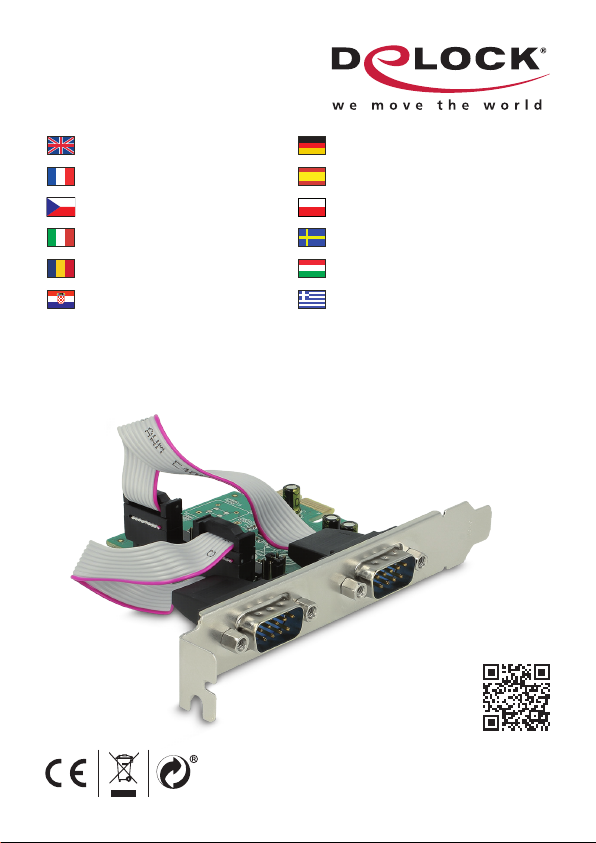
Serial PCI Express x1 Card
2 x Serial RS-232 with voltage supply
Product-No: 89641
User manual no: 89641-a
www.delock.com
User manual
Mode d’emploi
Uživatelská příručka
Manuale utente
Manual de utilizare
Korisnički priručnik
Bedienungsanleitung
Manual del usuario
Instrukcja obsługi
Bruksanvisning
Használati utasítás
Εγχειρίδιο χρήστη

-2-
English
Description
The PCI Express card by Delock expands a PC by two external serial RS-232
ports. Devices such as scanners, protocol converters, POS systems, infrared -,
IoT - devices etc. and dierent modes can be used.
Optional voltage supplies via RS-232
Connected devices can optionally be supplied with voltages of 5 V or 12 V.
Low Prole Form Factor
By using the included low prole brackets, the PCI Express card can be also
installed into a Mini-PC.
Specication
• Connectors:
external: 2 x serial RS-232 DB9 male
internal: 1 x PCI Express x1, V2.0
• Chipset: ASIX AX99100
• Compatible with 16C950 UART
• Selectable voltage supply: pin 1 / 9, maximum output power 23 W, 5 V (max. 1 A)
and 12 V (max. 1.5 A)
• Supports Active State Power Management (ASPM)
• Supports Direct Memory Access (DMA)
• Modes
Supports slow IrDA mode up to 115 Kbps
Supports Multi-Drop 9-bit mode
• Data transfer rate up to 921.6 Kbps
• Buer: 256 byte on each port
• Databits: 5, 6, 7, 8, 9
• Stop bits: 1, 1.5, 2
• Parity: even, odd, none, mark, space
• Flow control: none, hardware RTS / CTS, software XON / XOFF
• Operating temperature: 0 °C ~ 70 °C
• Dimensions (LxWxH): ca. 72 x 63 x 10 mm
System requirements
• Windows 7/7-64/8.1/8.1-64/10/10-64/11
• PC with one free PCI Express slot

-3-
English
Package content
• PCI Express card
• 2 x low prole bracket
• Driver CD
• User manual
Safety instructions
• Protect the product against moisture
• Avoid anti-static electricity when installing the card
Note:
• Maximum output power 23 watts at pin 1 and 9
An electrical short circuit or exceeding the maximum power of 23 W can destroy
the product or cause crashes or damage your system.
Hardware Installation
1. Turn o your PC and unplug the power cord.
2. Open the housing.
3. Remove the slot holder from the available PCI Express slot.
4. Insert the card straight and carefully into the free PCI Express slot, until it is
well seated.
5. Use a screw to attach the card to the housing.
6. Reattach the housing and connect the power cord to the AC adapter.
7. Switch on your computer.
Driver Installation
1. Switch on your computer.
2. The assistant for the Software Installation will appear. Click on "Cancel".
3. Put the driver CD in the CD ROM drive.
4. Navigate to the appropriate folder of your operating system under CD-drive\
Realtek\RTL8111 and choose "AX99100_Setup.exe".
5. Follow the instructions of the driver installation.
6. Restart the computer under Windows after installation of the driver.
7. After restart you can start using the device immediately.

-4-
English
Support Delock
If you have further questions, please contact our customer support
You can nd current product information on our homepage: www.delock.com
Final clause
Information and data contained in this manual are subject to change without
notice in advance. Errors and misprints excepted.
Copyright
No part of this user manual may be reproduced, or transmitted for any purpose,
regardless in which way or by any means, electronically or mechanically, without
explicit written approval of Delock.
Edition: 12/2023

-5-
Deutsch
Systemvoraussetzungen
• Windows 7/7-64/8.1/8.1-64/10/10-64/11
• PC mit einem freien PCI Express Steckplatz
Sicherheitshinweise
• Produkt vor Feuchtigkeit schützen
• Vermeiden Sie antistatische Auadung beim Einbau der Karte
Hinweis:
• Maximale Gesamtleistung 23 Watt an den Pins 1 und 9
Ein Kurzschluss oder ein Überschreiten der maximalen Leistung von 23 W kann
zu Systemabstürzen oder dauerhaften Beschädigungen an dem Produkt oder
Ihrem System führen.
Hardwareinstallation
1. Schalten Sie Ihren PC aus, ziehen Sie das Netzkabel.
2. Önen Sie das Gehäuse.
3. Entfernen Sie das Slotblech vom gewünschten freien PCI Express
Steckplatz.
4. Stecken Sie die Karte gerade und vorsichtig in den freien PCI Express Slot,
bis sie fest sitzt.
5. Befestigen Sie die Karte mit einer Schraube am Gehäuse.
6. Schließen Sie das Gehäuse wieder und verbinden Sie das Netzkabel mit
dem Netzteil.
7. Schalten Sie den Computer ein.
Treiberinstallation
1. Schalten Sie den Computer ein.
2. Danach erscheint von Windows der Hardware Assistent. Klicken Sie auf
"Abbrechen".
3. Legen Sie die Treiber CD in Ihr Laufwerk ein.
4. Navigieren Sie in den entsprechenden Ordner Ihres Betriebssystems unter
CD-Laufwerk\Moschip\AX99100 und wählen Sie "AX99100_Setup.exe".
5. Folgen Sie nun den Anweisungen der Treiberinstallation.
6. Nach der Treiberinstallation starten Sie den Rechner unter Windows neu.
7. Nach dem Neustart können Sie das Gerät verwenden.

-6-
Français
Conguration système requise
• Windows 7/7-64/8.1/8.1-64/10/10-64/11
• PC avec un slot PCI Express libre
Instructions de sécurité
• Protéger le produit contre l’humidité
• Éviter l’électricité statique lors de l’installation de la carte
Remarque :
• Puissance de sortie maximum 23 watts à la broche 1 et 9
Un court-circuit électrique ou un dépassement de puissance de plus de 23 W
peut détruire le produit ou entrainer un eondrement de votre système ou des
dégâts.
Installation matérielle
1. Eteignez votre PC et débranchez le cordon d'alimentation.
2. Ouvrez le boîtier.
3. Enlevez le cache du slot PCI Express disponible.
4. Insérez la carte tout droit et avec précaution dans le slot PCI Express libre
jusqu'à ce qu'elle soit bien en place.
5. Utilisez une vis pour attacher la carte au boîtier.
6. Remontez le boîtier et branchez le cordon d'alimentation et l'adaptateur AC.
7. Allumez votre ordinateur.
Installation du pilote
1. Allumez votre ordinateur.
2. L'assistant d'installation du logiciel apparaît. Cliquez sur "Annuler".
3. Mettez le CD de pilotes dans le lecteur de CD ROM.
4. Naviguer pour trouver le dossier approprié de votre système d'exploitation
sous CD-drive\Realtek\RTL8111 et choisissez "AX99100_Setup.exe".
5. Suivez les instructions d’installation du pilote.
6. Redémarrez l'ordinateur sous Windows après l'installation du pilote.
7. Après redémarrage vous pouvez immédiatement commencer à utiliser le
périphérique.

-7-
Español
Requisitos del sistema
• Windows 7/7-64/8.1/8.1-64/10/10-64/11
• PC con una ranura PCI Express libre
Instrucciones de seguridad
• Proteja el producto contra el polvo
• Evite la electricidad estática cuando instale la tarjeta
Nota:
• Potencia de salida máxima de 23 vatios en el pin 1 y 9
Un cortocircuito eléctrico o exceder la potencia máxima de 23 W puede destruir
el producto o causar fallas o dañar su sistema.
Hardware Instalación
1. Apague su equipo y desconecte el cable de alimentación.
2. Abra la carcasa.
3. Retire el soporte de la ranura de la ranura PCI Express disponible.
4. Inserte la tarjeta en posición recta y con cuidado en la ranura PCI Express
libre hasta que quede correctamente asentada.
5. Utilice un tornillo para jar la tarjeta a la carcasa.
6. Vuelva a colocar la carcasa y conecte el adaptador de CA del cable de
alimentación.
7. Encienda su PC.
Instalación del controlador
1. Encienda su PC.
2. Aparecerá el ayudante para la instalación del software. Haga clic en
"Cancelar".
3. Inserte el CD del controlador en la unidad de CD ROM.
4. Navegue a la carpeta apropiada del sistema operativo bajo CD-drive\
Realtek\RTL8111 y elija "AX99100_Setup.exe".
5. Siga las instrucciones de instalación del controlador.
6. Reinicie el equipo Windows después de instalar del controlador.
7. Después del reinicio el dispositivo estará listo para su uso.

-8-
České
Systémové požadavky
• Windows 7/7-64/8.1/8.1-64/10/10-64/11
• PC s volným PCI Express slotem
Bezpečnostní pokyny
• Chraňte produkt před vlhkostí
• Při instalaci karty se vyvarujte působení antistatické elektřiny
Poznámka:
• Maximální výstupní výkon 23 watt na pinu 1 a 9
Elektrický zkrat nebo překročení maximálního výkonu 23 W může zničit výrobek
nebo způsobit zhroucení nebo poškození systému.
Instalace hardware
1. Vypněte PC a odpojte přívodní šňůru napájení.
2. Otevřte kryt PC.
3. Vyndejte záslepku z volného PCI Express slotu.
4. Vložte kartu opatrně do volného PCI Express slotu až zcela dosedne.
5. Přišroubujte pomocí šroubováku kartu ke skříni.
6. Nasaďte zpět kryt a připojte napájecí šňůru.
7. Zapněte počítač.
Instalace ovladače
1. Zapněte počítač.
2. Windows zobrazí hlášku Pomocníka instalace. Klikněte na "Cancel" (Zrušit).
3. Vložte CD s ovladači do mechaniky.
4. Přejděte do příslušné složky vašeho operačního systému CD-drive\Realtek\
RTL8111 a zvolte "AX99100_Setup.exe".
5. Pokračujte podle instrukcí pro instalaci ovladače.
6. Restartujte počítač po instalaci ovladače.
7. Po restartu je možné disk ihned používat.

-9-
Polsku
Wymagania systemowe
• Windows 7/7-64/8.1/8.1-64/10/10-64/11
• PC z wolnym slotem PCI Express
Instrukcje bezpieczeństwa
• Produkt należy zabezpieczyć przed wilgocią
• Podczas instalacji karty należy się zabezpieczyć przed elektrycznością
statyczną
Uwaga:
• Maksymalna moc wyjściowa 23 waty na pinach 1 i 9
Zwarcie elektryczne lub przekroczenie maksymalnej mocy 23 W może zniszczyć
produkt lub spowodować zawieszenie lub uszkodzenie systemu.
Instalacja sprzętu
1. Wyłącz komputer i odłącz kabel zasilania.
2. Otwórz obudowę.
3. Usuń blokadę z wolnego slotu PCI Express.
4. Wsuwaj kartę prosto i ostrożnie do wolnego slotu PCI Express, aż zostanie
dobrze umocowana.
5. Przykręć śrubką kartę do obudowy.
6. Zamknij z powrotem obudowę i podłącz kabel do zasilacza.
7. Wyłącz komputer.
Instalacja sterownika
1. Wyłącz komputer.
2. Pojawi się asystent instalacji oprogramowania. Kliknij "Anuluj".
3. Włóż płytę CD-ROM ze sterownikami.
4. Navegue a la carpeta apropiada del sistema operativo bajo CD-drive\
Realtek\RTL8111 y elija "AX99100_Setup.exe".
5. Postępuj zgodnie z instrukcjami programu instalacyjnego.
6. Po instalacji sterownika uruchom ponownie komputer.
7. Po restarcie można od razu rozpocząć korzystanie z urządzenia.

-10-
Italiano
Requisiti di sistema
• Windows 7/7-64/8.1/8.1-64/10/10-64/11
• PC con uno slot PCI Express libero
Istruzioni per la sicurezza
• Proteggere il prodotto dall'umidità
• Evitare l'elettricità antistatica durante l'installazione della scheda
Nota:
• Potenza di uscita massima 23 watt per i pin 1 e 9
Un corto circuito o il superamento della potenza massima di 23 W può
distruggere il prodotto o causare incidenti o danni al sistema.
Installazione dell'hardware
1. Spegnere il PC e scollegare il cavo di alimentazione.
2. Aprire l'alloggiamento.
3. Rimuovere il supporto dallo slot PCI Express disponibile.
4. Inserire la scheda in linea retta e con cura nello slot PCI Express libero
nché non si trova in sede.
5. Utilizzare una vite per ssare la scheda nell'alloggiamento.
6. Reinserire l'alloggiamento e collegare il cavo di alimentazione all'adattatore
CA.
7. Accendere il computer.
Installazione del driver
1. Accendere il computer.
2. Viene visualizzato l'assistente di installazione del software. Fare clic su
"Cancel" (Annulla).
3. Inserire il CD del driver nell'unità CD ROM.
4. Andare alla cartella adeguata del sistema operativo in unità CD\Realtek\
RTL8111 e selezionare "AX99100_Setup.exe".
5. Attenersi alle istruzioni di installazione del driver.
6. Riavviare il computer in Windows dopo l'installazione del driver.
7. Dopo il riavvio, è possibile iniziare ad utilizzare il dispositivo immediatamente.
Indice
Lingue:
Altri manuali DeLOCK Scheda PCI

DeLOCK
DeLOCK 89133 Manuale utente

DeLOCK
DeLOCK 89119 Manuale utente

DeLOCK
DeLOCK 95273 Manuale utente

DeLOCK
DeLOCK 88206 Manuale utente

DeLOCK
DeLOCK 89004 Manuale utente

DeLOCK
DeLOCK 90061 Manuale utente

DeLOCK
DeLOCK 90091 Manuale utente

DeLOCK
DeLOCK 89111 Manuale utente

DeLOCK
DeLOCK 89135 Manuale utente

DeLOCK
DeLOCK 89592 Manuale utente

DeLOCK
DeLOCK 89383 Manuale utente

DeLOCK
DeLOCK 89046 Manuale utente

DeLOCK
DeLOCK 90299 Manuale utente

DeLOCK
DeLOCK 89379 Manuale utente

DeLOCK
DeLOCK 88606 Manuale utente

DeLOCK
DeLOCK 89127 Manuale utente

DeLOCK
DeLOCK 89015 Manuale utente

DeLOCK
DeLOCK 90104 Manuale utente

DeLOCK
DeLOCK 89050 Manuale utente

DeLOCK
DeLOCK 81260 Manuale utente


