
Detcon 240 Manuale utente

Model 240
Gas Detection/Alarm System
Operator’s Installation and Instruction Manual
DETCON, Inc.
3200 Research Forest Dr.,
The Woodlands, Texas 77387
Ph.281.367.4100 / Fax 281.298.2868
www.detcon.com
November 1, 2010 • Document #2923 • Revision 1.8

240 Operators Manual
Model 240 Operator Manual Rev. 1.8 ii
This page left intentionally blank
Shipping Address: 3200 A-1 Research Forest Dr., The Woodlands Texas 77381
Mailing Address: P.O. Box 8067, The Woodlands Texas 77387-8067

240 Operators Manual
Model 240 Operator Manual Rev. 1.8 iii
Table of Contents
1. Description.................................................................................................................................1
2. System Operation......................................................................................................................2
3. Specifications.............................................................................................................................3
4. Installation.................................................................................................................................4
4.1 Mounting and Cable Penetrations...................................................................................................................4
4.2 Power and I/O Connections............................................................................................................................ 4
4.2.1 AC Power.................................................................................................................................4
4.2.2 DC Power ................................................................................................................................5
4.2.3 Analog 4-20 mA Sensor Inputs ................................................................................................5
4.2.4 Serial Input Gas Sensors..........................................................................................................7
4.2.5 Serial Polling of the Model 140 Controller.............................................................................8
4.2.6 Relay Outputs...........................................................................................................................8
5. Start-up......................................................................................................................................9
5.1 Power Switch Selections................................................................................................................................9
5.2 Applying Power..............................................................................................................................................9
6. System Configuration.............................................................................................................10
6.1 Analog/Serial input selection .......................................................................................................................10
6.2 Password Protection .....................................................................................................................................10
6.3 Navigating the Menus................................................................................................................................... 10
6.3.1 PROG Key:............................................................................................................................10
6.3.2 “Up Arrow” Key: ..................................................................................................................11
6.3.3 “Down Arrow” Key:..............................................................................................................11
6.3.4 ENTER and Reset/Ack Key:...................................................................................................11
6.4 Main Display Functions ...............................................................................................................................12
6.5 User-Interface Menu Functions....................................................................................................................12
6.5.1 Menu Flow Chart...................................................................................................................13
6.5.2 Calibration Mode...................................................................................................................14
6.5.3 Set # of Channels ...................................................................................................................14
6.5.4 Set Channel Range.................................................................................................................14
6.5.5 Set Channel Type...................................................................................................................14
6.5.6 Set Channel Alarms ...............................................................................................................15
6.5.7 Set Relay Functions ...............................................................................................................15
6.5.8 Set Date and Time..................................................................................................................15
6.5.9 Set Modbus Address: .............................................................................................................16
6.5.10 View TWA and Peak Readings...............................................................................................16
6.5.11 View Event Records...............................................................................................................16
6.5.12 Download History..................................................................................................................16
6.6 Alarm Test Mode..........................................................................................................................................17
6.7 Display Contrast...........................................................................................................................................17
7. System Features......................................................................................................................18
7.1 Modbus Communications............................................................................................................................. 18
7.2 Download Procedure....................................................................................................................................20
8. Options.....................................................................................................................................26
8.1 Option for Battery Back-up Operation.........................................................................................................26
8.2 Option for 4-20mA Output(s)....................................................................................................................... 26
8.3 Optional Interface PCB for Remote Display................................................................................................ 26
8.4 Optional Remote Alarm Reset/Acknowledge Switch .................................................................................. 27
8.5 Optional Type Z Enclosure Purge Assembly ...............................................................................................27

240 Operators Manual
Model 240 Operator Manual Rev. 1.8 iv
9. Troubleshooting Guide...........................................................................................................28
10. Spare Parts...........................................................................................................................28
11. Warranty..............................................................................................................................28
Appendix A.....................................................................................................................................29
Revision Log..............................................................................................................................................................29
Table of Figures
Figure 1 System Operational Diagram.............................................................................................................................2
Figure 2 Dimensional View of Enclosure........................................................................................................................4
Figure 3 Power Input Schematic......................................................................................................................................5
Figure 4 Mother Board Layout.........................................................................................................................................6
Figure 5 Control Board Layout........................................................................................................................................7
Figure 6 Power Switch Configuration..............................................................................................................................9
Figure 7 Switch SW1.....................................................................................................................................................10
Figure 8 Front Panel User Interface...............................................................................................................................11
Figure 9 Menu Flow Chart.............................................................................................................................................13
Figure 10 Serial connection and jumper locations.........................................................................................................21
Figure 11 Invoking Hyper Terminal ..............................................................................................................................21
Figure 12 Connection Description .................................................................................................................................22
Figure 13 Connect to Configuration...............................................................................................................................22
Figure 14 Communications port properties....................................................................................................................23
Figure 15 Setting up capture ..........................................................................................................................................23
Figure 16 Naming Capture File......................................................................................................................................24
Figure 17 Downloading information..............................................................................................................................24
Figure 18 Saving file......................................................................................................................................................25
Figure 19 Optional Plug-in Module for 4-20mA Output and Remote Display..............................................................26
Shipping Address: 3200 A-1 Research Forest Dr., The Woodlands Texas 77381
Mailing Address: P.O. Box 8067, The Woodlands Texas 77387-8067

240 Operators Manual
Model 240 Operator Manual Rev. 1.8 Page 1 of 29
1. Description
Housed in a NEMA 4X weatherproof enclosure, the Detcon Model
240-N4X Gas Detection Alarm System has the capability to handle
two 4-20mA sensor input or two RS-485 serial sensor inputs. The
remotely mounted gas sensors (purchased separately) can include
any Detcon 4-20mA or RS-485 serial input device such as
combustible gas, toxic gas, or oxygen deficiency sensors.
The system displays real time channel information on a backlit
LCD. Configuration inputs are completely field-programmable and
include channel number, gas type, and gas concentration. It also
shows the current Alarm/Fault status via front panel LED
indicators. Standard features include recorded history of Time
Weighted Average (TWA), Peak readings, and
Alarm/Fault/Maintenance Events. Additional features include one-
touch Alarm Reset and Alarm Silence (Acknowledge) functions.
The Model 240-N4X has a built-in power supply, giving the user a multitude of power options. It can be
powered by either 115/230VAC or 11.5 to 30VDC, and has an optional one-hour battery backup in the
event of temporary power loss.
Each control channel has three field programmable alarm relays and one fault relay. The relays have two
discrete form “C” contacts and are rated for 5 Amps at 30VDC and 250VAC. The low, high, and high-high
alarms have individually field adjustable set points for each gas channel and include the provision to
configure the alarm relays in a normally energized (failsafe) or normally de-energized mode of operation.
The low, high, high-high and fault alarm relays may also be configured for latching/non-latching and
silenceable/non-silenceable operation.
240 Operators Manual
Model 240 Operator Manual Rev. 1.8 Page 2 of 29
2. System Operation
The Model 240-N4X can be configured for either two 4-20mA sensor inputs or two RS-485 serial sensor
inputs via a dipswitch selection. The system displays current status information on its LCD display. The
information displayed during normal operation includes the gas channel #, current reading and gas type.
Alarm values or fault condition can be field-programmed via the User Interface to cause an assigned relay
output to fire, thus triggering an external alarm device. As gas alarm or fault conditions clear, the assigned
relay outputs return to their normal states. Relays can be set-up as Energized/De-Energized, Latching/Non-
latching and Silenceable/Non-Silenceable. Using the front panel function key, the relay outputs can be
silenced or Reset.
The Model 240-N4X gas detection alarm system has onboard data logging to record all alarm, fault and
maintenance events. It also continuously logs the TWA and Peak readings, which can be downloaded for
external storage and review. The RS-485 serial output can continuously transmit sensor and alarm data to a
PC, PLC, DCS or SCADA where it can be further monitored and logged.
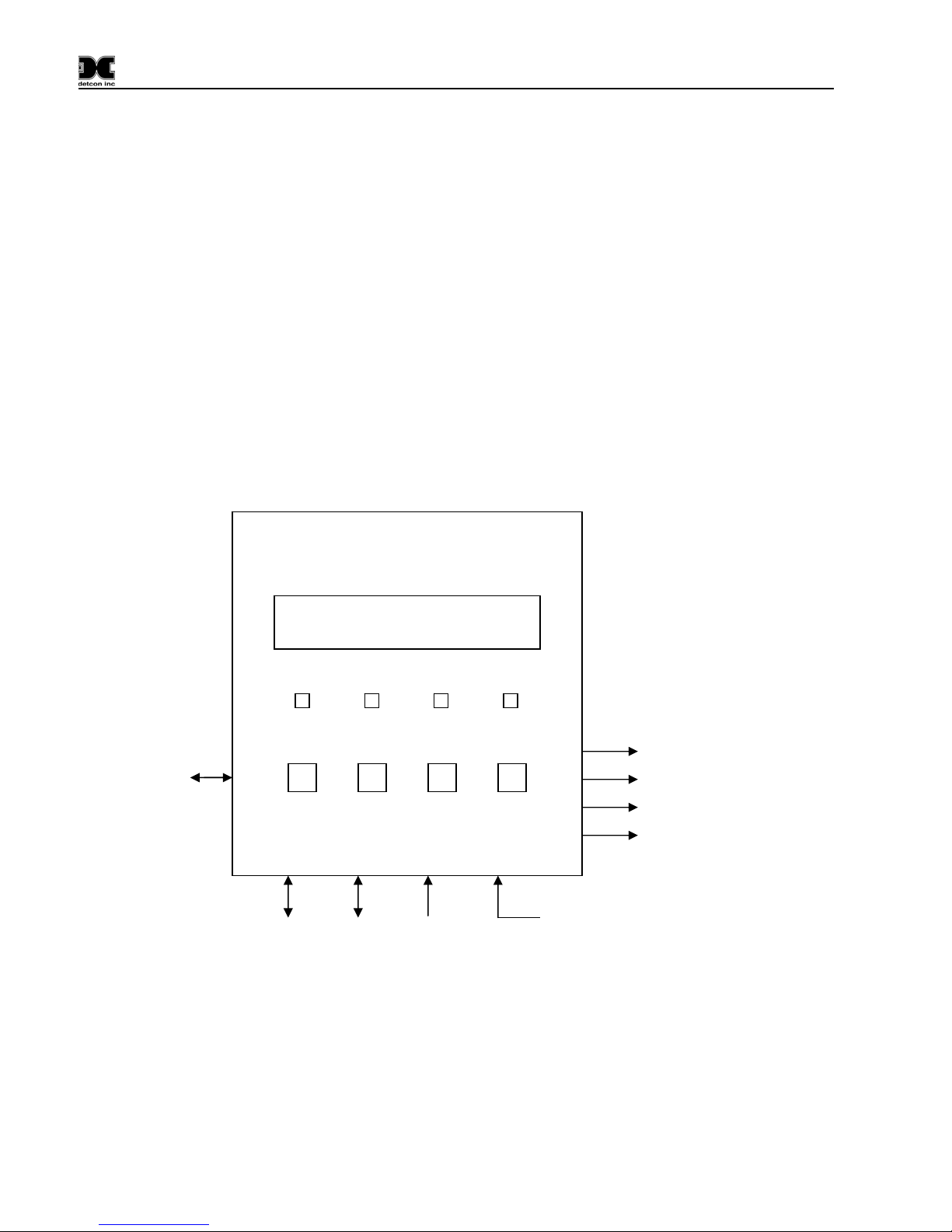
Figure 1 System Operational Diagram
RS-232 Port for
Uploading
Configuration and
Downloading
Historical Data
MODEL 240-N4X
Gas Detection/Alarm System
CH1 99 PPM CL2
CH2 40 PPM CL2
ALM 1 ALM 2 ALM 3 FAULT
PROG ↑↓ENTER ALM 1 RELAY
ALM 2 RELAY
ALM 3 RELAY
FAULT RELAY
(2 Discrete
Contacts each
)
Input Power
115/230VAC
11.5-30VDC
RS- 485 Output
to Master
Device
RS-485
Gas
Sensor
Input
4-20mA
Gas
Sensor
Input

240 Operators Manual
Model 240 Operator Manual Rev. 1.8 Page 3 of 29
3. Specifications
Capacity
2 Input Channels
Sensor Inputs Analog 4-20mA or
RS-485 Modbus RTU
Accuracy ± 1% Full Scale Range
Outputs
Qty 4 Relays: 2 Form C Contacts per relay
Rated for 5A @ 30VDC, 5A @ 250VAC
RS-485 (Standard)
RS-232 for Uploading/Downloading to PC (Standard)
4-20mA (Optional)
Power Input 115-230VAC
11.5-30VDC
Electrical
Power Consumption
Normal: 5 Watts @ 24VDC
Maximum: 12 Watts @ 24VDC
(Total system power dependent on number of gas sensors
& type of gas sensor connected)
Display 1”x5” Backlit LCD
Electrical Classification
NEMA 4X
Dimensions
10”W x 12”H x 6”D
Operating Temperature Range
-40F to +167F
-40C to +75C
Physical
Warranty One year
240 Operators Manual
Model 240 Operator Manual Rev. 1.8 Page 4 of 29
4. Installation
4.1 Mounting and Cable Penetrations
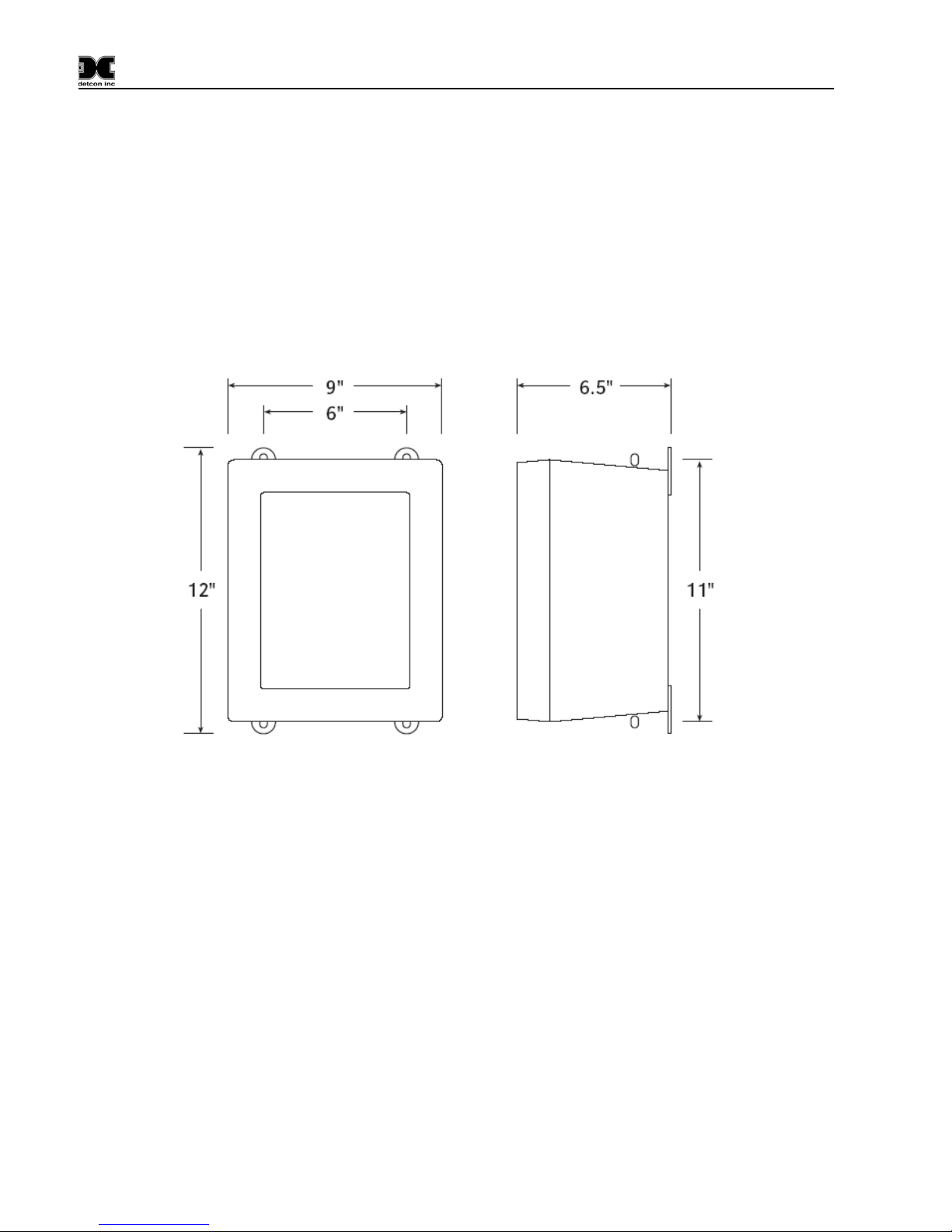
Securely mount the Model 240 N4X enclosure per the mounting dimensions provided in Figure 2.
Provide for suitable conduit/cable entries in the bottom of the enclosure. Keep AC power separate from
DC signals in conduit connections and runs.
Mounting Holes 5/16 Dia.
Figure 2 Dimensional View of Enclosure
4.2 Power and I/O Connections
Power and I/O connections are made on the Motherboard PCB, mounted inside on the back of the
enclosure. Plug-in male connector terminal blocks are provided for input wire terminations. This
connector style provides for quick disconnect convenience during replacement or servicing. (Refer to
Figure 4)
The connections for serial polling of gas sensors and RS-232 PC downloading activities are located at J7 on
the Controller PCB. (Refer to Figure 5)
4.2.1 AC Power
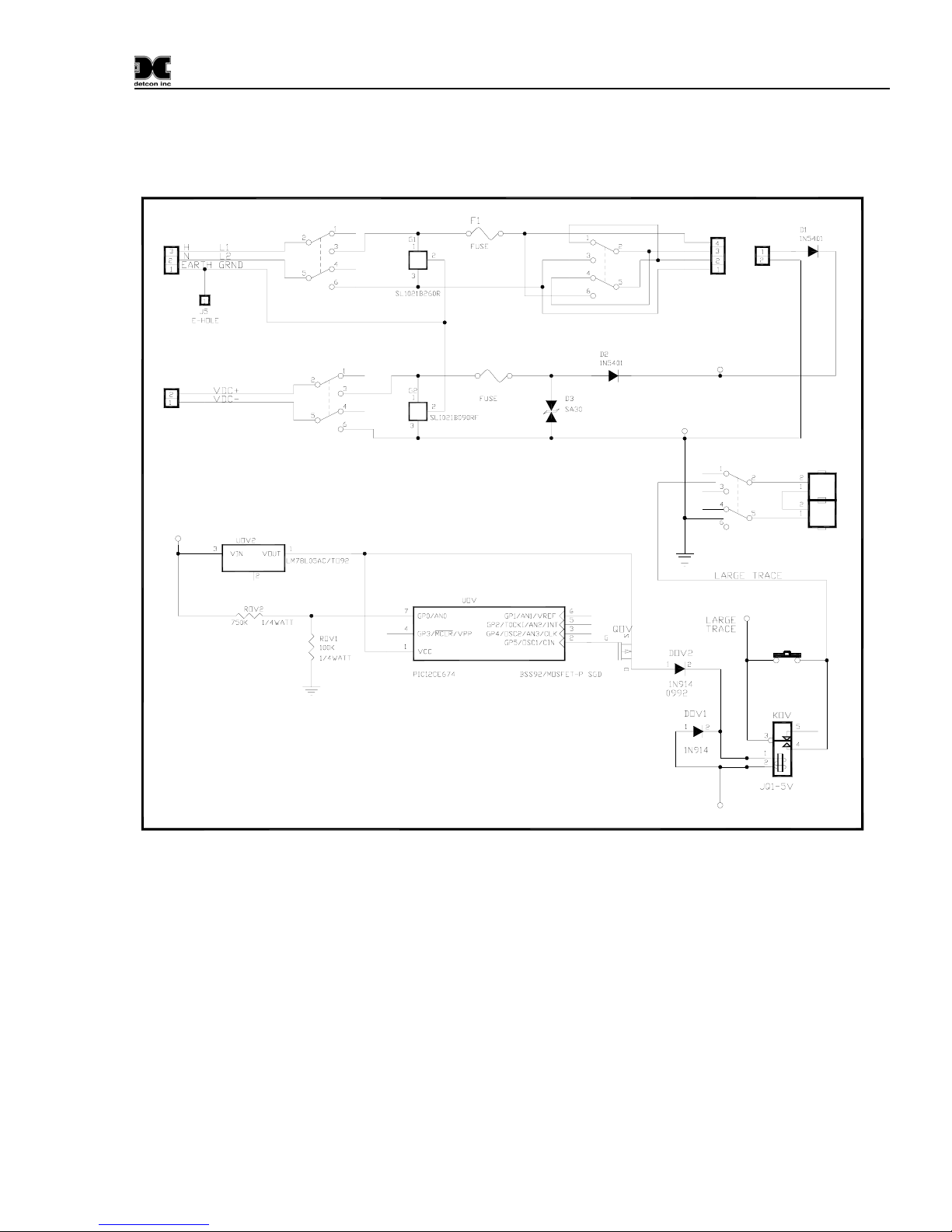
Connect the 115 or 230VAC input wiring to the terminals at J2, labeled “AC IN” in Figure 3 and Figure 4.
240 Operators Manual
Model 240 Operator Manual Rev. 1.8 Page 5 of 29
4.2.2 DC Power
For optional DC power input, connect 11.5-30VDC to the terminals at J8, labeled “DC IN” in Figure 3 and
Figure 4. This input can be used for primary power or back-up power in the event of a VAC power failure.
115VAC/220VAC
External
VDC
Input VDC ON/OFF
VIN
MOTHER BOARD POWER INPUT
External
VAC
Input
J8 +
-
J2
SW4
SW1
VAC ON/OFF
F2
BATTERY
RESTORE
VSS
VIN
SW3
BATTERY
ON/OFF
SWOV
BATT2
BATT1
DC POWER
SUPPLY
TO
FROM
VSS
VIN
SW2
PS1
PS2
Figure 3 Power Input Schematic
4.2.3 Analog 4-20 mA Sensor Inputs
Connect 4-20mA type gas sensors to the motherboard at the terminals labeled “CH 1” and “CH 2” (J15,
J16, respectively) in Figure 4. These connections are labeled (+, -, mA). For a 3-wire gas sensor connect
to the “+”, “-”, and “mA” terminations. For a 2-wire sensor connect to the “+” and “mA” terminations,
refer to the Operators Manual for the gas sensor that is being connected.
Note: Analog sensor polling requires switch SW1-1 on the Control PCB to be set in the “OFF” position.
(See Figure 5)

240 Operators Manual
Model 240 Operator Manual Rev. 1.8 Page 6 of 29
RIBBON CABLE
TO PROCESSOR
VDC
POWER
SWITCH
Battery Restore
Switch
Jumper for RS-485
Shield to Earth Grnd.
BATTERY
ON/OFF
VAC
POWER
SWITCH
VOLTAGE
SELECT
Figure 4 Mother Board Layout
Indice
Altri manuali Detcon Sistema di sicurezza


Manuali Sistema di sicurezza popolari di altre marche


EDM
EDM Solution 6+6 Wireless-AE Manuale utente

Highway Safety Group
Highway Safety Group EA401 Manuale utente

Siren
Siren LED GSM Manuale utente

Detection Systems
Detection Systems 7090i Istruzioni per il montaggio

Se-Kure Controls
Se-Kure Controls MicroMini SK-4841 Manuale utente

Siemens
Siemens FDM273 Manuale utente