3. OPERATION
3.1 DC Voltage Mea urement
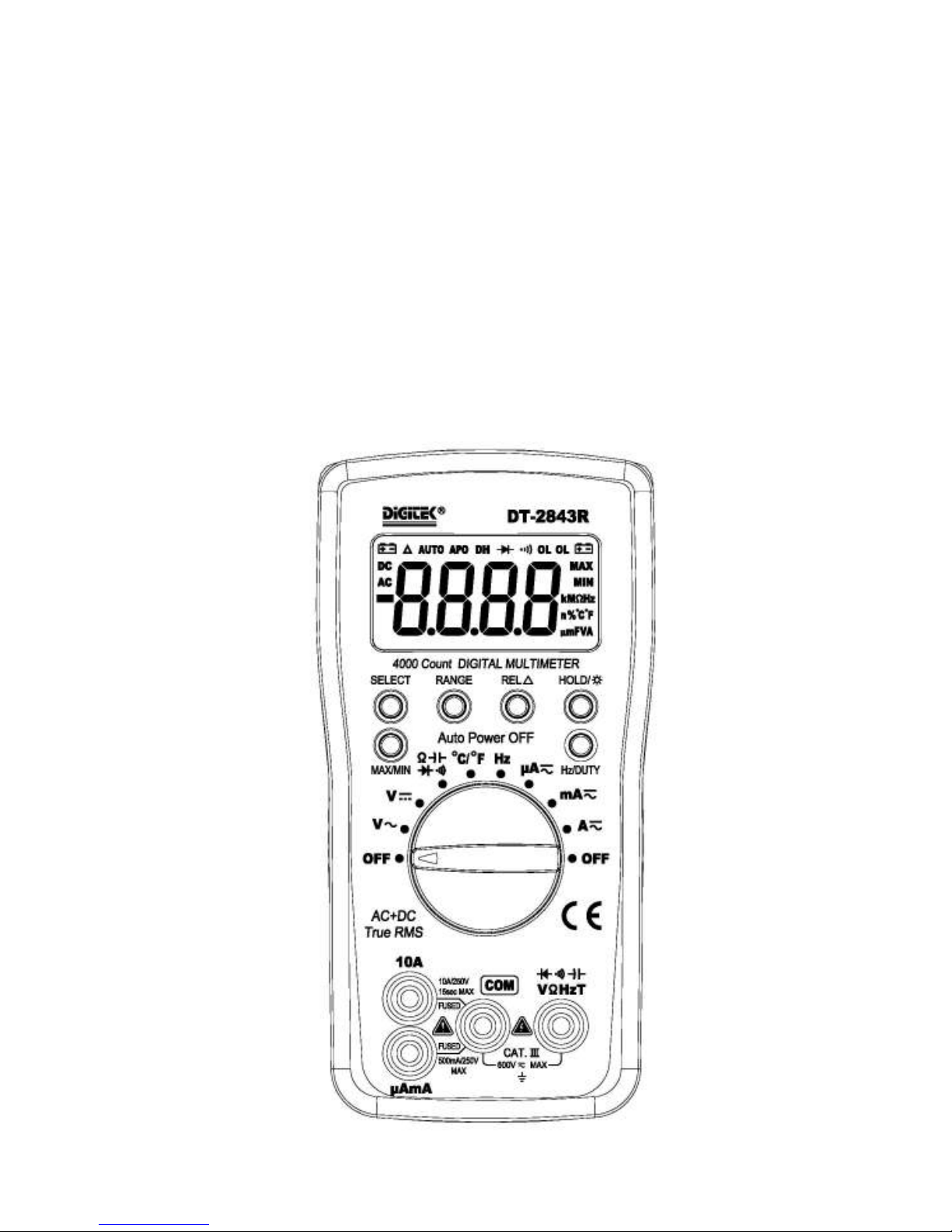
1) Connect the black test lea to "COM" socket an re test lea to the "VΩHz" socket.
2) Set the selector switch to esire “V” position.
3) Measure the voltage by touch the test lea tips to the test circuit where the
value of voltage is nee e .
4) Rea the result from the LCD panel.
3.2 AC Voltage Mea urement
1) Connect the black test lea to "COM" socket an re test lea to the "VΩHz" socket.
2) Set the selector switch to esire “V” position.
3) Measure the voltage by touch the test lea tips to the test circuit where the
value of voltage is nee e .
4) Rea the result from the LCD panel.
5) Press “Hz/DUTY” key to measurement frequency or duty cycle.
3.3 DC and AC Current Mea urement
1) Connect the black test lea to "COM" socket. For measurement up to 400mA, connect
the re test lea to the "µAmA" socket; for measurement
from 400mA to 10A, connect the re test lea to the "10A" socket
2) Set the selector switch to esire “µA ”、“mA ” or “A” position.
3) Press “SELECT” key to choose “DC” or “AC” measurement.
4) Remove power from the circuit un er test an open the normal circuit path where the
measurement is to be taken. Connect the meter in series with
the circuit.
5) Rea the result from the LCD panel.
6) On AC range, press “Hz/DUTY” key to measurement frequency or duty cycle.
3.4 Re i tance Mea urement
1) Connect the black test lea to "COM" socket an re test lea to the "VΩHz" socket.
2) Set the selector switch to esire “ ” position.
3) Press “SELECT” key to choose Re i tance measurement.
4) Connect tip of the test lea s to the points where the value of the resistance is nee e .
5) Rea the result from the LCD panel.
Note:
When take resistance value from a circuit system, make sure the power is cut
off an all capacitors nee to be ischarge .
3.5 Capacitance Mea urement
1) Connect the black test lea to "COM" socket an re test lea to the "VΩHz" socket.
2) Set the selector switch to esire “ ” position.
3) Press “SELECT” key to choose Capacitance measurement.
4) Connect tip of the test lea s to the points where the value of the capacitance is nee e .
5) Rea the result from the LCD panel.
Note:
a) Before testing, ischarge the capacitor by shorting its lea s together. Use caution in
han ing capacitors because they may have a charge on them of consi erable power
before ischarging.
b) Before testing, press “REL△” key to eliminate the zero error.
c) When testing 4000µF capacitor, note that there will be approx. 30 secon s time lag.
3.6 Diode and Audible continuity Te t
1) Connect the black test lea to "COM" socket an re test lea to the "VΩHz" socket.
2) Set the selector switch to esire “ ” position.
3) Press “SELECT” key to choose Diode or Audible continuity measurement.
4) Connect the test lea s across the io e un er measurement, isplay shows the approx.