
dji MATRICE 30 Dock Bundle Series Manuale utente

Maintenance Manual
2023.07v1.0
Dock Bundle

2 © 2023 DJI All Rights Reserved
Searching for Keywords
Search for keywords such as Battery or Install to find a topic. If you are using Adobe
Acrobat Reader to read this document, press Ctrl+F on Windows or Command+F on Mac
to begin a search.
Navigating to a Topic
View a complete list of topics in the table of contents. Click on a topic to navigate to that
section.
Printing this Document
This document supports high resolution printing.
This document is copyrighted by DJI with all rights reserved. Unless otherwise authorized by DJI,
you are not eligible to use or allow others to use the document or any part of the document by
reproducing, transferring, or selling the document. Users should only refer to this document and
the content thereof as instructions to operate DJI UAV. The document should not be used for other
purposes.

© 2023 DJI All Rights Reserved 3
Contents
Introduction 5
Disclaimer 5
Safety Guidelines 6
Operational Requirements 6
Firmware Update and System Calibration 6
Recommended Maintenance Interval 7
Maintenance Tool List 8
Dock Maintenance 9
Environment Inspection 9
Dock Body Inspection 9
Electrical Cabinet Inspection 10
Dock Cover Inspection 10
Dock Covers 10
Wind Speed Gauge Module and Rainfall Gauge 12
Dock Cover Arms 12
Landing Pad Inspection 13
Landing Pad Surface 13
The Back of the Landing Pad 14
Lower Compartment Inspection 14
Lower Compartment Assembly 14
External Circulating Fan 15
External Circulating Vents 16
Lower Compartment Drain 17
Emergency Stop Button Inspection 17
Aircraft Maintenance 18
Aircraft Body Inspection 18
Propulsion System 19
Frame Arms 19
Motors 20
Propellers and Propeller Adapters 21
Landing Gear 22
Gimbal Camera 22

DJI Matrice 30 Series Dock Bundle Maintenance Manual
4 © 2023 DJI All Rights Reserved
Infrared Sensing and Vision Systems, Auxiliary Lights, and Beacons 23
Aircraft Ports 24
Checklist Before Leaving 25
Intelligent Flight Battery 26
Battery Maintenance 26
Battery Replacement Standard 26
Battery Disposal 26
Battery Usage Warnings 26
List of Wearing Parts 27
Wearing Parts of the Dock 27
Wearing Parts of the Aircraft 27
DJI Maintenance Program 28
DJI FlightHub 2 28
DJI Pilot 2 30
After-Sales Service 32

DJI Matrice 30 Series Dock Bundle Maintenance Manual
© 2023 DJI All Rights Reserved 5
Introduction
The Maintenance Manual oers guidelines to help you in the daily upkeep and maintenance of
the dock and the aircraft, and also provides after-sales service information.
This document will focus on the maintenance instructions. Read the User Manual and
Maintenance Manual carefully to optimize user experience. If you have any questions on the
maintenance operations, contact DJI Support.
Disclaimer
Carefully read this entire document and all safe and lawful practices provided by DJITM before
using this product for the first time. Failure to read and follow instructions and warnings
may result in serious injury to yourself or others, damage to your DJI product, or damage to
other objects in the vicinity. By using this product, you hereby signify that you have read this
disclaimer carefully and that you understand and agree to abide by all terms and conditions of
this document and all relevant documents of this product. You agree to use this product only
for purposes that are proper. You agree that you are solely responsible for your own conduct
while using this product, and for any consequences thereof. DJI accepts no liability for damage,
injury, or any legal responsibility incurred directly or indirectly from the use of this product.
DJI is a trademark of SZ DJI TECHNOLOGY CO., LTD. (abbreviated as “DJI”) and its affiliated
companies. Names of products, brands, etc., appearing in this document are trademarks
or registered trademarks of their respective owner companies. This product and document
are copyrighted by DJI with all rights reserved. No part of this product or document shall be
reproduced in any form without the prior written consent or authorization of DJI. This disclaimer
is available in various languages. In the event of divergence among different versions, the
English version shall prevail. The nal interpretation of this document and all related documents
of this product belongs to DJI. This content is subject to change without prior notice. For up
to date product information, visit http://www.dji.com and click on the product page for this
product.

DJI Matrice 30 Series Dock Bundle Maintenance Manual
6 © 2023 DJI All Rights Reserved
Safety Guidelines
Before use, read the Safety Guidelines, User Manual, and Maintenance Manual carefully.
Operational Requirements
• Make sure to perform the maintenance procedure in accordance with the steps in this
manual.
• Measure the voltage on the contact points of the conductors and make sure there is no risk
of electric shock before touching any conductor surfaces or terminals. The dock must be
powered o before maintenance.
• In order to avoid an electric shock, DO NOT use any tools that are not insulated, such as a
screwdriver with a bare metal handle.
• Make sure to wear protective equipment when performing maintenance, such as a safety
helmet, goggles, insulated gloves, and insulated shoes.
• Make sure the dock is powered o before checking the movable parts of the dock, such as
the fan of the air conditioning system, the dock cover, and the driving rods to avoid injury.
• Before conducting on-site maintenance, make sure that there is no ight plan to be executed
on DJI FlightHub 2 and that the aircraft has landed inside the dock. Make sure to press the
emergency stop button on the dock before any operations. When using the DJI RC Plus
remote controller for on site testing, make sure to connect the remote controller to the dock
before releasing the emergency stop buttons.
Firmware Update and System Calibration
Update the rmware of the dock, the aircraft, and the Intelligent Flight Batteries to the lastest
version. If the update fails, restart the device and try again, or use DJI ASSISTANTTM 2 (Enterprise
Series) to update the rmware. Contact DJI Support if the issue persists. It is recommended to
perform aircraft calibration every six months to keep the aircraft in good condition.
List of Aircraft Calibration:
No. Category
1IMU calibration
2Compass Calibration
3Vision System Calibration
4 Gimbal Calibration
• Visit https://www.dji.com/matrice-30/downloads and refer to the Matrice 30 Series User
Manual for more information on aircraft calibration.
• Aircraft calibration is performed in DJI Pilot 2 App. Make sure to link the aircraft to the
DJI RC Plus remote controller when calibrating the aircraft.

DJI Matrice 30 Series Dock Bundle Maintenance Manual
© 2023 DJI All Rights Reserved 7
Recommended Maintenance Interval
It is recommended to perform inspection and maintenance regularly following the listed
standards to keep the dock and the aircraft in a good condition and reduce safety risks.
Product Service
Type
Maintenance Items Maintenance
Advice
Maintenance Interval [1]
Dock
Standard
Environment inspection,
dock appearance and
parts inspection, testing
and cleaning
Based on actual
use or contact
a DJI authorized
service provider
Per half year [2] / Per
1500 ights
Premium
Standard maintenance
items and replacement of
wearing parts
Contact a DJI
authorized
service provider
Per year [2] / Per 3000
ights
Aircraft
Basic
Deep cleaning, parts
inspection, updates and
calibrations
Recommend
factory service
or contact a
DJI authorized
service provider
Based on actual use.
It is recommended
to perform basic
maintenance for the
aircraft when performing
standard maintenance
for the dock
Standard
Deep cleaning, parts
inspection, updates
and calibrations, and
replacement of wearing
parts
Recommend
factory service
Per 300-hour ights /
Per year [2] / Per 1000
ights
Premium
Deep cleaning, parts
inspection, updates
and calibrations, and
replacement of wearing
parts and the propulsion
system
Recommend
factory service
Per 900-hour ights /
Per three years [2] / Per
3000 ights
[1] The activation time, flight hours, or number of flights specified in the maintenance interval shall be
whichever comes rst.
[2] Per half year / Per year / Per three years expresses the device activation time.
• DJI Enterprise may adjust the above maintenance services accordingly in different
areas. Please contact authorized dealers or DJI Support for the latest information.
• If the dock is installed in harsh environments, including but not limited to sandy or
dusty environments, environments with high salinity, high temperature, high humidity,
with pollutants nearby such as chemical plants, lumber mills, sewage treatment plants,
or with many willow catkins the maintenance interval should be shortened to 3 months.

DJI Matrice 30 Series Dock Bundle Maintenance Manual
8 © 2023 DJI All Rights Reserved
Maintenance Tool List
Adjustable Wrench Screws and Tools Triangular Key DJI RC Plus Remote
Controller
USB-C Cable
Water Container
Dust Blower
Dry Cloth
Soft Brush Sti Brush
PH0 2.5 mm
2 mm 3 mm

DJI Matrice 30 Series Dock Bundle Maintenance Manual
© 2023 DJI All Rights Reserved 9
Dock Maintenance
Environment Inspection
To ensure ight safety, it is recommended to regularly check the environment near the dock as
follows:
1. Clear animal or plant damages that might affect normal operation of the dock, such as
weeds, trees, ant nests, and rat holes.
2. Check if there are new buildings near the dock that may block the signal. Select another
location to install the dock if the signal obstruction becomes strong.
3. Check the ground conditions near the dock, and make sure to clear hidden risks that may
cause water immersion or inclination of the dock.
4. Check the environment near the alternate landing site, and clear debris that might aect the
aircraft landing.
Dock Body Inspection
1. Clean the dock shell with a soft, dry cloth and make sure the dock shell is clear of dirt or
foreign matter.
2. If there is any noticable damage or deformation, contact a DJI authorized service provider in
time.
3. Make sure the four expansion bolts are securely mounted. If loosened, tighten the bolts
using an adjustable wrench to ensure that the dock is securely installed.
DJI Matrice 30 Series Dock Bundle Maintenance Manual
10 © 2023 DJI All Rights Reserved
Electrical Cabinet Inspection
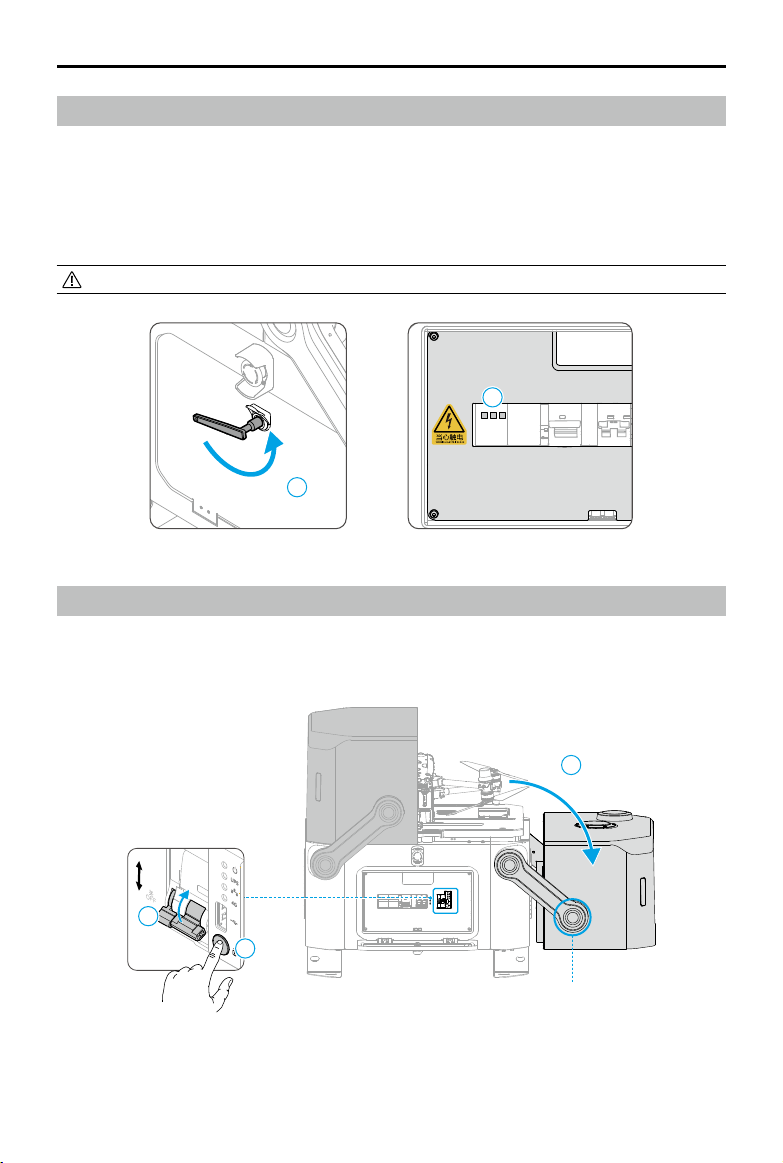
1. Open the electrical cabinet door using the triangular key.
2. Check the SPD trip indicator. Contact an authorized service provider to replace and repair
the SPD if the indicator turns red.
3. Make sure the surge protector circuit breaker (SCB), the AC power switch, and the backup
battery switch can be turned on/o normally.
• Pay attention to safety during operation in order to avoid an electric shock.
Dock Cover Inspection
Dock Covers
1. Power on the dock. Press and hold the manual release button, and then lift and rotate the
dock cover arms to open the covers.
1
开
ON
后备保护器
SCB
电源防雷器
SPD
交流电源
AC POWER
蓄电池
UPS
关
OFF
2
开
ON
后备保护器
SCB
电源防雷器
SPD
交流电源
AC POWER
蓄电池
UPS
关
OFF
开
ON
蓄电池
UPS
关
OFF
1
2
2
Connection Between the
Cover Arm and the Cover
Indice
Altri manuali dji Drone

dji
dji AGRAS T16 Manuale utente

dji
dji PHANTOM 4 PRO Manuale utente

dji
dji AIR 3 Manuale utente

dji
dji Phantom 4 Pro+ V2.0 Manuale utente

dji
dji mavic Manuale utente

dji
dji Zenmuse H3-3D Manuale utente

dji
dji Agras MG-1P Manuale utente

dji
dji Mavic 2 Enterprise Manuale utente

dji
dji Phantom 4 RTK Manuale utente

dji
dji Mini 2 Manuale utente

dji
dji MAVIC 3 PRO Manuale utente

dji
dji MATRICE 300 RTK Manuale utente

dji
dji PHANTOM 3 PROFESSIONAL Manuale utente
dji
dji Mini 2 Manuale utente

dji
dji TOPODRONE PHANTOM 4 PRO L1 PPK Manuale utente

dji
dji OSMO ACTION 4 Manuale utente

dji
dji AGRAS T16 Manuale utente

dji
dji AGRAS T40 Manuale utente

dji
dji AGRAS MG-1S Manuale utente

dji
dji M300 RTK Istruzioni per il montaggio


