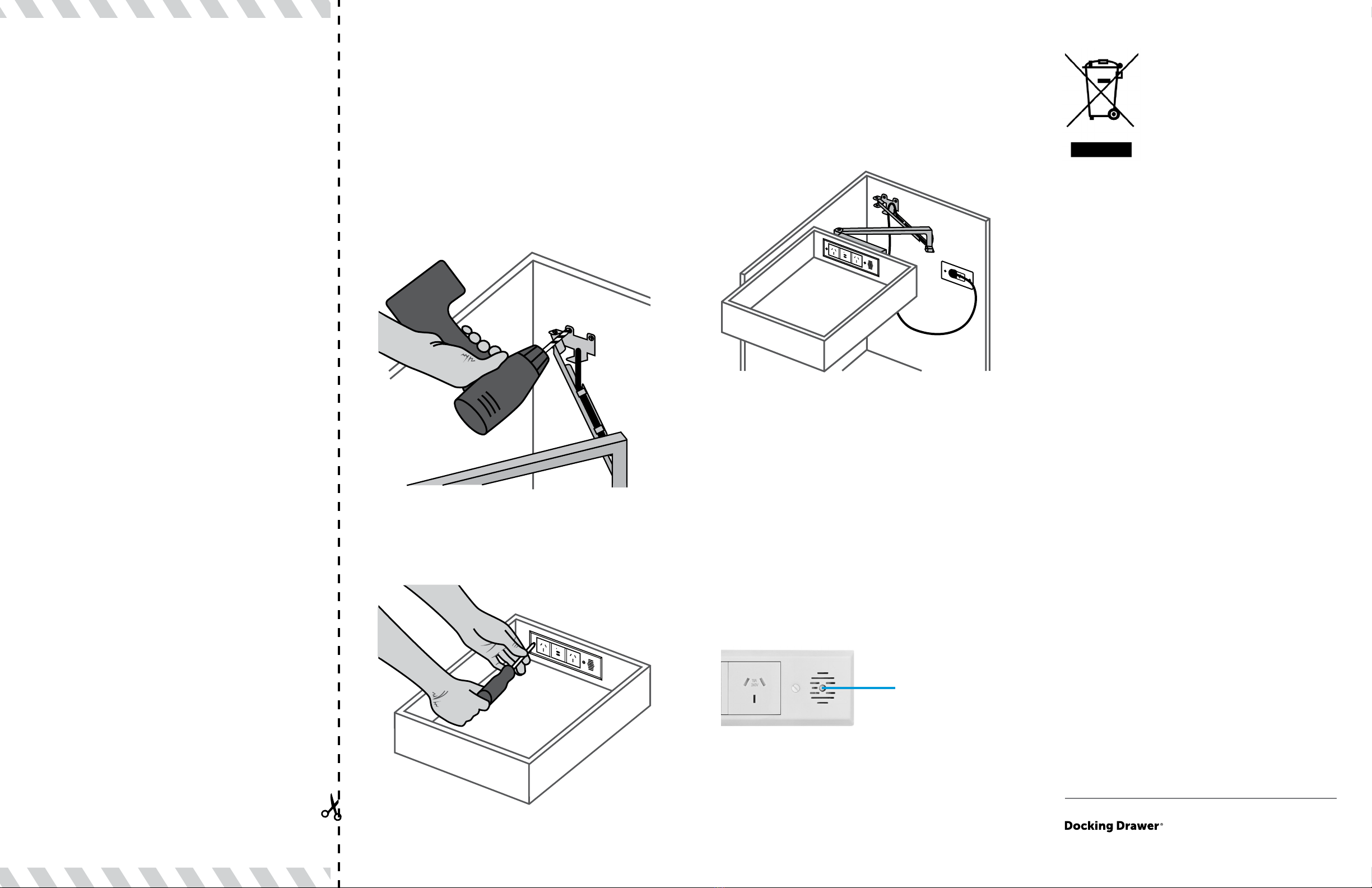
Step 6 - Align arms. With the drawer mostly
closed, mark the position of the rear mounting
bracket. It is important to make sure the
drawer moves freely in and out and that the
arms are square and even. Spend sucient
time at this step before fastening the bracket
to the rear wall to make sure everything
is square and the arms are in the correct
position. Once that is done, secure with the 3
rear mounting bracket screws provided.
Step 7 - Install the cover plate.
Step 8 - Connect the Docking Drawer power
cord to the in-cabinet electrical supply. For
more details about locating an in-cabinet
electrical supply for your Docking Drawer
installation, please refer to the Electrical
Planning Guide located in our Spec Book.
DD082222
For private households: Information
on Disposal for Users of WEEE This
symbol (gure 1) on the product(s) and
/ or accompanying documents means
that used electrical and electronic
equipment (WEEE) should not be
mixed with general household waste.
For proper treatment, recovery and
recycling, please take this product(s) to designated
collection points where it will be accepted free of charge.
Alternatively, in some countries, you may be able to
return your products to your local retailer upon purchase
of an equivalent new product.
Disposing of this product correctly will help save valuable
resources and prevent any potential negative eects
on human health and the environment, which could
otherwise arise from inappropriate waste handling.
Please contact your local authority for further details
of your nearest designated collection point. Penalties
may be applicable for incorrect disposal of this waste, in
accordance with you national legislation.
For professional users in the European Union
If you wish to discard electrical and electronic equipment
(EEE), please contact your dealer or supplier for further
information.
For disposal in countries outside of the
European Union
This symbol is only valid in the European Union (EU). If
you wish to discard this product please contact your local
authorities or dealer and ask for the correct method of
disposal.
www.dockingdrawer.com
+1 (925) 233-5598
How to Operate the Outlet
The Docking Drawer Trio Series in-drawer
outlets include a 50˚C interlocking thermostat
to protect against overheating inside the
drawer. To reset, correct the source of over
temperature and push the button in the center
of the vents of the cover plate. Note: You may
need to wait a few minutes for the unit to cool
before the thermostat can be reset.
Push to reset
interlocking
thermostat