
DPR DD01 Manuale utente

USER MANUAL
Double label dispenser
DD01
Please keep the original packaging in case you need to return the unit.
If we receive the system in non-original packaging, the warranty may be void.
Si prega di conservare l’imballo originale nel caso in cui sia necessario restituire l’unità.
La garanzia potrebbe decadere a causa di spedizione in un imballo non conforme.


index / indice
Characteristics / Caratteristiche 311
Programming / Programmazione
• Exiting menu / Uscita dal menú 4 14
• Enable rst menu / Abilitazione primo menú
• Setting series of label / Selezione serie di etichette 4 12
• Enable second menu / Abilitazione secondo menú
• Setting feed type / Selezione tipo di avanzamento 5 13
• Enable third menu / Abilitazione terzo menú
• Setting counter / Selezione contatore 7 15
• Enable fourth menu / Abilitazione quarto menú
• Setting company name / Scrittura nome societá 8 16
• Enable fth menu / Abilitazione quinto menú
• Sensor test / Test sensore 9 17
• Motor manual advance / Avanzamento manuale motore 9 17
• Counter zero setting / Azzeramento contatore 9 17
• Roll load on the dispenser / Caricamento bobina 10 18
2

CHARACTERISTICS
Electrical Characteristics
• External power supply with 220/18VAC transformer
• Fuse protection 2A
Electronic Characteristics
• Photocell to detect label presence
• Tachometer to control the label length
• Display with 2 lines of 16 characters
Electrical Characteristics
• Personalization of company name
• Photocell function control
• Programmable quantity of labels to detach from 0 to 999
• Continual display of the detached label quantity
• Continual display of the number of detached label series
• Programmable length of detached part of label
• Three dierent feed types
• Acoustic alarm sounds when the number of label series reaches the programmed quantity
• Programmable series from 2 to 3 labels of dierent lengths
Mechanical Characteristics
• Maximum dimensions
W=570mm (22.44”); H=240mm (9.45”); D=410mm (16.14”)
• Speed 120 rpm
• Roll diameter up to 300mm (11.81”)
• Core holder from 32mm (1.26”)
• Label width up to 150mm (5.90”)
3
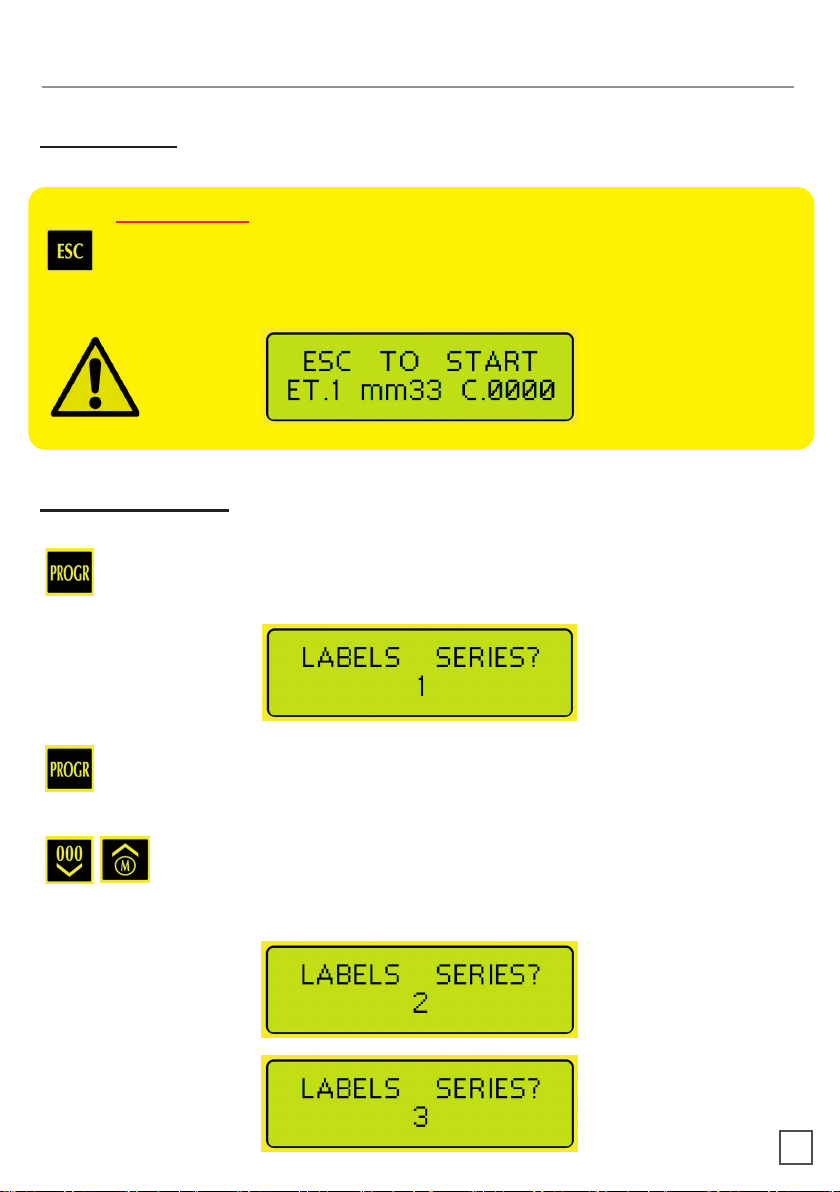
IMPORTANT
To exit at any moment from the programming mode and implement an alarm
reset, push this button.
When rst switched on the panel will display the following:
PROGRAMMING
Exiting Menu
Enable First Menu
Push this button to enter into the program mode and the panel will indicate that you
wish to detach one series label at a time.
Push this button again if you don’t want to select the series type and set the detached
label length.
By successively pushing these buttons you can change the series from 1 to 3
labels. Even if they are of dierent sizes but are part of a single series the panel
will display it:
4

Having established the type of series to use, when pushing these buttons for
each type of label, it is possible to modify the length of the label section that
needs to be detached for each single label. The panel will then display on the
following three types of messages.
Enable Second Menu
By successfully pushing these buttons you can choose three dierent feed
types.
This option allows the user to dene the detach delay time from 1 to 60 seconds
between labels.
To run this option please follow the next operation.
> Temporized feed
5

By successively pushing this button you enter in the setting seconds menu.
By successfully pushing these button you can select the detach delay time from
1 to 60 seconds between labels.
Example: In this case you can detach a label every 15 seconds.
This function dispenses the labels automatically.
> Automatic feed
This function dispenses the label only if you push the ESC button.
> Manual feed
IMPORTANT
In both cases the dispenser will be stopped if the counter function is active and
you reach the set number of labels.
6

Enable Third Menu
By successfully pushing this button you can select the counter function that presets
the number of labels to detach. The panel will then display the following two types of
messages.
Push this button to choose between having the counter function on or o.
When selecting “ACTIVE COUNTER YES” you can dene the quantity of labels to
detach and the panel will display the sequential counter with the option to select from
1 to 9999 labels or a series of labels to detach.
By pushing these buttons you can select the 4 digits of the counter one at a time.
Once selected, the digit to be modied can be changed between a value from
0 to 9.
IMPORTANT
To ensure that the detached labels correspond to the number selected under
the active counter menu YOU MUST push this button for a few seconds to
reset the counter.
7

IMPORTANT
With the manual function Automatic feed ON, the counter reset will display
“0001” because the rst label available for detachment will be displayed.
NOTE:
During operation, once the last label that was programmed detaches the dispenser will
stop and emit an acoustic warning signal. To turn o the alarm and reset the counter
push this button.
When selecting “ACTIVE COUNTER NO” the counter is disabled and the labels can
be detached with undened quantities.
Enable Fourth Menu
By successfully pushing this button you can enable the function that allows the
customers name to appear on the display.
By pushing these buttons you can select the 16 digits of the counter one after
another in order to insert the required text.
Having selected the digit to program with these buttons, you can change the
value with letters, numbers and symbols.
8

Enable Fifth Menu
By successfully pushing this button you enable the control of the sensor functions
for label presence. All of the digits will be on, as shown below with the functioning
sensors not in use.
By covering the sensor next to the panel with a nger, the digits turn o. As shown in
the following which demonstrates the use of the sensors by the label.
9
MOTOR MANUAL ADVANCE
Press this key for manual advance of the motor.
COUNTER ZERO SETTING
Press this key for 4 seconds to reset the counter to 0. When reset the dispenser will
emit a sound.
Indice
Lingue:
Altri manuali DPR Distributore


