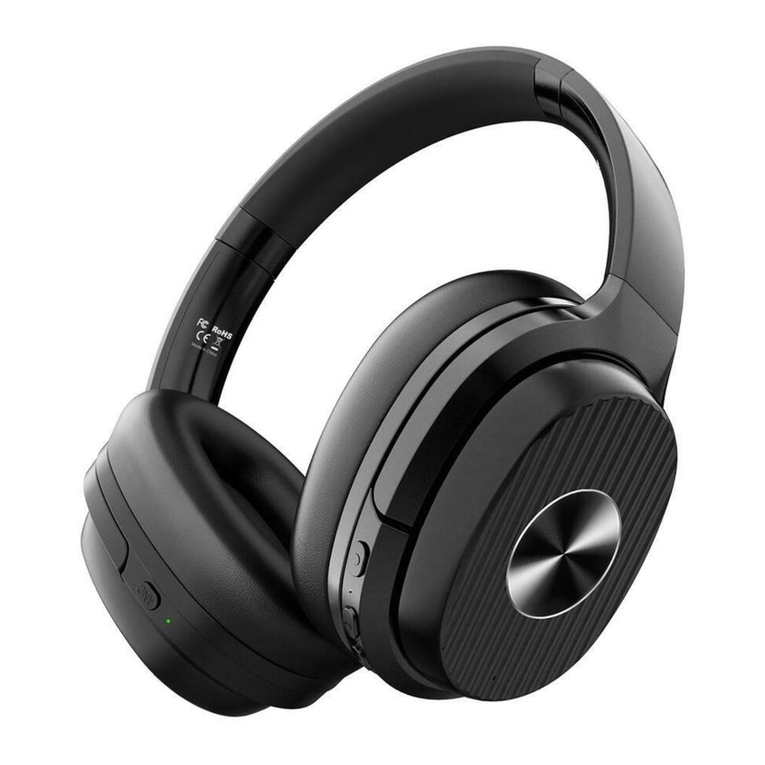
EKSA E5 Manuale utente

E5
Active Noise-cancelling Wireless Headphones

2
1
Hearing Safety:
1. To avoid hearing damage, please do not listen for a long time
at high volume.
2. Please cautiously use or stop using in potentially dangerous
situations.
3. Do not use the headphones while driving.
4. For your safety, please do not turn the volume too high while
running outside, so that you can hear your surroundings.
Operation Safety:
1. Avoid dropping.
2. Do not disassemble.
3. Keep away from children to avoid danger from improper use.
4. Do not submerge in water.
5. Do not use the device outdoor during thunderstorm.
6. Avoid operate in extreme temperatures, please use the device
within its operation temperature: -15°C(5°F)~55°C(131°F).
7. Use original or certified cables to charge.
8. Do not use any corrosive cleaner/oil to clean the headphones.
Safety Instructions What’s in the box?
EN
E5
Active Noise-cancelling Wireless Headphones
警告/注意
www.eksa.net

43
At a Glance
How to use?
Hold Multi-function Button for 3 seconds to turn on the
headphones, and then the device enters the paring mode.
(Indication light turns blue)
Hold Multi-function Button for 3 seconds to turn off the
headphones.
Press to adjust volume. Long press to skip to
next/previous song.
Press and hold the volume up and down buttons
simultaneously for 5 second to clear the Bluetooth pairing
record.
Press Multi-function Button to play/pause music.
Hold the ANC button for one second to turn on/off Active
Noising cancelling(Indication light turns green)
Press Multi-function Button to answer/end call.
Double press Multi-function Button to reject coming call /
activate the Siri voice control function.
Charging cable: please use the included USB-C charging cable
to charge the battery, another charging cable may damage the
headphones.
Note:This product supports charging voltage of 5-9V, and it
will start charging protection once over 9V.The battery will not
be charged if over 9V, please use the correct charger.
ANC Button
ANC Indicator
LED Indicator
Multi-function Button
Volume Down/Previouse Song
Volume Up/Next Song
USB-C Charging/AUX Port
WARNING
The in-flight plug adaptor lets you enjoy balanced sound from the in-flight entertainment
system while travelling in a plane.
The In-flight adaptor is NOT MEANT to charge your device. Plugging the in-flight adaptor into
a AC Power Socket to charge the headphones will cause severe damage to the device.

Easy Pairing
1. Hold Power Button for 3 seconds to turn on the
headphones, and then the device enter paring mode.
2. Keep the headphones and your Bluetooth device as close
as possible during the pairing process.
3. Turn on Bluetooth function of your Bluetooth device.
Search headphones' Bluetooth signal on your Bluetooth
device, and select “E5” to pair it with your Bluetooth
device. The Indicator Light slowly flashes blue when the
headphones pair successfully.
4. lf you are asked for the Password/PIN code during the
pairing procedure, enter “0000” (four zeros).
Pair to The Second Bluetooth Device
1. Make sure the headphones have been connected to the
first Bluetooth device successfully. And the headphones are
not playing music.
2. Turn off the first device’s Bluetooth.
3. Turn on the second device’s Bluetooth, find the “E5” model
name and select it to pair with your device.
4. Turn on the first device’s Bluetooth and select “E5” pair
it again.
Restore factory setting
Press and hold the volume up and down buttons simultaneously
for 5 second to clear the Bluetooth pairing record.
65
Functions
ANC-Active Noise Cancelling :
Turn on ANC: Hold the ANC button for one second and the
ANC Indicator light on green.
Turn off ANC: Hold the ANC button for one second and the
ANC Indicator turns off.
AUX Wired Connection:
The headphones supports AUX input for wired external audio
source connection. Simply Power Off the headphones and plug
in the audio cable.(Note:Wired mode is not available when the
headphones ran out of battery)
NOTE: The buttons and microphone on EKSA E5 will not work
when connected as wired headphones.
NOTE: EKSA E5 only has one audio channel, if you want
to play music from another Bluetooth device, please pause the
current device's music first

78
Technical Specifcation
Product Name: E5
Bluetooth Version: V5.0
Battery Capacity: 920mAH
Input: 5V 470mA
Bluetooth Chipset: QCC3003
Noise Reduction Depth: -20~-25dB
Speaker: Φ40 mm
Charging Time: About 2.5 hours
Using Time 1: 40 hours (ANC+BT)
Using Time 2: 60 hours (BT only)
Using Time 3: 154 hours (ANC only)
Bluetooth Profile: A2DP AVRCP HFP HSP SPP DID PXP FM
BAS
Bluetooth Range: 10m/33ft
Net Weight: 250g
Impedance: 32Ω
Driver Diameter: 40mm
Frequency Response: 20Hz-20kHz
Specification
Pairing: Red and blue light flash alternately
Paired: Blue light flashes
Playing: Slow flashes blue light
Charging: Red light on
Full Charge: Red light turns off
Battery Low: Red light flashes with voice prompt
ANC Working: Green Light turns on
Indicator Light
Collapsible Design

9 10
Q & A
Why the headphones can't pair with my mobile phone?
Please check whether your headphones are in pairing mode
or reconnection mode, check if Bluetooth search function
of your Bluetooth device has been turned on. And then go
to Bluetooth menu of your Bluetooth device, delete/forget
the headphones, and reconnect the headphones.
Why headphones can't be turned on?
Please double check battery status of your headphones.
Can I replace battery for the headphones?
No. these headphones use built-in non detachable
Li-Polymer battery. lt can't be replaced.
Can l use the headphones while driving?
For your safety, we strongly recommend you to not use
headphones to avoid distraction while driving.
Why the headphones sometimes disconnect with Bluetooth
device within 10 meters?
Please check if there is any metal material within relatively
close range may interfere Bluetooth connection. Because
Bluetooth is a radio technology that is sensitive to objects
between the headphones and its connected devices.
and its connected devices.
Why I cannot hear any voice from my computer or
mobile phone?
Please check if the output channel of your computer
support A2DP profle. And please check the volume of
your headphones, as well as computer/mobile phone.
Why am I unable to use the headphones to control
volume of select track of APP in my mobile phone?
Due to configuration of different application software, the
headphones may not totally compatible with some
applications.
What can I do if the Bluetooth is crashed?
(Cannot close or open)
Please reset headphone Bluetooth by inserting audio cable
into audio jack then removing it.
Why the Bluetooth is turned off when I use the audio
cable to connect?
This is our special set. All Bluetooth feature buttons stop
working and Bluetooth should be turned off when users
insert audio cable into jack. Don't worry, the Bluetooth will
be available when the audio cable is moved.
Why does the headphones not work when using audio cable?
If the battery of the headphones is completely dead, it cannot
be used in the wired state. Please after charging the
headphones for 10 minutes and then use the audio cable to
enter wired mode.
Q:
A:
Q:
A:
Q:
A:
Q:
A:
Q:
A:
Q:
A:
Q:
A:
Q:
A:
Q:
A:
Q:
A:

11 12
What is not Covered?
How to Make a Claim?
This warranty does not cover defects resulting from improper
or unreasonable use or maintenance; failure to follow operating
instructions; accidents; excess moistures; insects; lightning;
unauthorized alteration or modification of original condition;
damage caused by inadequate packing or shipping procedures;
loss of, damage to or corruption of stored data; damage caused
by use with non-EKSA products; product that requires
modification or adaptation to enable it to operate in any
country other than the country for which it was designed,
manufactured, approved and/or authorized, or repair of
products damaged by there modifications; and products purchase
form unauthorized dealers.
Please sign up for EKSA warranty service at www.eksa.net.
EKSA warrants that this product, for a period of 2 years from
the date of retail purchase by the original end-use purchaser,
when delivered to you in new condition, in original package,
from an EKSA authorized reseller and used in normal
conditions, is free from any defects in manufacturing and
workmanship. We will, at our sole option, repair or replace
(using new or refurbished replacement parts) any defective
parts within a reasonable period of time and free of charge.
24/7 Customer Service | Telephone: 00852 6940 4955,
Email: [email protected]
Limited Warranty
In the event damage has occurred to products, you must follow
these instructions:
Contact [email protected] with order number in e-commerce
website after you discover a product defect (or should have
discovered it, if such product defect was obvious);
In order to get professional solutions of EKSA, please give a
detailed explanation of how the damage occurred.
Return the products. EKSA will, at our sole option, repair or
replace (using new or refurbished replacement parts) any defective
parts within a reasonable period of time and free of charge.
Other Legal rights
This limited warranty gives you specific legal rights, and you also
may have other rights that vary from state to state or country to
country. Some places do not allow limitations on implied
warranties or the exclusion or limitation of incidental or
consequential damages, so the above limitations or exclusions
may not apply to you.

1. Um die Gehörschäden zu vermeiden, hören Sie bitte nicht
lange Zeit in hoher Lautstärke.
2. Bitte seien Sie vorsichtig die Kopfhörer in potenziell
gefährlichen Situationen zu nutzen.
3. Benutzen Sie bitte die Kopfhörer beim Fahren nicht.
4. Um Ihre Sicherheit zu gewährleisten, sollten Sie die Lautstärke
beim Laufen draußen nicht zu hoch einstellen, um die
Umgebung zu hören.
1. Bitte lassen Sie die Kopfhörer nicht fallen.
2. Nicht entfernbar
3. Halten Sie die Kopfhörer von Kindern fern, um Gefahren
durch unsachgemäßen Gebrauch zu vermeiden.
4. Tauchen Sie die Kopfhörer nicht in Wasser ein.
5. Verwenden Sie die Kopfhörer nicht im Draußen während
eines Gewitters.
6. Vermeiden Sie die Kopfhörer bei extremenTemperaturen
bitte zu vermeiden. Bitte verwenden Sie die Kopfhörer
innerhalb der Betriebstemperatur: -15°C(5°F)~55°C(131°F).
7. Verwenden Sie das originale oder zertifizierte Kabel, um die
Kopfhörer zu laden.
8. Verwenden Sie keinen korrosiven Reiniger / Öl, um die
Kopfhörer zu reinigen.
Produkterscheinung
13 14
DE
Sicherheitsfragen
Achtung
Sicherheitshinweise
E5
Active Noise-cancelling Wireless Headphones
警告/注意
www.eksa.net

Produkterscheinung
Bedienungsanleitung
15 16
Um die Kopfhörer einzuschalten, drücken Sie die
Multifunktionale Taste 3 Sekunden und die Kopfhörer
wird in Paarungsmodus eintreten.
Um die Kopfhörer auszuschalten, drücken Sie die
Multifunktionale Taste 3 Sekunden.
Drücken Sie die Lautstärketaste, um die Lautstärke
einzustellen. Lang drücken, um zum nächsten /
vorherigen Titel zu springen.
Drücken Sie Multifunktionale Taste, um Musik zu
spielen/zu pausen.
Rutschen Sie die ANC Taste, um Active Noise
Cancellation ein/auszuschalten.
Drücken Sie Multifunktionale Taste, um das Telefon
anzurufen/aufzulegen.
Drücken Sie die Multifunktionstaste zweimal, um einen
eingehenden Anruf abzulehnen oder die Siri-Sprachs-
teuerungsfunktion zu aktivieren.
Ladekabel: Verwenden Sie bitte das mitgelieferte
USB-C-Ladekabel, um die Akku zu laden. Ein anderes
Ladekabel kann den Kopfhörer beschädigen.
Hinweis: Dieses Produkt unterstützt Ladespannungen
von 5 bis 9V und startet den Ladeschutz, sobald 9V
überschritten werden. Der Akku wird nicht aufgeladen,
wenn die Ladespannung über 9V ist. Verwenden Sie
das richtige Ladegerät.
ANC-Anzeige
LED-Anzeige
/Vorheriger Titel
/Nächster Titel
USB-C-Buchse
WARNING
Mit dem Inflight-Adapter können Sie den ausgeglichen Sound des
Flugzeugunterhaltungssystems während des Flugs genießen.
Mit dem Inflight-Adapter können Sie Ihre Kopfhörer NICHT aufladen. Wenn Sie den
Inflight-Adapter zum Aufladen des Kopfhörers in eine Netzsteckdose stecken, wird das Gerät
schwer beschädigt.

Wie verbinden Sie es?
Wie wird es gepaart? Kopplung mit dem zweiten Bluetooth-Gerät
1. Halten Sie den Ein/Ausschalter 3 Sekunden lang gedrückt, um
den Kopfhörer einzuschalten, und dann wechselt das Gerät in
den Kopplungsmodus.
2. Halten Sie die Kopfhörer und Ihr Bluetooth-Gerät während
des Paarung-Vorgangs so nah wie möglich.
3. Aktivieren Sie die Bluetooth-Funktion Ihres Bluetooth-Geräts.
Suchen Sie das Bluetooth-Signal des Kopfhörers auf Ihrem
Bluetooth-Gerät und wählen Sie "EKSA E5", um es mit
Ihrem Bluetooth-Gerät zu koppeln. Die Anzeige blinkt
langsam blau, wenn der Kopfhörer erfolgreich gekoppelt wird.
4.Wenn Sie während des Paarung-Vorgangs nach dem
Password / PIN-Code gefragt werden, geben Sie "0000" (vier
Nullen) ein.
Werkseinstellung wiederherstellen
Drücken Sie die beiden Lautstärketasten gleichzeitig 5 Sekunden
lang, um die Bluetooth-Kopplungsaufzeichnung zu löschen.
Hinweis: EKSA E5 verfügt nur über einen Audiokanal. Wenn Sie
Musik von einem anderen Bluetooth Gerät spielen möchten,
pausieren Sie zuerst die Musik des aktuellen Geräts.
1. Stellen Sie sicher, dass die Kopfhörer erfolgreich mit dem
ersten Bluetooth-Gerät verbunden wurde. Und der
Kopfhörer spielt keine Musik.
2. Schalten Sie das Bluetooth des ersten Geräts aus.
3. Schalten Sie das Bluetooth des zweiten Geräts ein,
suchen Sie den Modellnamen "E5" und wählen Sie
ihn aus, um ihn mit Ihrem Gerät zu koppeln.
4. Schalten Sie das Bluetooth des ersten Geräts ein und
wählen Sie erneut "E5".
17 18
Altri manuali per E5
1
Indice
Lingue:
Altri manuali EKSA Cuffie senza fili