
ELECTRODRIVE Tug Axis 4T Manuale utente

Tug Axis 4T
Operating Manual

Tug Axis 4T Operating Manual—OM0026E
This manual contains important safety, installation and operating instructions for this
unit. Read this manual thoroughly and completely, and retain for future reference.
This unit can cause serious injury to personnel or damage to property if used incorrectly,
therefore do not use this machine for any other purpose apart from its intended use.
Using this unit incorrectly may void warranty.
Any damage audible or visible to this unit should be addressed at the time of discovery.
Electrodrive Pty Ltd can provide parts and service support on request through its
service partner company:
Serviced Equipment Pty Ltd
p: 1300 934 471
e: service@fallshaw.com.au
Made in Australia by:
Electrodrive Pty Ltd
2A Ayton Street, Sunshine North VIC Australia 3020
p: 1300 934 471 (within Australia)
p: +61 (03) 9300 8521 (International)
w: www.electrodrive.com.au
© Electrodrive

Tug Axis 4T—Operating Manual
3
Contents
Introduction..................................................................................................................... 5
Features ....................................................................................................................... 5
Controls ........................................................................................................................ 6
Operating instructions ................................................................................................... 6
Controls ........................................................................................................................ 7
Driving instructions ........................................................................................................ 9
Safety check ................................................................................................................. 9
Hitching to a trolley....................................................................................................... 9
Unhitching................................................................................................................... 10
Steering....................................................................................................................... 11
Charging ..................................................................................................................... 11
Maintenance ................................................................................................................. 12
Batteries...................................................................................................................... 12
Tyres............................................................................................................................ 12
Motor and transmission.............................................................................................. 12
Brakes......................................................................................................................... 12
Motor controller .......................................................................................................... 12
Throttle lever ............................................................................................................... 12
Fuses .......................................................................................................................... 13
Self-resetting circuit breaker....................................................................................... 13
Warranty ........................................................................................................................ 14
Modications and misuse will void your warranty...................................................... 14
General wear items not covered under warranty........................................................ 14

4
Appendix 1: Machine rating conditions...................................................................... 15
Appendix 2: Wiring diagram ........................................................................................ 16
Appendix 3: Fault codes .............................................................................................. 18
Appendix 4: Charging procedures for SLA batteries ................................................ 19
Charging setup ........................................................................................................... 19
During charging .......................................................................................................... 19
Charger manual .......................................................................................................... 19
Appendix 5: Spare parts list......................................................................................... 20
Service log .................................................................................................................... 22

Tug Axis 4T—Operating Manual
5
Introduction
Eortlessly move trolleys or wheeled equipment using the battery powered
Tug Axis 4T.
The Tug Axis 4T enables a single user to easily move up to four tonne load capacities.
It simply hooks on to your existing trolley or wheeled equipment with a simple hitch.
Productivity is greatly increased, and back or shoulder strain is eliminated.
Suitable for use:
§Through long corridors, factory aisles, round tight corners.
§Up and down ramps.
§On and o lifts.
Features
§Rated to tow up to 4000 kg.
§24 Volt DC power.
§Variable speed drive unit.
§Electro-magnetic park brake.
§Travel speed—up to 3 kph.
§Robust steel chassis.
§Tiller handle steering that folds up to reduce space when not in use.
§Programmable motor controller.
§Automatic charger.
6
Operating instructions
Controls
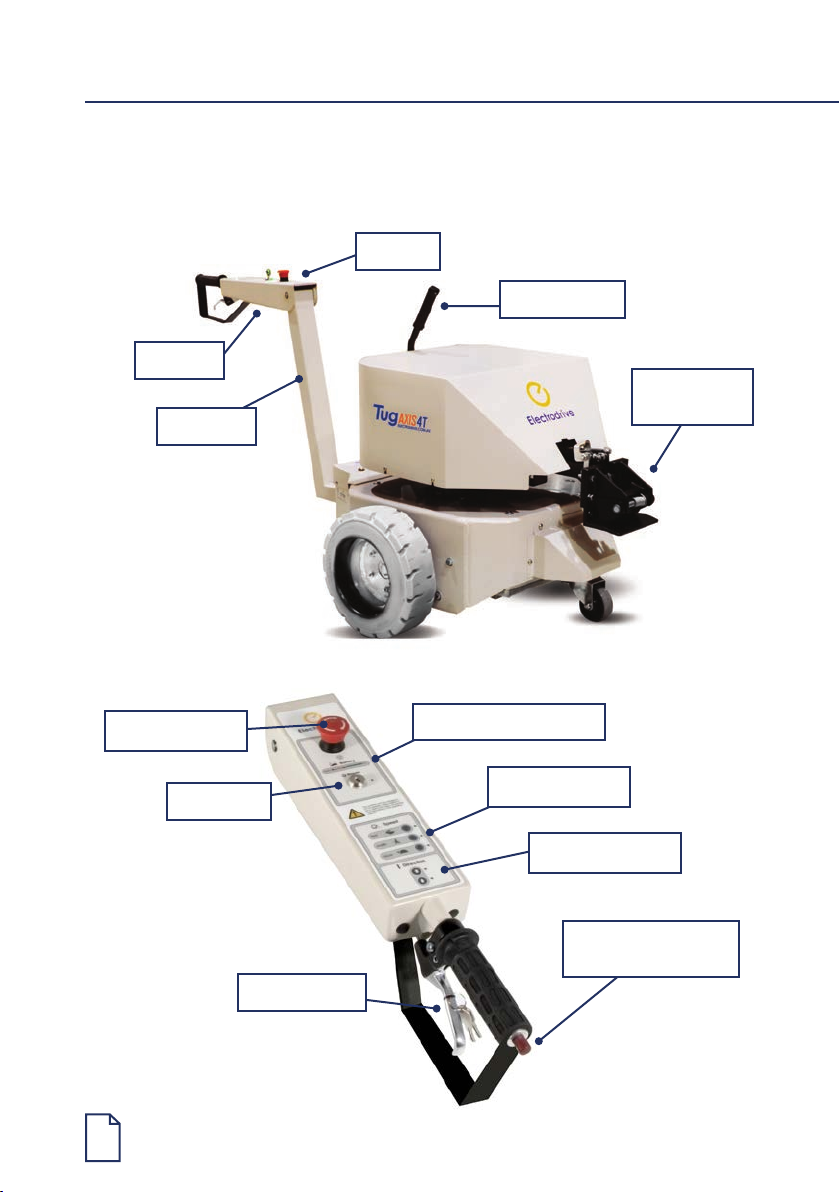
Controls
Auto-latching
hitch
Emergency stop Battery level indicator
Tiller arm
Speed selector
Key switch
Throttle lever
Emergency back-o
button
Direction selector
Tiller post
Hitch release

Tug Axis 4T—Operating Manual
7
Controls
Key switch
The key switch must be turned clockwise to switch the unit on. When ON, the LED
status indicator will be illuminated. If a fault occurs with the electronics, this LED light
will ash an error code (refer to Appendix 2). It is important to note that the unit should
be switched o and the key removed, whenever it is not in use. This eliminates the risk
of unauthorised movement and also prevents an unnecessary use of battery power.
Emergency stop and back-o button
The controls have two emergency buttons.
1. Emergency stop button—in an emergency, push this button to stop the unit.
To release, slightly twist the button and it will pop back up.
2. Emergency back-o button—when pressed, the unit will travel backwards until
released, to avoid pinning the operator against an obstacle.
Only use the emergency buttons in an emergency.
Direction selector
This determines the direction of travel. Push
the button corresponding to the desired travel
direction (forward/reverse).
Throttle lever
This lever provides variable speed control
from zero up to 100% of the governed speed.
Releasing the lever stops the unit.
Speed selector
The speed selector will always start in the SLOW position. Select a speed that you are
comfortable using. The speed can be changed whilst driving. It is advisable that you
operate this unit at a slow speed when entering a conned area.
Battery level indicator
The battery level indicator indicates the amount of charge left in the batteries. When it
appears to be running low, return the unit to the closest charging station to charge the
batteries. Being aware of the level of charge of the batteries will eliminate the possibility
of running low on power whilst away from the charging station. Red light only indicates
no usable battery power remaining.

8
Horn (where tted)
Push to sound the horn, release to turn o.
Charger socket
The charger socket is located on the body panel of the unit, next to the tiller post.
Brakes
When the speed control lever is released, the unit is slowed electrically by dynamic
braking until the machine and load comes to a complete stop.
Capacity
Refer to the serial plate for the unit’s safe working load, located on the body adjacent to
the tiller post.
Tug Axis 4T—Operating Manual
9
Driving instructions
Safety check
Before using the powered tug, the operator should complete the following check:
1. The battery charger is not connected.
2. The direction selector works.
3. The emergency stop button is released.
4. The brakes operate correctly when the throttle lever is released.
5. The battery indicator shows adequate charge.
6. There is no visible damage to the unit.
7. Back-o button works correctly.
Hitching to a trolley
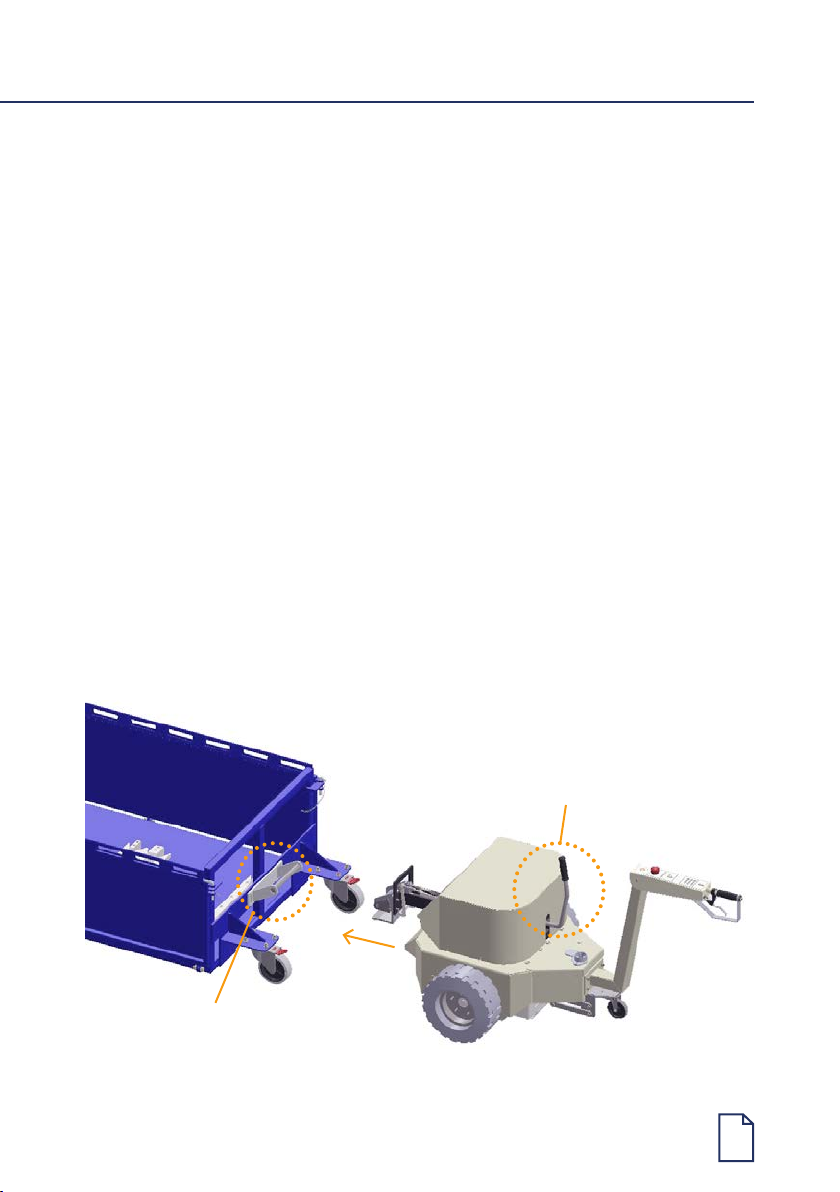
This tug is tted with an auto-latching hitch. Other hitches are also available.
1. Facing the tug, unhook the hitch release handle and move it backward.
This unlocks the auto-latching hitch.
1. Pull the hitch release
lever to unhook.
Trolley hitch bar.

10
In all cases, ensure that the trolley being attached to has its brakes engaged (or chocked)
and is free from obstruction. Inspect the trolley and ensure that the trolley castors are in
good condition.
Unhitching
Always make sure the trolley is on a at level surface and apply the castor brakes
(if tted) or chock the trolley wheels.
1. Unhook the hitch release handle by pulling towards operator to unlock the hitch.
2. Carefully drive the tug forward away from the trolley.
Towing a trolley with castors in poor condition can overload the tug,
and cause damage not covered under warranty.
This tug is not designed for use on inclined surfaces and doing so may
pose a risk of accident or injury. Use this tug on level ground only.
2. Carefully reverse the tug back onto
the trolley’s tow bar until the tug
hitch sits over the tow bar.
3. Once aligned, move the tug forward.
This will automatically lock the tug
hitch over the trolley’s tow bar.
Questo manuale è adatto per i seguenti modelli
3
Indice
Altri manuali ELECTRODRIVE Sistema di sollevamento


Manuali Sistema di sollevamento popolari di altre marche


Genie
Genie Z-60/34 Manuale utente

Screen Technics
Screen Technics INTERFIT Vertical Up Lift Manuale utente

Mortuary Lift
Mortuary Lift ULTIMATE 1000 Manuale utente

Custom Equipment
Custom Equipment Hy-Brid 3 Series Manuale di programmazione

Custom Equipment
Custom Equipment Hy-Brid Lifts 2 Series Manuale di programmazione

Hy-Brid Lifts
Hy-Brid Lifts HB-P3.6 Manuale di programmazione


