
Endorphines GROUND CONTROL Manuale utente

GROUND CONTROL
FIRMWARE V.2.10

WARRANTY
1-year warranty is guaranteed from the product's purchase date in case of any
manufacturing errors or other functional deficiencies during runtime.
The warranty does not apply in case of:
damage caused by misuse
mechanical damage arising from careless treatment (dropping, vigorous
shaking, mishandling, etc.)
damage caused by liquids or powders penetrating the device
heat damage caused by overexposure to sunlight or heating
electric damage caused by improper connecting
The warranty covers replacement or repair, as decided by us. Please contact us
via email for a return authorization before sending anything. Shipping costs of
sending a module back for servicing is paid by the customer. Device complies
with all EU regulations concerning RoHS lead-free manufacturing and WEEE
disposal.
VISIT US:
https://endorphin.es
https://youtube.com/user/TheEndorphines
https://facebook.com/TheEndorphines
https://twitter.com/endorphin_es
https://www.instagram.com/endorphin.es/
https://www.modulargrid.net/e/modules/browser/vendor:167
For technical requests: support@endorphin.es
For dealer / marketing inquiries: [email protected]
FURTH BARCELONA, S. L. (EU VAT ID: ES B66836487)

GROUND CONTROL
42hp eurorack modular polymetric and polyrhythmic performance
CV/MIDI/USB-MIDI sequencer / workstation for drums and melodies
4 tracks: drum track with 8 triggers and modulation and 3 melodic
CV/Gate tracks. Velocity and CC is recorded from external MIDI
2 octave keyboard (no velocity or pressure action), play sequences
and grooves on the fly or use external USB/MIDI gear or DAW
integration or control external MIDI gear
arbitrary, up to 64 steps per pattern, 24 patterns per track, 24
projects
various record modes: 101-style step input with step editing, live
recording and step editor with x0x-style drum editing
dedicated mute/solo bus with momentary mute or quantized to
pattern length action
works also as a power supply for your modular system (same as
Shuttle Control) or can be powered by a buss board like any other
module
arpeggiator, roller, patterns queue, slides, ties/rests, ratchets,
transpose
music scales easily editable via highlighted keys: chromatic, minor,
major, pentatonic etc.
external CV modulation matrix: control various sequencer
parameters under CV: pattern shift, semitone and octaves offset,
shuffle, ratchets, slide, gate length, CV to CC values or pattern
change

INTRO
Ground Control is a powerful performance sequencer for CV/Gate signals, drum
triggers as well as MIDI and USB-MIDI devices.
It features X0X, 101, step editing and live play approaches for sequencing and
recording. That empowers you to create grooves on the fly with fast polymetric
input so you can concentrate on the score without menu diving.
Quick start guide: https://youtu.be/t0OjK-sw3zI
Loopop's full tutorial: https://youtu.be/XhriE0MKjp0
Turbo start: https://youtu.be/UwHBblPGvRA
Essential guide: https://youtu.be/gUsYx2ekUPg
CONNECTING THE POWER
Ground Control module can be powered in two different ways. It is very important
to use only one of the powering options:
1) Connect the module directly into the power buss board with supplied 16-16
ribbon cable like any other eurorack module
2) Power the module from the faceplate with 12-20V DC power adapter. In that
case the ribbon cable connector will act as a power supply. For single sequencer
connection you would need 500mA adapter. For using the sequencer as a power
supply - the higher the amperage of the DC adapter the better, minimum
recommended rated as 3A or more. The DC jack accepts universal 2.1 or 2.5mm /
5.5mm barrel. In that case the 16 pin cable can act as a power source for your
buss board – that can be any passive or flying buss-board. It will deliver identical
current – up to 1A per +12V rail and up to 700mA per -12V rail. Small +5V
jumper (off by default) on the left side will enable +5V source into the buss-
board.
Hint: power consumption will increase, if devices are powered from USB
HOST
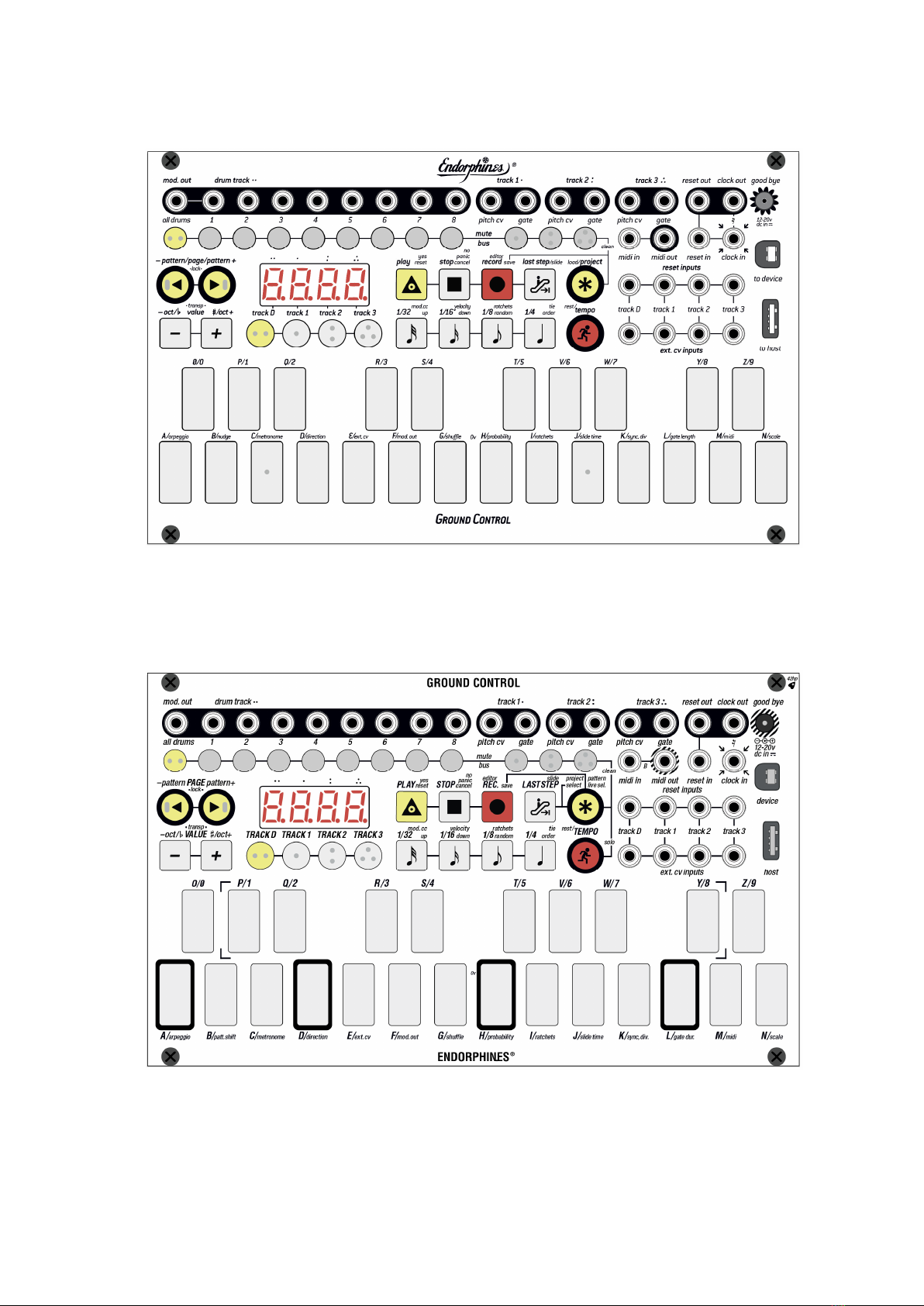
BLACK PANEL DESIGN
NEW SILVER PANEL DESIGN

INTERFACE
TRIGGERS / CV / GATE / OUTPUTS
Ground Control has the following tracks:
DRUM TRACK that consists of 8x drum triggers. Each drum trigger also sends
individual velocity value via MIDI or USB-MIDI, with velocity editing via the
step editor. By default, the drum track is assigned to Rt/Tx MIDI channel 10
(see MENU → M/MIDI settings). Trigger outputs are v-trigger outputs with
increased 0...10V output range to drive low pass gates more efficiently
3X MONOPHONIC MELODIC TRACKS with physical 1v/oct pitch CV and gate
outputs. Pitch CV outputs cover 10 octaves -5v to +5v (similar as the Shuttle
Control outputs. Gate outputs are 0 to 10V
MODULATION TRACK with physical CV output. Can be assigned to drum or
melodic tracks with MIDI CC#01. Alternatively can be assigned to any track’s
note velocity.
The lowest recognizable MIDI note is C of -2
nd
octave (MIDI note number 0) — its
output voltage corresponds to exact -5V. The highest note is C of 8
th
octave (MIDI
note number 120) with the corresponding output voltage of +5V. C3 is the central
note that returns exactly 0 volts. It is important to notice that the range of output
voltages for any CV output is limited to -5V ... +5V.
TRANSPORT BAR
PLAY
: playback start button:
Single press starts the playback when the sequencer is stopped
Once pressed during the playback, it resets all the tracks to their first
steps

Combination of TRACK D/1/2/3 + PLAY during the playback resets
pressed track to the first step
In some actions PLAY button acts as Yes/confirmation of the call to
action (e.g. overwriting not empty project).
STOP
: playback stop button:
Once we are in the menus, single press acts as an exit from the menu
or cancel of call to action without stopping the playback
Also acts as a PANIC BUTTON when pressed and held a few times in
case some MIDI devices have hanged notes
RECORD
: that button enables record or edits the notes in different
combinations:
When sequencer is not running, short RECORD button press starts the
step record input on the selected track (see TRACK D/1/2/3 buttons)
Long press enters the editor (X0X for drums or step editor for melodic
tracks)
When sequencer is running, then short press enables live recording and
long hold enters the live editor, so you can preview all the changes on
the fly
Combination → RECORD enters the save Pattern/Project menu
Combination → RECORD → RECORD saves all the current project
settings as well as all unsaved tracks
Combination TEMPO+RECORD starts RECORD WAIT mode.
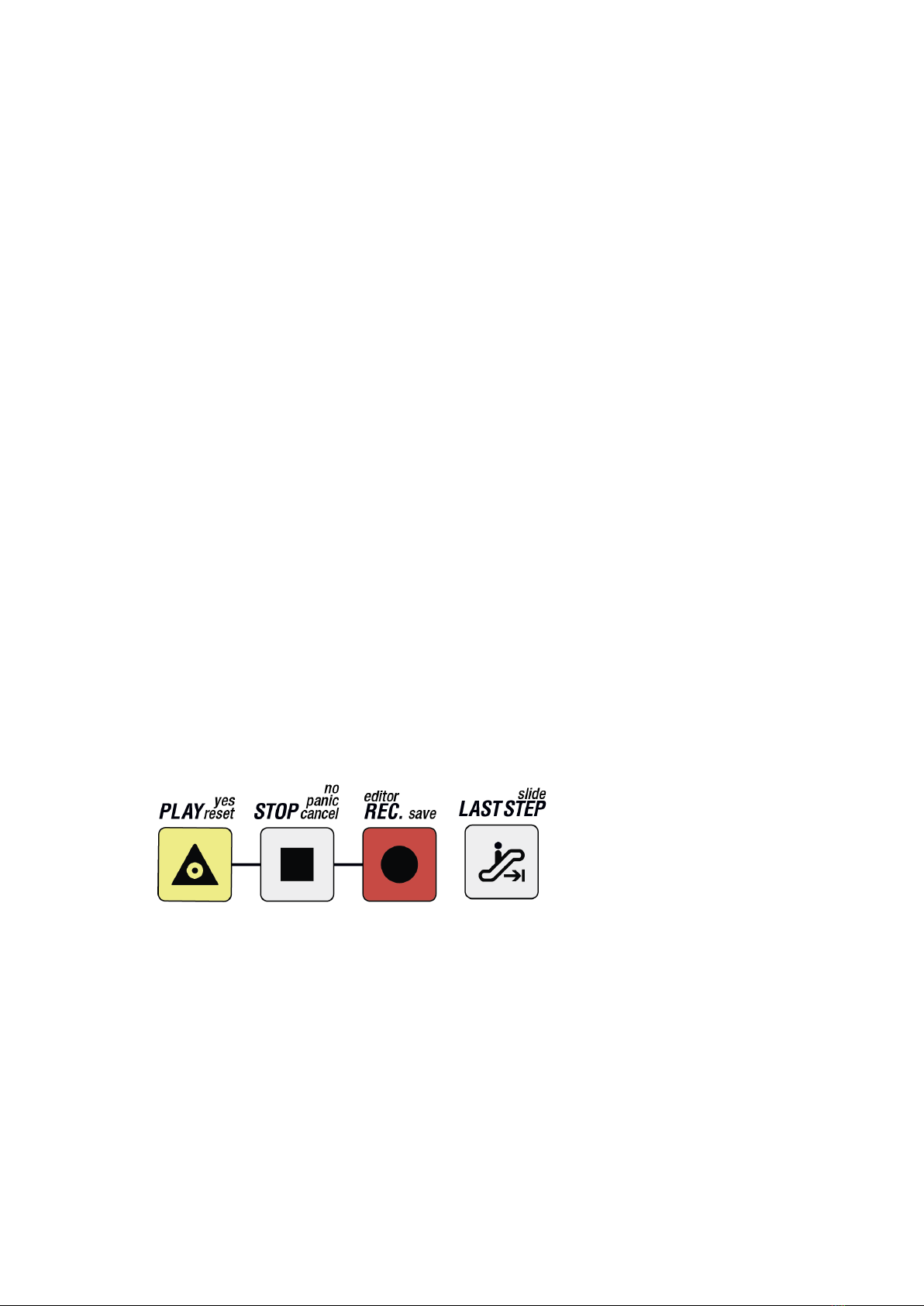
LAST STEP
: sets the amount of steps per track but in other menus acts as
alternative key (e.g. alternating project / pattern) etc.:
Combination LAST STEP + MUTE BUS → VALUE-/+ (or PAGE or
numeric keys P/0...Z/9) sets the amount of steps per separate drum or
melodic tracks. After choosing the track with TRACK D/1/2/3 buttons,
we adjust its pattern length
In melodic tracks editor that button acts as a flag for enabled slide on
the active step
In the menu acts as alternative selection of project or pattern
load/save
TEMPO + LAST STEP locks the BPM value on the screen
When arpeggiator enabled with 1/32…1/4 buttons, short press latches
the arpeggiator, and long hold enables arpeggiator’s super-latch mode
In F/MOD.OUT settings, pressing that buttons enables smooth CV
values vs stepped modulation values.
TRACKS
Ground Control features 1 DRUM TRACK (consisting of 8 TRIGGERS), 3
MONOPHONIC MELODIC TRACKS and 1 MODULATION TRACK assignable to any
of those tracks. Once we are going to record, play, or edit one of the tracks, we
activate it with appropriate TRACK D/1/2/3 buttons.
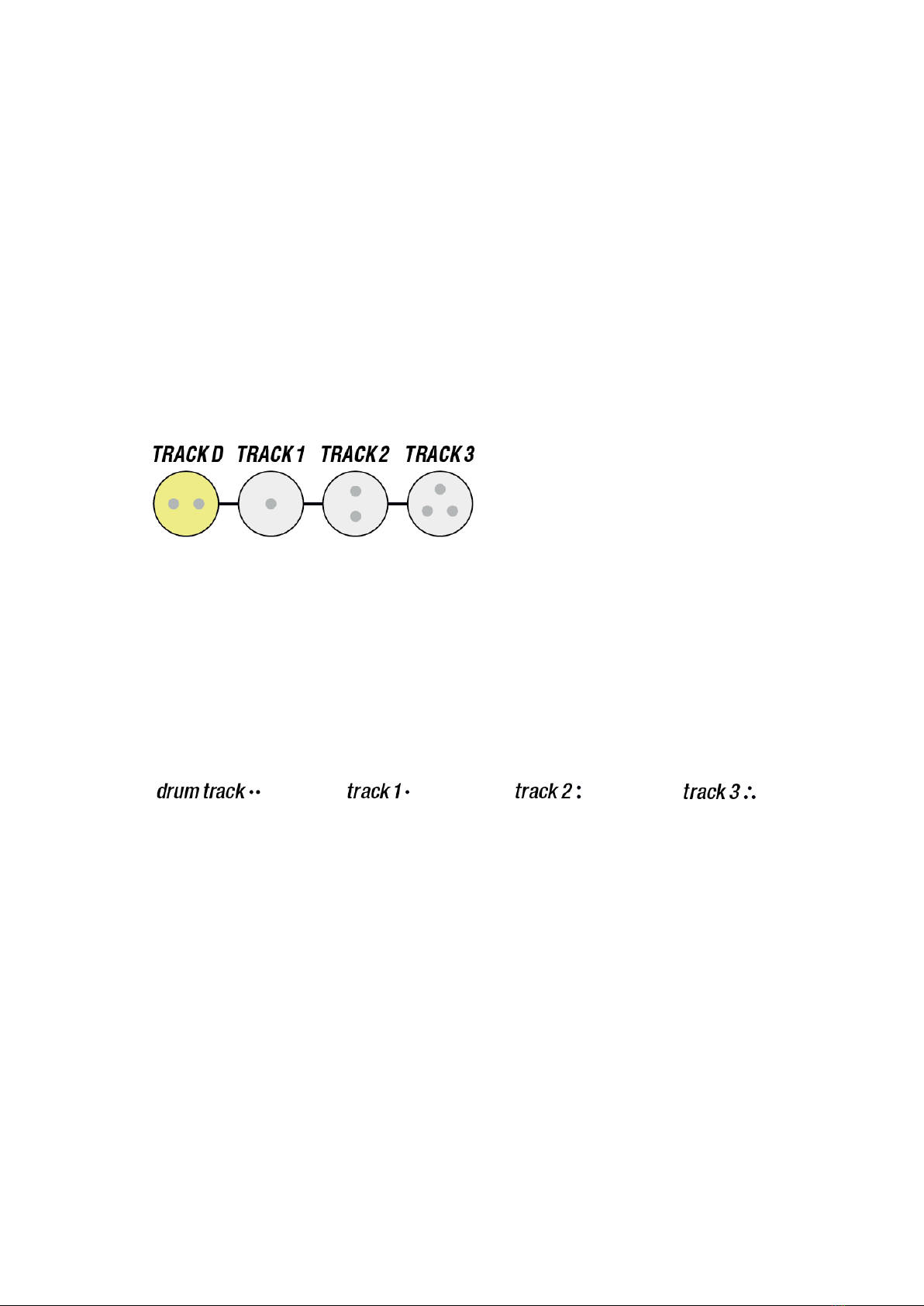
Each track has a special dot symbol, which is written in same combination on the
track names as well as also duplicated with physical bumps on the rubber keys to
help navigate those main tracks with the fingers when you are on the stage:
You can only select one of the four tracks at a time and depending on which track
is active you can configure different MENU settings.
In the menu settings of a specific track, TRACK D/1/2/3 buttons enter that
track’s settings
Combination of TRACK 1/2/3 + TRANSPOSE +/- buttons will shift currently
selected pattern by 1 octave up or down on each combo press
Combination of TRACK D/1/2/3 + 1/32...1/4 buttons sets the time division of
the track. Same combination with the long hold sets the same division but in
triplets
Combination of TRACK D/1/2/3 + PLAY during the playback resets pressed
track to the first step.
DISPLAY
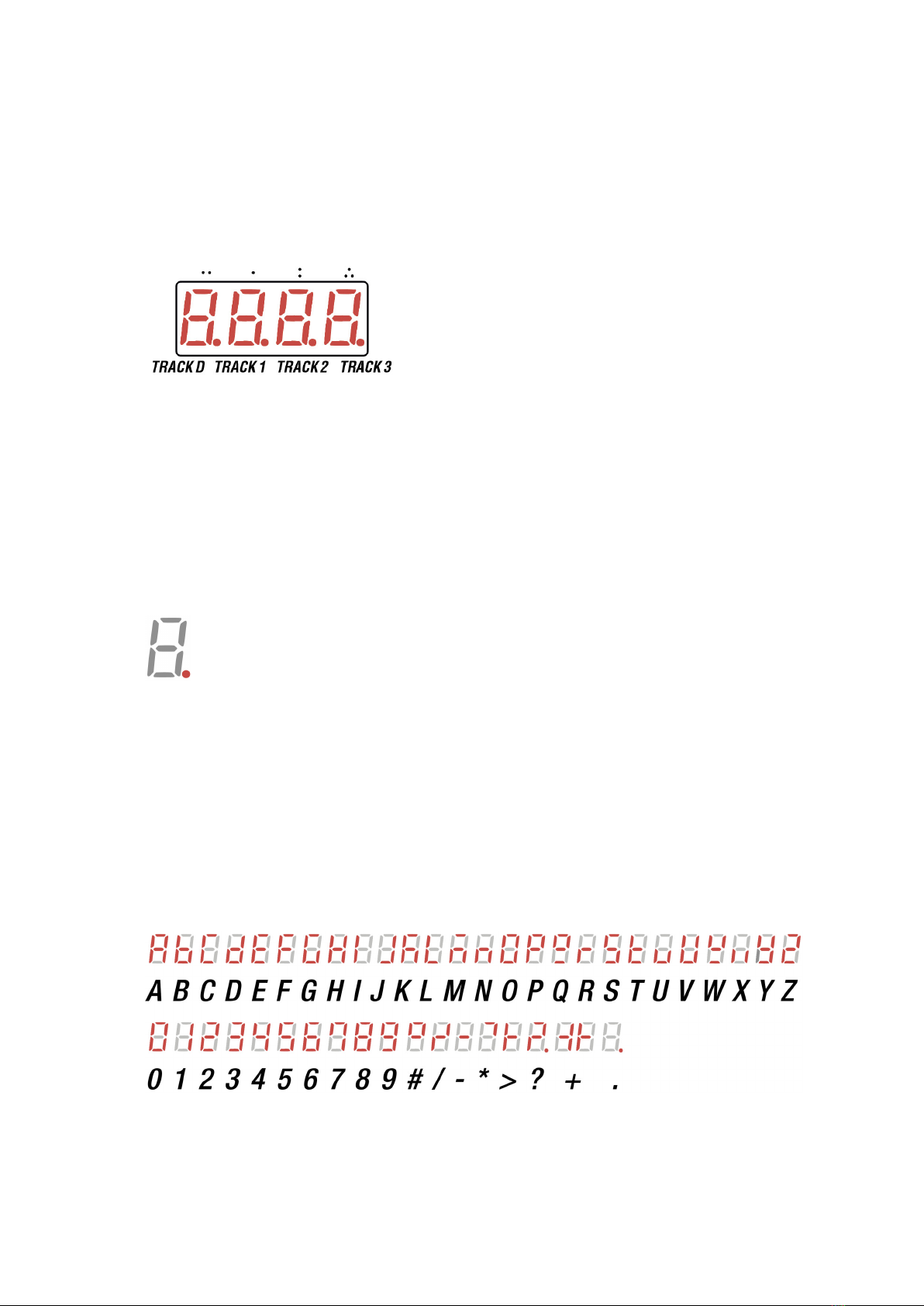
4-symbol display shows various information:
By default or on time-out it always shows currently selected preset on each of
the tracks: each of the 4 letters of alphabet shows one of the 24 (A to Z )
patterns on each of the TRACKS D/1/2/3. The dots pattern above the screen
corresponds to same bumps on the rubber buttons of the tracks
In the menus display shows numeric values, parameters of selected menu
items, hints etc.
- small dot near each track letter appears if that pattern is altered and is
currently unsaved. That dot disappears if we switch to another not altered pattern.
After returning back to the unsaved pattern the dot will appear again. Once we
save the pattern (or SAVE EVERYTHING by
(PROJ)
→ RECORD → RECORD ), the
dot disappears.
Once we turn off the module’s power, all unsaved patterns will be lost.
THE ALPHABET / DISPLAY TYPE-FACE FAMILY
Indice
Altri manuali Endorphines Sintetizzatore

Endorphines
Endorphines Godspeed+ Manuale utente

Endorphines
Endorphines Shuttle Manuale utente

Endorphines
Endorphines Running Order Manuale utente

Endorphines
Endorphines GATEWAY T XP Manuale utente

Endorphines
Endorphines Running order 3U Manuale utente

Endorphines
Endorphines TWO OF CUPS Manuale utente

Endorphines
Endorphines Airstreamer 4 Manuale utente


