
Espedeo PM-2000A Manuale utente

PM-2000A
3D Polarized System
User Manual
October 12th, 2022
Before installing and operating the Espedeo™ PM-2000A 3D Polarized System, please read this User Manual thoroughly

- 2 -
October 12th, 2022
PM-2000A 3D Polarized System User Manual
REGULATORY NOTICES
FCC COMPLIANCE STATEMENT
This equipment has been tested and found to comply with the limits for a Class A digital device, pursuant to
Part 15 of the FCC Rules. These limits are designed to provide reasonable protection against harmful
interference when the equipment is operated in a commercial environment. This equipment generates,
uses, and can radiate radio frequency energy and, if not installed and used in accordance with the
instruction manual, may cause harmful interference to radio communications. Operation of this equipment
in a residential area is likely to cause harmful interference in which case the user will be required to correct
the interference at his own expense.
WARNING
This is a Class A product. In a domestic environment this product may cause radio interference in which
case the user may be required to take adequate measures.

- 3 -
October 12th, 2022
PM-2000A 3D Polarized System User Manual
Table of Contents
1. SYSTEM INTRODUCTION......................................................................................................1
1.1. Key Features............................................................................................................................ 1
2. SYSTEM SPECIFICATIONS......................................................................................................2
3. CORRESPONDING REQUIREMENTS FOR CINEMA..................................................................3
4. SYSTEM COMPONENTS........................................................................................................4
4.1. Polarizer.................................................................................................................................. 6
4.2. Adjustable Bracket Extension Kit..............................................................................................6
4.3. Motorized Bracket...................................................................................................................7
4.4. Bracket Support Base...............................................................................................................7
5. INSTALLATION OF THE 3D SYSTEM........................................................................................8
5.1. Installing the Motorized Bracket ..............................................................................................8
5.2. Installing the Polarizer............................................................................................................. 9
5.3. Installing the Adjustable Bracket Extension Kit ....................................................................... 10
5.4. Cable Connections for Passive 3D System............................................................................... 11
5.4.1. Alternative Power Connection when 3D Interface is not available from Projector (with power converter
and GPIO control signal)...........................................................................................................................................12
5.5. LED indicators of Passive 3D System....................................................................................... 13
5.6. Adjusting the operating position of the Polarizer for 3D Playback ........................................... 14
5.7. Adjusting the default 3D operating position of the Motorized Bracket (When adjustments
mentioned in Section 5.6 cannot be performed)................................................................................ 15
6. OPTICAL ALIGNMENT ........................................................................................................17
7. NOTES...............................................................................................................................18
7.1. Installation............................................................................................................................ 18
7.2. Routine Maintenance............................................................................................................ 18
7.3. Transportation....................................................................................................................... 18
7.4. Safety.................................................................................................................................... 19
7.5. Tips....................................................................................................................................... 19

- 1 -
October 12th, 2022
PM-2000A 3D Polarized System User Manual
- 1 -
1. System Introduction
The Espedeo™ PM-2000A is a standalone passive 3D Polarized System specially developed for digital
cinema projectors. Featuring flexible and easy installation, the system can automatically switch to the
corresponding operating position by identifying 2D and 3D signals. Equipped with specified polarized
glasses, the PM-2000A is able to present stunning and brilliant 3D images.
1.1.Key Features
▪Easy Installation
The system can be installed right in front of digital cinema projector by simply using the bracket
delivered along with the system itself.
▪Simple Connection
The entire system is simply connected by two connection cables with the digital cinema projector
and motorized bracket.
▪2D-3D Switching
The polarizer automatically identifies 2D/3D signals. It automatically moves to the front of the lens
while playing 3D images and automatically moves to the standby position when playing 2D images
or system is idle.
▪Easy Maintenance
The polarizer can be cleaned and maintained in an easy and fast manner. In addition, the polarized
glasses can be directly replaced if there are any damages of the polarized glass that affect
projection quality.

- 2 -
October 12th, 2022
PM-2000A 3D Polarized System User Manual
- 2 -
2. System Specifications
Electrical Parameters:
System power consumption
< 12W
From 3D interface
Power supply
12V DC 1A
Synchronization signal input
3D interface (15pin)
From Power converter
Power input
100 - 240V AC 60-50Hz
Power output
12V DC 1A (through the
synchronization cable)
Table 1
Optical Properties:
Projector luminance
Max. 33,000 lumens
Luminous efficiency
≥ 30% (for Espedeo™ Supra-5000 Projector)
16% ± 1% (for other DCI-compliant Projectors)
Contrast ratio
> 200:1
Cross-talk rate
< 0.5%
Response time
< 150μs
Operating temperature
0~50°C
Operating humidity
≤ 60%
Maximum screen size
18m (59ft) width
Window size
186 x 104mm
Optical type
Circular polarization
Supported Frame rates
24fps, 48fps & 60fps per eye
Table 2

- 3 -
October 12th, 2022
PM-2000A 3D Polarized System User Manual
- 3 -
3. Corresponding Requirements for Cinema
Cinema Requirements:
Polarized glasses
Espedeo™ Polarized 3D glasses
Silver screen: Luminance Gain factor
≥ 2.4
Table 3
Digital Cinema Projector Settings:
Dark time
650 - 850μs
Output Reference delay time
-120μs
Table 4

- 4 -
October 12th, 2022
PM-2000A 3D Polarized System User Manual
- 4 -
4. System Components
The PM-2000A 3D System consists of the following components:
Sr. No.
Part Description
Quantity
①
Polarizer
1 PCS.
②
Adjustable Bracket
Extension Kit
3 PCS.
③
Motorized Bracket
1 PCS.
④
Bracket Support Base
1 PCS.
⑤
DB37M/9F synchronization cable (optional with power converter)
1 PCS.
⑥
DB9M/9F motor signal cable (between bracket and polarizer)
1 PCS.
⑦
DB9F/15M synchronization cable (between projector and polarizer)
1 PCS.
⑧
Power converter (optional)
1 PCS.
⑨
Power cord (optional with power converter)
1 PCS.
Table 5

- 5 -
October 12th, 2022
PM-2000A 3D Polarized System User Manual
- 5 -
Figure 1: System Components
NOTE
When installing the 3D system, handle the equipment with care to avoid damaging the digital cinema
projector lens or the polarizer.

- 6 -
October 12th, 2022
PM-2000A 3D Polarized System User Manual
- 6 -
4.1.Polarizer
Figure 2: Polarizer
The dimensions of the polarizer are approximately 234 x 211 x 25mm and its weight is about 1.3 kg.
NOTE
The polarizer is a major optical component of the PM-2000A system. Ensure that it is handled it care
during system installation.
4.2.Adjustable Bracket Extension Kit
Length: 320mm
Length: 300mm
Length: 650mm
Figure 3: Adjustable Bracket Extension Kit
Adjustable bracket extension kit is used to connect the polarizer with the motorized bracket. It uses a
combination of aluminum rods of different lengths for easy height adjustment and makes it compatible
with various projector lens height.
- 7 -
October 12th, 2022
PM-2000A 3D Polarized System User Manual
- 7 -
4.3.Motorized Bracket
Figure 4: Motorized Bracket
▪The motorized bracket is a passive 3D system apparatus for automatic switching between
3D/2D playing.
▪Installed on top of the bracket support base, the motorized bracket connects to the polarizer
through the DB9M/9F motor signal cable. When the digital cinema projector is playing 3D movie,
the polarizer automatically moves upward to the front of the lens to polarize light paths. When
the digital cinema projector is playing 2D movie, the polarizer automatically moves downward
from the front of the lens.
▪The motorized bracket works with the adjustable bracket extension kit to adjust the position of
the polarizer.
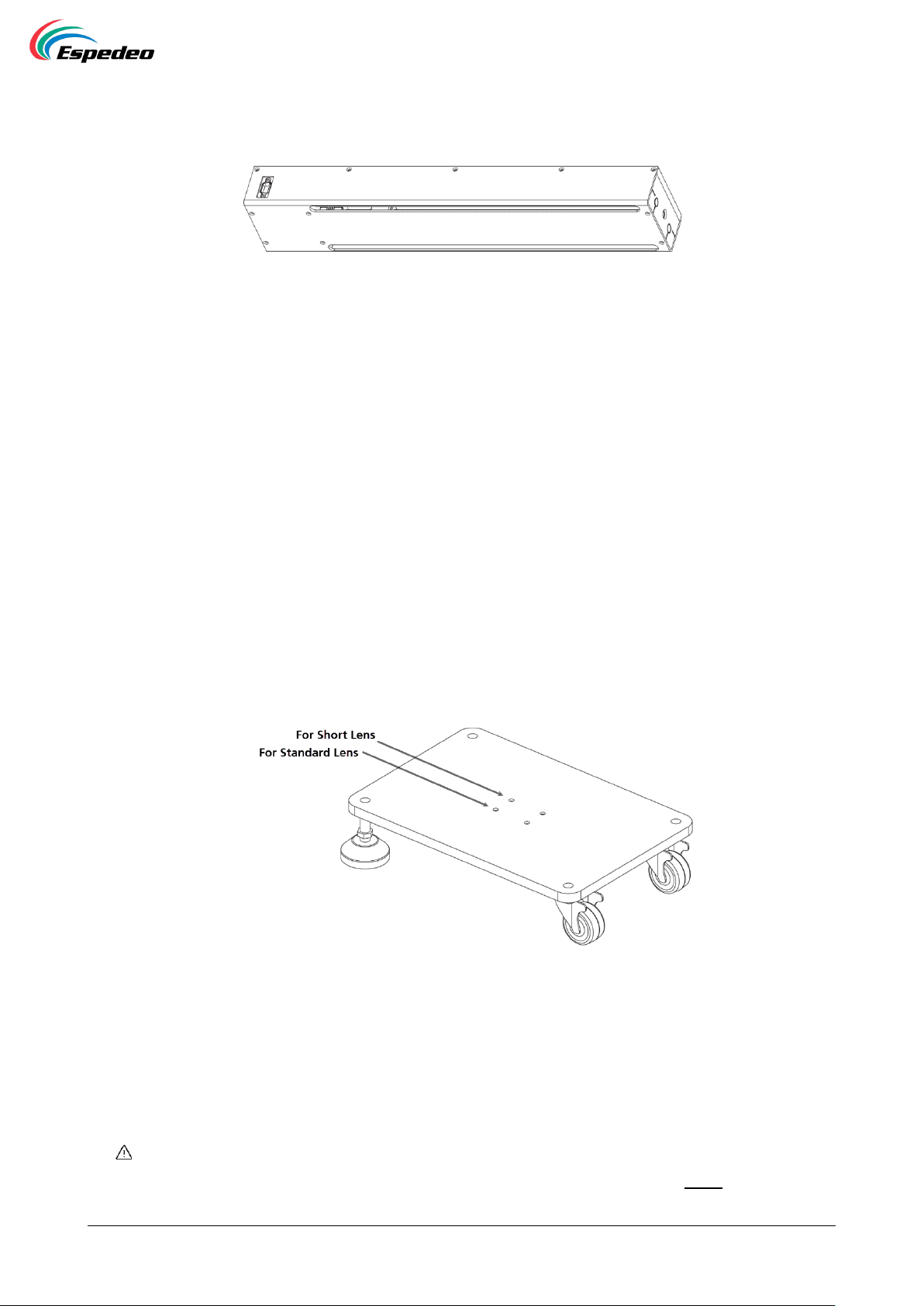
4.4.Bracket Support Base
Figure 5: Bracket Support Base
The bracket support base is placed in front of the digital cinema projector which is used to fix the
position of motorized bracket. The height of the legs can be adjusted to fit various installations.
Moreover, two sets of screw holes are used to fix the bracket for the alternative, as shown in Figure 5.
NOTE
Please ensure that the distance between projector lens and the polarizer is within 15cm after the installation.
Indice
Altri manuali Espedeo Accessori per proiettori


