ETIC IPL-I1128 Manuale utente

IPL-M156 : PSTN router
IPL-I1128: ISDN router
IPL-L134 : Dedicated line router
_________________
User manual
Document reference : 9017109-01
_________________
www.hvssystem.com
Siège social :
2 rue René Laennec
51500 Taissy
France
Contact :
Tél : 0326824929
Fax : 0326851908
Distribué par :

Page 2 User manual ref. 9017109-01 IPL-M156 / IPL-I1128 / IPL-L134 router
The IPL-M156 and IPL-I1128 and IPL-L134 routers are manufactured by
ETIC TELECOMMUNICATIONS
13 Chemin du vieux chêne
38240 MEYLAN
FRANCE
:
TEL : + 33 4-76-04-20-00
FAX : + 33 4-76-04-20-01
web : www.etictelecom.com

CONTENT
IPL-M156 / IPL-I1128 / IPL-L134 router User manual ref. 9017109-01 Page 3
OVERVIEW
1PRODUCTS IDENTIFICATION....................................................................................6
2SPECIFICATIONS........................................................................................................7
3PRODUCT OVERVIEW...............................................................................................9
INSTALLATION
1PRODUCT DESCRIPTION.......................................................................................13
1.1 Leds...............................................................................................................13
1.2 Connectors...................................................................................................13
1.3 DIP-switches.................................................................................................16
2VENTILATION............................................................................................................16
3SUPPLY VOLTAGE...................................................................................................16
4ETHERNET INTERFACE...........................................................................................16
5RS232 INTERFACE...................................................................................................17
6RS485 INTERFACE...................................................................................................17
7INPUT & OUTPUT CONNECTION............................................................................17
8PSTN LINE (IPL-M156)..............................................................................................18
9ISDN LINE (IPL-I1128)...............................................................................................19
10 DEDICATED LINE (IPL-L134)...................................................................................19
CONFIGURATION
1OVERVIEW................................................................................................................20
2CONNECTING A PC TO THE ETHERNET INTERFACE..........................................20
3MODIFYING THE CONFIGURATION PARAMETERS THROUGH THE LAN .........21
4WRONG IP ADDRESS OR PASSWORD..................................................................21
../..

CONTENT
Page 4User manual ref. 9017109-01 IPL-M156 / IPL-I1128 / IPL-L134 router
…CONFIGURATION
5SAVING CONFIGURATION MODIFICATIONS.........................................................22
6ASSIGNING AN IP ADDRESS TO THE LAN INTERFACE.....................................22
7MODEM CONFIGURATION ......................................................................................23
7.1 PSTN modem (IPL-M156).............................................................................23
7.2 ISDN adapter (IPL-I1128) .............................................................................23
7.3 Dedicated line modem (IPL-L134)...............................................................23
8CONFIGURING CONNECTIONS BETWEEN ROUTERS........................................24
8.1 Dial-up PSTN or ISDN connection..............................................................24
8.2 Dedicated line connection...........................................................................27
9CONFIGURING STATIC ROUTES............................................................................30
10 REMOTE USERS CONNECTION..............................................................................31
10.1 Configuring the users list............................................................................32
11 RESTRICTING THE RIGHTS OF A REMOTE USER ...............................................33
11.1 Filter structure..............................................................................................33
11.2 Configuration................................................................................................34
12 SERIAL TO IP GATEWAY.........................................................................................37
12.1 Modbus gateway..........................................................................................38
12.2 RAW TCP gateway.......................................................................................41
12.3 Multicast gateway ........................................................................................43
13 ADVANCED FUNCTIONS.........................................................................................45
13.1 Alarms...........................................................................................................45
13.2 Configuring the web portal.........................................................................47
13.3 Restricting access to the administration server.......................................48
../..

CONTENT
IPL-M156 / IPL-I1128 / IPL-L134 router User manual ref. 9017109-01 Page 5
MAINTENANCE
1DIAGNOSTIC.............................................................................................................49
2SAVING THE PARAMETERS FILE...........................................................................50
3UPDATING THE FIRMWARE....................................................................................50
APPENDIX 1 : HTML configuration server

OVERVIEW
IPL-M156 / IPL-I1128 / IPL-L134 router User manual ref. 9017109-01 Page 6
1 Products identification
IPL-M156 IPL-I1128 IPL-L134
Analog switched telephone line (PSTN)
•
ISDN ETSI BRI interface ( one B channel 64 kb/s)
•
Dedicated, voice band, 2 wire line
•
RJ45 Ethernet 10 Mb/s 1 1 1
RS232-RS85 111
IP router •••
NAT – DNAT – Port forwarding •••
SNMP traps •••
DNS •••
DHCP client or server (LAN interface) •••
Firewall SPI •••
Remote access server (RAS) •••
VPN PPTP, IPSEC, SSL •••
Remote access server • • •
Digital input for email alarms 333
Serial gateway :
Raw TCP client and server,
Telnet server,
Multicast,
Modbus client and server,
Unitelway
•••
Html Configuration •••
Option software IO Viewer •••

OVERVIEW
IPL-M156 / IPL-I1128 / IPL-L134 router User manual ref. 9017109-01 Page 7
2 Specifications
General characteristics
Dimensions 136 x 38 x 108 mm (h, l, p)
Electrical safety EN 60950- UL 1950
CEM
ESD : EN61000-4-2 : Discharge 6 KV
RF field : EN61000-4-3 : 10V/m < 2 GHz
Fast transient : EN61000-4-4
Surge voltage : EN61000-4-5 : 4KV line / earth
RoHS 2002/95/CE (RoHS)
Supply voltage 9 to 40 VDC - 170 mA at 24 VDC
Operating T° -20°C / + 60°C Humidity 5 - 95 %
PSTN / ISDN / Dedicated line
PSTN Analog PSTN line (2 wires)
V90 modem 56 kb/s
DTMF and pulse dialling
International and programmable line interface
ISDN ETSI EURO-ISDN conform
BRI interface
1 B channel management (64 kb/s)
Dedicated line 2 wires line
V34 modem –33.4 kb/s
Voice band 300-3400 Hz
Ethernet / IP router
Ethernet One Ethernet 10BT interface
IP router Remote connections- static routes - RIP V2
Ip address
translation
Source IP @ translation (NAT)
Destination IP @ translation (DNAT)
Port translation (Port forwarding)
DNS Domain name
IP address assignment Fixed IP @ or DHCP client or DHCP server

OVERVIEW
Page 8 User manual ref. 9017109-01 IPL-M156 / IPL-I1128 / IPL-L134 router
Security
Connection PPP connection
Login & password
Call-back
VPN Client or server IPSEC or TLS/SSL or PPTP
Encryption 3DES
Certificate 509
Logs Date and time stamped logs
Remote access server (RAS)
User list 25 users
Connection PPP connection
Login & password
call-back
Alarms 3 inputs : emails
Serial interface
RS232 1200 - 115200 kb/s parity N / E / O
Serial to IP gateways
Modbus master and slave
Raw client et server
Telnet
Multicast
UDP multicast
unitelway

OVERVIEW
IPL-M156 / IPL-I1128 / IPL-L134 router User manual ref. 9017109-01 Page 9
3 Product overview
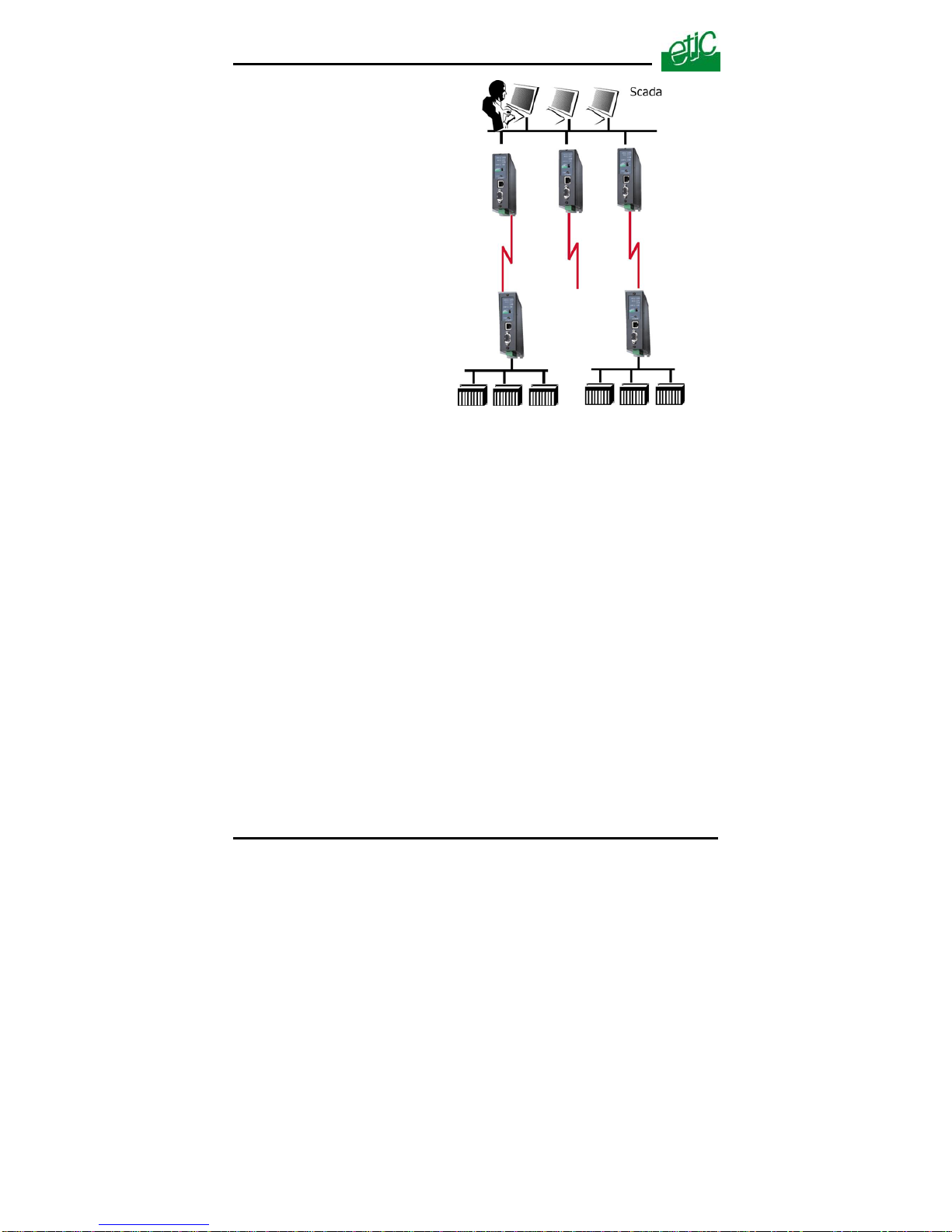
The IPL is designed to interconnect safely automated devices over the
PSTN or ISDN or dedicated lines.
PSTN network
ISDN network

OVERVIEW
Page 10 User manual ref. 9017109-01 IPL-M156 / IPL-I1128 / IPL-L134 router
IP router
The IPL router provides flexible and comprehensive solutions to route IP
frames from one network to other networks.
The solutions include remote nodes description, static routes, RIP
protocol and destination network address translation (DNAT).
Safe VPN links
The IPL router is able to establish safe VPN tunnels.
Once a VPN is established between two IPL routers , each IP device
connected to the first LAN can exchange IP frames with any device
connected to the other LAN as if they were linked with a private line.
If the VPN is established between a remote user PC and an IPL router,
the remote user can access to the devices connected to the router.
Authentication can be carried out with a pre-shared key or with
certificates.
Dedicated line network
Questo manuale è adatto per i seguenti modelli
2
Indice
Altri manuali ETIC Router di rete

ETIC
ETIC IPL-DAC Manuale utente

ETIC
ETIC RAS-E Manuale utente

ETIC
ETIC IPL-M156 Manuale utente

ETIC
ETIC IPL-3G Manuale utente

ETIC
ETIC IPL-3G-G-1400 Manuale utente

ETIC
ETIC IPL-G12 Manuale utente

ETIC
ETIC 1400 Manuale utente

ETIC
ETIC IPL-CW-2 Series Manuale utente

ETIC
ETIC IPL-E-2 Series Manuale utente

ETIC
ETIC IPL-E Manuale utente
Manuali Router di rete popolari di altre marche

NETGEAR
NETGEAR FS526T - Switch Manuale utente

Korenix
Korenix JetNet 5710G Series Manuale utente

Automated Logic
Automated Logic ZN551 Manuale del proprietario

Cisco
Cisco ASR 1000 Series Manuale dell'operatore

EnGenius
EnGenius ESR-9710 Manuale utente

Cisco
Cisco 805 Series Istruzioni operative e di sicurezza