
eWON eWON500 Manuale utente

Page 1
eWON500™
The Programmable Gateway
ver 1.0
9/11/05
User Guide
PURPOSE
You have just received your brand new eWON500™!
ACT’L produces a complete range of Ethernet/Internet
gateways also known as “Programmable Industrial Routers”
(PIR). See our website http://www.ewon.biz to get further
information about the eWON™ range.
The eWON500™ can be used as a programmable
gateway: The eWON500™ becomes the interface between
a proprietary serial protocol and a ModbusTCP Supervisor.
The eWON500™ can transform your old serial-only device
to an Up-to-date Ethernet SCADA ready device.
The goal of the current document is to teach you how to
correctly configure the eWON500™ as a Programmable
Gateway to address a wide range of various serial devices.
eWON500™ is just out of the box, you have already
powered it ON (12-24VDC) and connected its
Ethernet cable.
• Enter http://10.0.0.53 in the address bar from your Internet Explorer
(refer to the eBuddy User Guide if you need to change the eWON™ IP address and subnet mask)
• Enter adm (User Name)/adm (Password) then Enter
You are now navigating on your eWON500™!
Every eWONs™ are shipped with the pre configured IP address 10.0.0.53
and adm/adm as User Name/Password.

eWON500™
The Programmable Gateway
ver 1.0
9/11/05
Page 2
User Guide
eWON500™ is a programmable gateway
Programmable gateway - What you can do with
Communicating with serial devices
The eWON500™ has been designed to enable communication with any serial device (RS232 or
RS485)
A programmable gateway is used to enable the supervision of any device that embeds a serial port and
a proprietary communication protocol, following those 2 principles:
• The eWON500™ is designed to communicate through its serial port with a device.
The protocol from this device will be partially or totally coded in the eWON500™
• The significant data from the device will be published on the Ethernet link through the
eWON500™ Memory Tags, either with the ModbusTCP protocol or with the SNMP protocol
The serial protocols that are used on those devices are either ASCII (text) or binary.
We will only explain the case of the ASCII protocol which is more didactic and visual.
The serial protocols communication modes
The communications with serial devices use principally 2 operating modes:
• The Question-Answer mode
•Automatic sending of messages (at regular intervals or not)
You will find in this document some examples to illustrate those two operating modes.
The eWON500™ embeds a programming language
Main characteristics from the eWON500™ BASIC language
The programming language used in the eWON is the BASIC*, which is an interpreted language using a very
simple syntax. However, this language embeds all the basic instructions and functions that can be found in a
programming language, and also specific eWON500™ functions, such as the ability to read Tags, to
program alarms, to manage schedule tasks,..
* The document Programming eWON : Learning by examples you can download on the
eWON™ web site http://www.ewon.biz (Support/Documentation/How-to...) will provide you a
detailed practical learning of the eWON500™ BASIC language.
Page 3
eWON500™
The Programmable Gateway
ver 1.0
9/11/05
User Guide
eWON500™ serial port special features
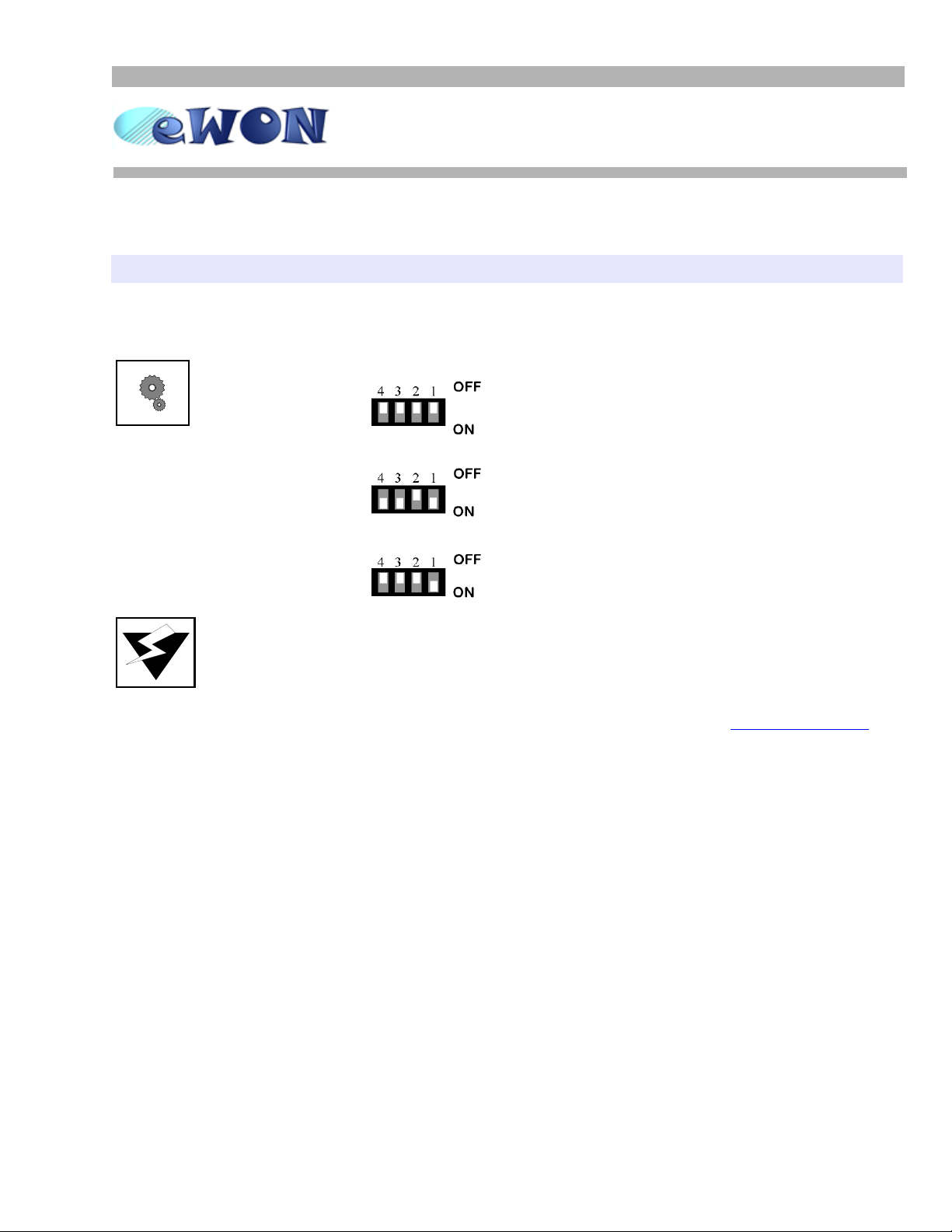
¤ The serial ports can be configured in RS232 or RS485 by means of a dip switch. You have
just to configure the switches according to the illustrations below:
RS232 dipswitch panel configuration
All switches OFF
RS485 dipswitch panel configuration
WITH polarization
RS485 dipswitch panel configuration
WITHOUT polarization
¤ The eWON500™ BASIC language manages the serial port configuration, that means that the
serial port CANNOT BE USED by any IO server at the same time!!
¤ The eWON500™ BASIC instructions listed below are dedicated to operations on the serial
port. You will find exhaustive information on the eWON500™ BASIC instructions in the
eWON™ User Guide you can download from the eWON™ web site: http://www.ewon.biz
(Support/Documentation/User guides).
OPEN “com:1...” Opening the COM port
CLOSE Closing the COM port
PUT Writing on the COM port
GET Reading on the COM port
¤ There is no way to know the number of characters present in the incoming buffer from the
serial link.

Page 4
eWON500™
The Programmable Gateway
ver 1.0
9/11/05
User Guide
Question/Answer Protocol
Below are detailed the steps required to code a program sending a “question” on the serial port and waiting for
an “answer”:
1 Serial port initialization gosub InitSerial_QA
2Sendingaquestion Q$=”CMD”:gosub SendQuestion
3 Waiting for a delay tset 4,2 + ontimer
4 Reading the answer+displaying goto ReadAnswer
5goto2
Rem --- eWON start section: SERIAL_QA
Rem --- eWON user (start)
InitSerial_QA:
Open "com:1,9600,8n1n" For Binary Input As 1
ontimer 1,"goto Question"
tset 1,10
return
CloseSerial:
Close 1
return
Question:
Q$ = "??"+chr$(13)
gosub SendQuestion
end
SendQuestion:
rem flush the serial input buffer
A$ = GET 1
A$=""
rem send the Question Q$ to serial
put 1,Q$
rem Wait 2 seconds before read the input buffer
rem set a timer handler and a timer of 2 seconds
Ontimer 4,"goto ReadAnswer"
tset 4,2
return
ReadAnswer:
rem stop the timer4
tset 4,0
rem read the serial input
A$ = GET 1
rem process the Answer
a% = len(A$)
print time$;" RxLen: ";a%
print "Rx: ";A$
SerialTag@ = VAL(A$)
end
Rem --- eWON user (end)
End
COM ports special features:
- always 'binary'
The serial ports are always Input/Output even when
opened with Input (input/output does not exist)
Initialiazing a timer to send the Question every 10
seconds
End of the initialization process (QA mode)
Question = “??” + CR
We first empty the read buffer prior to send the question
The question is sent on the serial port
Initializing a timer to wait for the answer
Stop the timer to read only once when timer expires
Reading the entire input buffer (default: 2048 bytes max)
Displaying the answer in ScriptControl
If the answer represents a numeric value, it has to be
converted prior to be assigned to a Tag
To test this Program, insert a Gosub InitSerial_cont in the init_section.

eWON500™
The Transparent Gateway
ver 1.0
9/11/05
Page 5
User Guide
To test this Program, insert a Gosub InitSerial_cont in the init_section.
Spontaneous Protocol
The device moreoften sends fix length messages in this functionning mode
1 Serial port initialization gosub InitSerial_Cont
2 Reading the input buffer goto GetSerial
3 Waiting for a delay
4 Reading the answer+displaying gosub ProcessBuffer
5goto2
Rem --- eWON start section: SERIAL_cont
Rem --- eWON user (start)
InitSerial_cont:
Rem open the COM port
Open "com:1,9600,8n1n" For Binary Input As 1
B$=""
rem Set a timer handler
Ontimer 4,"goto GetSerial"
Rem and the set the timer to 2 seconds
Tset 4,2
return
end
GetSerial:
rem read the input buffer
A$ = Get 1
rem add characters in a buffer
B$=B$+A$
a% = len(B$)
rem wait for receive 16 characters
If (a%<16) Then
print "buff: ";B$
Goto EndGetSerial
Else
If a%>16 Then
rem extract the 16 first char
C$=B$(1 To 16)
rem keep the remainding char
B$=B$(17 To)
Else
rem buffer holds exactly 16 characters
C$=B$
B$=""
Endif
Endif
Print time$;" ";C$
gosub ProcessBuffer
EndGetSerial:
End
ProcessBuffer:
rem extract the value of a substring and assign it to Tag
If (C$(1)="N") Then
SerialValue@ = VAL(C$(8 To 16))
Else
Print Time$;" unknown message"
Print C$
Endif
return
Rem --- eWON user (end)
End
Rem --- eWON end section: SERIAL_cont
COM ports special features:
- always 'binary'
- The serial ports are always Input/Output even when
opened with Input (input/output does not exist)
The GetSerial procedure will be called every 2 seconds
Reading the entire input buffer (default: 2048 bytes max)
Concatenation from the characters
Testing that the complete message has been received
Extraction of the 16 first characters in C$
C$ contents the message
Message processing procedure call
End from the GetSerial procedure
Altri manuali per eWON500
1
Indice
Altri manuali eWON Portale


Manuali Portale popolari di altre marche

LST
LST M500RFE-AS Manuale utente

Kinnex
Kinnex Media Gateway Manuale utente

2N Telekomunikace
2N Telekomunikace 2N StarGate Manuale utente

Mitsubishi Heavy Industries
Mitsubishi Heavy Industries Superlink SC-WBGW256 Manuale utente

ZyXEL Communications
ZyXEL Communications ZYWALL2 ET 2WE Manuale utente

Telsey
Telsey CPVA 500 - SIP Manuale utente


