eWON Netbiter LC300 Series Manuale utente

Netbiter LC300 Series
USER MANUAL
SCM-1202-047 1.2 ENGLISH

Important User Information
Liability
Every care has been taken in the preparation of this document. Please inform HMS Industrial Networks AB of any
inaccuracies or omissions. The data and illustrations found in this document are not binding. We, HMS Industrial
Networks AB, reserve the right to modify our products in line with our policy of continuous product development.
The information in this document is subject to change without notice and should not be considered as a commit-
ment by HMS Industrial Networks AB. HMS Industrial Networks AB assumes no responsibility for any errors that
may appear in this document.
There are many applications of this product. Those responsible for the use of this device must ensure that all the
necessary steps have been taken to verify that the applications meet all performance and safety requirements in-
cluding any applicable laws, regulations, codes, and standards.
HMS Industrial Networks AB will under no circumstances assume liability or responsibility for any problems that
may arise as a result from the use of undocumented features, timing, or functional side effects found outside the
documented scope of this product. The effects caused by any direct or indirect use of such aspects of the product
are undefined, and may include e.g. compatibility issues and stability issues.
The examples and illustrations in this document are included solely for illustrative purposes. Because of the many
variables and requirements associated with any particular implementation, HMS Industrial Networks AB cannot as-
sume responsibility for actual use based on these examples and illustrations.
Intellectual Property Rights
HMS Industrial Networks AB has intellectual property rights relating to technology embodied in the product de-
scribed in this document. These intellectual property rights may include patents and pending patent applications in
the USA and other countries.
eWON®and Netbiter®are registered trademarks of HMS Industrial Networks AB. All other trademarks mentioned in
this document are the property of their respective holders.
Netbiter LC300 Series User Manual SCM-1202-047 1.2

Netbiter LC300 Series User Manual SCM-1202-047 1.2
Table of Contents Page
1 Preface ............................................................................................................................... 3
1.1 Document History ..........................................................................................................3
1.2 Document Conventions ..................................................................................................3
2 Installation ........................................................................................................................ 4
2.1 Basic Installation Steps ..................................................................................................4
2.2 Factory Reset ................................................................................................................4
2.3 Connectors and Indicators..............................................................................................5
2.4 Wiring Examples.......................................................................................................... 11
3 Configuration ................................................................................................................. 12
3.1 Accessing the Web Interface.........................................................................................12
3.2 Login Screen ...............................................................................................................13
3.3 Main Menu Bar ............................................................................................................13
3.4 Setup..........................................................................................................................14
3.5 Configuration...............................................................................................................24
4 Usage ............................................................................................................................... 35
4.1 Select page .................................................................................................................35
4.2 Status .........................................................................................................................35
4.3 Devices.......................................................................................................................36
4.4 Alarm..........................................................................................................................37
A Internal Registers.......................................................................................................... 39
B SNMP................................................................................................................................ 41
C Technical Data................................................................................................................ 42

This page intentionally left blank

Preface 3 (44)
1 Preface
This document describes the installation, configuration and use of Netbiter LC300 Series
gateways.
For additional documentation and software downloads, FAQs, troubleshooting guides and tech-
nical support, please visit www.netbiter.com/support.
1.1 Document History
Version Date Description
1.0 2017-10-02 First release
1.1 2017-10-27 Minor corrections
1.2 2017-11-06 Minor corrections
1.2 Document Conventions
Ordered lists are used for instructions that must be carried out in sequence:
1. First do this
2. Then do this
Unordered (bulleted) lists are used for:
• Itemized information
• Instructions that can be carried out in any order
...and for action-result type instructions:
► This action...
➨leads to this result
Bold typeface indicates interactive parts such as connectors and switches on the hardware, or
menus and buttons in a graphical user interface.
Monospaced text is used to indicate program code and other
kinds of data input/output such as configuration scripts.
This is a cross-reference within this document: Document Conventions, p. 3
This is an external link (URL): www.hms-networks.com
This is additional information which may facilitate installation and/or operation.
This instruction must be followed to avoid a risk of reduced functionality and/or
damage to the equipment, or to avoid a network security risk.
Caution
This instruction must be followed to avoid a risk of personal injury.
WARNING
This instruction must be followed to avoid a risk of death or serious injury.
Netbiter LC300 Series User Manual SCM-1202-047 1.2

Installation 4 (44)
2 Installation
2.1 Basic Installation Steps
This product contains parts that can be damaged by electrostatic discharge (ESD).
Use ESD protective measures to avoid equipment damage.
Connecting power with reverse polarity or using the wrong type of power supply
may damage the equipment. Make sure that the power supply is correctly
connected and of the recommended type.
Make sure that you have all the necessary information about the capabilities and restrictions of
your local network environment before installation.
1. Mount the unit on a flat surface or on a DIN rail using the adapter kit (optional).
2. Connect the slave devices and/or Ethernet network as needed.
3. For mobile networking (LC350), connect the mobile antenna and insert the SIM card.
4. Connect a suitable power supply and apply power.
5. Configure the unit.
2.2 Factory Reset
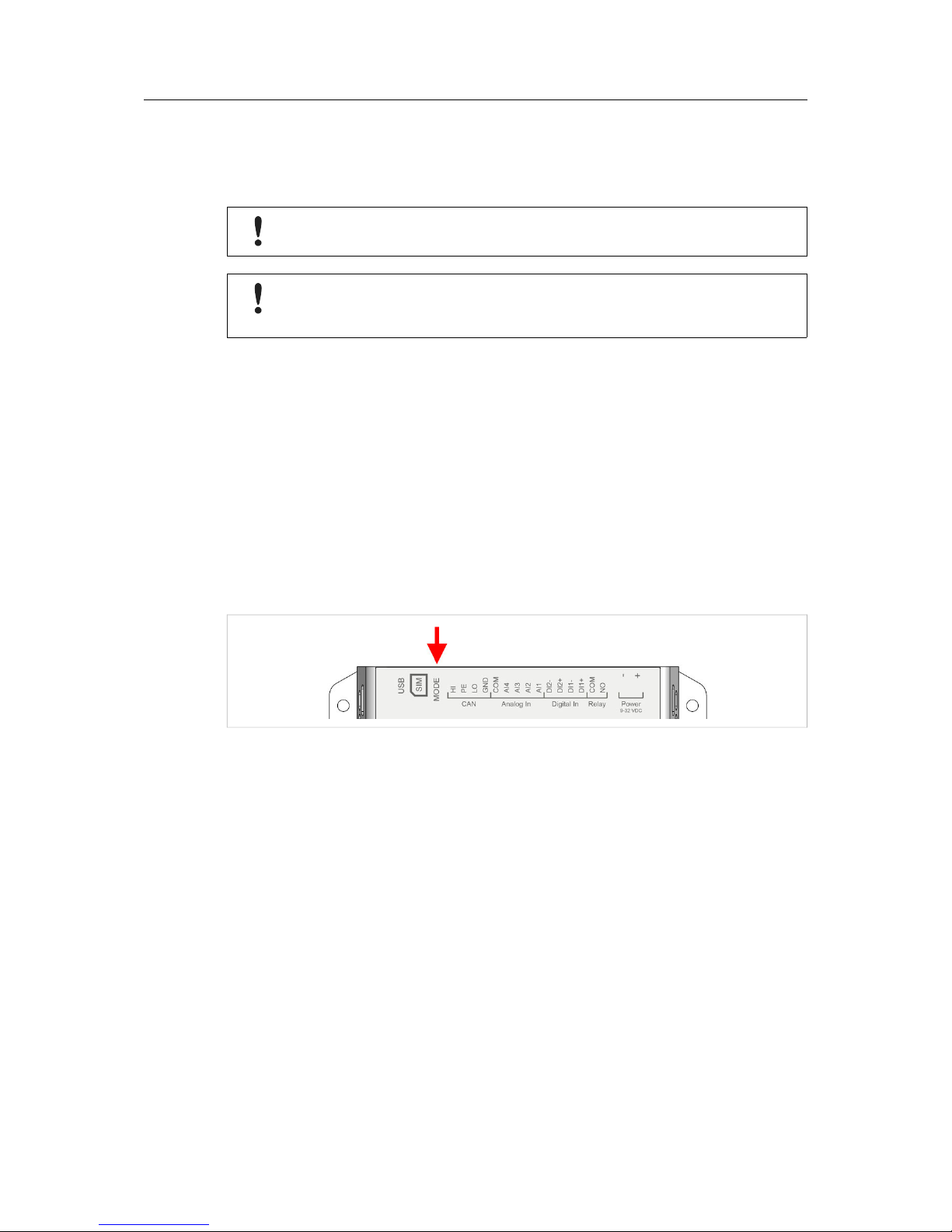
Keep the MODE button pressed while powering on to reset to the factory default settings.
Fig. 1 Factory reset
Netbiter LC300 Series User Manual SCM-1202-047 1.2

Installation 5 (44)
2.3 Connectors and Indicators
2.3.1 I/O Terminal Block
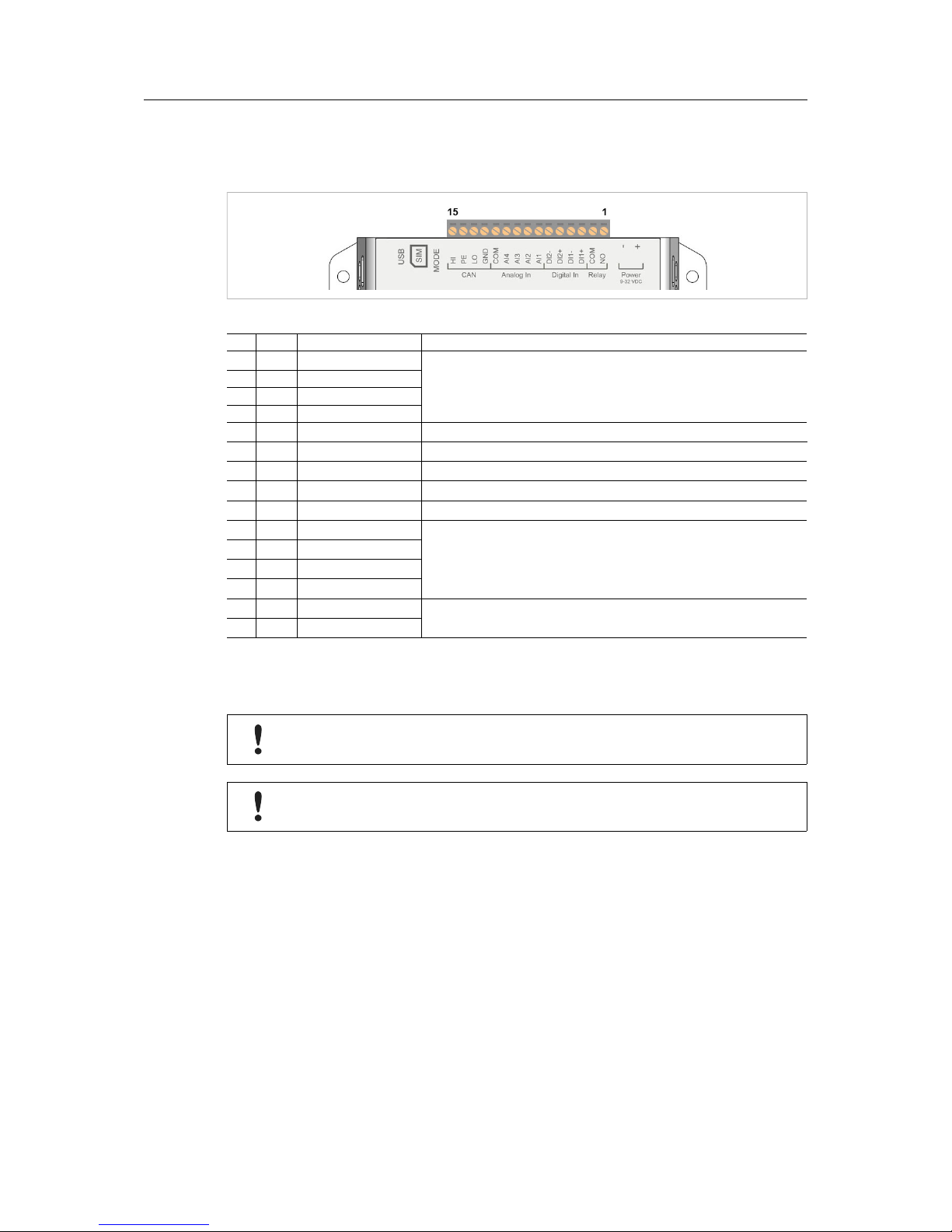
Fig. 2 Terminal block
Pin Label Function Note
15 HI CAN High
(reserved for future use)
14 PE CAN Shield
13 LO CAN Low
12 GND CAN Ground
11 COM Analog Input common
10 AI4 Analog Input 4 0–20 mA or 0–10 VDC
9 AI3 Analog Input 3 0–20 mA or 0–10 VDC or PT100
8 AI2 Analog Input 2 0–20 mA or 0–10 VDC
7 AI1 Analog Input 1 0–20 mA or 0–10 VDC or PT100
6 DI2- Digital Input 2
Dry contact type – do not apply power to these inputs
5 DI2+ Digital Input 2
4 DI1- Digital Input 1
3 DI1+ Digital Input 1
2 COM Relay output common Isolated inputs
Rated load: 1 A @ 24 VDC
1 NO Relay output, NO
The analog inputs must be configured for voltage, current or PT100 input.
The digital inputs are of the dry contact type which require no control voltage.
Do not connect power to the digital inputs as this may damage the unit.
The relay output must be supplied from an isolating transformer using a secondary
listed fuse rated at maximum 3.3 A and minimum 30 VDC.
Netbiter LC300 Series User Manual SCM-1202-047 1.2

Installation 6 (44)
2.3.2 Power Supply
Connecting power with reverse polarity or using the wrong type of power supply
may damage the equipment. Make sure that the power supply is correctly
connected and of the recommended type.
Fig. 3 Power supply connection
Connect a DC power supply of the recommended type to the +(plus) -(minus) terminals. See
also Technical Data, p. 42.
2.3.3 USB Connector
Fig. 4 USB connector
The USB micro B connector can be used to connect a computer to the unit for local configura-
tion, firmware upgrades and troubleshooting.
Netbiter LC300 Series User Manual SCM-1202-047 1.2

Installation 7 (44)
2.3.4 SIM Card (LC350)
Fig. 5 Installing the SIM card
The SIM card must have a mobile data plan and PIN code security must be disabled. Additional
configuration via the local web interface is required.
Insert the SIM card carefully and push it firmly downwards until it clicks into place. Observe the
position of the cut-off corner and the contact surfaces.
Make sure that the SIM card does not slip behind the holder.
2.3.5 Antenna Connector (LC350)
Fig. 6 LC350 antenna connectors
Make sure that you attach the antenna to the 3G/GPRS connector on the front panel. The GPS
antenna connector is reserved for future use.
Netbiter LC300 Series User Manual SCM-1202-047 1.2

Installation 8 (44)
2.3.6 RS-485 Serial Interface (3-pin)
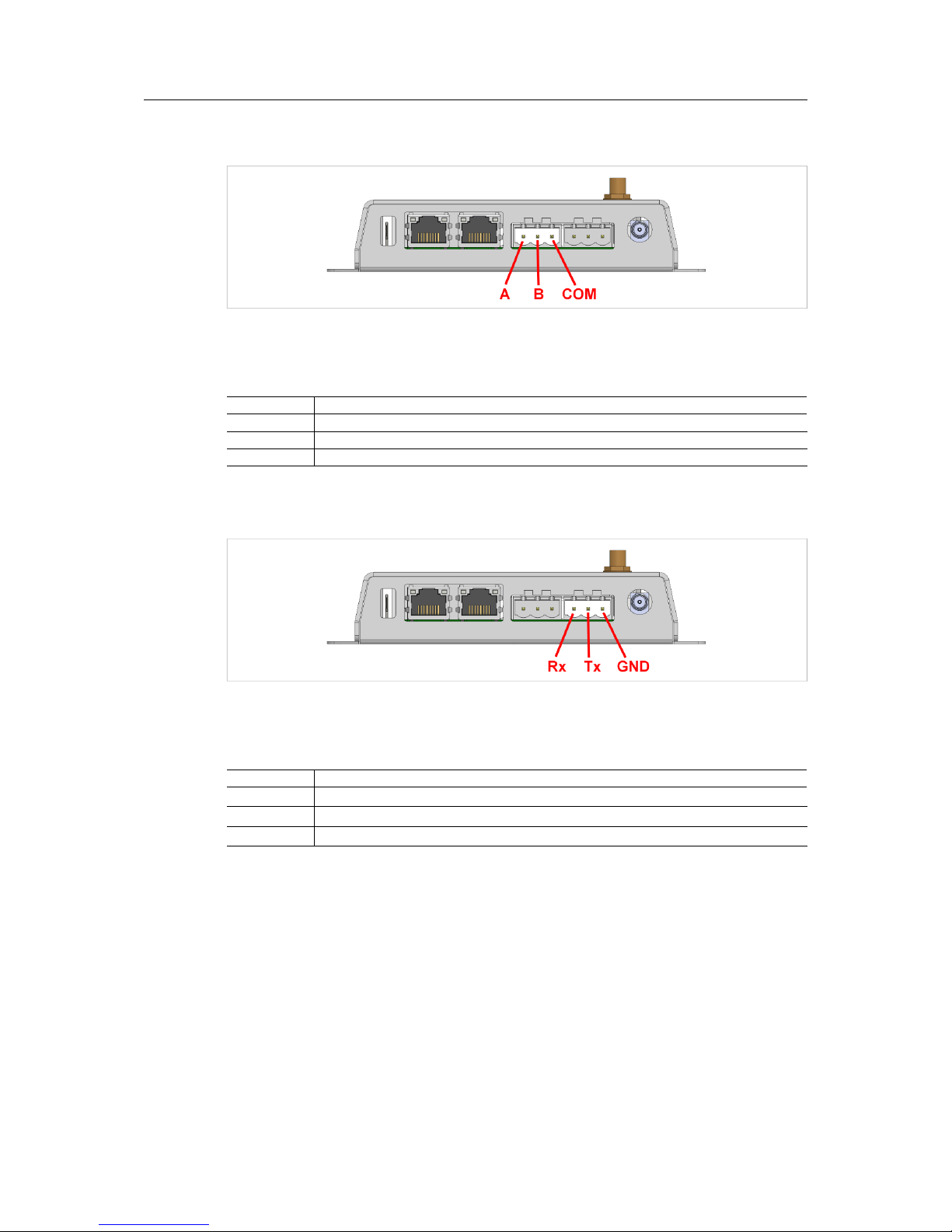
Fig. 7 RS-485 connector
The RS-485 interface can be used for multiple Modbus RTU devices.
RS-485 connector pin layout
Pin Function
A RS-485 A line
B RS-485 B line
COM RS-485 common
2.3.7 RS-232 Serial Interface (3-pin)
Fig. 8 RS-232 connector
The RS-232 interface can be used for a single Modbus RTU device.
RS-232 connector pin layout
Pin Function
Rx Receive (input)
Tx Transmit (output)
GND Signal ground
Netbiter LC300 Series User Manual SCM-1202-047 1.2
Indice
Altri manuali eWON Portale
Manuali Portale popolari di altre marche

LST
LST M500RFE-AS Manuale utente

Kinnex
Kinnex Media Gateway Manuale utente

2N Telekomunikace
2N Telekomunikace 2N StarGate Manuale utente

Mitsubishi Heavy Industries
Mitsubishi Heavy Industries Superlink SC-WBGW256 Manuale utente

ZyXEL Communications
ZyXEL Communications ZYWALL2 ET 2WE Manuale utente

Telsey
Telsey CPVA 500 - SIP Manuale utente