
Ezy-Lift Ezy 2000 Manuale utente


1
Product Specifications 1 Inspection & Maintenance 30
Installation 3 Trouble Shooting 32
Chevrolet Unit Frame Installation 7 Warranty 33
Frame Installation-All Non Chevrolet Trucks 14 Hydraulic Diagram 34
Install Hydraulic & Power-All Truck Units 19 Electrical Diagram 35
Know Your Ezy-Lift 26 Replacement Parts List 36
Operation 28
Installation of the Ezylift must only be performed by qualified personnel with the proper tools in a prop-
erly equipped facility.
TABLE OF CONTENTS
The Ezy-Lift model 2000 lifting systems have a rated lift capacity of 2000 lbs.
Overloading your vehicle can create safety hazards!
Read and obey all Danger, Warning, Caution, and Operating Instructions on the Ezy-Lift and in this manual.
Make sure that all placards are in place and legible. Failure to comply with safety precautions in this manual and
on the Ezy-Lift is a safety violation that may result in serious injury, death, or property damage.
Read this entire manual before beginning work. Always wear safety glasses and use care when
working with power tools. Safety is a primary concern in the design and manufacturing of our
products. But remember that all efforts to provide safe equipment can be totally negated by a single careless act of
an installer or operator. Accident prevention and safety are dependent upon the awareness and proper training of
the personnel who operate and maintain this equipment. The best safety device is a careful and informed owner/
operator. Taking precedence over any specific rule, however, is the most important rule of all: SAFETY
INTRODUCTION
Throughout the manual you will see advisory signs that indicate special attention to various procedures in installa-
tion and operation.
The DANGER sign indicates an imminently hazardous situation which, if not avoided, will result
in serious injury or death.
The WARNING sign indicates a potentially hazardous situation which, if not avoided, could
result in serious injury or death.
The CAUTION sign indicates a potentially hazardous situation which, if not avoided could result
in minor or moderate injury.

Lifting Capacity 2000 Pounds for 8 foot cargo beds
Power Supply 12 VDC operation from vehicle battery, 150 AMP fuse at vehicle battery
Hydraulic System Bi-Directional hydraulic pump & flow control valve, two 3” hydraulic cylinders pro-
vide lift rotation of the boom arms
Winch Designed for lifting with 159:1 gear rotation, full load mechanical brake, 5:1 safety
factor
Winch Wire Rope 1/4” diameter 7x19 construction, galvanized, 35 foot length with 1.5 ton eye hoist
hook, latch and handling strap
Frame 11 gauge steel with black powder finish
Lifting Boom Arms High strength structural steel
Hub Bushings Self-lubricating bronze sleeve bushings
Remote Control 2 button 4-way control: up & down (Winch Wire), in & out (Boom), 10 foot cable
Operating Time From fully retracted (parked) to fully extended in approximately 45 seconds
Hydraulic Fluid ATF, OD18 or other clean hydraulic oil with a viscosity of 150 to 360 SUS at 38°C
(100°)F
Operating Temperature Range between 20°F to 140°F
System Weight Approximately 320 Pounds
Warranty One Year
Specification and features are subject to change without notice as models are upgraded.
PRODUCT SPECIFICATIONS
2


PREPARE FOR INSTALLATION
Completely empty the truck bed. Once empty it is recommended that the bed be power washed prior to installa-
tion.
Bed Liners Spray-in bed liners provide an acceptable mounting surface for Ezy-Lift installations. However, hard
plastic drop-in bed liners must be removed from the truck bed in order to provide a solid mounting suitable
for installing Ezy-Lift.
It Takes Two. Several steps in the installation require the help of another person, for example
placing components properly, or attaching backing plates under the bed. Identify all compo-
nents supplied in the installation kit and match them with the parts list. If any components are missing, contact
Ezy-Lift Tech Support at 713.589.9449 before beginning installation.
Park the truck on a level surface, set the parking brake and chock the wheels for safety.
Tools Needed
Rivet Nut Tool (Included—Dodge Only) Standard Open End Wrench Set
Drill Metric Open End Wrench Set
Tape Measure Drill Bit Set
Ratchet 1” Metal Hole Saw Bit
Rasp Saw
Standard Deep Socket Set 5 Foot 2 x 4 Lumber
Standard Hex Socket Set Rubber Mallet
Electrical Cord #2 Phillips Drill Bit
Attaching Pieces Included (Hardware Package)
Description Description
5/16x1-1/4 Button Head Screw 5/16 Nylon Lock Nuts
1/4x3/4 Button Head Screw 5/16 Nuts
3/4 Self Tapping Screw Rubber Grommets
5/16 x 4 Hex Head Bolts Black Tie Wraps
5/16 Flat Washer Crossbar End Caps
1/4 Flat Washer Anchor Points (Chevrolet Only)
5/16 Lock Washer Rivet Nuts (Dodge Only)
Qty
18
17
16
6
19
20
10
Qty
6
18
5
20
2
8
4
Extra Parts The Ezy-Lift is shipped with a few extra attaching parts i.e. screws, washers, nuts, and bolts to ensure
that there is enough to complete the installation. Having leftover attaching parts is normal.
3

Read the instructions completely before installation. It is recommended not to skip steps. We have carefully
considered the order of each step to ensure the best possible installation with the fewest possible problems.
Prior to installation, park the truck on a level surface, set the parking brake and chock the
wheels for safety.
Before beginning the installation remove the packing material to expose the Ezy Lift on the pallet. LEAVE BOTH
FRAMES SECURED TO THE PALLET. Carefully inventory the items identified in the illustration above. Check
the items in the hardware package against the list on page 3 of this manual. If any items are missing contact Ezy
Lift tech support at 713.589.9449.
2 - Unit Arm Frames 1 - Winch Cross Bar 2 - Side Fillers 1 - 90° Square
2 - Access Covers 2 - L Spacers 2 - 3 Hole Brackets 1 - Hardware Package
1 - Red Power Cord 1 - Unit Remote Control
Each of the parts and quantities listed below should be on the pallet
4

BEGINNING STEPS
LEAVE EZYLIFT FRAMES SECURED TO PALLET
Remove the tailgate and remove the tail light assemblies. (Do not remove tail
lights for Chevrolet Installs)
If installing the unit in a Chevrolet Pick Up truck turn to pages 8 through 13
for Arm Frame installation instructions.
Measure the distance between the pick up truck wheel wells. If
the distance exceeds 50” it is necessary to mount the “L” Spacers
to each of the unit Arm Frames.
If it is necessary to mount the “L” Spacers install them with the unit frames still secured to the pallet. On the
front end of the unit frame there are 9 pre-dilled holes, 5 large and 4 small. Count back from the front (cab end) of
the frame and position the vertical end of the “L” Spacer so that the large hole at the axis of the “L” Spacer is
aligned with the second large hole in the frame. Take two of the self tapping screws and attach the “L” Spacer
using the two small holes. Note the illustrations below.
5

Note the illustration to the left. The large pre-
drilled holes are used to attach the frame to the
wheel well with 5/16” screws at a later stage in the
installation. The small holes are used, along with
the self tapping screws, to attach the “L” Spacer to
the unit frame before installation.
6
The installation of the Boom Arm Frames after the mounting of the “L” Spacers will differ slightly for the
Dodge, Ford and Toyota and for the Chevrolet pick up trucks. The installation instructions for the Chevro-
let trucks are found in a separate section beginning on the next page and continuing through page 13.
Pages 8 through 13 will apply to Chevrolet trucks only.
If installing the Boom Arm Frames for a Dodge, Ford or Toyota, please turn to page 14 of the manual and
continue the installation.
The installation will be done in four steps:
• Measure the wheel well distance and determine the need for the “L” Spacer and, if needed, mount the
“L” Spacer. Leave the unit Boom Arm Frames attached to the pallet but unpack the rest of the pieces
and make sure that they are all there. (Refer to the list on page 4)
• Installation of the unit Arm Frames to the truck bed
• Running and connecting the Hydraulic Hoses and Electrical Cords
• Mounting of the Winch Crossbar and connecting the Winch Electrical Leads

Chevrolet Truck Boom Arm Frames
Installation Section
The following section (pages 8 through 13) provide Boom Arm Frames installation instructions for
Chevrolet trucks only.
If the Ezy-Lift is being installed in a Ford, Toyota or Dodge truck please turn to page 14 to continue Boom
Arm Frames installation instructions.
7
Chevrolet Frame Installation
The installation of the unit Arm Frames in a Chevrolet pick up truck differs from that of
other pick up trucks. After the frames are installed the remainder of the installation is
the same for other truck makes and models. The next seven pages address Chevrolet
Arm Frame installations only.
8
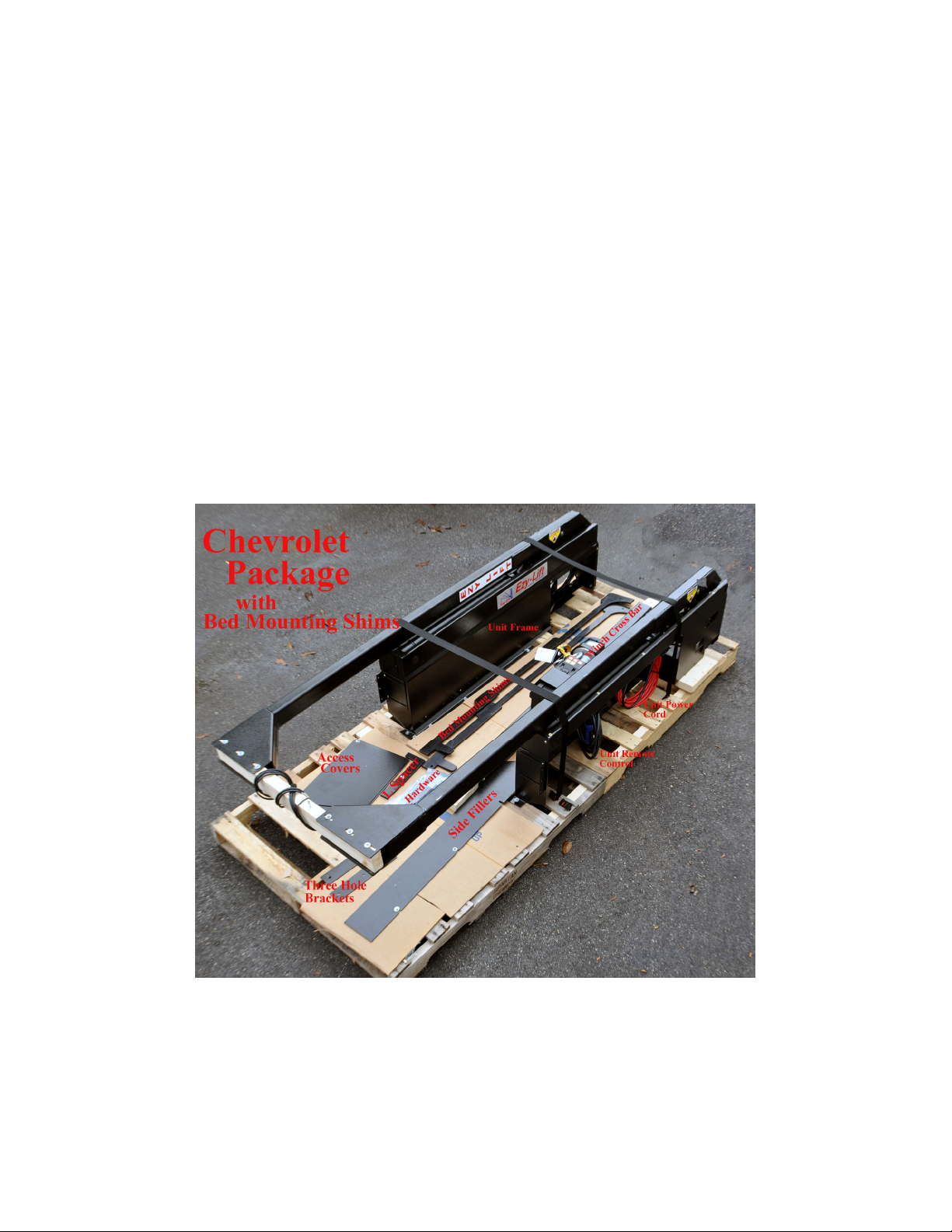
Strip away the packaging materials but leave the unit frames bolted and strapped to the pallet. Check
the contents of the package. Compare to the list and photo below.
2 - Unit Arm Frames 1 - Winch Cross Bar 2 - Side Fillers 2 - Bed Mounting Shims
2 - Access Covers 2 - L Spacers 2 - 3 Hole Brackets 1 - Hardware Package
1 - Red Power Cord 1 - Unit Remote Control 1 - 90° Square
Back out the screws securing all of the unit pieces except the unit arm frames and set the
items aside.
Indice
Manuali Sistema di sollevamento popolari di altre marche


Genie
Genie Z-60/34 Manuale utente

Screen Technics
Screen Technics INTERFIT Vertical Up Lift Manuale utente

Mortuary Lift
Mortuary Lift ULTIMATE 1000 Manuale utente

Custom Equipment
Custom Equipment Hy-Brid 3 Series Manuale di programmazione

Custom Equipment
Custom Equipment Hy-Brid Lifts 2 Series Manuale di programmazione

Hy-Brid Lifts
Hy-Brid Lifts HB-P3.6 Manuale di programmazione


