
Flipkart XS-IFT001A Manuale utente

User's MANUAL
XS IFT001A
1. Introduction of infrared thermometer
This is non-contact infrared thermometer applicable to forehead measurment.
The thermometer measures body themperature by collecting heat radiation emitting. by
forehead.
It is simply operational, reliable and highly accurate. Users can get a precise reading within
one second by one touch.
This thermometer is widely used in fanilies, schools and customers.
2. Features
1. Brand new patented probe design ensures high accurate: +- 0.2°C;
2. It only takes 0.5 second to meassure the body's temperature;
3. Excellent adaption to ambient temperature. Accurate and reliable even under
complicated;
4. Three colors to show the temperature: green - normal; orange - sight fever; red - high;
5. Body model and Objact model available. One switch to change mode;
6. Avoid touching skin, measure baby's temperature conveniently;
7. Automatically recall of last reading;
8. Large LCD with back - lit;
9. Automatic shut off;
3. Technical parameters
Test range: 32.0°C ~ 42.9.°C
Accuracy: +- 0.2°C (35.0°C ~ 42.0°C)
+- 0.3°C (32.0°C ~ 42.0°C and 42.1°C ~ 42.9.°C)
Test Distance: 1 - 5 cm
Response time: 0.5 S
Power: 2 pcs AAA Battaries (DC3V)
Memory: 32
Styndby time: 6 seconds
Resolution: 0.1°C/°F
Humidity: 15% ~ 80%
AP: 70 ~ 106 kPa
Temperature for
transportation
and storage: -20°C ~ +55°C/°F
Net Weight: 116g (No battaries)
Working temperature: 16°C ~35°C
Standard Packing Accories
AAA battaries 2pcs
User MANUAL 1pcs
Product size 152*92*34mm
Gift Box 192*118*50mm
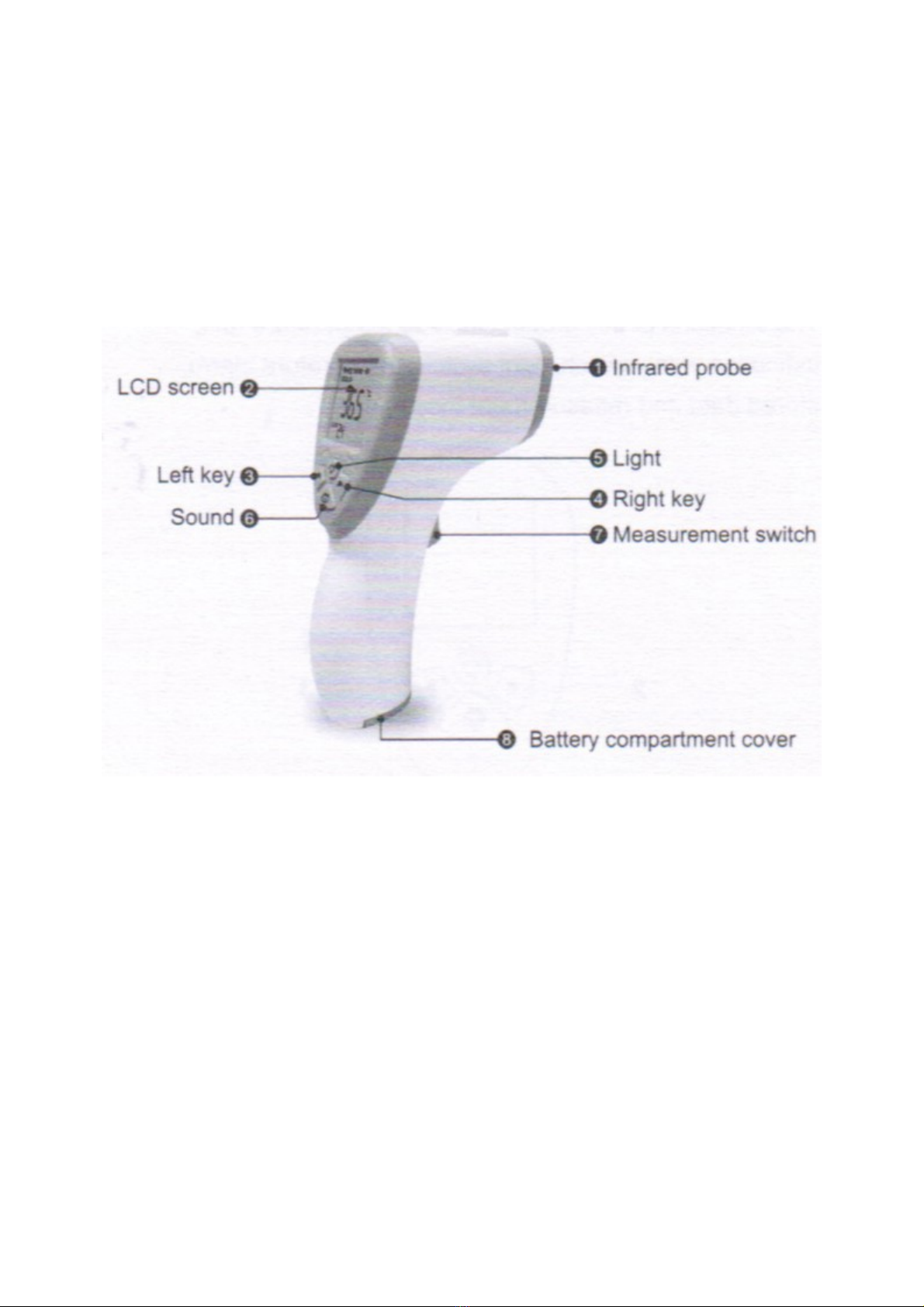
4. Illustration
1- Infrared probe
2- LCD screen
3- Left key
4- Right key
5- Light
6- Sound
7- Meassurment switch
8- Battery compartment cover
. Screen icon definition
1 - Measure mode
2 - Temperature
3 - Stored data location
4 - Buzzer
5 - Celsius °C
6 - Fahrenheit °Fahrenheit
7 - Battery volume

6. Function of buttons
The functions of this product include temperature unit,
inication voice switch, light switch, temperature alarm,
stored data and measurment mode.
1 - Light - Quick press to start or turn off the light, Long press the "Light" key to switch
"Body" and "Object".
2 - Left - Quick press to look up stored data.

3 - Right - Quick press to look down stored data.
4 - Sound - Quick press to start or turn off the sound, Long press "Sound" key for 2
seconds to the mode of "setting".
7. Set up
1. Long press the "Light" key to switch "Body" and "Objact".
2. Press "Right" and "Left" to check the stored data.
3. Long press "Sonud" key for 2 seconds to the mode of "Setting", the LCD screens
shows F1. 2. Press "Right" and "Left" to switch C and F.
4. Long press "Sonud" key for 2 seconds to the mode of "Setting", the LCD screens
shows F1, press "Sound" one more time and shows F2. Press "Right" and "Left" to set up
the warming temperature, default it on 37.5°C.
5. Long press "Sonud" key for 2 seconds to the mode of "Setting", the LCD screens
shows F1, press "Sound" 2 times and shows F3. Press "Right" and "Left" to set up the
buzzer, default "open".
6. Long press "Sonud" key for 2 seconds to the mode of "Setting", the LCD screens
shows F1, press "Sound" 2 times and shows F4. Press "Right" and "Left" to set up the
offset, default "0.0".
(Tips: the offset can be set up from -3.0°C ~ +-3.0°C in the normal measurment distance
and environment. For example the body's temperature is meassured as 35.9°C in a
special environment, but the body's real temperature is 36.6°C, in this case, the right
temperature can be set up "36.6°C" by "F4".)
8. Use steps
Step 1: Put into battery (tips: Do not install wrong):
Step 2: From forehead 1-5 cm, them press the measurement switch, the screen will show
the body temperature.
Notes: If the temperature is low the screen will "Lo", If the temperatureis too high, the
screen will show "Hi".
9. Battery perlasment
- Open the batterylid and take out exhausted batteries;
- Put into 2 pcs AAA battaries according to the positive and negative poles (see following
picture), clode the battery lid.
10. Notes

1. Take out batteries in case the thermometer is not user for long period, Don't put the
battariesin fire;
2. Dispose of battaries according to local regulations;
11. Maintenance tips
- Make sure the sensor and probe cavity is clean, otherwise it kill affect accuracy.
Cleaning method for probe:
1. Use the cotton stick or soft cloth with water or alcohol to wope the casing;
2. Use the cotton stck or soft cloth with alcohol to wipe the sensor surface or probe cavity
gently. Don't use thermometer before alcohol is vaporized.
- Read this manual book thoroghly before use. Make sure the battary is well installed;
- It is not allowed to put the thermometer in any liquid or expose to strong sunlight or
extremely low themperature;
- Strong crash or hit to the product will cause its damage;
- Do not dismantle this thermometer by yourself. Keep the thermometer far from children's
reach;
- Do not use the thermometer under the circumstance of strong electromagnetic interface;
- The measurement reults are probably fluctuating due to improper measurement ways.
Please practice adequate measurements to improve your skills.
- The measurement results can not supersede a doctor's diagnosis;
Special maintenance is unnecessary for this thermometer, Please contact distributor or
amnufacturer in case of malfunction.
Indice


