
FOR-A FocusTemp Manuale utente

0123
-20°C
60°C
85%
ForaCare Suisse AG
Neugasse 55,
9000, St. Gallen,
Switzerland
www.foracare.ch
MedNet EC-REP GmbH
Borkstraβe 10, 48163 Mϋnster,
Germany
Forehead Thermometer
Stirnthermometer
Thermomètre frontal
Termometro frontale
Termómetro de frente
Voorhoofdthermometer
Termómetro de leitura na testa
Termometru de frunte
Operating Instructions
Bedienungsanleitung
Mode d’emploi
Istruzioni per l’uso
Instrucciones de funcionamiento
Gebruiksaanwijzing
Instruções de funcionamento
Instrucțiuni de utilizare
FORA IR42a
311-1242100-038
Ver 5.0 2021/08

EN-2
EN-3
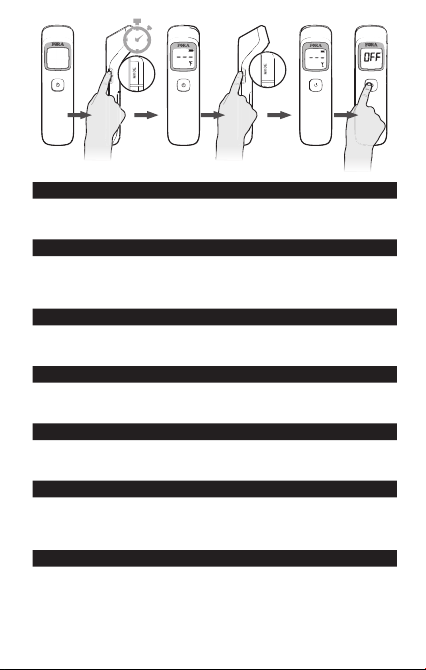
2”
Selecting the measuring unit / EN
When the thermometer is o, press MODE key for 2 seconds to enter
selection mode. Press MODE key again to switch between °F and °C.
Press POWER key.
Auswahl der Messeinheit / DE
Wenn das Thermometer ausgeschaltet ist, drücken Sie 2 Sekunden lang
die MODE-Taste, um in den Auswahlmodus zu gelangen. Drücken Sie die
MODE-Taste erneut, um zwischen °F und °C umzuschalten. Drücken Sie
die POWER-Taste.
Sélection de l’unité de mesure / FR
Lorsque le thermomètre est éteint, appuyez sur la touche MODE pendant
2 secondes pour entrer dans le mode sélection. Appuyez de nouveau sur
la touche MODE pour passer de °F à °C. Appuyez sur la touche POWER.
Selezione dell’unità di misura / IT
Quando il termometro è spento premere il tasto MODE per 2 secondi per
accedere alla modalità di selezione. Premere un’altra volta il tasto MODE
per cambiare da °F a °C. Premere il tasto di accensione.
De meeteenheid selecteren / NL
Druk wanneer de thermometer uit staat 2 seconden op de MODE-toets
om de selectiemodus te openen. Druk nogmaals op de MODE-toets om
over te schakelen tussen °F en °C. Druk op de POWER-toets.
Selección de la unidad de temperatura / ES
Cuando el termómetro esté apagado, pulse la tecla MODE (modo)
durante 2 segundos para entrar en el modo de selección. Pulse de nuevo
la tecla MODE para cambiar de °F a °C. Pulse la tecla de encendido/
apagado.
Seleção da unidade de medida / PT
Com o termómetro desligado, tocar na tecla MODE (Modo) durante 2
segundos para introduzir o modo de seleção. Tornar a tocar na tecla
MODE (Modo) para escolher entre °F e °C. Tocar na tecla de Ligar/
Desligar.

EN-4
INTRODUCTION
Thank you for choosing FORA FocusTemp Forehead Thermometer.
Please read this instruction manual first so that the thermometer can
be used safely and correctly. Keep this instruction manual for future
reference. This innovative medical device uses advanced infrared
(IR) technology to measure temperature instantly and accurately
on the forehead/any surface area. FORA FocusTemp Forehead
Thermometer delivers a body temperature reading from the thermal
radiation emitted from the forehead without any body contact.
INTENDED USE
FORA FocusTemp Forehead Thermometer is intended for the
intermittent measurement and monitoring of human body temperature
from the forehead. The device is intended for use by people of all
ages in the home or by healthcare professionals.
Επιλογή της μονάδας μέτρησης / EL
Όταν το θερμόμετρο είναι απενεργοποιημένο, πατήστε το κουμπί MODE
για 2 δευτερόλεπτα για να μεταβείτε στη λειτουργία επιλογής. Πατήστε
το κουμπί MODE ξανά για να εναλλάξετε μεταξύ °F και °C. Πατήστε το
κουμπί POWER.
Selectarea unității de măsurare / RO
Când termometrul este oprit, apăsați tasta MOD timp de 2 secunde
pentru a accesa modul de selectare. Apăsați din nou tasta MOD pentru a
comuta între °F și °C. Apăsați tasta PORNIRE.
Volba měrné jednotky / CZ
Když je teploměr vypnutý, stiskněte na 2 sekundy tlačítko MODE,
abyste vstoupili do režimu výběru. Opětovným stisknutím tlačítka MODE
přepínáte mezi °F a °C. Stiskněte tlačítko POWER.
Wybieranie jednostki pomiarowej / PL
Aby przejść do trybu wyboru, gdy termometr jest wyłączony, należy
przytrzymać przycisk MODE (Tryb) wciśnięty przez 2 sekundy. Ponownie
nacisnąć przycisk MODE (Tryb), aby przełączać między jednostką °F
a jednostką °C. Nacisnąć przycisk POWER (Zasilanie).
Ölçüm biriminin seçilmesi / TR
Termometre kapalıyken 2 saniye boyunca MODE tuşuna basarak seçme
moduna giriniz. °F ile °C arasında değişiklik yapmak için tekrar MODE
tuşuna basınız. POWER tuşuna basınız.

EN-5
APPEARANCE AND KEY FUNCTIONS OF THE
THERMOMETER
MEMORY SET MORE
1
2
3
5
6
7
4
1. Probe lens
2. Display screen
3. Power/ Measure button
4. Protective sensor cap
5. Mode button
6. Memory button
7. Battery Cover
LCD SCREEN
72
1
3
4
5
8
9
6
1. Adult body temperature
indicator
2. Child body temperature
indicator
3. Object surface temperature
indicator
4. Error message
5. Memory mode
6. Hold Symbol
7. Battery indicator
8. Temperature display
9. Temperature unit

EN-6
IMPORTANT SAFETY INSTRUCTIONS
READ THIS BEFORE USING AND KEEP THESE
INSTRUCTIONS IN A SAFE PLACE
1. Close supervision is necessary when the thermometer
is used by, on, or near children, handicapped persons or
invalids.
2. Use the thermometer only for the intended use described in
this manual.
3. Do not use the thermometer if it is not working properly, or if
it has sustained any damage.
4. Keep the sensor end clean and free of debris. See
Maintenance section for instructions.
5. Do not use ethylene oxide gas, heat, autoclave, or any other
harsh methods to sterilize the device.
6. Put in place the protective sensor cap on the sensor end
when not in use.
7. Do not use the device shortly after exercise, bathing or
coming indoors.
8. If coming from an environment of warmer or cooler
temperature or after a period of exertion, allow the user and
the thermometer to reach room temperature for 20 minutes
prior to taking a measurement.
9. As the forehead temperature may be affected by sweat, oil
and the surrounding temperature, the reading shall be taken
as a reference only.
10. Do not use in presence of flammable anesthetic mixtures.
11. Do not use accessories which are not supplied or
recommended by the manufacturer.
12. Proper maintenance is essential to the longevity of your
device. If you are concerned about the accuracy of
measurement, please contact the local customer service or
place of purchase for assistance.

EN-7
WARNING AND PRECAUTIONS
► As with any thermometer, proper technique is crucial to
getting accurate temperature readings. Please read this
manual thoroughly and carefully before use.
► Always operate the thermometer in an operating
temperature range 10°C to 40°C, and relative humidity of
less than 85%.
► Always store the thermometer in a cool and dry place:
temperatures between -20°C to 60°C; relative humidity less
than 85%. Avoid direct sunlight.
► Avoid dropping the thermometer.
► Basic safety precautions should always be observed,
especially when the thermometer is used on or near
children and disabled persons.
► This thermometer is not intended to be a substitution for a
consultation with your physician.
► If you experience any serious incident that occurred in
relation to the use of this product, please report it to the
manufacturer and the competent authority of medical
devices in your country.
► A serious incident means any incident that directly or
indirectly led, might have led, or might lead to any of the
following:
(a) the death of a patient, user, or other people,
(b) the temporary or permanent serious deterioration of a
patient's, user's or other person's state of health,
(c) a serious public health threat.

EN-8
USING THE DEVICE
Install Battery
1. Remove the battery cover by pressing down at the arrow mark
and slide to the direction of the arrow as shown in the figures
below.
2. Install (2) AAA alkaline batteries and close the battery cover.
3. Remove the batteries if the thermometer is stored and not in
use.
Selecting the measuring unit
When the thermometer is off, press MODE key for 2 seconds to
enter selection mode. Press MODE key again to switch between
°F and °C. Press POWER key.
MEASUREMENT MODES
The default measuring mode is for the adult forehead temperature.
Press the MODE button on the side of the thermometer to adjust
the measuring mode.
Adult Forehead Mode: measuring the forehead
temperature of adults
Children Forehead Mode: measuring the forehead
temperature of children (age: 3 ~ 36 months)
Object Surface Mode: measuring the surface
temperature of objects

EN-9
MEASURING TEMPERATURE FOR ADULTS
1. Remove the protective cap. The
forehead should be clear of hair
and perspiration.
2. Aim at the center of the forehead
area 3 to 7cm away from and
perpendicular to the surface of the
skin.
3. Press and release the Measure
button to take a measurement.
A double “beep” sound indicates
that a reading has been taken and
displayed on the LCD screen.
When a reading is more than 38°C,
a warning symbol will flash with a red
backlight.
4. To take another measurement,
follow steps 2 and 3.
5. The thermometer turns off
automatically after 30 seconds.
Replace the sensory cap when
finished.

EN-10
WARNING AND PRECAUTIONS
► If the reading is < 31.9°C, “Lo” will be displayed.
► If the reading is ≥ 32.0°C and ≤ 37.9 °C, it will be displayed
with a green backlight.
► If the reading is ≥ 38°C and ≥ 43°C, it will be displayed with
a red backlight.
► If the reading is ≥ 43.1°C, “Hi” will be displayed.
Questo manuale è adatto per i seguenti modelli
1
Indice
Altri manuali FOR-A Termometro

FOR-A
FOR-A Diamond Nexus Manuale utente

FOR-A
FOR-A Diamond Nexus Mini Manuale utente

FOR-A
FOR-A IR20 Series Manuale utente

FOR-A
FOR-A IR19 Manuale utente

FOR-A
FOR-A FocusTemp IR42a Manuale utente

FOR-A
FOR-A IR20 Series Manuale utente

FOR-A
FOR-A IR10 Manuale utente

FOR-A
FOR-A TM10 Manuale utente

FOR-A
FOR-A IR21 Manuale utente

FOR-A
FOR-A IR20 Series Manuale utente


