
Fujitsu TeamPoS 7000 Manuale utente

User
Guide
TeamPoS
Model 7000
All in One (AIO)
PoS Computer
Document D900000454
Revision 1.0

Title: TeamPoS Model 7000 AIO PoS
Computer System User Guide
(D900000454)
COPYRIGHT © 2012 FUJITSU FRONTECH NORTH AMERICA
INC. ALL RIGHTS RESERVED. TeamPoS 7000, SHAPING
TOMORROW WITH YOU AND ASSOCIATED LOGOS ARE
TRADEMARKS OR REGISTERED TRADEMARKS OF FUJITSU
FRONTECH NORTH AMERICA INC. ALL OTHER MARKS ARE
THE REGISTERED TRADEMARKS OR TRADEMARKS OF THEIR
RESPECTIVE OWNERS IN THE UNITED STATES AND/OR OTHER
COUNTRIES.
The descriptions and information in this document are guidelines,
detailing the recommendations of Fujitsu Frontech North America Inc.
(FFNA).
Fujitsu endeavors to ensure that the information in this document is
correct and fairly stated. The information within this document has been
reviewed for accuracy, but as with most documents, errors may be found
and corrected in future revisions. Fujitsu Frontech North America Inc.
does not accept liability for any errors or omissions. The development of
Fujitsu products and services is continuous, and published information
may not be up to date. It is important to check the current position with
Fujitsu.
Date: March 6, 2012
Version: Version 1.0
Audience: Corporate clients and field engineers

TeamPoS7000_User Guide_D900000454.pdf Page 1
Revision 1.0 - March 6, 2012 TeamPoS 7000 User Guide: Contents
Contents
TeamPoS7000_User Guide_D900000454.pdf
Chapter 1. Overview
1.1 TeamPoS 7000 AIO Overview............................................................................................. 3
1.1.1 Features.................................................................................................................................................4
1.2 AIO Peripherals.................................................................................................................. 7
1.2.1 LCD Monitors.......................................................................................................................................7
1.2.2 VF70 VFD ............................................................................................................................................7
1.2.3 VF35 VFD (Mini).................................................................................................................................7
1.2.4 Keypad+ MSR ......................................................................................................................................8
1.2.5 MSR AIO..............................................................................................................................................8
1.2.6 CT11 Thermal Printer...........................................................................................................................8
1.2.7 FP-510 Thermal Printer........................................................................................................................9
1.2.8 Epson TM-T88V Printer.......................................................................................................................9
1.2.9 Epson TM-H2000 Printer .....................................................................................................................9
1.2.10 Epson TM-H6000IV Printer.............................................................................................................10
1.2.11 Cash Drawers....................................................................................................................................10
1.2.12 LEDs and Buttons.............................................................................................................................11
1.2.13 Connectors........................................................................................................................................13
1.2.14 Limited Power Source ......................................................................................................................13
Chapter 2. Introduction
2.1 System Configurations and Components ......................................................................... 15
2.1.1 System illustration (AIO Countertop Mount model)..........................................................................15
2.2 System Configurations ..................................................................................................... 16
2.2.1 Hardware.............................................................................................................................................16
2.2.2 Operating Systems..............................................................................................................................18
Chapter 3. Basic Operations
3.1 Turning the Power On ...................................................................................................... 19
3.2 Turning the Power Off...................................................................................................... 20
3.3 Adjusting the Displays......................................................................................................21
3.3.1 LCD Display.......................................................................................................................................21
3.3.2 Customer Display (LCD)....................................................................................................................22
3.3.3 Customer Display (VFD)....................................................................................................................22

TeamPoS7000_User Guide_D900000454.pdf Page 2
Revision 1.0 - March 6, 2012 TeamPoS 7000 User Guide: Contents
3.4 Adjusting the Speaker Volume .........................................................................................22
3.5 Using the (Optional) MSR................................................................................................23
3.6 Using the CT11 Printer .....................................................................................................24
3.6.1 Paper roll............................................................................................................................................ 26
3.7 Cash Drawer Operations...................................................................................................28
3.7.1 Opening and closing the drawer......................................................................................................... 28
3.7.2 Inserting and removing till from drawer............................................................................................ 28
3.8 Relocating the System.......................................................................................................29
Chapter 4. Daily Maintenance
4.1 Cleaning the Equipment....................................................................................................31
4.1.1 Cleaning the main unit....................................................................................................................... 31
4.1.2 Cleaning the magnetic card reader (option)....................................................................................... 32
4.1.3 Cleaning the printer............................................................................................................................ 32
4.1.4 Cleaning the print head and roller...................................................................................................... 32
Chapter 5. Troubleshooting
5.1 Troubleshooting ................................................................................................................33
5.2 Paper Jams.........................................................................................................................34
5.3 Paper Jams Frequently ......................................................................................................34
5.4 Supplies.............................................................................................................................35
Appendix
Ensure Safe Use .........................................................................................................................i
Disclaimer..................................................................................................................................i
Computer Viruses.......................................................................................................................i
Regulatory Information.............................................................................................................ii
Safety........................................................................................................................................iii
Getting Started .........................................................................................................................iv
Warning Symbols......................................................................................................................v
Safety Considerations...............................................................................................................vi
Handling Precautions.............................................................................................................viii
Modifying or Reproducing the Unit.........................................................................................ix
Acronym Identification.............................................................................................................x
THIS DOCUMENT CONTAINS CONFIDENTIAL INFORMATION, IS PROVIDED FOR FUJITSU CUSTOMER USE ONLY,
AND IS NOT TO BE SHARED WITH ANY THIRD PARTY WITHOUT FUJITSU’S PRIOR WRITTEN CONSENT.
Overview Chapter 1 - Overview
Revision 1.0 - March 6, 2012 TeamPoS 7000 AIO Overview - 3
1
Overview
1.1
TeamPoS
7000
AIO Overview
Thank you for purchasing the TeamPoS 7000 system, which is Fujitsu’s Model 7000 series of
PoS computer systems. This manual is intended for personnel who operate the TeamPoS 7000.
It provides notes on handling, describes basic operating procedures, and gives supplementary
information which operators should know before using the TeamPoS 7000 series of PoS
computer systems.
We hope that the TeamPoS 7000 will help you operate your business in a more efficient
manner. This manual illustrates the TeamPoS Model 7000 Series All in One (AIO) PoS
computer systems (part of the KD02909-7000 series) and describes the procedures required for
using these systems.
The following sections provide a brief overview of the TeamPoS 7000 AIO control units as
well as their peripherals.
The TeamPoS Model 7000 family of products is a state-of-the-art Point of Sale (POS)
terminal. Built on industry standard platforms, the TeamPoS 7000 leverages Intel-embedded
components and standard operating system, software applications and peripherals. It supports
standard PC components such as high-performance CPUs, memory, hard disk, video and audio.
Main components such as power supply, hard drives, etc. are shared between models.
The TeamPoS 7000 system can be used as a computer to run standard PC applications, such as
word processing, spreadsheets, etc., subject to operating system and licensing restrictions. This
system offers dual 2.5” hard disk or solid state drives, on board LAN, 15” primary LCD
display, optional 12”/15” second LCD displays; USB, I/O expansion modules, and runs on a
variety of software platforms.
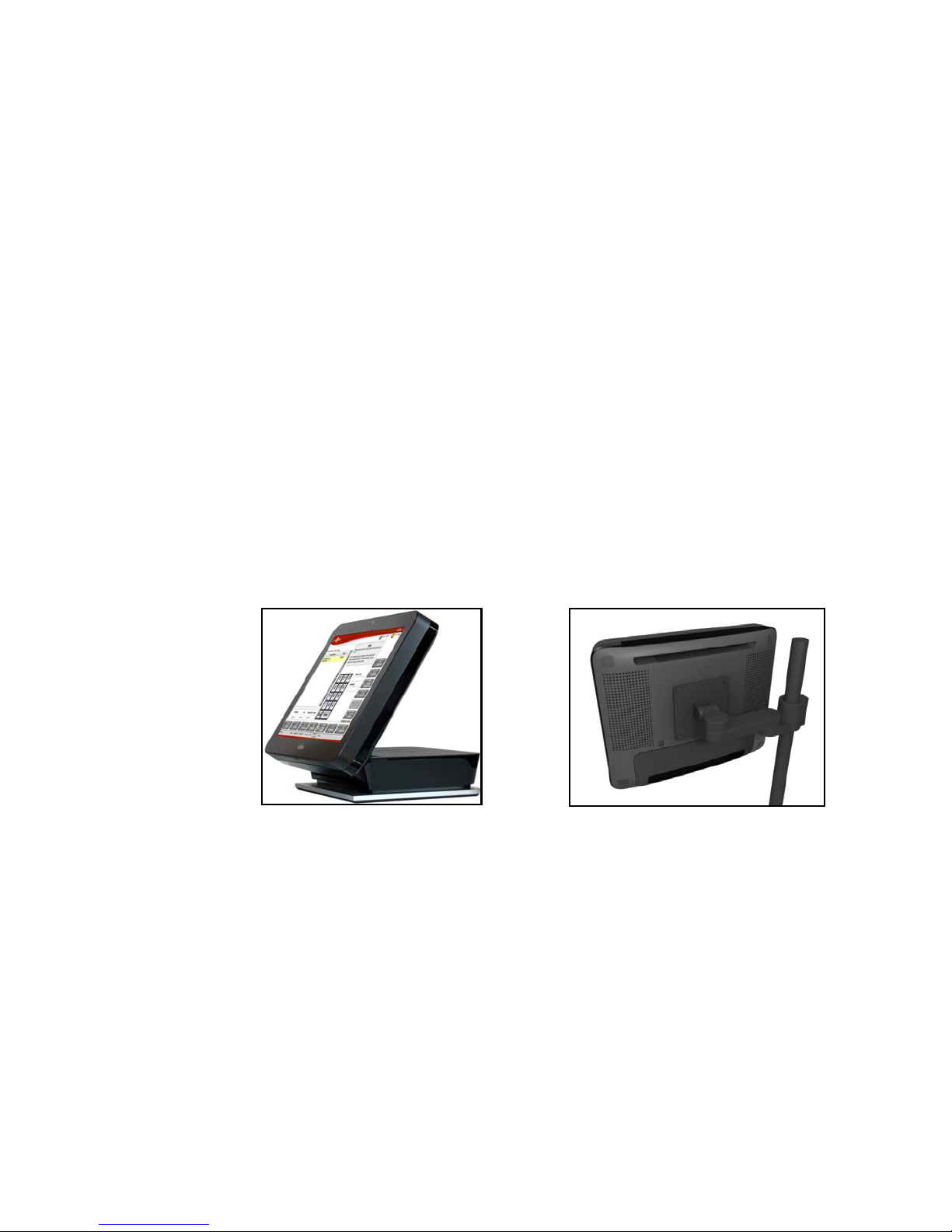
All In One (AIO) Countertop Mount AIO VESA Back Panel

THIS DOCUMENT CONTAINS CONFIDENTIAL INFORMATION, IS PROVIDED FOR FUJITSU CUSTOMER USE ONLY,
AND IS NOT TO BE SHARED WITH ANY THIRD PARTY WITHOUT FUJITSU’S PRIOR WRITTEN CONSENT.
Chapter 1 - Overview TeamPoS 7000 User Guide
4 - TeamPoS 7000 AIO Overview TeamPoS7000_User Guide_D900000454.pdf
The TeamPoS 7000 also contains functionality required by retail application software and are
“retail hardened” to support the harsh environments found in most retail stores. Depending on
the application requirements, there is a very large number of possible configurations. Memory
capacity, number of hard disks, CPU speed, and the number of powered RS-232 and USB ports
are selectable by the customer. Chassis configurations and operating systems are also
selectable.
The TeamPoS Model 7000 Series (KD02909-7000) AIO PoS computer is available in five
models:
• TeamPoS 7000 Model A100R, AIO, Atom D525 CPU, 15" LCD w/Resistive Touch, 2GB
RAM, 1 x HDD 250GB
• TeamPoS 7000 Model A200R, AIO, Celeron G540 CPU, 15" LCD w/ Resistive Touch,
2GB RAM, 1x HDD 250GB
• TeamPoS 7000 Model A200I, AIO, Celeron G540 CPU, 15" LCD w/ IR Touch, 2G RAM,
1x HDD 250GB
• TeamPoS 7000 Model A300R, AIO, i3 CPU, 15" LCD w/ Resistive Touch, 4G RAM, 1x
HDD 250GB
• TeamPoS 7000 Model A300I, AIO, i3 CPU, 15" LCD w/ IR Touch, 4G RAM, 1x HDD
250GB
1.1.1 Features
The TeamPoS 7000 All in One is available as a Countertop Mount, VESA Back Panel mount,
or Column Mount system, supporting various peripherals and settings.

THIS DOCUMENT CONTAINS CONFIDENTIAL INFORMATION, IS PROVIDED FOR FUJITSU CUSTOMER USE ONLY,
AND IS NOT TO BE SHARED WITH ANY THIRD PARTY WITHOUT FUJITSU’S PRIOR WRITTEN CONSENT.
Overview Chapter 1 - Overview
Revision 1.0 - March 6, 2012 TeamPoS 7000 AIO Overview - 5
Features include:
• Small footprint to free up counter space
• Embedded power brick and cable management to improve counter “look” and increase
reliability
• Full-flat LCD with infrared and resistive touch and flexible tilt angles
• Various microprocessor options (Atom D525, Celeron G540, Core-i3)
• Proximity sensor to exit standby mode
• Remote Management with Intel AMT (A300)
• Dual disks (A100, A200, A300)
• RAID 0/1 support (A200, A300)
• Optional integrated webcam
• Microphone
• Flexible configurations for a wide range of market segments (convenience stores, specialty
stores, quick service restaurants (fast food), table service restaurants, hotels)
90oTilted Flat 0o
Storage/space saving
Countertop with Dual LCD
Countertop with Mini VFD
Countertop with VFD pole
AIO VESA Back Panel mount

THIS DOCUMENT CONTAINS CONFIDENTIAL INFORMATION, IS PROVIDED FOR FUJITSU CUSTOMER USE ONLY,
AND IS NOT TO BE SHARED WITH ANY THIRD PARTY WITHOUT FUJITSU’S PRIOR WRITTEN CONSENT.
Chapter 1 - Overview TeamPoS 7000 User Guide
6 - TeamPoS 7000 AIO Overview TeamPoS7000_User Guide_D900000454.pdf
• Higher performance i3 CPU to handle applications with blazing speeds
• 2GB DDR3 memory, extendable
• Selectable high capacity storage (HDD: 250GB or SSD: 30/62GB)
• Security (RAID1) and higher performance (RAID0) with SSD or HDD RAID
• Fanless model for silent running and against oily/dusty air (model A100)
• Built to last for retail environment
• Water and dust proof (IP53) * for front LCD
• Anti-discoloration materials
• Several Operating Systems certified for long life management
• Cost-effective energy saving
• Power saving mode for CPU and LED backlight
• Compatible with previous Fujitsu peripherals and applications

THIS DOCUMENT CONTAINS CONFIDENTIAL INFORMATION, IS PROVIDED FOR FUJITSU CUSTOMER USE ONLY,
AND IS NOT TO BE SHARED WITH ANY THIRD PARTY WITHOUT FUJITSU’S PRIOR WRITTEN CONSENT.
Overview Chapter 1 - Overview
Revision 1.0 - March 6, 2012 AIO Peripherals - 7
1.2 AIO Peripherals
1.2.1 LCD Monitors
15-, 12-, and 7-inch LCD monitors for AIO secondary display.
• Support for two types of touch panels for 12- and 15-inch monitors: flat surface Resistive;
IR with bezel (15-inch only)
1.2.2 VF70 VFD
VF70
• USB interface
1.2.3 VF35 VFD (Mini)
VF35 VFD
• USB interface
• This VFD is located on top of the AIO LCD.
Image of 7"
customer monitor
to be added

THIS DOCUMENT CONTAINS CONFIDENTIAL INFORMATION, IS PROVIDED FOR FUJITSU CUSTOMER USE ONLY,
AND IS NOT TO BE SHARED WITH ANY THIRD PARTY WITHOUT FUJITSU’S PRIOR WRITTEN CONSENT.
Chapter 1 - Overview TeamPoS 7000 User Guide
8 - AIO Peripherals TeamPoS7000_User Guide_D900000454.pdf
1.2.4 Keypad+ MSR
40-key keyboard
• USB interface
• This keyboard and MSR are located on the right side of the AIO LCD.
1.2.5 MSR AIO
• USB interface
• This MSR are located on the right side of the AIO LCD.
1.2.6 CT11 Thermal Printer
Thermal printer:
• USB interface
•300mm/s
• 16 shades of gray printing
• Tool-less part replacement (thermal head, cutter, platen)
Indice
Altri manuali Fujitsu Terminale touch


