Furuno GP-330B Manuale utente

GPS RECEIVER
GP-330B
OPERATOR'S MANUAL
www.furuno.co.jp
MODEL

i
IMPORTANT NOTICE
• The descriptions in this manual are intended for readers with a solid knowledge of English.
• No part of this manual may be copied or reproduced without written permission.
• If this manual is lost or worn, contact your dealer about replacement.
• The contents of this manual and equipment specifications are subject to change without notice.
• Store this manual in a convenient place for future reference.
• FURUNO will assume no responsibility for the damage caused by improper use or modification
of the equipment (including software) by an unauthorized agent or a third party.
• When it is time to discard this product it must be done according to local regulations for disposal
of industrial waste. For disposal in the USA, refer to the Electronics Industries Alliance (http://
www.eiae.org/).
• The serial number for this equipment is recorded on the underside of the GPS receiver, which
may not be visible depending on installation method. Record the serial number below for future
use.
Serial No.

ii
SAFETY INSTRUCTION

iii
TABLE OF CONTENTS
FOREWORD................................................................................................................... iv
SYSTEM CONFIGURATION ........................................................................................... v
1. INSTALLATION ........................................................................................................ 1
1.1 Equipment Lists.............................................................................................................1
1.2 Tools & Materials...........................................................................................................1
1.3 Choosing the Mounting Location...................................................................................2
1.4 Mounting........................................................................................................................3
1.4.1 Pole/Rail (Pipe) Mount ...........................................................................................3
1.4.2 Deck Mount............................................................................................................4
1.4.3 Flush Mount ...........................................................................................................5
2. WIRING, SETTINGS ................................................................................................. 6
2.1 NMEA 2000®Connection..............................................................................................6
2.1.1 Direct Connection...................................................................................................6
2.1.2 Network Connection...............................................................................................7
2.1.3 Routing and Connecting the Cable Assembly........................................................8
2.2 NMEA 0183 Connection................................................................................................9
2.3 Settings for NavNet vx2...............................................................................................10
3. MAINTENANCE, TROUBLESHOOTING ............................................................... 11
3.1 Maintenance................................................................................................................11
3.2 Troubleshooting...........................................................................................................11
4. TECHNICAL INFORMATION ................................................................................. 12
4.1 NMEA 0183 Sentences ...............................................................................................12
4.2 NMEA 2000®PGN Commands....................................................................................13
SPECIFICATION ....................................................................................................... SP-1
PACKING LIST............................................................................................................ A-1
OUTLINE DRAWINGS ................................................................................................ D-1
INTERCONNECTION DIAGRAM ................................................................................ S-1
Declaration of Confomity

iv
FOREWORD
A Word to the Owner of the GP-330
Congratulations on your choice of the FURUNO GP-330B GPS Receiver. We are confident you
will see why the FURUNO name has become synonymous with quality and reliability.
For 60 years FURUNO Electric Company has enjoyed an enviable reputation for quality marine
electronics equipment. This dedication to excellence is furthered by our extensive global network
of agents and dealers.
This equipment is designed and constructed to meet the rigorous demands of the marine environ-
ment. However, no machine can perform its intended function unless installed, operated and
maintained properly. Please carefully read and follow the recommended procedures for installa-
tion and maintenance.
Thank you for considering and purchasing FURUNO equipment.
Feature
The GP-330B is a high performance GPS Receiver designed for any type of vessel. This compact
and cost-effective receiver offers extremely accurate position fixes, within 3 meters with the WAAS
mode activated.
• 12 channels for receiving 12 satellites simultaneously
• Output in NMEA 2000®or NMEA 0183 format
• Position fixed within approx. 60 seconds after start up
• Position updated every second
• Space-saving installation
• Ideal position-fixing sensor for NavNet®3D series

v
SYSTEM CONFIGURATION
: Standard supply
: Optional supply
: Local supply
NMEA 2000
NMEA 0183
NavNet 3D Series
FI-50 Series Instruments
AIS
Autopilot
Current Indicator
ECDIS
Remote Display Unit
NavNet vx2 Series
Radar
Scanning Sonar
Video Plotter
GP-330B
R

1
1. INSTALLATION
1.1 Equipment Lists
1.2 Tools & Materials
• Mounting hardware with standard 1-14" UNS (Pole/Rail Mount installation) threads
• Safety goggles
• Dust mask
• Screwdrivers (Pole/Rail Mount or Deck Mount installation)
• Teflon pipe thread tape, 1/2" wide (some installations)
• Pencil (some installations)
• Electric drill (some installations)
• Drill bits (some installations):
• Pilot hole - 3 mm or 1/8"
• Deck mount screw holes - 5.1 mm or #7
• Deck mount cable hole - 25 mm or 1"
• Flush mount stud holes - 6 mm or 1/4"
• Flush mount cable hole - 38 mm or 1-1/2"
• Loctite®242®or other removable thread locker (Flush Mount installation)
• Cable ties (some installations)
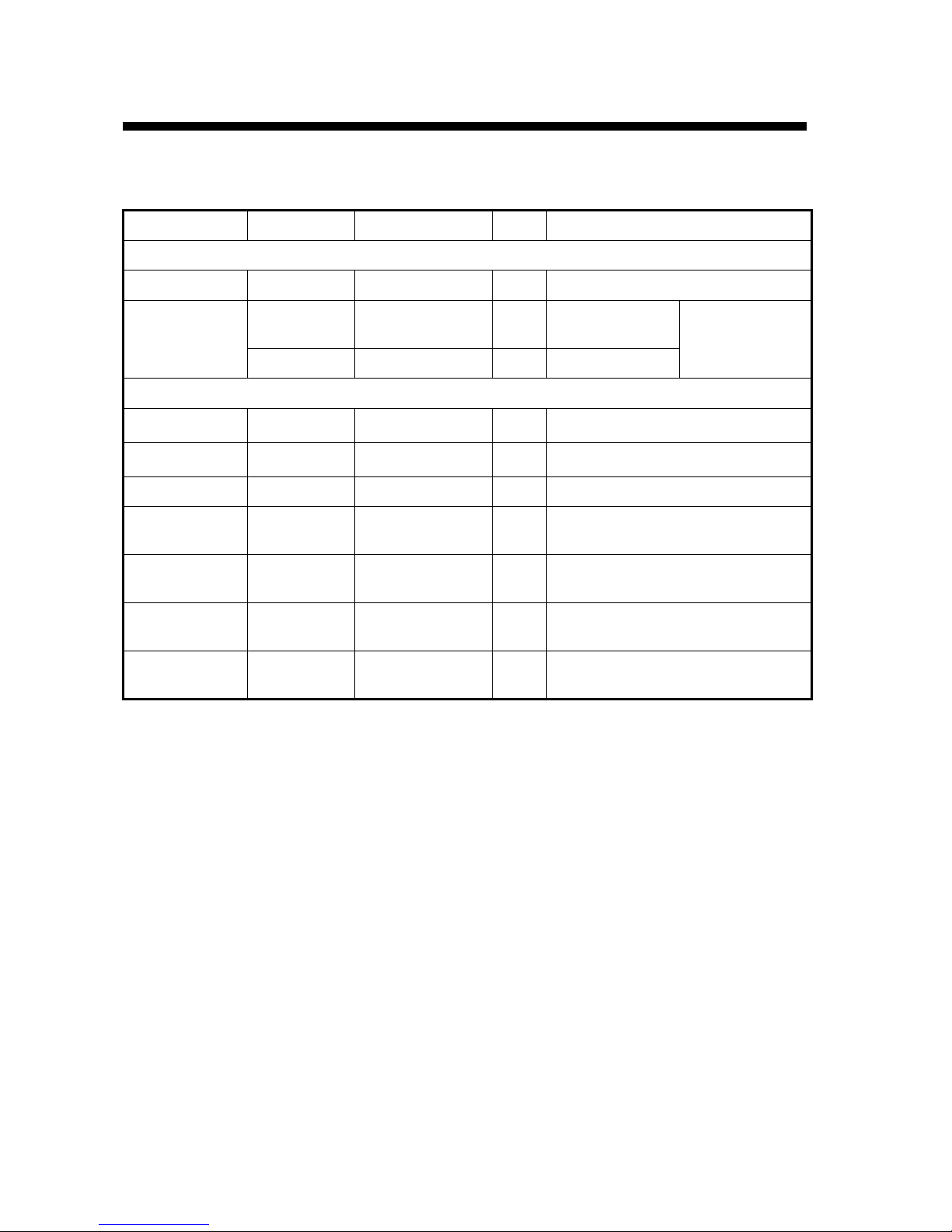
Name Type Code No. Qty Remarks
Standard Supply
GPS Receiver GP-330B 1
Installation
Materials
CP20-03200 000-012-581 1 set With NMEA 2000
cable (6 m) See packing list
at back of
manual.
CP20-03210 000-012-582 1 set No cable
Optional Supply
Cable Assy. 22-1025-02 000-168-883-10 1 6 m, for NMEA 2000®
Cable Assy. 22-1025-06 000-168-884-10 1 10 m, for NMEA 2000®
Cable Assy. 22-910-03 000-168-885-10 1 10 m, for NMEA 0183
Cable Assy. MJ-A7SPF/
SRMD-100 000-144-534 1 10 m, straight, MJ7P(P)-MJ7P(J),
for NMEA 0183
Flush Mount Kit GP-330B-
FLUSH KIT 001-037-630 1
Deck Mount Kit GP-330B-
DECK KIT 001-037-640 1
Pipe Mount Kit GP-330B-
PIPE KIT 001-041-560 1

1. INSTALLATION
2
1.3 Choosing the Mounting Location
For a reliable GPS signal, selecting the best location for the receiver is very important. It can be
mounted on a pole, rail, or flat surface. Choose a location that balances the requirements below.
• The GPS receiver must have a clear view of the sky to the horizon in all directions. Note that
frozen water spray may degrade reception.
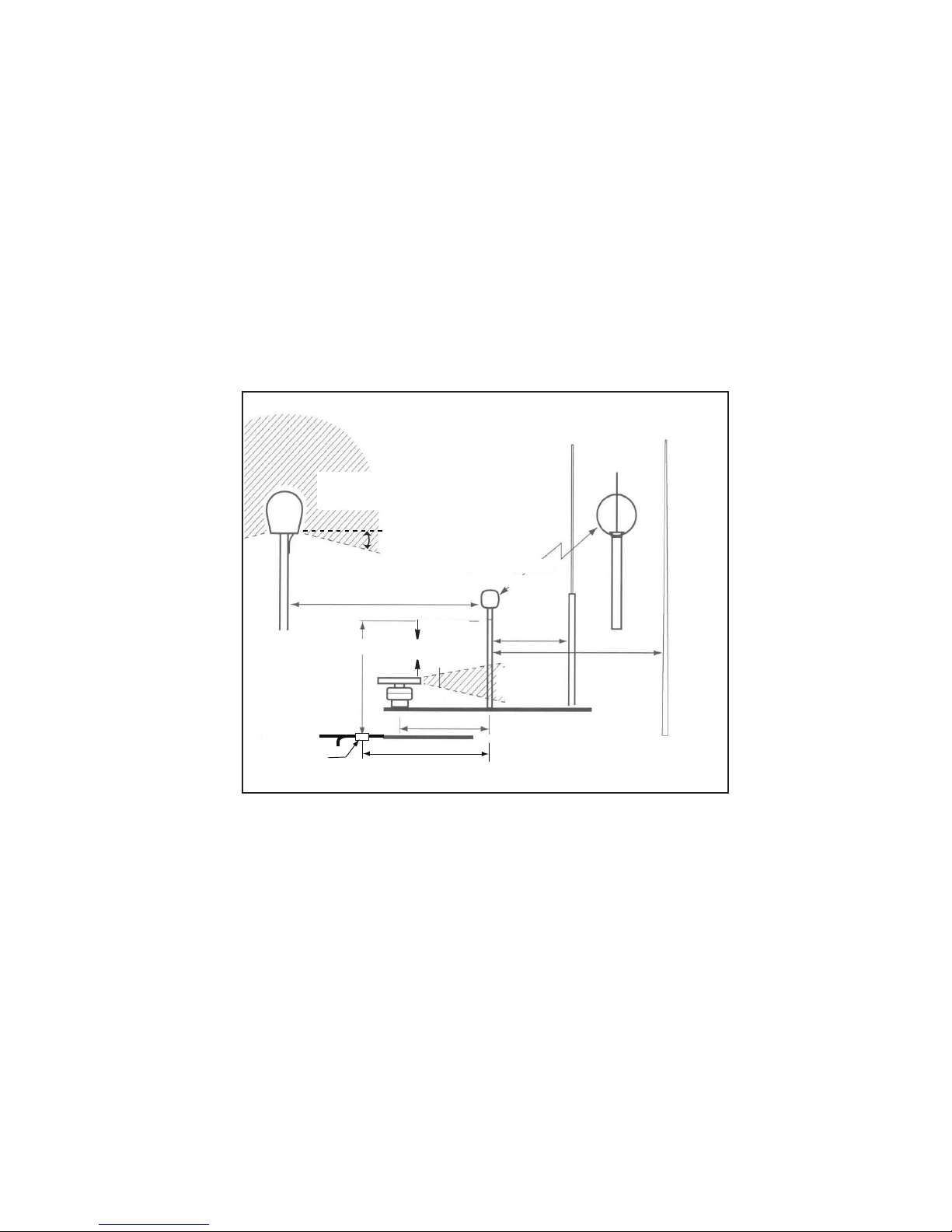
• Referring to the figure below for distances, mount away from any VHF radio, satellite commu-
nications equipment, radar, or other antennas to avoid mutual interference.
• Mount above or below any radar beam. Do not mount within a radar beam.
• Mount reasonably level with the earth’s surface -- not tilted to one side.
•Do not mount on top of a sailboat mast. The sway will cause jitter in the data.
•Do not mount where the GPS receiver could be a tripping hazard or tread upon.
not within
INMARSAT beam
VHF antenna
or RX MF/HF
whip antenna Loop
antenna
GPS receiver
TX whip
antenna
(MF/HF)
INMARSAT
antenna
Long-wire
TX MF/HF
antenna
Min. 3 m
not within
radar beam
Min. 1 m Min. 4 m
Min. 1 m
Min. 5 m
Min. 1.5 m
Min. 5 m
Radar
Min. 4 m
B-, F-type: 25°
C-type: 15°
Antenna
insulator

1. INSTALLATION
3
1.4 Mounting
1.4.1 Pole/Rail (Pipe) Mount
CAUTION! - Do not use the flush mount materials to mount the unit on a pole. Water may leak
into the unit.
The nut assembly supplied has standard 1-14" UNS threads that can be screwed to a standard
marine antenna mount, extension pole, or rail-mount bracket. Before beginning the installation,
plan for securing the pole/rail bracket to the boat and purchase locally all the necessary hardware.
It may be helpful to fasten the pole/rail bracket to the boat before proceeding.
1. Unscrew the mount base (part C) from the surface bracket (part E). (The surface bracket is
not used in this installation. See the next page for part (E)).
2. Remove the label from the GPS receiver’s socket (underside of receiver). The label may be
discarded.
Fasten the mount base (part C) to the GPS receiver (part A) with the supplied two panhead
screws, flat washers and spring washers. The torque for the screws is 1.35 N m.
3. Decide if you want the cable to exit through the center or along the side of the pole/rail brack-
et. Slide the nut assembly (captive nut and adaptor) onto the cable at the 9-pin GPS connector
end. Do not connect the GPS receiver at this time.
1) Center exit: Pass the instrument connector end of the cable down through the center of
the pole. Be sure to leave several inches of cable extending beyond the nut assembly.
2) Side exit: Place the cable side-exit adaptor (part D) over the cable. Being sure the cable
is passing through the slot in the side, screw the nut assembly onto the adaptor. Hand-
tighten only. Do not over tighten.
Note: Use the adaptor supplied as it has smooth edges that will not chafe the cable. Do
not use a purchased part.
CAUTION: if you use a thread locker, use teflon pipe thread tape. Do not use a liquid thread
locker as it may weaken the plastic, causing it to swell and crack.
4. Screw the extension pole/rail bracket onto the nut assembly/cable side-exit adaptor. Hand-
tighten only. Do not over tighten.
5. Remove the protective cap from the GPS connector on the cable. (Save the cap to protect the
connector, when the receiver is removed.) Plug the cable firmly into the GPS receiver.
6. With the alignment tab on the GPS receiver facing forward, slide the captive nut upward and
screw it onto the mount base. Hand-tighten only. Do not over tighten.
1)
2)

1. INSTALLATION
4
1.4.2 Deck Mount
See the outline drawing for mounting hole dimensions and fixing instructions
1. Unscrew the mount base (part C) from the surface bracket (part E) (see figure above). Re-
move the label from over the GPS receiver's socket. (The label may be discarded.) Fasten the
mount base (part C) to the GPS receiver (part A) with the supplied panhead screws, flat wash-
ers and spring washers. The torque for the screws is 1.35 N m.
2. Screw the surface bracket (part E) onto the mount base of the assembled GPS receiver. Use
a pencil to extend the alignment tab onto the surface bracket. Unscrew the surface bracket.
3. At the selected location, position the surface bracket with the pencil mark facing forward. Us-
ing it as a template, mark the position for the three mounting screws and the center hole for
the cable.
4. Using a 3 mm or 1/8" bit, drill the pilot holes. Using 5.1 mm or #7 bit, drill the three mounting
holes. Drill the cable hole with a 25 mm or 1" bit.
Fiberglass-Minimize surface cracking by running the drill in reverse until the gelcoat is pen-
etrated.
5. At the location shown in the figure above, coat the surface bracket (part E) with silicone seal-
ant.
6. Apply silicone sealant to the three #10 x 1/2" self-tapping screws to seal the deck. With the
pencil mark facing forward, fasten the surface bracket in place. Do not block the drain slots.
They will allow any water that accumulates inside the surface bracket to escape. CAUTION:
Do not use a liquid thread locker as it may weaken the plastic, causing it to swell and crack.
7. Wrap pipe thread tape around the threads of the mount base two times to seal it tightly to the
surface bracket.
8. Coat the part of the GPS connector shown in the figure on page 4 with silicone sealant. Pass
the GPS connector end of the cable up through the hole in the surface bracket.
9. Remove the protective cap from the cable's GPS connector. (Save the cap to protect the con-
nector, when the receiver is removed.) Plug the cable firmly into the GPS receiver.
10. Counterclockwise twist the cable three and one-half turns. Then screw the GPS receiver onto
the installed surface bracket. Hand-tighten only. Do not over tighten.
Altri manuali per GP-330B
2
Indice
Altri manuali Furuno GPS

Furuno
Furuno GP-80 Manuale utente

Furuno
Furuno GP-80 Manuale utente

Furuno
Furuno GP-310B Manuale utente

Furuno
Furuno LC-90MK2 Manuale utente

Furuno
Furuno GP-70 Manuale utente

Furuno
Furuno GP-50 MARK-3 Manuale utente

Furuno
Furuno GP-80 Manuale

Furuno
Furuno GP-7000 Manuale utente

Furuno
Furuno MFDBB Manuale di istruzioni

Furuno
Furuno GP-3700 Manuale utente

Furuno
Furuno GP-150 Manuale utente

Furuno
Furuno GP-7000 Manuale utente

Furuno
Furuno GP-1650W Manuale utente

Furuno
Furuno GP-37 Manuale

Furuno
Furuno GP-170 Manuale utente

Furuno
Furuno GP-1640 Manuale utente

Furuno
Furuno GP-33 Manuale utente

Furuno
Furuno FEA-2807 Manuale utente

Furuno
Furuno GP-7000F Manuale

Furuno
Furuno GP-3500 Manuale utente