
G-project G-Boom 3 Manuale utente

DO NOT PRINT
THIS PAGE
BLUETOOTH WIRELESS BOOMBOX
FM Radio
DSS Dual Speaker
Stereo
Rechargeable
Battery
Bluetooth
Wireless
G-850

Welcome to G-PROJECT
Thanks for purchasing G-BOOM3 and joining G-Project. For more info,
please visit our website at www.gprojectgear.com
™
PACKAGE CONTENTS:
• G-BOOM3 Bluetooth Wireless Boombox
• AC Power Adapter
• User Guide
BLUETOOTH WIRELESS BOOMBOX
SPECIFICATIONS
Power Adapter AC Input .................................................................................. 100-240V ~ 50/60Hz
Power Adapter DC Output ................................................................................................ 12V 1.5A
Output Power...................................................................................................... 2 x 10W <1% THD
Battery .................................................................................... 7.4V, 2000mAh, Rechargeable Li-Ion
Battery Recharging Time.................................................................................................... 2.5 hours
Battery Playback Time.................................. Up to 8 hours (varies by volume level and audio content)
BLUETOOTH:
Bluetooth specication .............................................................................................................. v5.1
Supported Bluetooth Prole...................................................................................................... A2DP
Range..............................................................................................................33ft (10m) line of sight
RADIO:
Frequency range (FM) .............................................................................................. 87.5 ~ 108 MHz
Specications are subject to be updated without notice.
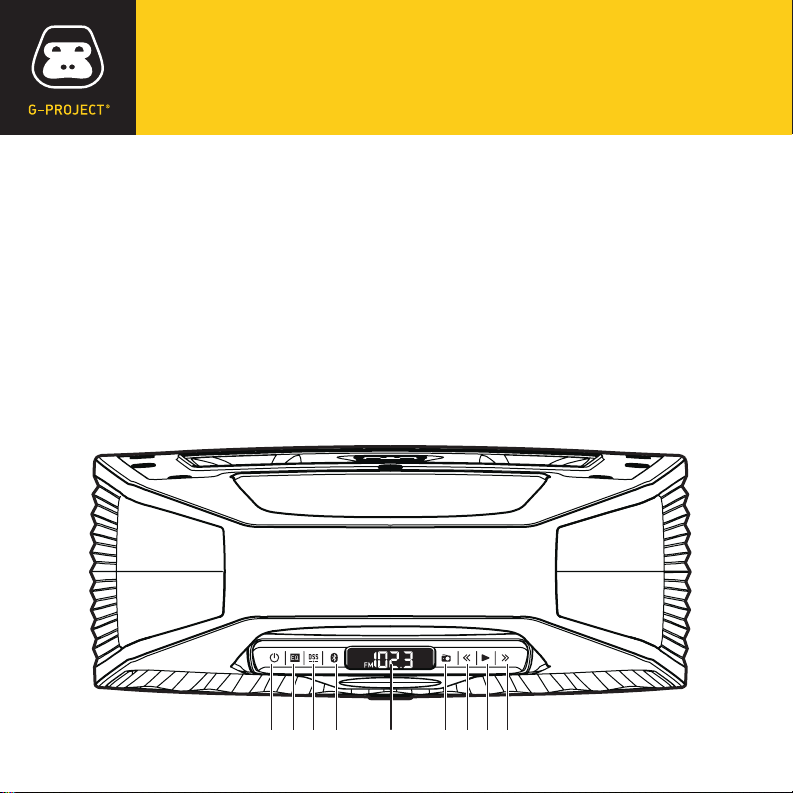
LOCATION OF CONTROLS
1. Power ON / OFF Button
2. EQ Button
3. DSS Button
4. Bluetooth PAIR Button
5. LCD Display
6. FM Radio
7. Tune Down Button
8. Play / Radio Preset Button
9. Tune Up Button
1 6
7
8 92 3 4 5
BLUETOOTH WIRELESS BOOMBOX
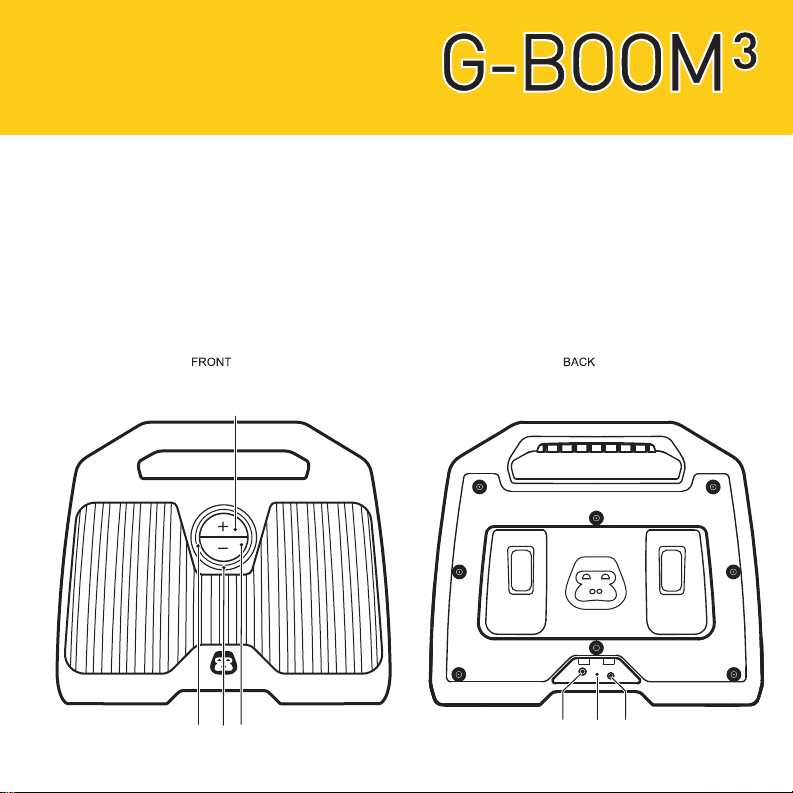
10. LED Ring
11. Volume +Up Button
12. Volume –Down Button
13. LED Charging Indicator
14. DC IN Jack
15. Reset Button
16. LINE-IN Jack
14 15 16
10 12
13
11
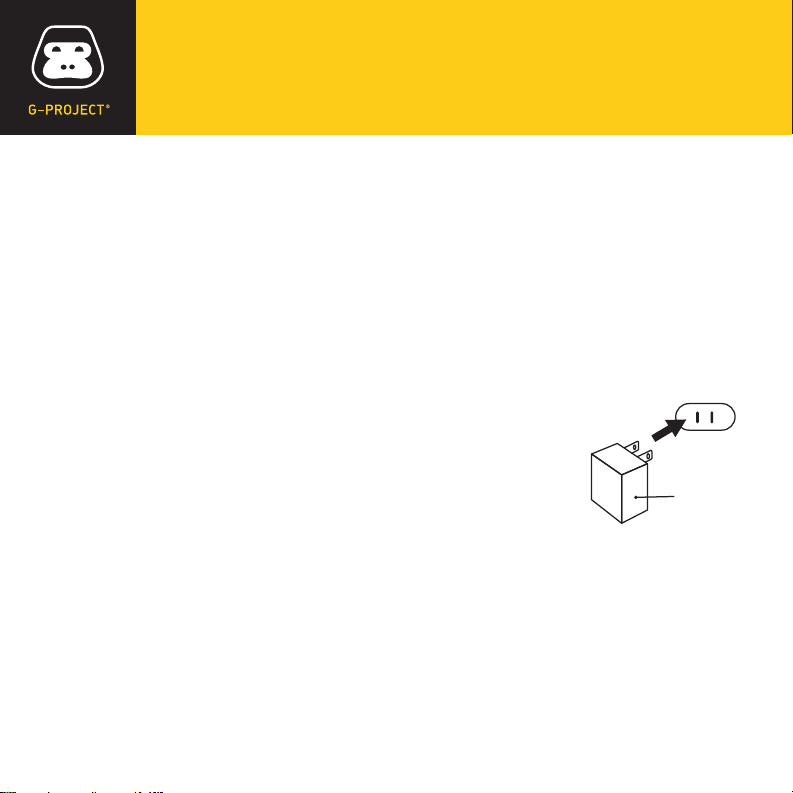
POWER SOURCE
Connect the supplied AC adapter (DC 12V 1.5A) to the DC IN Jack on the back of
G-BOOM3 and plug the other end into a standard wall outlet (100~240V 50-60Hz).
NOTES: Disconnect both ends of the AC adapter when not in use. Use only the supplied
AC adapter with the following spec: AC In - 100-240V AC, 50/ 60Hz / DC Out - 12V 1.5A
RECHARGE BATTERY
Connect the supplied AC adapter to the DC IN Jack on the
back of G-BOOM3 and plug the other end into a standard wall
outlet to being automatically recharging the built-in battery. The
red LED charging light on G-BOOM3 will illuminate to indicate
charging process and turn off when the battery is fully charged.
AC outlet
AC adapter
WHEN TO RECHARGE BATTERY
When G-BOOM3 battery is low, the red LED Charging indicator will begin ashing
to warn you to recharge your G-BOOM3 for continued use and enjoyment.
•
The battery is internal and cannot be replaced
•
Actual battery life varies with use, settings, and environmental conditions
•
Rechargeable batteries have a limited number of charge cycles
•
Charge the rechargeable battery at least biannually
NOTES
BLUETOOTH WIRELESS BOOMBOX
EQUALIZER (EQ)
There are 3 EQ presets:
EQ1 = (Default) Dynamic: full bass and crisp high frequencies.
EQ2 = Deep: Added emphasis on bass and low mids frequencies.
EQ3 = Bright: Added emphasis on mids, vocals and high frequencies.
Press the EQ Button repeatedly to cycle through them. The LED ring will ash
1, 2 or 3 times when the EQ button is pressed to indicate preset EQ1, EQ2
or EQ3 respectively.
CHANGING THE INPUT SOURCE
When the G-BOOM3 powers “ON”, the default audio input source is Bluetooth.
To switch to Radio, press the FM Radio button once and G-BOOM3 will enter FM
Radio mode.
NOTE: If inserting audio cable into the Line-In Jack, G-BOOM3 will change to Line-In mode
automatically regardless of the current input source.

PLAYING THE RADIO
1With G-BOOM3 powered “ON”, press the FM RADIO button. The current
FM station and FM icon will appear on the display.
2For manual tuning, repeatedly press the TUNE UP or TUNE DOWN button to
manually adjust the tuning on the LCD display until the desired station appears.
3For auto tuning, press and hold the TUNE UP or TUNE DOWN button until the
display starts to scan, then release the button. The tuner will search and stop on
the next strongest station signal it nds. Repeat this process until the desired
station appears on the LCD display.
NOTES: G-BOOM3 features a built-in internal FM antenna. For best reception please place
the unit close to window or open area to improve reception quality. Keep digital music
players or mobile phones away from G-BOOM3 as this may cause interference. Do not place
G-BOOM3 near the AC power adapter as this may lead to reception interference.
BLUETOOTH WIRELESS BOOMBOX
SETTING RADIO PRESETS
1To preset a radio station to memory, rst follow the previous steps to tune in the
desired station.
2Press and hold the PLAY / RADIO PRESET button to create a preset for the
current station. “P” will appear and “##” (the preset number) will blink on the
LCD display.
3Press the TUNE UP or TUNE DOWN button to select a preset number (01- 10).
Press the PLAY / RADIO PRESET button again to conrm the setting and the
station will be saved into memory.
4Repeat these steps for up to 10 presets, as desired.
5To recall a preset station, repeatedly press the PLAY / RADIO PRESET button
until the desired preset number appears in the display and the station tunes in.
NOTES: Saving a new station preset in the same position as a previously saved station
will replace the previously stored station for that preset number.
Altri manuali per G-Boom 3
1
Indice
Altri manuali G-project Sistema stereo portatile


