
G-project G-BOOM2 Manuale utente

BLUETOOTH WIRELESS BOOMBOX
WITH FM RADIO
G-BOOMG-BOOM
FM Radio
Rechargeable
Battery
Rugged
Construction
Wireless
Bluetooth
G-750

PACKAGE CONTENTS:
• G-BOOM2 Bluetooth Wireless Boombox
• AC Power Adapter
• User Guide
Welcome to G-PROJECT
Thanks for purchasing G-BOOM2 and joining G-Project. With just the
right combination of performance, durability, features, and style at the
right price, our goal is to provide rugged speakers and accessories
that t your lifestyle. We hope you agree.
For more info, please visit our website at www.enterG-project.com
™

BLUETOOTH WIRELESS BOOMBOX
G-BOOMG-BOOM
STOP BY AND SAY HELLO TO US:
facebook.com/gprojectgear
twitter.com/gprojectgear
instagram.com/gprojectgear
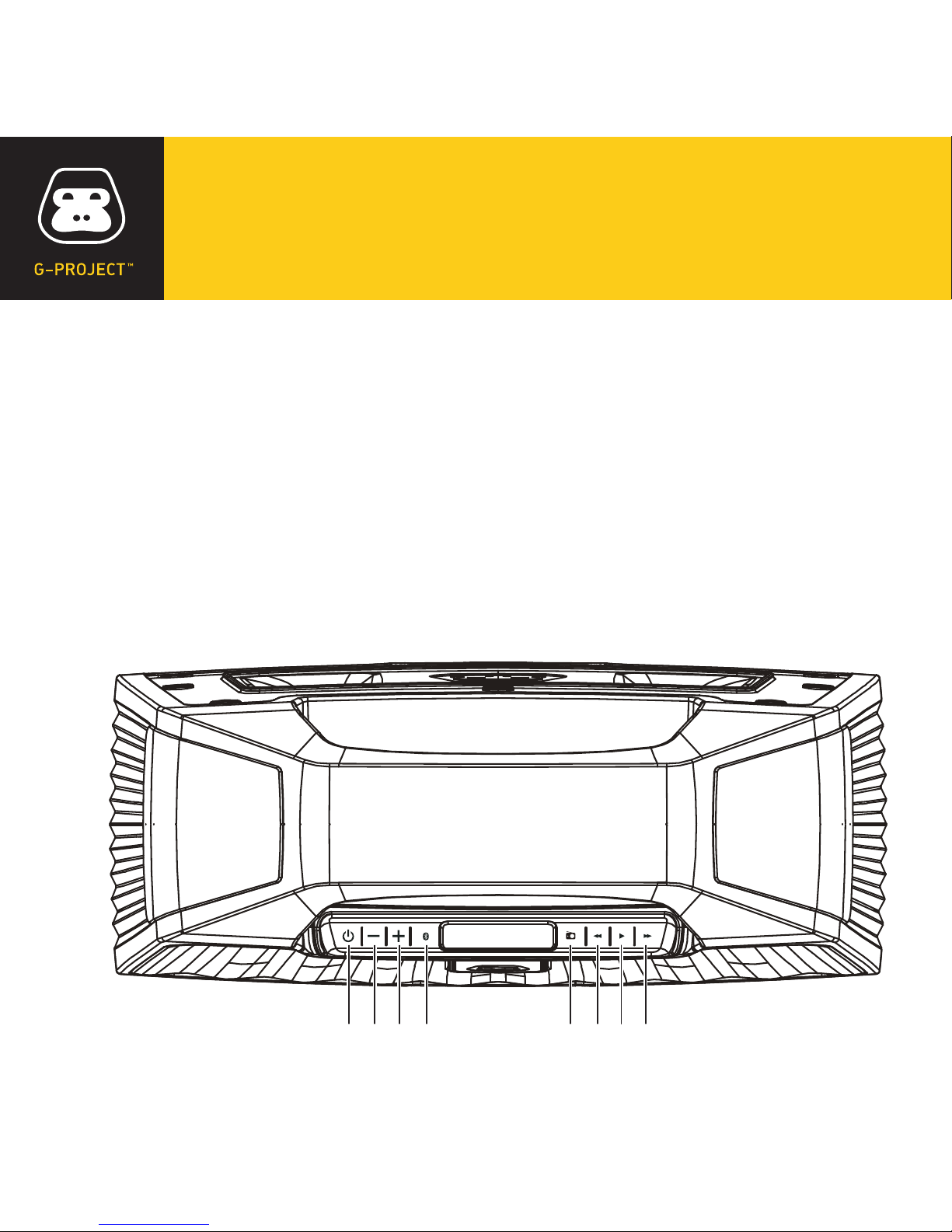
LOCATION OF CONTROLS
1. Power ON/OFF Button
2. Volume – Down Button
3. Volume + Up Button
4. Bluetooth PAIR Button
5. FM Radio
6. Tune Down
7. Play / Radio Preset
8. Tune Up
1 6
7
82 3 4 5

BLUETOOTH WIRELESS BOOMBOX
G-BOOMG-BOOM
9. LCD Display
10. LED Status Indicator
11. LED Charging Indicator
12. DC IN Jack
13. Reset Button
14. LINE-IN Jack
10 11 12 13 14
9

POWER SOURCE
Connect the supplied AC adaptor (DC 12V 1.5A) to the DC IN Jack on the back of
G-BOOM2 and plug the other end into a standard wall outlet (100~240V 50-60Hz).
NOTES: Disconnect both ends of the power cord when not in use. Use only the supplied
AC adaptor with the following spec: AC In - 100-240V AC, 50/ 60Hz / DC Out - 12V 1.5A
RECHARGE BATTERY
Connect the supplied AC adaptor to the DC IN Jack
on the back of G-BOOM2 and plug the other end into
a standard wall outlet to being automatically
recharging the built-in battery. The red LED charging
light on G-BOOM2 will illuminate to indicate charging
process and turn off when the battery is fully charged.
AC outlet
AC adapter

BLUETOOTH WIRELESS BOOMBOX
G-BOOMG-BOOM
WHEN TO RECHARGE BATTERY
When G-BOOM2 battery is low, the red LED Charging indicator will begin ashing
to warn you to recharge your G-BOOM2 for continued use and enjoyment.
NOTES:
•
The battery is internal and cannot be replaced
•
Actual battery life varies with use, settings, and environmental conditions
•
Rechargeable batteries have a limited number of charge cycles
•
Charge the rechargeable battery at least biannually
CHANGING THE INPUT SOURCE
When G-BOOM2 powers “ON”, the default audio input source is FM radio.
To switch to Bluetooth, press the Bluetooth PAIR button once and G-BOOM2 will
enter Bluetooth mode.
NOTE: If inserting audio cable into the Line-In Jack, G-BOOM2 will change to Line-In mode
automatically regardless of the current input source.

PLAYING THE RADIO
1With G-BOOM2 powered “ON”, press the FM RADIO button. The current
F M s t a t i o n a n d F M i c o n w i l l a p p e a r o n t h e d i s p l a y a n d t h e L E D S T A T U S i n d i c a t o r
w i l l i l l u m i n a t e g r e e n .
2For manual tuning, repeatedly press the TUNE UP or TUNE DOWN button to
m a n u a l l y a d j u s t t h e t u n i n g o n t h e L C D d i s p l a y u n t i l t h e d e s i r e d s t a t i o n a p p e a r s .
3For auto tuning, press and hold the TUNE UP or TUNE DOWN button until the
d i s p l a y s t a r t s t o s c a n , t h e n r e l e a s e t h e b u t t o n . T h e t u n e r w i l l s e a r c h a n d s t o p o n
t h e n e x t s t r o n g e s t s t a t i o n s i g n a l i t n d s . R e p e a t t h i s p r o c e s s u n t i l t h e d e s i r e d
s t a t i o n a p p e a r s o n t h e L C D d i s p l a y .
NOTES: G-BOOM2 features a built-in internal FM antenna. For best reception please place
the unit close to window or open area to improve reception quality. Keep digital music
players or mobile phones away from G-BOOM2 as this may cause interference. Do not place
G-BOOM2 near the AC power adaptor as this may lead to reception interference.

BLUETOOTH WIRELESS BOOMBOX
G-BOOMG-BOOM
SETTING RADIO PRESETS
1To preset a radio station to memory, rst follow the previous steps to tune in the
d e s i r e d s t a t i o n .
2Press and hold the PLAY / RADIO PRESET button to create a preset for the
c u r r e n t s t a t i o n . “ P ” w i l l a p p e a r a n d “ # # ” ( t h e p r e s e t n u m b e r ) w i l l b l i n k o n t h e
L C D d i s p l a y .
3Press the TUNE UP or TUNE DOWN button to select a preset number (01- 10).
P r e s s t h e P L A Y / R A D I O P R E S E T b u t t o n a g a i n t o c o n r m t h e s e t t i n g a n d t h e
s t a t i o n w i l l b e s a v e d i n t o m e m o r y .
4Repeat these steps for up to 10 presets, as desired.
5To recall a preset station, repeatedly press the PLAY / RADIO PRESET button
u n t i l t h e d e s i r e d p r e s e t n u m b e r a p p e a r s i n t h e d i s p l a y a n d t h e s t a t i o n t u n e s i n .
NOTES: Saving a new station preset in the same position as a previously saved station
will replace the previously stored station for that preset number.

BLUETOOTH OPERATION
You can stream audio wirelessly to G-BOOM2 from up to 33’ away using your
iPhone, iPad, iPod, Android, laptop, or other A2DP Bluetooth enabled device.
1Press the POWER ON/OFF button to turn on G-BOOM2.
2Then press the Bluetooth PAIR button. The LED Status indicator will ash
b l u e a n d B l u e t o o t h i c o n w i l l l i g h t u p o n t h e L C D d i s p l a y .
3Turn on your compatible A2DP Bluetooth device and enable Bluetooth.
4Search for Bluetooth devices and select “G-BOOM2”.
5The blue LED Status indicator will change from ashing to solid,
i n d i c a t i n g t h a t y o u r B l u e t o o t h d e v i c e i s c o n n e c t e d t o G - B O O M 2 .
NOTES:
• Press and hold the Bluetooth PAIR button for 3 seconds to disconnect the current
B l u e t o o t h c o n n e c t i o n .
• The unit will return to pairing mode and the blue LED Status indicator will ash.
• If asked for a password, enter “0000”.
Indice
Altri manuali G-project Sistema stereo portatile


