
Gamma Led Vision TX-6 Z Manuale utente

TX-6 Z
350w LED Spot with CMY Color Mixing
User Manual
TX-6 – GAMMA LED Vision
Page 1 of 19

Table of Contents
Table of Contents
1. Introduction and Setup.......................................................................................................................................3
Unpacking and In the Box.................................................................................................................................3
Mounting and Operation...................................................................................................................................3
Features......................................................................................................................................................................4
Safety Precautions.................................................................................................................................................5
Customer Support.................................................................................................................................................6
2. Setup and Operation...........................................................................................................................................7
Using the LCD Menu and Buttons................................................................................................................7
DMX Setup...............................................................................................................................................................8
DMX Basics..........................................................................................................................................................8
DMX Wiring........................................................................................................................................................8
DMX Modes and Configuration...................................................................................................................10
3. Maintenance..........................................................................................................................................................15
Routine Maintenance........................................................................................................................................15
Fixture Cleaning..............................................................................................................................................15
Troubleshooting Problems.............................................................................................................................15
4. Technical Specifications....................................................................................................................................17
Photometric Reports..........................................................................................................................................18
TX-6 – GAMMA LED Vision
Page 2 of 19

1. Introduction and Setup
Unpacking and In the Bo
Thank you for choosing the TX-6 Z from GAMMA LED Vision. You ill see you have acquired
a po erful and versatile moving light.
Inside the box you should find:
•TX-6 Z Fixture: 1
•Attached, Fold-Do n Clamps ith Omega Brackets 2
•DMX Cable 1
•1m Po erCon to Edison Cable 1
(Flight case and Safety cable are optional, please contact your dealer)
Please check carefully that there is no damage from shipping. Should there be any problems,
please consult your dealer and don’t use the light until you’ve verified it’s good to go!
Mounting and Operation
Before installation, please read the user manual carefully, then prepare Omega Brack-
ets (2 pcs), Clamps (2 pcs), and Safety Cable (1 pc).
Clamp Mounting: The TX-6 Z provides provides fold-do n clamps hich sit attached to
Omega Brakcets hich then attach to base on the unit. We promise it’s less confusing
than it sounds.
The folding clamps can s ivel freely, and the s ivel is tightened do n via an allen
rench. The clamps do not have to be removed for floor-standing operation.
As an added safety measure be sure to attached at least one properly rated safety cable
to the fixture using on of the safety cable rigging point integrated in the base assembly.
TX-6 – GAMMA LED Vision
Page 3 of 19
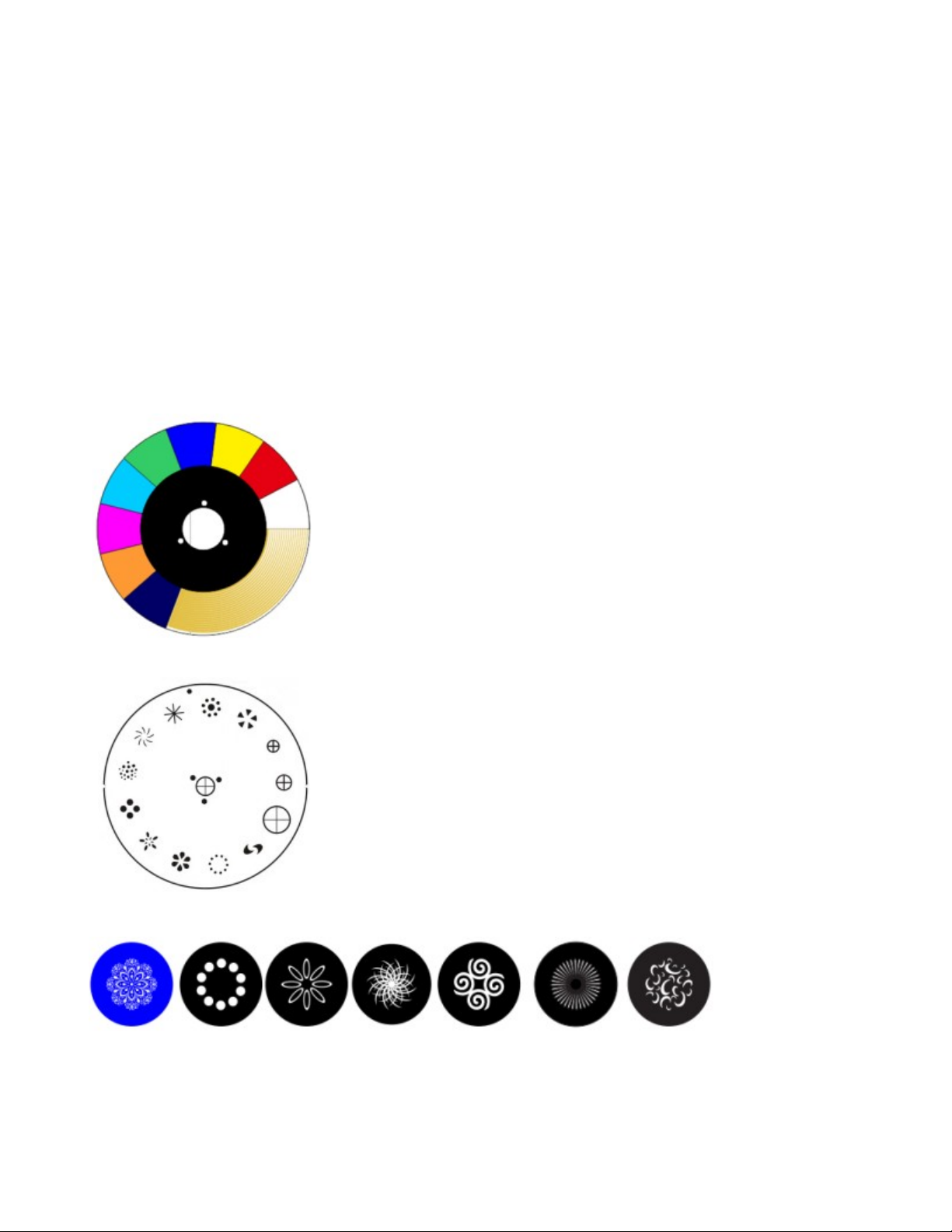
Features
High Brightness 350w LED Source with 50,000 Life Expectancy
Motorized oom from 2º -22º
540 Degree Pan and 270 Degree Tilt
CMY Color Mixing
7 Rotating and 12 Fixed Gobos
Color Wheel with Variable CTO Filter
Frost Filter
Variable Strobe
Dual, Independently Rotating Prisms
Motorized Focus
Color and Variable CTO Wheel:
Fi ed Gobo Wheel:
Rotating Gobos (22.7mm OD, 14mm Ma Image Size)
TX-6 – GAMMA LED Vision
Page 4 of 19

Safety Precautions
Please keep this User Guide for future consultation. If you sell the unit to another user, be
sure that they also receive this instruction manual.
Caution: For added protection mount the fixtures in areas outside alking paths, seating ar-
eas, or in areas ere the fixture might be reached by unauthorized personnel.
Before mounting the fixture to any surface, make sure that the installation area can hold a
minimum point load of 10 items the device’s eight.
Fixture installation must al ays be secured ith a secondary safety attachment, such as an
appropriate safety cable.
Never stand directly belo the device hen mounting, removing, or servicing the fixture.
From a ceiling, or set on a flat level surface (see illustration belo ). Be sure this fixture is kept
at least 0.5m (1.5ft) a ay from any flammable materials (decoration etc.).
Al ays use and install a safety cable as a safety measure to prevent accidental damage
and/or injury in the event the clamp fails.
DO NOT connect the device to any dimmer pack.
During initial start-up some smoke or smell may arise. This is a normal process and does not
necessarily mean that the device is defective, and it ill decrease gradually ithin 15 minutes.
∙Don’t try to modify the fixture ithout any instruction by the manufacturer.
∙Warranty is voided if there are any malfunctions from not follo ing the user manual hile op-
erating or any hazardous operation, like shock short circuit, electronic shock, lamp broken,
etc.
TX-6 – GAMMA LED Vision
Page 5 of 19

Customer Support
WARRANTY POLICY
GAMMA LED Vision warrants its products for the periods set below from the date of pur-
chase to be free of manufacturer and workmanship defects. Warranty does not cover nor-
mal wear and tear caused by force, negligence or misuse of products. GAMMA LED Vi-
sion is not responsible for any damages or injury caused by misuse or improper handling
of the products and in accordance with instructions and specifications of manual.
Warranty terms are as follows:
LED Fixtures:
Indoor: 2 Years
Outdoor (IP 54 or higher): 1 Year
Lamp Fixtures: 1 year / excludes the lamp
LED Video Products:
Indoor: 2 Years
Outdoor (IP 54 or higher): 1 Year
Controllers: 2 years
Batteries: 6 months
All Trussing Related Products and Accessories: 1 Year
Please visit WWW.GAMMALEDVISON.COM for complete Limited Warranty terms and con-
tact information.
TX-6 – GAMMA LED Vision
Page 6 of 19

2. Setup and Operation
Using the LCD Menu and Buttons
The TX-6 features a standard LCD screen and buttons for operation. Press Menu to en-
ter the menu. Use the Up and Down arrows to navigate through the options and press
Enter to go into the menu or confirm your selection. The menu will automatically exit af-
ter a period of inactivity.
The TX-6 ’s display is also a touchscreen. You can use the touchscreen or buttons, your
choice :)
Menu
Address Address,
Channel
Mode
Set the DMX starting address of the light and DMX
channel mode.
Work Mode
DMX, Auto
Run, Sound
Ctrl, Scene
Mode, M/S
Choose
Set the Type of Control for the TX6 Z to use.
Display Set display settings such as screen rotation, touch en-
able, etc. Under “Screen Saver”, “Mode 1” ill turn off
the LCD hen not in use.
Scene Here you can manually test each feature of the fixture
such as Pan/Tilt, Dimmer, Zoom, etc.
Advanced
Modify settings such as Pan Invert, Tilt Invert.
Status
Vie status’ of the fixture such as running time and internal
temperature.
TX-6 – GAMMA LED Vision
Page 7 of 19

DMX Setup
DMX Basics
DMX512 stands for digital multiplex 512. This means that 512 channels are controlled
digitally through 1 data cable.
A channel is a set of 255 steps that are assigned to control attributes in each light. This
may be a color like red, green or blue, and intensity, strobe, pan/tilt or other attributes.
Multiple sets of 512 “universes” may be used. Only 1 universe will travel on a DMX cable,
but through networked DMX (Art-Net or sACN E1.31), many universes can travel over a
network.
DMX Wiring
DMX works by connecting 1 or multiple lights to the output of a DMX lighting console or
software with a DMX interface.
DMX lights connect in what is called a “daisy-chain”. Your first DMX cable will plug it’s
male DMX connector into the female DMX connector on your lighting console. The re-
maining female connector will then connect to the DMX input on your first light.
You may then connect your next fixture to the output of your first light, and continue the
chain.
32 Fixture Rule – DMX only allows you to connect up to 32 fixtures in a single daisy
chain for signal strength. Sometimes, depending on the fixtures and cable length, this
number is less (or more).
DMX Cables can be 3-pin or 5-pin. These use the same type of data, and in the 5-pin
only pins 1, 2, and 3 are used. The cable should be a 2 conductor, shielded cable of at
least 110 ohms resistance. Microphone cable is not DMX cable. Please refer to the dia-
gram below:
TX-6 – GAMMA LED Vision
Page 8 of 19

For installations where the DMX cable has to run a long distance or is in an electrically
noisy environment, it is recommended to use a DMX terminator. This helps in preventing
corruption of the digital control signal by electrical noise and reflections. The DMX ter-
minator is simply an XLR plug with a 120 Ω resistor connected between pins 2 and 3,
which is then plugged into the output XLR socket of the last fixture in the chain. Please
see illustrations below:
TX-6 – GAMMA LED Vision
Page 9 of 19
DMX Modes and Configuration
The TX-6 has multiple DMX modes, sometimes called “personalities”, “profiles”, or as we
will use here “modes”.
In general, modes with more DMX channels offer a greater level of control or options but
take up more of your output channels on your lighting console or software.
Modes with less DMX channels often offer less control, but may be plenty for your needs.
Depending on your needs and control solution, you may not need channels for auto-
mated programs, strobes, or macros – your console may have great effects! In this case,
you can use a lesser channel mode and fit more lights per DMX universe.
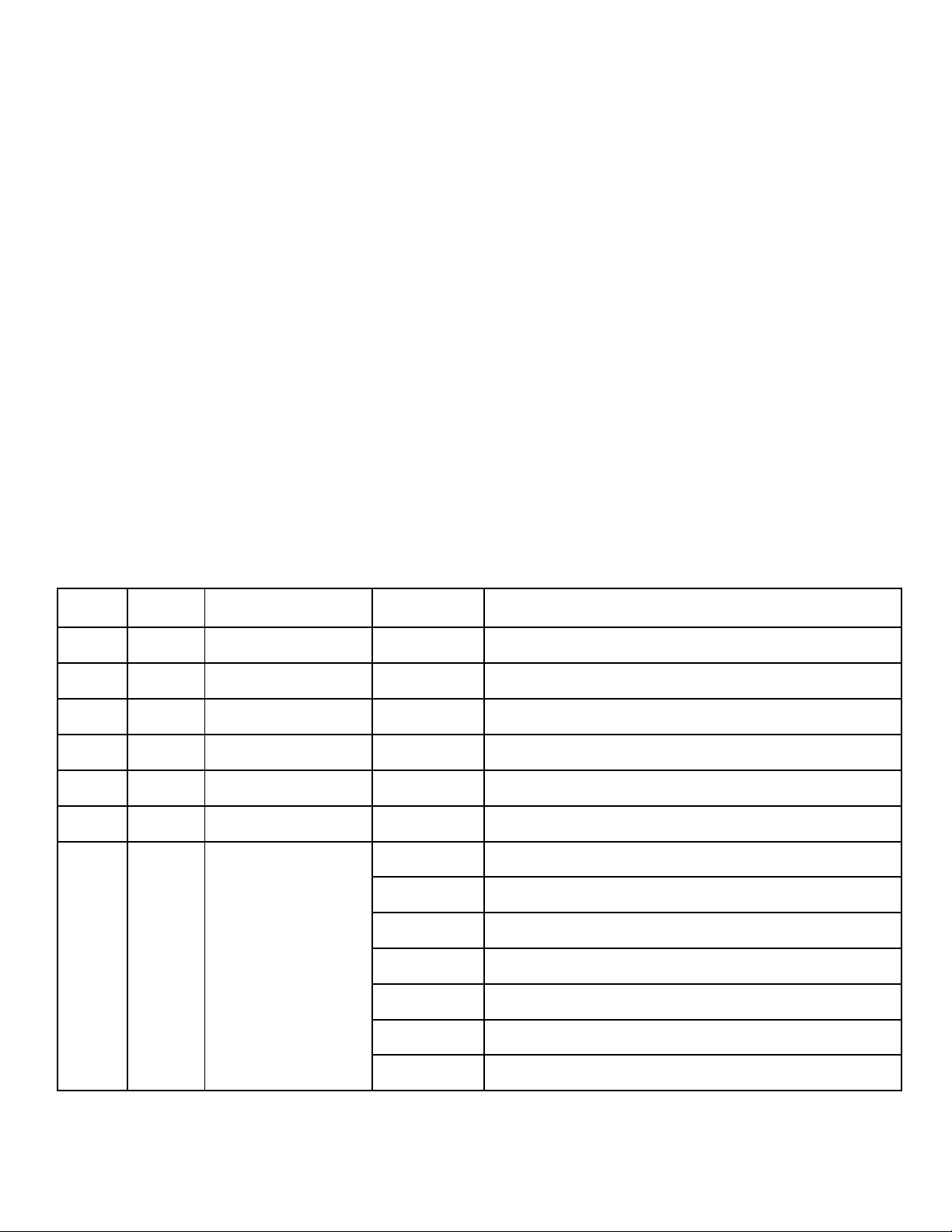
The TX-6 offers a 22 and 26 channel mode.
The 26 channel mode features 16-bit control for more parameters and a PT speed control,
while still not taking many more channels.
We recommend using the 26 channel mode for best results.
View the DMX mode charts below to find the mode that best suits your needs
26CH 22CH Function Value Description/Options
1 1 Pan
0-255 0-540º Pan Control
2 2 Pan Fine 0-255 Fine Control for Pan
3 3 Tilt 0-255 0-270
º
Degree Tilt Control
4 4 Tilt Fine
0-255 Fine Control for Tilt
5 P/T Speed 0-255 Pan/Tilt Speed, Fast to Slow
6 5 Dimmer 0-255 Intensity Control
7 6 Strobe 0-3
Closed
4-103
Pulse Strobe, From Slow to Fast
104-107
Open
108-155
Open Strobe from Slow to Fast
156-207
Close Strobe from Slow to Fast
208-212
Open
213-251
Random Strobe
TX-6 – GAMMA LED Vision
Page 10 of 19
Indice
Altri manuali Gamma Led Vision Riflettore


Manuali Riflettore popolari di altre marche

Guangzhou Yinhe Lighting&Sound Equipment Factory
Guangzhou Yinhe Lighting&Sound Equipment Factory NE-204 Manuale utente

LIVARNO home
LIVARNO home 375304 2101 Istruzioni originali

Cameo
Cameo CLQS40WW Manuale utente

Leviton
Leviton Ellipsoid 5/50 Manuale utente

Monacor
Monacor img Stage Line PARL-56PDX/CR Manuale utente

Vector
Vector SL3AKV Manuale utente


EuroLite
EuroLite Akku flat light 1 Manuale utente

Commercial Electric
Commercial Electric SPTM-1401 Manuale utente

Vision & Control
Vision & Control SLB-500-W5K7-P-SL Manuale utente

Teknik
Teknik FLEXI Manuale utente

Craftsman
Craftsman CMXLSB10 Manuale utente

EuroLite
EuroLite LED SLS-144 UV Floor Spot Manuale utente