
GEPRC CineLog35 Manuale utente

User Manual & Setup Guide
V1.0
CineLog35
User Manual &Setup Guide
V1.0

Contents
Overview:................................................................................................................................... 3
Specification:......................................................................................................................3
Features:.............................................................................................................................3
Warranty Policy:.........................................................................................................................5
PS:....................................................................................................................................... 5
DJI Digital FPV System:............................................................................................................. 6
Bind TBS NanoRX:..................................................................................................................... 7
Bind FrSky R-XSR:......................................................................................................................8
Install Betaflight:........................................................................................................................ 9
Install Drivers:.................................................................................................................... 9
ARM(DJI Transmitter):.............................................................................................................10
OpenTX Transmitter:...............................................................................................................11
Install Silicone Pad,Landing pad:........................................................................................... 13
Install Propellers:..................................................................................................................... 16
Pre-flight Check:..................................................................................................................... 17
Include:.....................................................................................................................................18
Contact:....................................................................................................................................18

3/18
Overview:
The CineLog35 HD developed by GEPRC specifically for mounting complete GoPro HD
camera is now officially released, There are two versions are currently available: HD VISTA
Nebula Pro and Analog.
CineLog35 is improved and developed on the basis of CineLog30. Integrated protection
guard design, the overall structure is firmer and durable. We adopts latest GEP-F722-45A
AIO FC with higher calculation speed and high efficiency, the 5 UART Ports bring perfect
performance and sufficient extended function. and the electronic system runs more stable.
CineLog35 equips with VISTA HD VTX and the Nebula Pro camera, and the picture quality is
extreme clear and clean. Upgraded power system, 2004 motor with D90-3 propeller has
stronger power output. It comes with a 3D Print mount to install the GoPro 9 & GoPro 10.
and the Incidental base can carry Insta360 GO2 camera/ Naked GoPro Hero 8/Caddx Peanut
camera.
We are pursuing lighter weight, better flying feel, and more extended functions of
Quadcopters.
Specification:
Model: Cinelog35 Quadcopter
FC: GEP-F722-45A AIO
ESC: BLheli_S 45A
VTX: VISTA
Camera: Caddx Nebula Pro / Caddx Ratel2
Antenna: Momoda UFL LHCP / Momoda MMCX RHCP
Motor: GR2004-1750KV / GR2004-2550KV
Propeller: D90-3
Frame: GEP-CL35
Motor to Motor: 142mm
Weight: 236.6g (CineLog35 HD VISTA Nebula Pro 4S PNP)
Receiver: PNP , Frsky R-XSR , TBS NanoRX
Features:
1. Upgrade 3.5-inch integrated protection guard to ensure flight safety.The new design has
significant roles at many aspects such as reduce noise, reduce Vibration and durable
high-strength structural design.
2. Equipped with VISTA HD VTX and Nebula Pro camera.
3. The CineLog35 has an Great mount compatibility for camera. It can install GoPro10,

4/18
GoPro9, GoPro8 or Naked GoPro 8, Insta 360 GO2 cameras and Caddx peanut cameras.
4. Improving the damping rings, the shooting effect is more stable,clearer and reduce jelly.
5. GR2004 motor with D90-3 propeller has stronger power output.
6. Independent receiver cabin, convenient and quick to binding.
7. The GEPRC Team's Splendid Tuning and the overall flight feel is delicate and flexible.
.

5/18
Warranty Policy:
1. If Quadcopter is damaged or unknown issue,please contact GEPRC. We'll do our best to
get this taken care of quickly for you.
2. Any impact damage, product liquid damage, high temperature burn or other artificial
damage is not covered by warranty.
PS:
1. All components has been strictly inspected and tested before shipping.
2. If you have any problems, please cooperate with our engineers to figure out solutions.
(E-mail: support@geprc.com.)

6/18
DJI Digital FPV System:
1. Turn the power of the DJI FPV Goggles, DJI FPV Transmitter,and Quadcopter. Press the DJI
FPV Goggles bind button twice, and it will beep to indicate the binding state.
2. Press the VISTA bind button,the indicator light turn red ,indicating that it is binding.Then
the indicator light turns yellow, means the binding is successful,and the FPV Goggles will
display the received picture.
3. Press the C1 custom button,record button and right scroll wheel button of the
transmitter,at the same time. The indicator light turns blue, and the transmitter sends a beep
indicating that it is binding.
4. Press the VISTA bind button,the indicator light turn red ,indicating that it is binding.Then
the indicator light turns yellow, means the binding is successful.And the transmitter
inducator light turns Green.
Bind Button
Binding successful
Binding
Bind Button
Record Button
C1 Custom Button
Right Scroll Wheel Button
Binding Successful
Binding
Bind Button
Binding
Binding Successful

7/18
Bind TBS NanoRX:
1. For Taranis X9D/X9D Plus/X9E and Taranis QX7, turn on the transmitter, go to the
TOOLS – CROSSFIRE SETUP – XF Micro TX ,and select Bind.
2. Turn on the receiver while holding the bind button on the receiver, release the button
and the green light on flash .and then holding the button for 8 second ,and release. And
the green light is off and the red light is flashing, ‘update micro RX?’ will appear on the
transmitter screen, and select ‘ENTER’.
3. Wait for the update to complete, the binding is successful, and the receiver green light is
on.
1
2
3
4
5
6
Bind Button
Binding
Binding Successful

8/18
Bind FrSky R-XSR:
1. For Taranis X9D/X9D Plus/X9E and Taranis QX7, turn on the transmitter, go to the
MENU – MODEL SETUP – PAGE 2, choose Internal RF, and select BIND.
2. Turn on the receiver while holding the bind button on the receiver, release the button
and the bule,red,yellow LED on .
3. When the red light flashes, it indicates that the binding is successful.Turn off the
receiver,and then turn on the receiver.The blue light and yellow light of receiver are on,
indicating that the link is normal.
1
2
3
Binding Button
Binding
Binding

9/18
Install Betaflight:
Although your Quadcopter comes from the factory nearly completely ready to fly, you still
need to install betaflight to facilitate your subsequent use of betaflight for debugging.
Installation package download address:
https://github.com/betaflight/betaflight-configurator/releases
Enter the web page, pull to the bottom, and select the appropriate installation package to
download. EXE suffix is Windows system, DMG suffix is MacOS system, RPM / DEB suffix is
Linux system, APK suffix is Android system.
Install Drivers:
If you are on windows, you must install the driver manually. MacOS and Linux do not.
CP210x Drivers:
https://www.silabs.com/products/development-tools/software/usb-to-uart-bridge-vcp-dri
vers
STM USB VCP Drivers:
http://www.st.com/en/development-tools/stsw-stm32102.html
Zadig:
http://zadig.akeo.ie/
10 /18
ARM(DJI Transmitter):
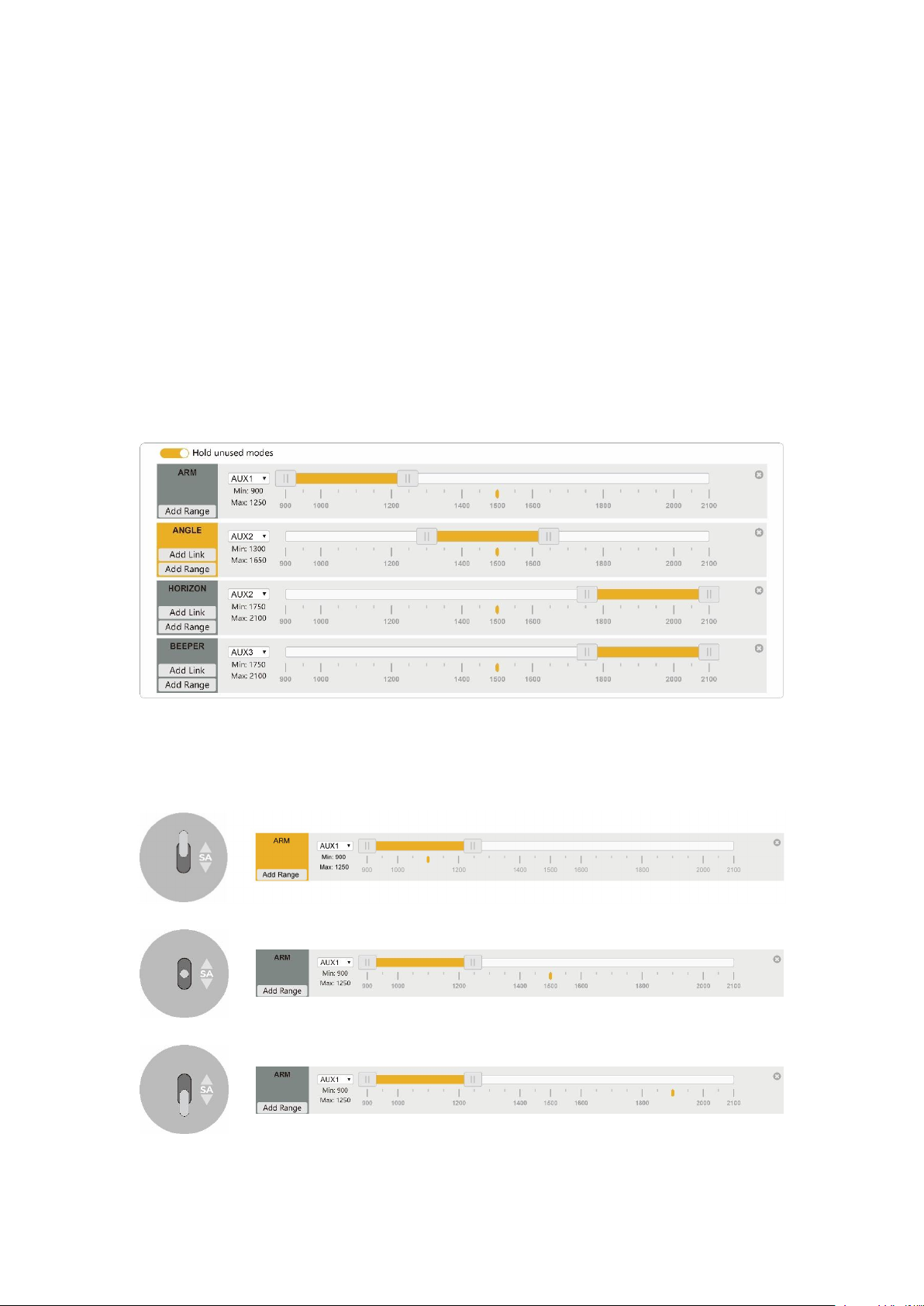
With DJI FPV Transmitter, the toggle switch is set at the factory. The corresponding functions
of each switch are as follows:
SAAUX1(ARM)
SBAUX2(MODES)
SCAUX3(BEEPER)
SDAUX4(Vacancy)
DJI toggle switches are all three sections. If you move the Yellow cursor of the corresponding
aux channel of the switch, the corresponding function will be turned on when you move to
the set range.
Indice
Altri manuali GEPRC Quadricottero

GEPRC
GEPRC Cinelog25 Manuale utente

GEPRC
GEPRC SMART16 Manuale utente

GEPRC
GEPRC CineLog30 Manuale utente

GEPRC
GEPRC CineStyle 4K Manuale di istruzioni

GEPRC
GEPRC Pika Manuale di istruzioni

GEPRC
GEPRC MARK5 Manuale utente

GEPRC
GEPRC Cinebot30 Manuale utente

GEPRC
GEPRC SMART35 Manuale utente

GEPRC
GEPRC Sparrow Manuale di istruzioni

GEPRC
GEPRC Crocodile5 Baby Manuale utente


