
geratech EGE-UHD-444 Manuale utente

EGE-UHD-444
4x4 4K UHD HDMI Matrix


EGE-UHD-444
4x4 4K UHD HDMI Matrix
DISCLAIMERS
The information in this manual has been carefully checked and is believed to be accurate.
Geratech assumes no responsibility for any infringements of patents or other rights of third
parties which may result from its use.
Geratech assumes no responsibility for any inaccuracies that may be contained in
this document. Geratech also makes no commitment to update or to keep current the
information contained in this document.
Geratech reserves the right to make improvements to this document and/or product at any
time and without notice.
COPYRIGHT NOTICE
No part of this document may be reproduced, transmitted, transcribed, stored in a retrieval
system, or any of its part translated into any language or computer le, in any form or by
any means—electronic, mechanical, magnetic, optical, chemical, manual, or otherwise—
without express written permission and consent from Geratech.
© Copyright 2011 by Geratech.
All Rights Reserved.
Version 1.1 August 2011
TRADEMARK ACKNOWLEDGMENTS
All products or service names mentioned in this document may be trademarks of the
companies with which they are associated.

EGE-UHD-444
4x4 4K UHD HDMI Matrix
SAFETY PRECAUTIONS
Please read all instructions before attempting to unpack, install or operate this equipment
and before connecting the power supply.
Please keep the following in mind as you unpack and install this equipment:
• Always follow basic safety precautions to reduce the risk of re, electrical shock and
injury to persons.
• To prevent re or shock hazard, do not expose the unit to rain, moisture or install this
product near water.
• Never spill liquid of any kind on or into this product.
• Never push an object of any kind into this product through any openings or empty slots
in the unit, as you may damage parts inside the unit.
• Do not attach the power supply cabling to building surfaces.
• Use only the supplied power supply unit (PSU). Do not use the PSU if it is damaged.
• Do not allow anything to rest on the power cabling or allow any weight to be placed
upon it or any person walk on it.
• To protect the unit from overheating, do not block any vents or openings in the unit
housing that provide ventilation and allow for sufcient space for air to circulate around
the unit.
REVISION HISTORY
VERSION NO. DATE (DD/MM/YY) SUMMARY OF CHANGE
VR0 03/09/15 Preliminary release
19/09/16 update Function Descriptions

EGE-UHD-444
4x4 4K UHD HDMI Matrix
CONTENTS

EGE-UHD-444
4x4 4K UHD HDMI Matrix
1
1. INTRODUCTION
The 4 by 4 HDMI 4K UHD Matrix is capable of switching and routing an HDMI signal from
any of its four sources to any of four connected HDMI displays, allowing any source to
be shown independently on any display. It supports 3D, 'Deep Color' and high-denition
lossless audio formats. Control of inputs and outputs can be easily operated through the
on-panel buttons, IR remote control, RS-232 or Telnet/WebGUI control.
2. APPLICATIONS
• Showroom display control
• Educational demo
• Installation usage
• Advertising display
3. PACKAGE CONTENTS
• 1×4 by 4 HDMI 4K UHD Matrix
• 1×IR Extender
• 1×Remote Control (CR-33)
• 1×USB Type to Mini USB OTG Adaptor
• 1×5V/4A DC Power Adaptor
• 1×Power Cord
• 1×Operation Manual
4. SYSTEM REQUIREMENTS
HDMI source devices such as Blu-ray/DVD player, games consoles or set-top boxes and
HDMI equipped output display (HDTV/monitor) and HDMI High Speed cables.

EGE-UHD-444
4x4 4K UHD HDMI Matrix
2
5. FEATURES
• HDMI (with 3D & 4K2K supported), HDCP and DVI compliant
• Supports up to 7.1 channels of high-denition audio (LPCM, Dolby TrueHD, Dolby Atmos
and DTS-HD Master Audio)
• Supports HDTV resolutions up to 4K2K (3840×2160@24/25/30 Hz & 50/60 Hz with
YUV420, 4096×2160@24 Hz & 50/60Hz with YUV420)
• Support Internal/External/Custom EDID management.
• Supports controls through on-panel buttons, IR remote control, RS-232, Telnet and
WebGUI
• Input port HDCP support Standard and Apple mode. The Apple mode selection to
guarantees the use of Apple devices

EGE-UHD-444
4x4 4K UHD HDMI Matrix
3
6. OPERATION CONTROLS AND FUNCTIONS
6.1 Front Panel
1 IR Window: Accepts the remote control signal of this matrix only.
2 POWER Button and LED: Press this button to power the matrix on/off. The LED will
light up in green when the power is on and in red when put it into standby mode.
3 EDID Button and LED: Press this button to select external or standard EDID. When
the LED illuminate it represent the external EDID is selected. External EDID is base on
output A to inputs 1 and output B to input 2 and so on... For example, when all outputs
select input 1, the source will based on output A's highest EDID and send out the signal
corresponsively. Under this same scenario, if only output A supports 4K2K then other
outputs will have no image. Select standard EDID which supports 720p/2CH to allows
all outputs with image display.
4 OUTPUT A~D Buttons and LEDs: Press the 'A', 'B', 'C' or 'D' button to select the
source (1~4) for that output, the corresponding LED will light to indicate the selected
source.

EGE-UHD-444
4x4 4K UHD HDMI Matrix
4
6.2 Rear Panel
1 INPUT 1~4: Connect to HDMI equipped source devices such as DVD/Blu-ray players,
set-top boxes or games consoles.
2 OUTPUT A~D: Connect to an HDMI TVs/displays or monitors for display of the selected
source signal.
3 IR IN: Connect the supplied IR extender for IR signal reception from the remote control
included in the package. Ensure that the remote is within the direct line-of-sight of the IR
Extender.
4 RS-232: Connect to a PC/laptop or RS-232 control system with a D-sub 9-pin male
cable to control the unit with RS-232 commands (see Section 6.6).
5 CONTROL: Connect to an active Ethernet link with an RJ45 terminated cable to control the
unit with WebGUI.
6 SERVICE: This slot is for rmware update use only. Power on the unit and connected to
PC/Laptop, use Telnet/RS232 command to type "update mcu", then connect the USB ash
driver which content rmware le in Root directory. then the power LED will be blinking
which represent the update is being processed. Once the update is done the device will be
reboot automatically.
7 DC 5V: Connect the 5V DC power supply to the unit and plug the adaptor into an AC
outlet.
EGE-UHD-444
4x4 4K UHD HDMI Matrix
5
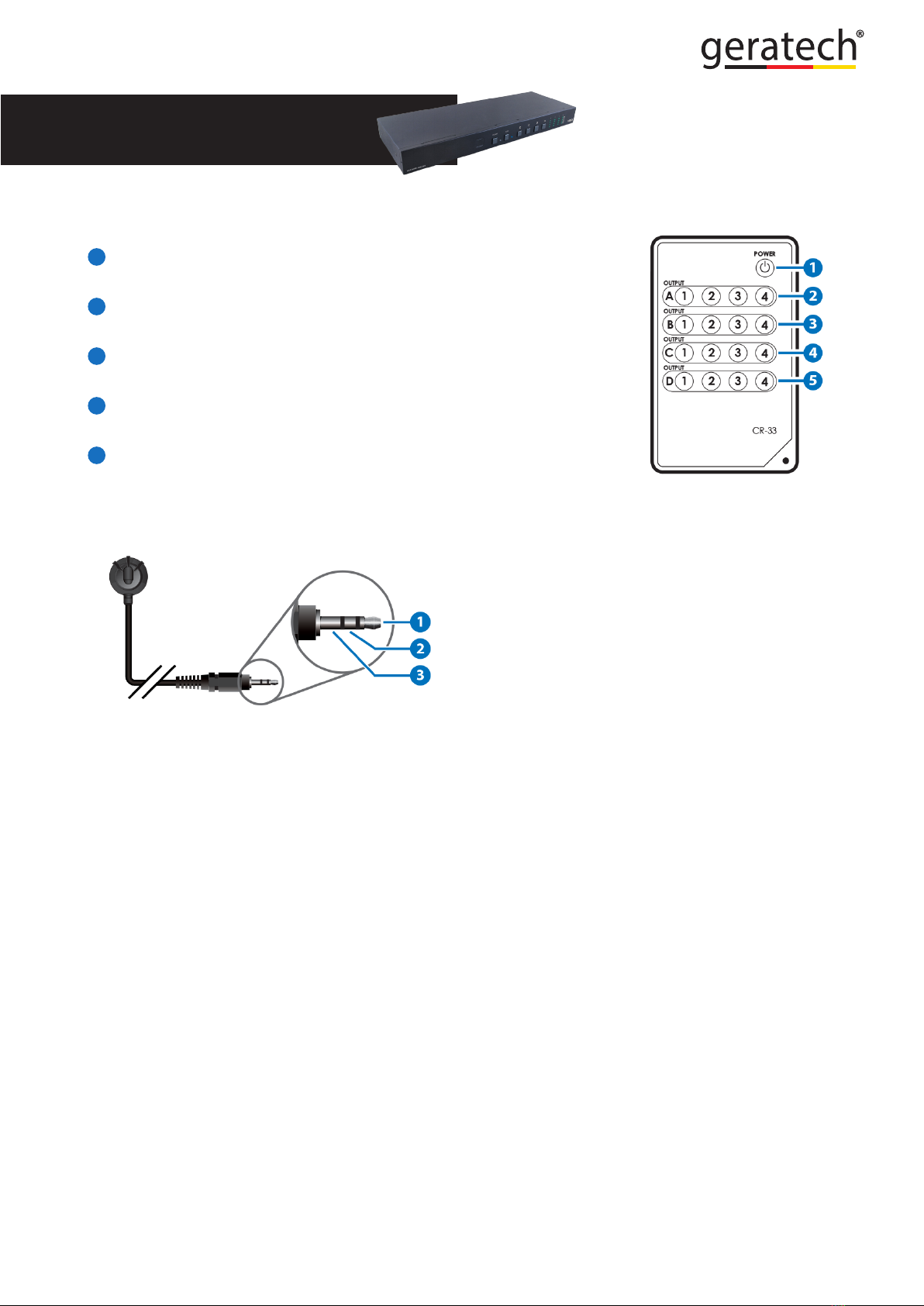
6.3 Remote Control
1 POWER: Press this button to switch the unit ON or to put it into
standby mode.
2 OUTPUT A and 1~4: Press buttons 1~4 to select the required
source for Output A.
3 OUTPUT B and 1~4: Press buttons 1~4 to select the required
source for Output B.
4 OUTPUT C and 1~4: Press buttons 1~4 to select the required
source for Output C.
5 OUTPUT D and 1~4: Press buttons 1~4 to select the required
source for Output D.
6.4 IR Cable Pin Assignment
IR Extender
IR Signal
Power
Grounding
Indice
Altri manuali geratech Commutatore a matrice


