
GOLDSHIP Nostalgic Classic Manuale utente

You have just purchased a Goldship
product, tested and approved by
worldwide.
In addition to quality technology, choose
Goldship, you get the certainty of the
best customer service. Our team is
formed by professionals and committed to
your total satisfaction.
For the correct installation and use of
the appliance / week you just purchased,
please read this manual carefully. It
contains all the information necessary for
proper use.
EN - USER MANUAL
Nostalgic Classic
Cód.: CXR-1496

• Bluetooth 4.2v Speaker
• 10W RMS - Stereo
• 3 Speeds: 33 - 45 - 78 RPM
• RCA Auxiliary Output
• Aux input. P2
• Internal Battery
• Vinyl
Please read all instructions carefully and keep this manual for future reference.

3
NOSTALGIC CLASSIC
3
Features
With the product
Bluetooth 4.2v
Auxiliary input P2
RCA Output: L / R
Stereo - 2 Satellite Boxes
Turntable Speed: 33-45-78 RPM
45 RPM Disc Adapter
Power: 10W RMS 4Ω - (5W RMS X 2)
Frequency Response: 100Hz ~ 10Khz
Auxiliary Output Stereo L / R
Product Power Supply: 5V DC - 2A
Working voltage: 3.7V
Bivolt Source: 100 ~ 240V AC 50 / 60Hz
Wood material with PVC coating
Acrylic cover
1 User Manual
1 Power Supply 5V / 2A DC
1 Adapter 45 RPM
1 Auxiliary cable P2

Connecting the Product
Connecting to an external amplier
Power Network Connection
Make sure that the mains voltage of the place where the product source will be connected corresponds to the
operating voltage of the unit. Use the power supply that came with the product to connect it to the back of the
unit and to a wall outlet with a voltage between 100 ~ 240V AC
After connecting your Vitrola Goldship to the Outlet, turn the volume selector (On / Off) clockwise until you
hear a “Click”.
Open the Cover and remove the arm and needle guards.
Vitrola Goldship has 2 built-in speakers where you can play the sound directly. However, if you prefer to use
your VCR in an amplied external Sound System, simply plug the audio plugs into the Auxiliary output of the unit
and into the auxiliary input of an amplied sound system, via an RCA cable (not supplied)
- Red plug at the R channel output.
- White plug at the L channel output.

5
NOSTALGIC CLASSIC
5
Listening to a Vinyl Record
Place the disc of your choice on the Turntables. If necessary, be sure to attach the adapter to the disc shaft.
Choose the desired playback speed using the speed select switch between 33.3, 45 and 78rpm.
Turn on the rotary switch, note that this also controls the volume.
Release the arm lock.
Lift the arm with the lift lever.
Carefully place the arm on the edge of the disc or in the desired range. With the lever, carefully lower the arm to start
playing your disc.
The end of the playback of the turntable will stop automatically. Lift the arm and return it to the rest position.
Attach the needle guard.
At the end of use, turn the unit off.
Note
Some vinyl records have an automatic stop area, and may be outside the Vitrola stop area, and vinyl disc
playback may stop before the end of the last track.
Attention
Attempting to start and / or stop the turntable manually will result in product breakdown, leading to
loss of product warranty.

Bluetooth®Function
On the selector switch, switch to the Bluetooth® function, then you will hear a “Ding Dong” beep, and the blue
LED will blink to indicate that the unit is ready for pairing.
On your device, activate the Bluetooth® feature and devices, browse and select by “GOLDSHIP 1496.” After
pairing, the unit will issue a “Ding Dong” beep and the blue LED light will keep access, indicating that the pairing
process has been successful.
Note:
- The wireless distance is up to 10m.
- Make sure no other Bluetooth devices are nearby that could affect the connection.

7
NOSTALGIC CLASSIC
7
Maintenance
Replacing the needle
STEP 1: Carefully place a screwdriver at the tip of the stylus and push downward (A)
STEP 2: Remove the old stylus by gently pulling it down and forward simultaneously
Note:
It is recommended that you clean your recorder with a dry, preferably dry, anti-static cloth or, if necessary,
slightly dampened with water, just after wiping with a dry cloth.
To ensure the best sound quality when listening to your discs, we recommend that the needle that comes with
the product should be changed periodically (approximately every 250 hours)
Dust the needle when necessary with a soft brush dipped in alcohol (brushing from behind the front of the
cartridge)
When carrying your disc player, do not forget to:
- Replace the needle cartridge cap.
- Place the rest clip on the pick-up arm.
8
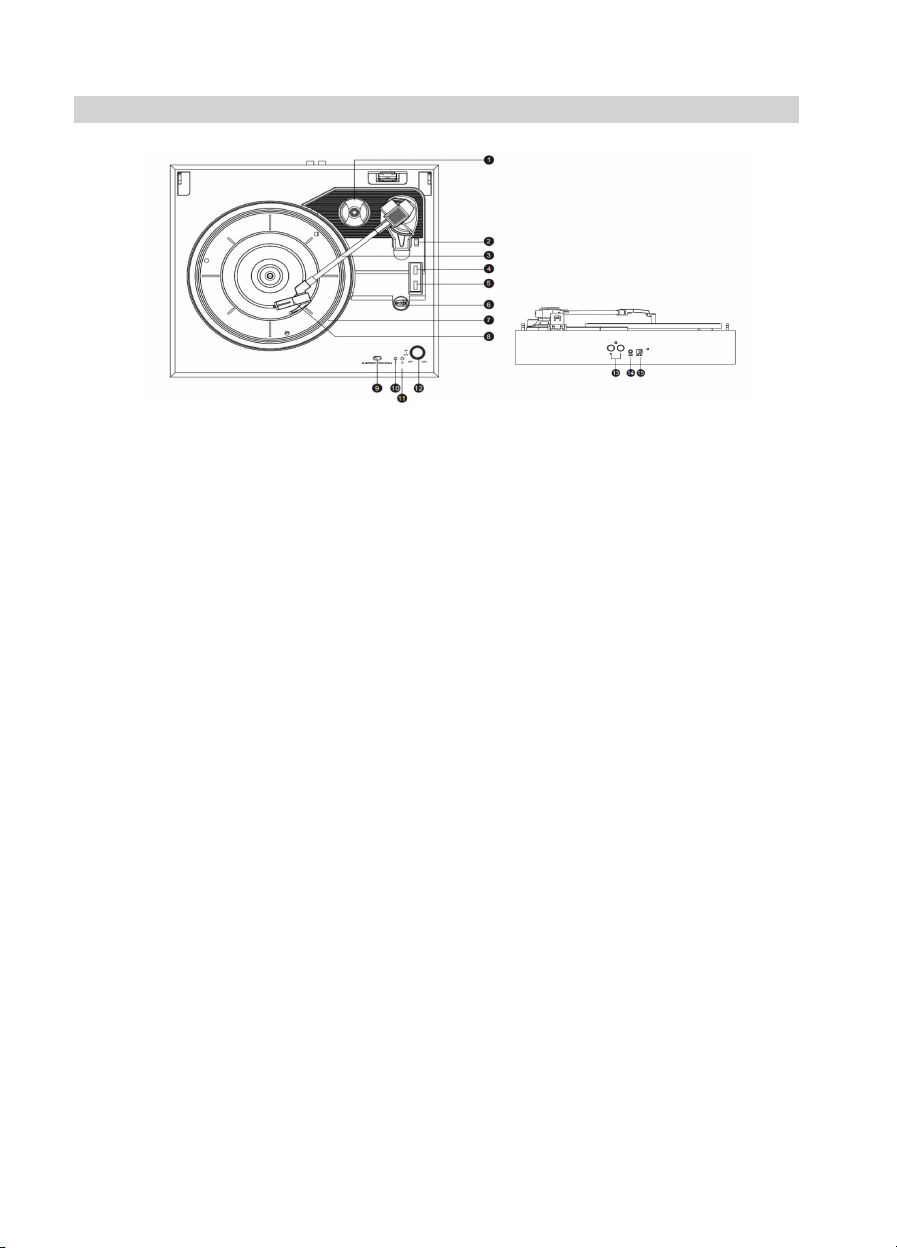
Description
1 45rpm Adaptor
2 Arm Raising lever
3 Tone Arm
4 Stop controller
5 Speed selection (Three speed for choice: 33, 45,
78 rpm)
6 Arm Lock
7 Turntable
8 Armrest
9 BLUETOOTH/TURNTABLE Switch = Select Bluetooth
or Turntable mode
10 LED Bluetooth mode indicator light
11 LED Power indicator light
12 Power ON/OFF = Rotate the knob
Left Rotate = decrease volume
Right Rotate = increase volume
13 RCA OUT R/L = Connect R/L channel to the mixer
or amplier
14 AUX IN
15 DC charging port (DC 5V)
Note:
It is recommended that you clean your recorder with a dry, preferably dry, anti-static cloth or, if necessary,
slightly dampened with water, just after wiping with a dry cloth.
To ensure the best sound quality when listening to your discs, we recommend that the needle that comes with the
product should be changed periodically (approximately every 100 hours).
Dust the needle when necessary with a soft brush dipped in alcohol (brushing from behind the front of the
cartridge).
When carrying your disc player, do not forget to:
- Replace the needle cartridge cap.
- Place the rest clip on the pick-up arm.

9
NOSTALGIC CLASSIC
9
When using electrical units, basic safety precautions should always be followed.
Children under the age of 8 years and persons with reduced physical, sensory or mental capabilities or lack of
experience and knowledge may use this unit only if they have received supervision or instructions on using the unit
safely and understand the risks involved. with the unit.
Unless they are over 8 years old and supervised, children should not clean or maintain the user.
This unit is not a toy.
This unit contains no user-serviceable parts. If the unit and its accessories are not working properly or have been
dropped or damaged, only quali ed personnel should perform repairs. Improper repairs can put the user at risk and
loss of product warranty
Keep the unit and the USB cable out of the reach of small children.
Keep the unit and the USB cable away from heat or sharp edges that could cause damage.
Keep the unit away from sources of heat, direct moisture from the sun, water or any other liquid.
Keep the USB cable away from any parts of the unit that may become hot during use.
Keep the unit free from dust, lint etc.
Do not immerse the unit in water or any other liquid.
Do not operate the unit with wet hands.
Do not operate the unit if it has been exposed to water, moisture or any other liquid to prevent electric shock,
explosion and / or injury to you and damage to the unit.
Do not leave the unit unattended while connected to another device.
Do not use the unit for anything that is not supplied. Do not use this unit outdoors.
Do not store the unit in direct sunlight or in high humidity conditions.
Do not place objects in any of the openings.
Do not play music at excessive volume levels as damage to your hearing and / or equipment may occur.
It is imperative to disconnect the USB cable after the unit has been used, before being cleaned and during repair.
This unit should be placed on a stable, heat resistant surface.
This unit is for household use only. It should not be used for commercial purposes.
To avoid possible hearing damage, do not listen at high volume levels for long periods of time.
Warning: Keep the unit away from ammable materials.
Battery safety
The battery pack should not be placed near excessive heat sources such as re.
The power terminals must not short-circuit.
Used batteries should be removed from the unit to prevent leaks.
In case of battery leakage, do not allow any liquid to come into contact with the skin or eyes.
Security instructions

All rights reserved, Leadership Copyright
We reserve the right to change technical specications.
Warning: Do not use this product too close to Water, near re and in humid places.
Under risk of electric shock and product breakdown and loss of warranty. Any
repairs must be done by an authorized authorized professional, at the risk of loss of
warranty.
To avoid danger of suffocation, keep the plastic bag that accompanies the product
packaging away from infants and children. Do not use this bag in cots, beds, to store
toys. This bag is not a toy, and should be disposed of properly after unpacking the
product.
This symbol on the product or its packaging indicates that this product should not be
treated as household waste. Instead, it should be disposed of at an electronics pick-
up point closest to your home, applicable to the recycling of electrical and electronic
equipment. By ensuring that this product is disposed of correctly, you will help avoid
potential negative consequences for the environment.
Questo manuale è adatto per i seguenti modelli
1
Indice
Lingue:


