
Gree ME34-44/G Manuale utente

Owner's Manual
Original Instructions
24 Volt Adaptor
Model: ME34-44/G
Thank you for choosing our product.
Please read this Owner’s Manual carefully before operation and
retain it for future reference.
If you have lost the Owner's Manual, please contact the local agent
or visit www.gree.com or send an email to global@cn.gree.com for
the electronic version.
GREE ELECTRIC APPLIANCES, INC. OF ZHUHAI

To Users
Thank you for selecting Gree’s product. Please read this instruction manual
carefully before installing and using the product, so as to master and correctly use the
product. In order to guide you to correctly install and use our product and achieve
expected operating effect, we hereby instruct as below:
(1) This appliance is not intended for use by persons (including children) with
reduced physical, sensory or mental capabilities, or lack of experience and
knowledge, unless they have been given supervision or instruction
concerning use of the appliance by a person responsibility for their safety.
Children should be supervised to ensure that they do not play with the
appliance.
(2) This instruction manual is a universal manual; some functions are only
applicable to particular product. All the illustrations and information in the
instruction manual are only for reference, and control interface should be
subject to actual operation.
(3) In order to make the product better, we will continuously conduct
improvement and innovation. We have the right to make necessary revision
to the product from time to time due to the reason of sales or production,
and reserve the right to revise the contents without further notice.

(4) For personal injury or property loss and damage caused by improper
operation such as improper installation and debugging, unnecessary
maintenance, violation of related national laws and rules and industrial
standard, and violation of this instruction manual, etc., we will bear no
liability.
(5) The 24 Volt Adaptor is the universal component. When indoor unit has
connected with the 24 Volt Adaptor , display status of indoor unit is decided
by the indoor unit. Valid status and invalid status are all belong to normal
status.
(7) The final right to interpret for this instruction manual belongs to Gree
Electric Appliances Inc. of Zhuhai.
(6) The 24 Volt Adaptor is a general model, applicable for several kinds of units.
Some functions of the 24 Volt Adaptor are not available for certain kinds of
units, more details please refer to the owner’s manual of unit. The setting of
such unavailable function will not affect unit’s operation.

Contents
1 Safety Notices (Please be sure to abide ) .......................... 1
2 Notices for Use .................................................................... 2
3 Functions Overview ............................................................. 3
4 Detail Introduction ............................................................... 4
4.1 Interface Function Instruction .................................................. 4
4.2 Button Instruction .................................................................... 6
4.3 Display Instruction ................................................................... 7
4.4 Function Instruction ................................................................. 7
5 Product Installation ........................................................... 14
5.1 Product Dimension ................................................................ 14
5.2 Installation Procedure ........................................................... 15
5.3 Communication Connection .................................................. 16
6 Malfunction Display ........................................................... 20

24 Volt Adaptor
1
1 Safety Notices (Please be sure to abide)
WARNING: If these safety notices are not abided strictly, it may cause
severe damage to the unit or the people.
NOTE: If these safety notices are not abided strictly, it may cause slight or
medium damage to the unit or the people.
This sign indicates that the items operation must be prohibited. Improper
operation may cause severe damage or death to people.
This sign indicates that the items must be observed. Improper operation
may cause damage to people or property.
WARNING!
This product can’t be installed at corrosive, inflammable or explosive
environment or the place with special requirements, such as kitchen. Otherwise,
it will affect the normal operation or shorten the service life of the unit, or even
cause fire hazard or serious injury. As for the above special places, please
adopt special air conditioners with anti-corrosive or anti-explosion function.

24 Volt Adaptor
2
2 Notices for Use
NOTICE
(1) This device use 24VAC for power supply. Do not connect other power to this
device. Otherwise, it may cause fire hazard or damage to the unit.
(2) Before touching the electric components, please be sure the appliance is
disconnected to power.
(3) Never install the appliance in a damp place or allow it to be exposed to direct
sunlight.
(4) Never install the appliance near heat source or a place that may easily get
splashes of water.
(5) Please install the appliance in a place without electromagnetic interference or
dusty particles.
(6) Make sure that the communication wires are connected to the correct ports,
otherwise communication failure will occur and may damage the appliance.
(7) Once wires are connected, use insulative tape to protect the wires from
oxidation and short circuit.
(8) Working conditions for the appliance:
Temperature: -20~+60°C;
Relative humidity: 85%;
Install it indoors and avoid direct sunlight, rain and snow.
(9) Thermostat should be configured for use with a conventional system.
(10) Functions with “*” are optional for indoor units. If a function is not included in an
indoor unit, the adaptor can’t set the function, or setting of this function is invalid
to the indoor unit.
24 Volt Adaptor
3
3 Functions Overview
24 volt adaptor is applicable for Gree split-type unit, cassette unit, duct-type unit,
floor ceiling unit and so on.
Transfer the control signal of 24VAC HVAC Thermostat (such as nest) into the control
signal of Gree split-type unit, cassette unit, duct-type unit, floor ceiling unit and so on to
make the third party 24VAC HVAC Thermostat can control Gree split-type unit, cassette
unit, duct-type unit, floor ceiling unit and so on. The device type should be set as “24 Volt
Adaptor”. As for different type of 24VAC HVAC Thermostat the output 24VAC signal is
different. Please set different interface type for 24 volt adaptor according to the output
signal type of your purchased 24VAC HVAC Thermostat.
NOTE!
The signal of 24VAC HVAC Thermostat is the control command for controlling
compressor, 4-way valve, indoor fan and other loads (set “00” for P01).And
the type of 4-way valve (P02) also needs to be set. Refer to “parameter
setting” for details.
The signal of 24VAC HVAC Thermostat is the control command for setting
cooling, heating, fan and other operation modes (set “01” for P01).

24 Volt Adaptor
4
Please refer to the section of parameter setting for detailed setting operation.
Appearance of 24 volt adaptor is shown as below:
Fig. 3.1 Appearance of 24 volt adaptor
4 Detail Introduction
4.1 Interface Function Instruction
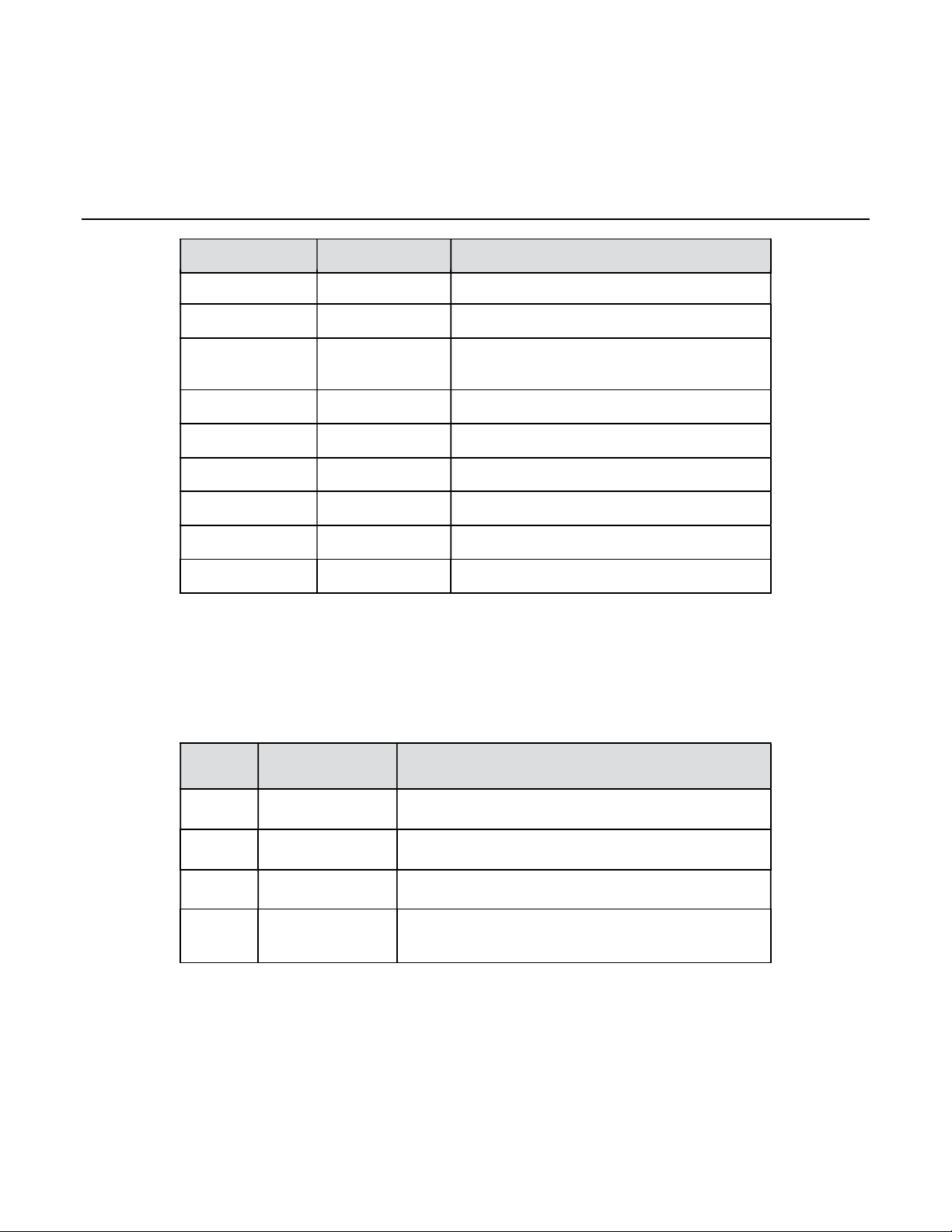
Schematic diagram of interface of main board and interface function instruction
are shown as below:

24 Volt Adaptor
5
Fig.4.1 Schematic diagram of interface’s function
Table 4.1.1 Function instruction of interface of main board
No. Interface Instruction
1 H1, H2 RS485 communication interface,
connecting the indoor unit
2 O/B 4-way valve for heat pumps
3 TR Supply power for adapter (24VAC)
SW4
1
SW3
SW2
SW1
2 3 4 5 6 7 8 9 10 11 12
24 Volt Adaptor
6
No. Interface Instruction
4 R Supply power for thermostat (24VAC)
5 TC Supply power for adapter (Common)
6 C Supply power for thermostat
(Common)
7 G Fan/ indoor fan
8 W Heating/E-heater
9 Y Cooling/compressor
10 G1 Low fan speed
11 G2 Medium fan speed
12 G3 High fan speed
4.2 Button Instruction
Function instruction for buttons are shown as below:
Table 4.2.1 Function instruction for buttons
No. Buttons name Button function
SW1 BACK Return after parameter setting
SW2 DOWN Decrease parameter setting
SW3 UP Increase parameter setting
SW4 ENTER Enter into project parameter setting and
confirm parameter setting value
Indice
Altri manuali Gree Ricevitore


