
Grizzly Pro Video r-THREE Manuale utente

Grizzly Pro Video
r-THREE
Integrated Remote Camera System
Operating Instructions
These instructions cover the r-THREE family of products which
includes the r-ONE, the r-THREE and the r-THREE-LS. Before
operating any of these systems, please read this manual and
keep it for future reference.
©2004, 2005 by Grizzly Pro Video

r3a-x2.0
1
Thank You & Welcome!
We at Grizzly Pro Video would like to say thanks for
choosing our remote camera system. If you have any
questions, check http://www.grizzlypro.com for contact
information or call us toll free at 1-866-remcam1. We truly
appreciate any and all feedback!
The r-THREE family of products includes the r-ONE, the r-
THREE and the r-THREE-LS. Given the scalability of our
product design, in most cases the r-THREE family of products
can be described together. Where differences exist, a note
will be given.
The r-THREE family of Integrated Remote Camera Systems
has been designed for LANC™ cameras (including HD!).
You will get the most benefit from this system if you are
using such cameras. However, we do support Non-LANC
Panasonic cameras, but only with a limited set of features.
The following Operating Instructions have been written for
LANC cameras; if you are using a Panasonic camera, see
Panasonic Support on page 49 for the noted differences.
ENJOY!
Grizzly Pro Staff
LANC™ is a registered trademark of Sony

r3a-x2.0 2
Table of Contents
Introduction ……………………………………….………... 3
Limitations ………………………………….......................... 5
System Components ...……………..……………….……... 6
Options and Accessories …………………… …… 7
r-ONE Cabling ……………………………............................. 8
r-THREE Cabling ……………………………......................... 11
r-THREE Components ……………………………….……..... 15
1. r-THREE Control Head ……………….………...…15
2. r-THREE Interface Box ………………….……..…..25
3. r-THREE Pan/Tilt Head ……………………...….. 28
Basic Operations ………………………..............…………….30
1. r-ONE Example … ……………….………...………...31
2. r-THREE Examples ………………….……..………...32
r-THREE Advanced Operations ………………….……..….. 35
MODES …………………………….……..…..............36
Time Code MODE ……………………….……..…... 37
SYS MODE …………………………………………...38
Table 1 - SYS MODE Menu ……….……..... 39
Table 2 - Curve Configuration …….……....43
Table 3 - Deadband Configuration ……….... 44
CAM MODE ……………………………………..…..46
Table 4 - LANC Camera Commands …….....46
Panasonic Support …………………………………….…….. 49
Helpful Hints ……………………………………………..…..51
Troubleshooting ……………………………………….……..52
INDEX ……………………………………………………..…. 57
FCC Warning …………………………………………..……… 58
Warranty ……………………………………………….…….. 59
NOTES ……………………………………………………….. 60

r3a-x2.0
3
Introduction
With your r-THREE system, you will be able to easily setup and
remotely control up to three cameras.
The key elements of the r-THREE system are:
From a single point (your chair) and a single controller
(in your hands), you have the ability to
odynamically switch to any camera and operate the
camera remotely (e.g. start/stop record, zoom, focus,
exposure, pan & tilt, etc).
omonitor the view for all camera.
oattach the composite video signal from two or all
three cameras to a live switch or purchase the LS
option.
omonitor the status of your cameras (e.g. record
on/off, time codes, battery charge, etc).
oconfigure the system to your needs (e.g. adjust pan,
tilt and zoom speed, configure joystick response, etc.)
osend camera menu commands to your LANC camera
as if you were dialing the menus dial from the back
of your camera. (e.g. exposure control)
In addition, only a very thin, flexible CAT5 cable from each
pan/tilt head to one centralized interface box is needed for
each remote camera. This cable powers the pan/tilt head
and enables the remote control features for the associated
pan/tilt head and camera as well as sending a video feed
back to the operator. Except for the cameras, the power for
the entire system comes from this one centralized point in
the
r
-THRE
E
s
y
stem.

r3a-x2.0 4
We recommend that you first read r-THREE Cabling, r-THREE
Components and then r-THREE Basic Operations as you practice
using the system.
Once you have become familiar running the r-THREE system with
only the Basic Operations, then read over the features described in
the Advanced Operations. Keep in mind that the system, as
shipped, is fully configured to control up to three cameras
remotely, so none of the features described in the Advanced
Operations are required to successfully operate your r-THREE
system.

r3a-x2.0
5
Limitations
♦Cameras cannot exceed 6 pounds, as heavier cameras
will respond poorly and are not within the
specification of the Pan/Tilt Head.
♦The r3a-ptzcable (CAT5) cables can extend up to 600’
from each Pan/Tilt Head to the r-THREE Interface
Box.
♦A 12V power supply is required to run the system. If
battery power is used, we strongly recommend using
a 12V lead acid battery as the Low Battery indicator
will be in-accurate if other types of batteries are used.
♦Not all cameras support the LANC protocol. Not all
LANC cameras support all LANC protocols. All
LANC cameras support zoom, focus, power on/off,
record on/off and time codes. Other features like
auto focus control, and some CAM MODE functions
(see Table 4) are dependent upon what portions of the
LANC protocol the manufacturer of your camera has
chosen to implement.
♦Panasonic cameras do not support the rich set of
LANC commands that can be found on many others
camera. Therefore, you will find that the CAM
MODE features are not supported for Panasonic
cameras. In a nutshell, if you have a Panasonic
camera, you will only be able to control Pan, Tilt,
Zoom, Record On and Record Off remotely. See
Panasonic Support on page 40.
r3a-x2.0 6
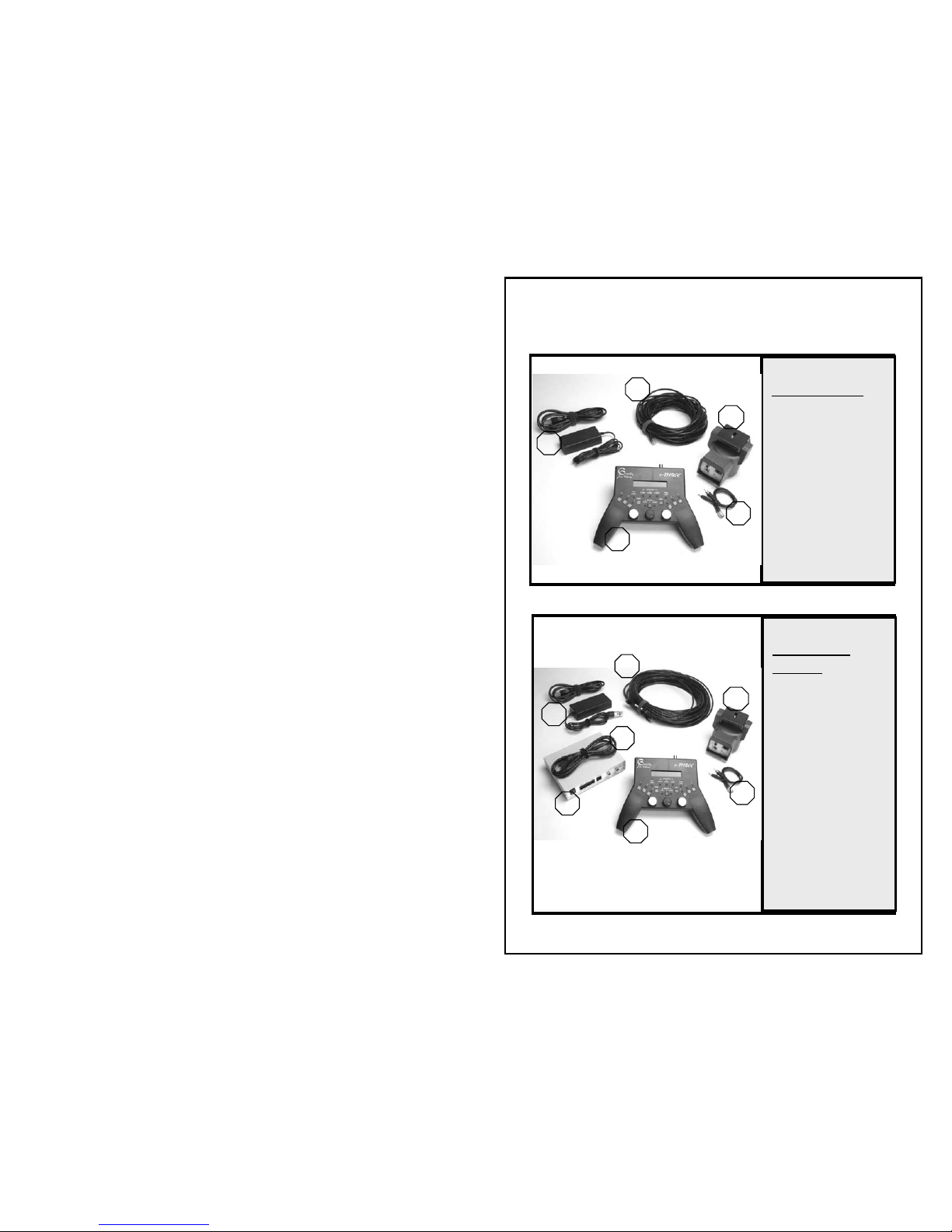
System Components
r-ONE System:
1- r-THREE Control
Head
2- r-THREE Pan/Tilt
Head
3- r-ONE Power
Supply
4-r3a-ptzcam-rca
5-r3a-ptzcable-50
2
3
5
1
4
r-THREE(-LS)
System:
1- r-THREE Control
Head
2- r-THREE Pan/Tilt
Head
3- r-THREE Power
Supply
4- r3a-ptzcam-rca
5- r3a-ptzcable-100
6- r-THREE
Interface Box
7- r3a-intcable
1
2
3
4
5
6
7

r3a-x2.0
7
Options and Accessories
Pan Tilt Head
For additional remote cameras, the following is needed:
Up to three r-THREE Pan Tilt Heads are supported.
Optional Powered Monitor Cable
(for r-THREE and r-THREE-LS only)
If using a monitor with a power specification of 12V at no
more than 0.75A, we highly recommend our powered
monitor cable. The r-THREE Interface Box can provide the
needed power for up to two monitors, if such a cable is used.
We recommend the Marshall 5.6 Pro Monitor, though other
monitors that draw 12V @ no more than 0.75A and take a
composite input should work.
Powered
Monitor
Cable
r3a-moncable
[rca or phone]
r-THREE PanTilt
Head
r3a-ptzcam-rca
r3a-ptzcable-
[50’, 100’ or 300’]
(300’ shown on Jack Reel)

r3a-x2.0 8
r-ONE Cabling
1. Connect the r3a-ptzcable to
the r-THREE Control Head.
This connector is labeled
Interface.
2. Connecting the r-THREE
Pan Tilt Head:
a. Attach the r-THREE
Pan Tilt Head to a
light stand, tripod or
any stable surface.
b. Attach your camera to
the r-THREE Pan Tilt
Head.
c. Connect the other end of the r3a-ptzcable to an r-THREE
Pan Tilt Head. This connector is labeled Interface Box.
d. Connect the camera to its power source.
e. Set the LANC PANASONIC switch on r-THREE Pan Tilt to
•LANC for cameras that support the LANC protocol (e.g.
Sony, Canon).
•PANASONIC for Panasonic cameras

r3a-x2.0
9
3. Connect the r3a-ptzcam-rca
cable to the back of the r-
THREE Pan Tilt Head. This
connector is labeled Camera.
4. Connect the other two ends
of the r3a-ptzcam-rca to your
camera.
a. The small phone plug
should connect to the
LANC connector on your
camera (or to the remote
connector for Panasonic
cameras).
b. The remaining plug
should connect to the Video plug on your camera. On most
cameras this connector is yellow.
5. Connecting the monitor:
a. Connect the monitor
cable that came with
your monitor to the
Preview on the r-THREE
Control Head.
b. Connect the other end of
this cable to your
monitor.
c. Connect the power cable
that came with your monitor to the monitor and power up
your monitor.
Indice


