8
PREPRESS & REGISTRATION
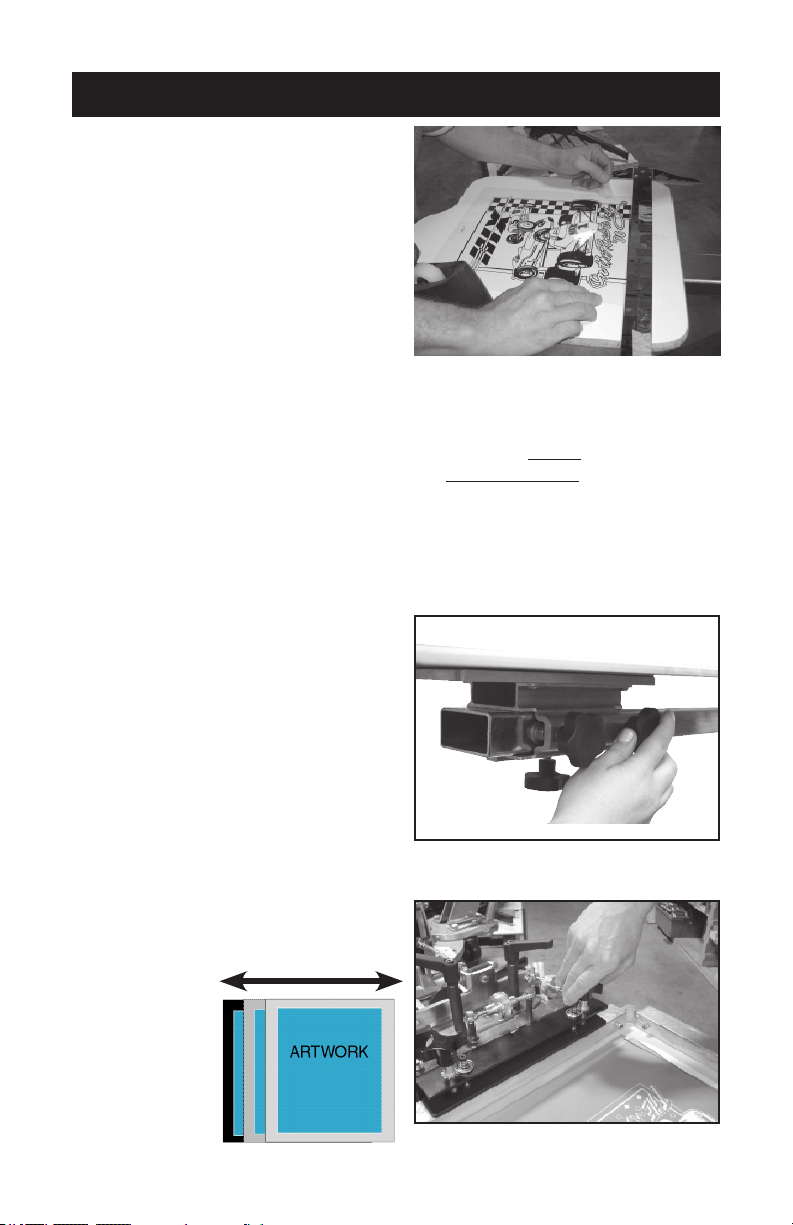
2. Center, level, and tape your art/
lm positive (normally the black
or trap) on one shirt board using
a T-Square and a ruler. Roughly
center or position to desired lo-
cation. Make sure all printable
images lie within the bound-
ary of the shirtboard. (Fig. 16)
Then register your screens to
the film positive (see page 9).
(film positive- Any artwork on
a clear lm that can be used to
expose a screen.
3. Optionally, if you do not have a positive or vellum; you can spray tack
adhesive on the shirt board, then load a shirt or pellon onto the board.
Then “print” the black/darkest color or keyline positive directly onto the
shirt or pellon. Cure, then register your screens to this print (see page
9). (keyline positive- the outline that traps all other color separation
positives. pellon- test print material, so to not ruin usable material.)
NOTE: Slight adjustments to the shirtboard to improve alignment may be
necessary.
4. To adjust the shirtboard: (Fig.
17) Loosen the shirt board and
position so that it lines up with the
screen frame when it is lowered
into the horizontal position.
REMEMBER to tighten the side knob
rst and then the bottom/larger knob.
5. Lower the screen onto the shirt
board with the taped artwork.
6. Loosen the screen clamps on back
clamp models or angled back
knob on side clamp presses and
center the screens side to side if
needed.
Fig. 16
Fig. 17
Fig. 18
Note: Keep
in mind you
still want the
screen to fit
tight against
the back of the
screen clamps
to improve sup-
port. (Fig. 18)
side to side