
honor P30 Manuale utente

ELE-L09
ELE-L29
Quick Start Guide
Snabbstartguide
Kort startvejledning
Hurtigveiledning
Aloitusopas
Instrukcja obsługi
Trumpasis gidas
Īsā pamācība
Lühijuhend
Οδηγός γρήγορης έναρξης
Stručný návod k obsluze
Príručka so stručným návodom
Schnellstartanleitung
Priročnik za hiter začetek
Gyorsútmutató
Vodič za brzi početak
Ghid de pornire rapidă
Кратко ръководство
Кратко упатство
Kratko uputstvo
Краткое руководство пользователя
Akıllı Telefon Hızlı Kullanım Kılavuzu
Короткий посібник
P30P30


Contents
English............................................................................1
Svenska.........................................................................11
Dansk........................................................................... 20
Norsk ...........................................................................29
Suomi........................................................................... 38
Polski............................................................................ 46
Lietuvių ........................................................................56
Latviešu ....................................................................... 65
Eesti..............................................................................74
Ελληνικά...................................................................... 82
Čeština..........................................................................94
Slovenčina.................................................................. 104
Deutsch.......................................................................113
Slovenščina.................................................................124
Magyar....................................................................... 133
Hrvatski...................................................................... 143
Română...................................................................... 152
Български.................................................................. 162
Македонски...............................................................173
Srpski..........................................................................183
Русский ......................................................................192
Українська..................................................................203
Türkçe.........................................................................212
i

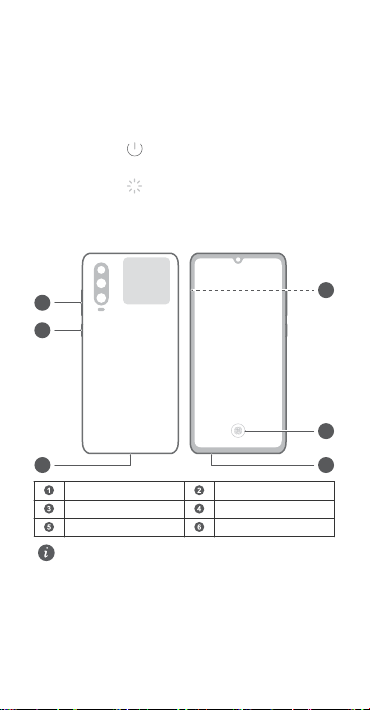
Know Your Device
Before using the device, familiarize yourself with its basic
operations.
lTo power on your device, press and hold the power button
until the screen turns on.
lTo power off your device, press and hold the power button,
and then touch .
lTo restart your device, press and hold the power button,
and then touch .
lPress and hold the power button for 10 or more seconds to
forcibly restart your device.
NFC
4
1
2
6
5
3
Volume button Power button
Type-C port Headset jack
In-screen ngerprint Card slot
lPlease keep the NFC area close to other devices or
objects while using the NFC function.
lCheck out the pre-installed Tips app and master all the
great features on your device.
English
1
Getting Started
lDo not insert or remove the SIM card when your device
is powered on.
lEnsure that the card is correctly aligned and that the
card tray is level when you insert it into your device.
lBe careful not to scratch your device or hurt yourself
when using the eject pin.
lStore the eject pin out of the reach of children to
prevent accidental swallowing or injury.
lDo not use cut or modied SIM or NM cards (nano
memory cards) with your device as these may not be
recognized and could damage the card tray (slot).
lIf your SIM card does not match your device, please
contact your carrier.
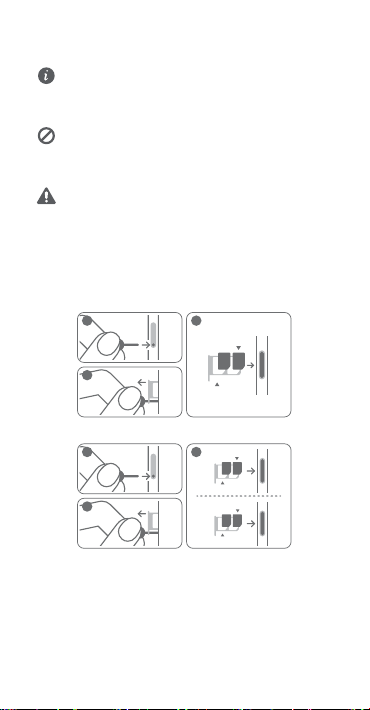
Follow the instructions in the following gures to set up your
device. Please use the eject pin included.
Single-SIM:
3
nano-SIM 1
NM Card
2
1
Dual-SIM:
3
2
1
nano-SIM 1
nano-SIM 2
NM Card
nano-SIM 1
2

Dual SIM Card Management
(dual-SIM devices only)
Your device supports dual card dual standby. Under Settings >
Wireless & networks > Dual SIM settings, select the default
mobile data card and calling card as needed.
Dual 4G
lIf both of your SIM cards support 4G services, when one of
them is active on a 4G voice call, you will be prompted to
handle any new call to the other SIM card. Answering the
new call will automatically end the active call.
lThe default mobile data SIM card can still be used for
Internet surng on a 4G network when the other card is on
a 4G voice call.
lSome of the aforementioned features may be
unavailable in certain areas due to network
interference.
l4G voice services require the support of your carrier's
network and the deployment of relevant services.
Contact your carrier to activate 4G services.
lIf this guide is inconsistent with the description on the
ofcial website, the latter prevails.
3

For More Information
If you encounter any problems while using your device, you
can obtain help from the following resources:
lVisit http://consumer.huawei.com/en to view device
information, frequently asked questions and other
information.
lVisit http://consumer.huawei.com/en/support for the most
up-to-date contact information for your country or region.
lYou can nd service hotlines, retailer addresses, service
policies and more information for your local region in
HiCare.
Go to Settings and touch System > About phone > Legal to
view legal information for your product.
Go to Settings and touch System > About phone > Legal >
Safety information to view safety information for your
product.
Go to Settings and touch System > About phone >
Authentication info to view regulatory information for your
product.
Go to Settings and touch System > Certication logos to
view more information on certication logos for your product.
All pictures and illustrations in this guide, including but
not limited to the device color, size, and display content,
are for your reference only. The actual device may vary.
Nothing in this guide constitutes a warranty of any kind,
express or implied.
4

Safety Information
Please read all of the safety information carefully before using your device
to ensure its safe and proper operation and to learn how to dispose of your
device properly.
Operation and safety
l To prevent possible hearing damage, do not listen at
high volume levels for long periods.
lUsing an unapproved or incompatible power adapter, charger, or
battery may damage your device, shorten its lifespan, or cause a re,
explosion, or other hazards.
lIdeal operating temperatures are 0 °C to 35 °C. Ideal storage
temperatures are -20 °C to +45 °C.
lPacemaker manufacturers recommend that a minimum distance of 15
cm be maintained between a device and a pacemaker to prevent
potential interference with the pacemaker. If using a pacemaker, hold
the device on the side opposite the pacemaker and do not carry the
device in your front pocket.
lKeep the device and the battery away from re, excessive heat and
direct sunlight. Do not place them on or in heating devices, such as
microwave ovens, water heaters, stoves or radiators.
lAdhere to local laws and regulations while using the device. To reduce
the risk of accidents, do not use your wireless device while driving. If
you must make or answer a call, stop your vehicle at a safe location
rst.
lWhile ying in an aircraft or immediately before boarding, only use your
device according to instructions provided. Use of a wireless device in an
aircraft may disrupt wireless networks, present a hazard to aircraft
operation, or be illegal.
lTo prevent damage to your device's parts or internal circuits, do not use
it in dusty, smoky, damp, or dirty environments or near magnetic elds.
lWhen charging the device, make sure the power adapter is plugged
into a socket near the devices and is easily accessible.
lUnplug the charger from electrical outlets and the device when not in
use.
lDo not use, store or transport the device where ammables or
explosives are stored (in a gas station, oil depot, or chemical plant, for
example). Using your device in these environments increases the risk of
explosion or re.
lDispose of this device, the battery, and accessories according to local
regulations. They should not be disposed of in normal household waste.
Improper battery use may lead to re, explosion, or other hazards.
lPlease consult your doctor and the device manufacturer to determine if
operation of your phone may interfere with the operation of your
medical device.
5

lAdhere to any rules or regulations set forth by hospitals and health care
facilities.
lThis device contains a built-in battery. Do not attempt to replace the
battery by yourself. Otherwise, the device may not run properly or it
may damage the battery. For your personal safety and to ensure that
your device runs properly, you are strongly advised to contact a Huawei
authorized service center for a replacement.
Potentially Explosive Atmosphere
Power off your device in any area with a potentially explosive atmosphere,
and comply with all signs and instructions. Areas that may have potentially
explosive atmospheres include the areas where you would normally be
advised to turn off your vehicle engine. Triggering of sparks in such areas
could cause an explosion or a re, resulting in bodily injuries or even
deaths. Do not power on your device at refueling points such as service
stations. Comply with restrictions on the use of radio equipment in fuel
depots, storage, and distribution areas, and chemical plants. In addition,
adhere to restrictions in areas where blasting operations are in progress.
Before using the device, watch out for areas that have potentially explosive
atmospheres that are often, but not always, clearly marked. Such locations
include areas below the deck on boats, chemical transfer or storage
facilities, and areas where the air contains chemicals or particles such as
grain, dust, or metal powders. Ask the manufacturers of vehicles using
liqueed petroleum gas (such as propane or butane) whether this device
can be safely used in their vicinity.
Disposal and recycling information
The crossed-out wheeled-bin symbol on your product, battery, literature or
packaging reminds you that all electronic products and batteries must be
taken to separate waste collection points at the end of their working lives;
they must not be disposed of in the normal waste stream with household
garbage. It is the responsibility of the user to dispose of the equipment
using a designated collection point or service for separate recycling of
waste electrical and electronic equipment (WEEE) and batteries according
to local laws.
Proper collection and recycling of your equipment helps ensure electrical
and electronic equipment (EEE) waste is recycled in a manner that
conserves valuable materials and protects human health and the
environment, improper handling, accidental breakage, damage, and/or
improper recycling at the end of its life may be harmful for health and
environment. For more information about where and how to drop off your
EEE waste, please contact your local authorities, retailer or household
waste disposal service or visit the website http://consumer.huawei.com/en/.
Reduction of hazardous substances
This device and its electrical accessories are compliant with local applicable
rules on the restriction of the use of certain hazardous substances in
electrical and electronic equipment, such as EU REACH, RoHS and Batteries
6
Questo manuale è adatto per i seguenti modelli
2
Indice
Lingue:
Altri manuali honor Telefono cellulare

honor
honor X6 5G Manuale utente

honor
honor TFY-LX1 Manuale utente

honor
honor HEY-W09 Manuale utente

honor
honor FRD-L24 Manuale utente

honor
honor 3C Lite Manuale utente

honor
honor Bee2 Manuale utente

honor
honor 90 Lite Manuale utente

honor
honor LLD-L31 Manuale utente

honor
honor ALI-NX1 Manuale utente

honor
honor DUA-L22 Manuale utente

honor
honor View 10 Manuale utente

honor
honor X6 Manuale utente

honor
honor RBN-NX3 Manuale utente

honor
honor View 20 Manuale utente

honor
honor STF-L09 Manuale utente

honor
honor RMO-NX3 Manuale utente

honor
honor Magic V2 Manuale utente

honor
honor FRI-NX9 Manuale utente

honor
honor 50 Lite Manuale utente

honor
honor X9 5G Manuale utente


