
HumanTechnik earis xs Manuale utente

ES
Instrucciones de servicio
Página 23
EN
User manual
Page 2

2 Deutsch
Important safety notices ..........................................................................3
Safety notes on the lithium-polymer rechargeable battery ........................4
Introduction .............................................................................................4
Contents of package ...............................................................................5
Product overview.....................................................................................6
Connecting the transmitter to an audio source.........................................9
Connecting the transmitter to digital-out (S/PDIF / Toslink).......................9
Connecting the transmitter to RCA sockets ...........................................10
Connecting the transmitter to a headphone jack socket ........................10
Connecting the transmitter to a SCART socket......................................11
Powering the transmitter........................................................................12
Using the rechargeable battery ..............................................................12
Earbuds.................................................................................................13
Using “earis XS” ....................................................................................14
Using the “earis XS” underchin receiver .................................................14
Audio source selection ..........................................................................15
Adjusting the volume .............................................................................15
Adjusting the balance ............................................................................15
Set listening profile for sound improvement............................................16
Pairing transmitter and receiver..............................................................18
Important notes .....................................................................................18
Warranty................................................................................................19
Environmental information / disposal......................................................19
Troubleshooting.....................................................................................20
Specifications ........................................................................................22
Index Page

English 3
Important safety notices
Before setting up and using the device, please read these instructions care-
fully and thoroughly.
• Keep this user manual in a safe place so that it can be accessed by
other users at all times.
• Do not use the device if it is obviously damaged.
• Only use the device in locations where 2.4 GHz radio technology is
permitted.
• The device and in particular the power supply unit are only intended
for operation in dry indoor areas. Operation is only guaranteed within
room temperatures of 5°C to 35 °C.
• Keep the product, packaging and accessories away from children
and pets to avoid accidents.
• Always handle the device and accessories carefully and do not place
them in dirty or dusty areas.
• Clean the transmitter and receiver regularly. For hygienic reasons,
also clean the soft silicone earbuds regularly. Replace the earbuds for
the ones available as accessories.
• Paints and furniture polishes can chemically attack the transmitter‘s
rubber feet and cause surface damage to your furniture.
• Use only the provided power supply unit to power the transmitter.
• In the event of several days‘ absence, we recommend unplugging the
power supply unit from the mains electricity socket.
Attention:
Your receiver can be set to a very high volume. To protect your own hear-
ing or the hearing of people with regular hearing capabilities, especially
children, from damage caused by excessive volume, please observe the
following instructions:
1. Set the receiver to a low volume level before using it.
2. During use, adjust the volume to a level that is comfortable for you.
3. If you have a pacemaker, please check with your physician or the man-
ufacturer of the pacemaker before using this product.
4. If you use other medical devices, use the device only in accordance
with the safety instructions of your physician or the manufacturer.

4 English
Safety notes on the lithium-ions rechargeable
battery
The battery used in the “earis XS” is a lithium-ions battery manufactured in
accordance with the latest standards and safety regulations. Misuse or im-
proper treatment can damage the battery, in which case the Humantechnik
Group assumes no liability.
In extreme cases there is a risk of:
- development of heat
- development of fire
- explosion
- smoke or gas emission
• Do not expose the battery to temperatures above 70°C, e.g. by sun-
light or throwing it into fire.
• Do not expose the battery to water and condensation.
• Do not short-circuit the battery.
• Do not disassemble or deform the battery.
• Store the device / battery in a cool and dry place at room tempera-
ture.
• Only use the chargers provided for the battery.
• When not in use for a prolonged time, recharge the battery in the unit
regularly (every 6 months for approx. 1 hour).
• Charge the battery only at an ambient temperature of 10 °C to 40 °C.
• If the device is obviously defective, do not recharge the battery.
• Refer to the information regarding warranty and disposal.
Introduction
This digital wireless headset uses the latest digital radio technology and
enables sound amplification.
Enjoy crystal clear stereo- and TV sound anywhere in the house.
This digital wireless headset is intended to be used as assistive listening
that can be used help the hearing impared.
Please read this user manual carefully in order to set up the device correctly
and to become familiar with all the possibilities it offers.
English 5
Contents of package
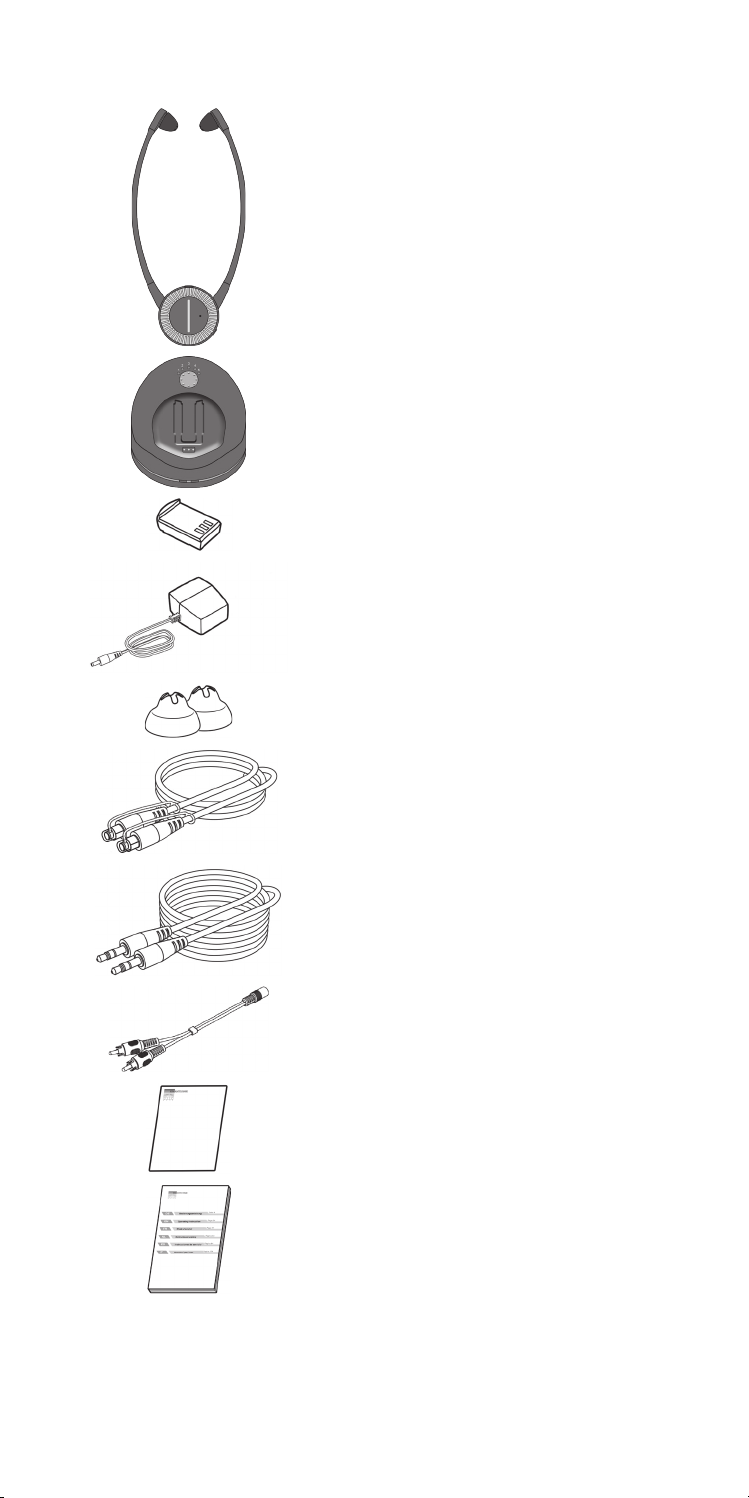
1 “earis XS” receiver
1 “earis XS” transmitter
2 rechargeable batteries
1 power supply
1 pair of small earbuds
1 Toslink optical (digital) cable
1 audio connection lead with 3.5 mm
stereo jack plugs
1 audio-adapter RCA to 3.5mm stereo jack
1 quick guide
1 user manual
6 English
Product overview
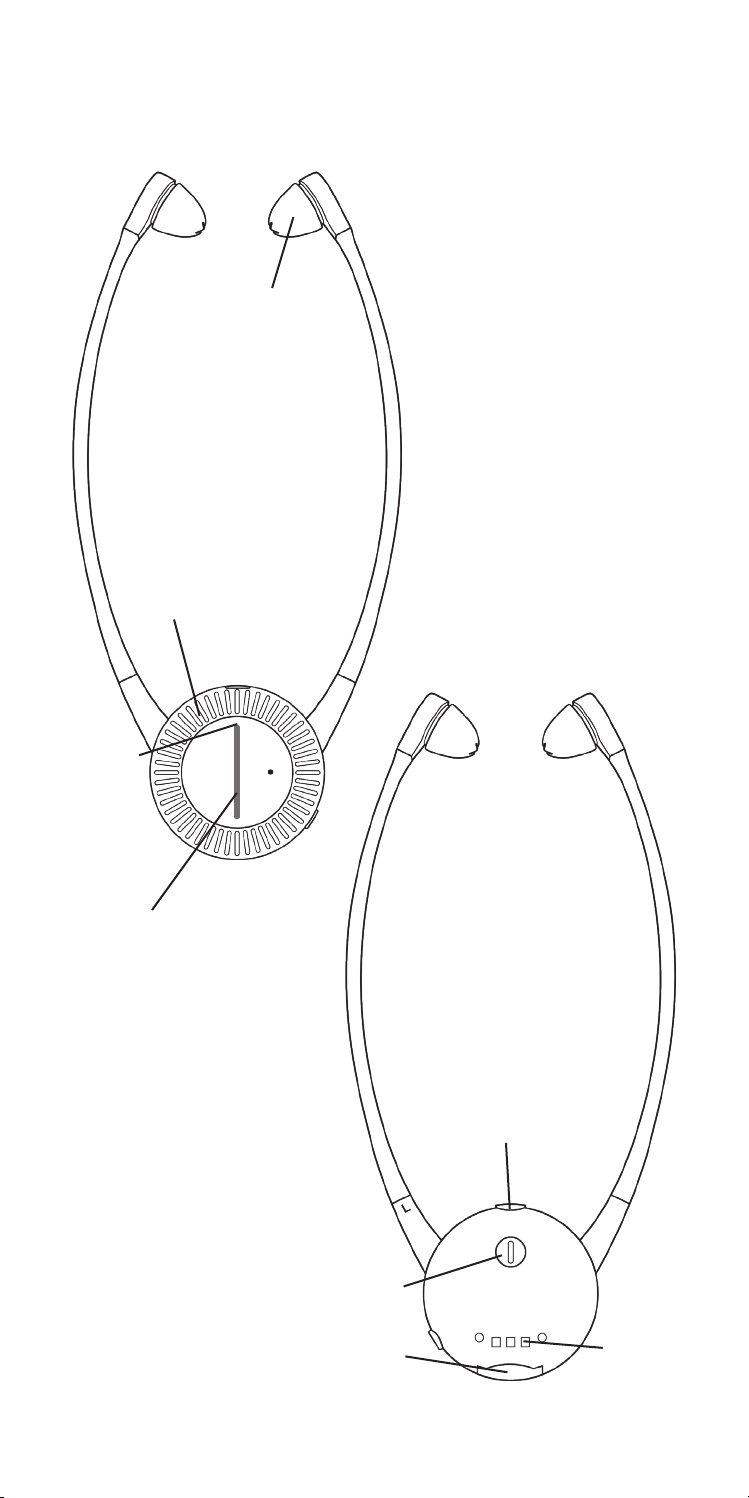
Overview: Underchin receiver
1. Volume control
2. Speaker earbuds
3. Battery compartment
4. Status-LED / function button
5. Balance adjuster
6. Volume indicator
7. Charging contacts
8. Battery status
7
6
2
1
4
5
3
8
English 7
Overview: Transmitter
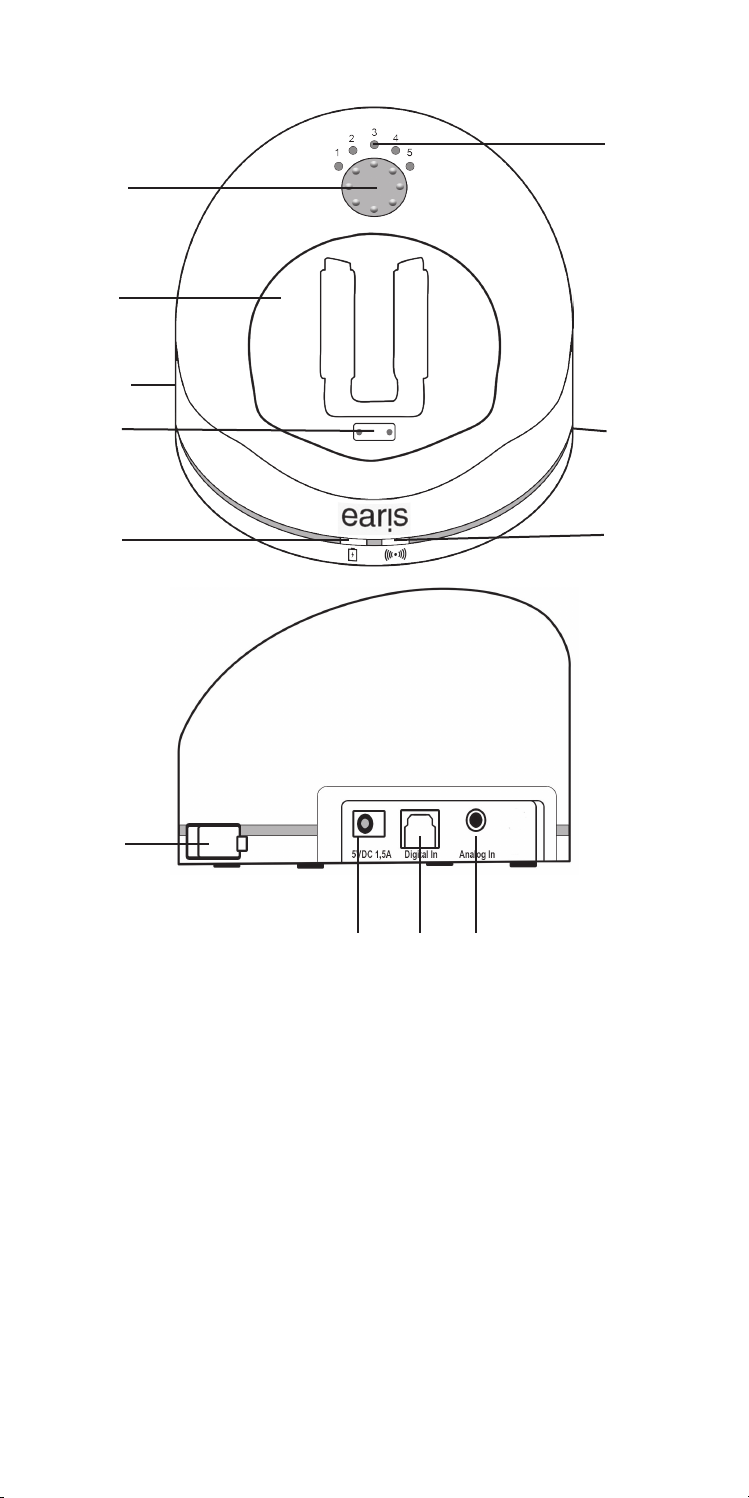
1. Charging dock
2. Status LED for receiver in charging dock
3. Charging compartment for spare rechargeable battery
4. Status LED for spare rechargeable battery
5. Charging contacts with support magnet
6. Status LED
7. Tone control / pairing button
8. Tone profile setting indicator
9. Connection socket for power supply
10. Optical-digital Toslink connector
11. Jack socket for connecting analogue audio sources (blue)
12. Analogue / digital selector switch
12
7
5
2
4
6
8
3
911
10
1

8 English
Overview: Status LED on transmitter
Status LED Transmitter.....
dark ... is switched off
white light ... is switched on and transmitting
white light flashes fast ... is in pairing mode
flashes 4x in white ....has no PCM signal at digital input
white light flashes 4x slow Connection to receiver lost
Overview: Status LED on receiver
Status LED Receiver.....
dark ... is switched off
constant green light ... is switched on and receiving
red LED on top ....Battery is empty soon
volume indicator bar flashes
rapidly ... is in pairing mode
Overview of audible alerts
Audible alert Signification
during use: 1 beep
every 30 seconds battery is almost depleted
when altering the volume:
1 beep maximum volume reached
when altering the volume:
2 beeps minimum volume reached
during use: 5 beep
every 20 seconds receiver is out of transmission range of
the transmitter

English 9
Connecting the transmitter to an audio source
Turn off the audio source before connecting the transmitter. Place the
transmitter near the audio source. Do not place the transmitter in the imme-
diate vicinity of thick reinforced concrete walls and other radio-transmitting
devices, as the transmission range could be reduced.
You have several possibilities to connect “earis XS” to a sound source (e.g.
TV, stereo set etc.).
Check the options of connection of your audio source.
Connecting options:
DIGITAL AUDIO OUT
-S/PDIF digital output (Toslink)
AUDIO OUT
LR
- RCA sockets
- Headphone jack
))
)
)
- Loudspeaker
AV
- SCART socket
Connecting the transmitter to digital-out
(S/PDIF / Toslink)
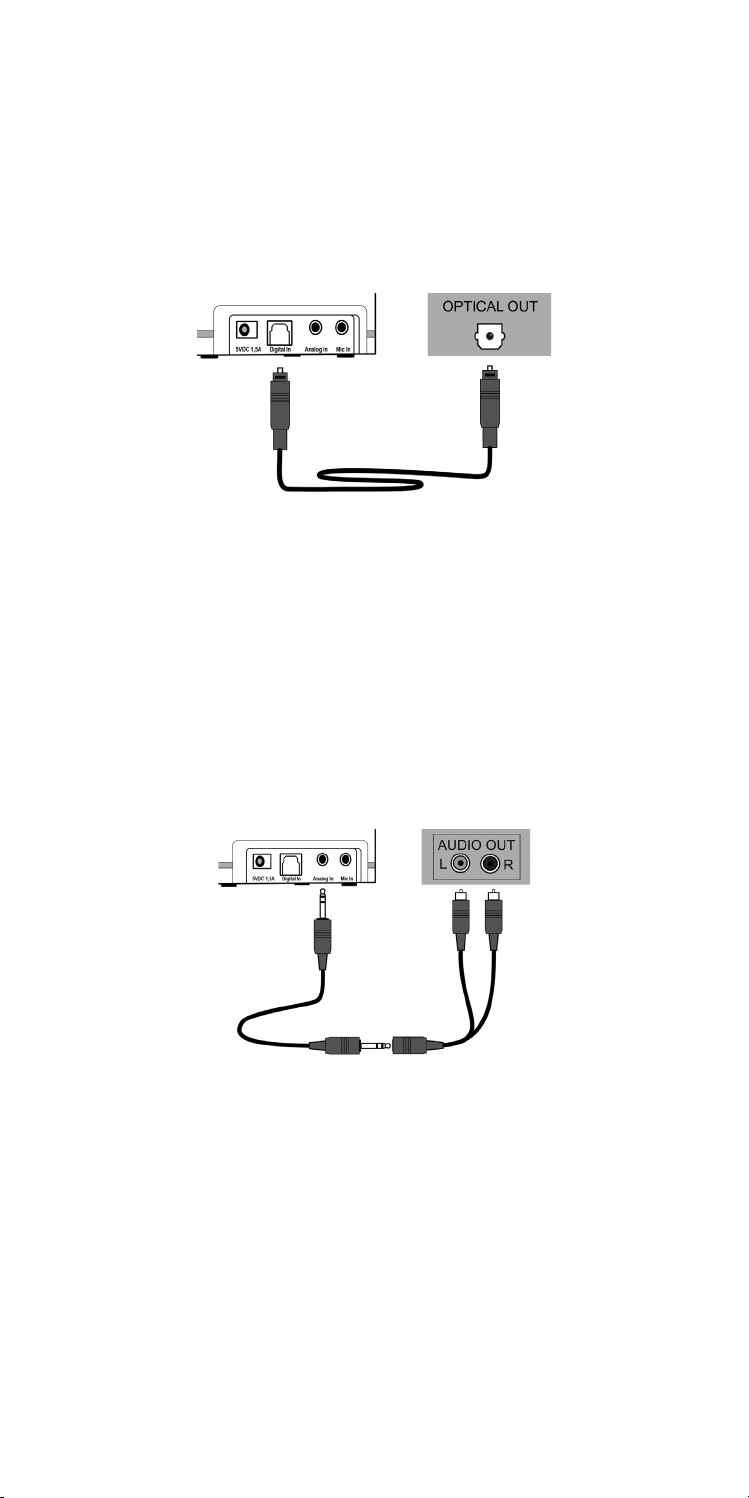
For best audio quality, connect the transmitter to your audio source using
the Toslink optical (digital) cable.
Please note that the digital input can only transmit audio sources in PCM /
Stereo standard.
Refer to the manual of the connected audio source to learn how to set up
the digital output.
10 English
Audio playback is not possible if a combined digital signal (bitstream) is
used. The status LED on the transmitter will flash twice, with a pause in
between, if there is no usable digital signal input.
Remove the protective caps on the two Toslink connectors on the cable.
Plug the Toslink optical cable into the transmitter‘s Digital In connector and
connect it to your audio source. The analog/digital switch on the transmit-
ter‘s left side must be set to “Digital”.
Connecting the transmitter to RCA sockets
Good audio quality can be achieved by connecting the transmitter to your
audio source using the analogue audio connection lead.
Plug the supplied audio connection cable into the transmitter‘s blue “An-
alog In” socket. Connect the RCA adapter cable audio connection lead.
Plug the RCA connectors into the RCA sockets of your audio source. Make
sure that the white connector is connected to the white socket of the audio
source and the red connector is connected to the red socket of the audio
source.
The analogue/digital switch on the transmitter‘s left side must be set to
“Analog”
Connecting the transmitter to a headphone jack
socket
Plug the supplied audio connection lead into the transmitter‘s blue “Analog
In” socket. Plug the audio connection lead into the headphone jack of your
audio source.
Set the volume of your sound source to a medium level, where possible.
There are TV sets that mute the speakers when devices are connected to
their headphone jack. On some television sets, this automatic muting can
be turned off via the TV settings menu. Alternatively, use another option for
Questo manuale è adatto per i seguenti modelli
1
Indice
Lingue:
Altri manuali HumanTechnik Cuffia

HumanTechnik
HumanTechnik PL-100 Manuale utente

HumanTechnik
HumanTechnik CM-BT2 Manuale utente

HumanTechnik
HumanTechnik Introson 2.4 Manuale utente

HumanTechnik
HumanTechnik CM-BT2 Manuale utente

HumanTechnik
HumanTechnik Swing Manuale utente

HumanTechnik
HumanTechnik Introson 2.4 Manuale utente

HumanTechnik
HumanTechnik Tiviton DAB Manuale utente

HumanTechnik
HumanTechnik cm-BT Manuale utente

HumanTechnik
HumanTechnik Earis Set Manuale utente

HumanTechnik
HumanTechnik SWING IR Manuale utente


