
IFM TCC8 Series Manuale utente
Operating instructions
Temperature transmitter
TCCxxx
80285272 / 00 02 / 2021
UK

2
Contents
1 Preliminary note���������������������������������������������������������������������������������������������������3
1�1 Key to the symbols ����������������������������������������������������������������������������������������3
2 Safety instructions �����������������������������������������������������������������������������������������������3
3 Getting started �����������������������������������������������������������������������������������������������������4
4 Functions and features ����������������������������������������������������������������������������������������4
5 Function���������������������������������������������������������������������������������������������������������������5
5�1 IO-Link �����������������������������������������������������������������������������������������������������������5
5�2 Diagnostic signal �������������������������������������������������������������������������������������������6
5�3 Analogue signal ���������������������������������������������������������������������������������������������6
5�4 Diagnostic function ����������������������������������������������������������������������������������������8
5�4�1 Calibration check function �������������������������������������������������������������������8
5�4�2 Diagnostic messages ���������������������������������������������������������������������������9
5�5 Simulation mode������������������������������������������������������������������������������������������10
5�6 Binary data transmission (BLOB) ���������������������������������������������������������������� 11
6 Installation���������������������������������������������������������������������������������������������������������� 11
6�1 Use in hygienic areas to 3-A������������������������������������������������������������������������ 11
6�2 Use in hygienic areas to EHEDG ����������������������������������������������������������������12
6�3 Units with clamp process connection ���������������������������������������������������������13
6�4 Units with process connection G ½ sealing cone ����������������������������������������14
6�4�1 Flush mount hygienic zero-leak using PEEK gasket ��������������������������14
6�4�2 Flush mount zero-leak using metal-to-metal seal�������������������������������14
6�5 Units for process adaptation via clamping ring��������������������������������������������15
7 Electrical connection������������������������������������������������������������������������������������������16
8 Operating and display elements ������������������������������������������������������������������������17
9 Parameter setting ����������������������������������������������������������������������������������������������17
9�1 Parameters ��������������������������������������������������������������������������������������������������18
9�2 Analysis functions ����������������������������������������������������������������������������������������18
10 Operation���������������������������������������������������������������������������������������������������������19
11 Technical data ��������������������������������������������������������������������������������������������������19
12 Troubleshooting �����������������������������������������������������������������������������������������������19
13 Maintenance, repair and disposal��������������������������������������������������������������������21

3
UK
1 Preliminary note
Technical data, approvals, accessories and further information at www�ifm�com�
1.1 Key to the symbols
►Instruction
> Reaction, result
[…] Designation of keys, buttons or indications
→Cross-reference
Important note
Non-compliance may result in malfunction or interference�
Information
Supplementary note�
2 Safety instructions
• The device described is a subcomponent for integration into a system�
- The manufacturer is responsible for the safety of the system�
- The system manufacturer undertakes to perform a risk assessment and to
create a documentation in accordance with legal and normative requirements
to be provided to the operator and user of the system� This documentation
must contain all necessary information and safety instructions for the operator,
the user and, if applicable, for any service personnel authorised by the
manufacturer of the system�
• Read this document before setting up the product and keep it during the entire
service life�
• The product must be suitable for the corresponding applications and
environmental conditions without any restrictions�
• Only use the product for its intended purpose (→ Functions and features).
• Only use the product for permissible media (→ Technical data).
• If the operating instructions or the technical data are not adhered to, personal
injury and/or damage to property may occur�
14 Factory setting �������������������������������������������������������������������������������������������������21

4
• The manufacturer assumes no liability or warranty for any consequences
caused by tampering with the product or incorrect use by the operator�
• Installation, electrical connection, set-up, operation and maintenance of the
product must be carried out by qualified personnel authorised by the machine
operator�
• Protect units and cables against damage�
3 Getting started
The unit can be used without any further parameter setting with the settings
described under → 14 Factory setting�
If necessary, the factory setting can be changed via the IO-Link interface:
►Connect unit to PC to set the parameters via the IO-Link interface�
►Set the standard unit of measurement�
- [Uni]: °C or °F
►Set the analogue signal�
- [OU2]: I = 4���20 mA or Ineg = 20���4 mA or OFF = output off
- [ASP] and [AEP]: Scaling of the measuring range�
►Configure the analogue signal for the alarm�
- [FOU2]: On = 21�5 mA or OFF = 3�5 mA
►Set the calibration check limit�
- [ccL]: Temperature deviation from which the unit provides a warning�
►Configure the switching logic for the alarm and the warning of the diagnostic
output�
- [P-n]: PnP or nPn
►Activate / deactivate the LED at the head of the unit�
- [LED]: ON = LED is on (green, blue, red) or OFF = LED off or Notification =
LED on for warnings and alarms only
►Finish parameter setting, install (→ 6), connect (→ 8) and set up the unit�
4 Functions and features
The unit detects the medium temperature and provides the measured value via an
analogue and/or a digital signal�

5
UK
The unit features an integrated diagnostic function and a calibration check function
(→ 5.4.1)� The diagnostic messages are provided via an analogue signal or a
switching signal or as a digital communication signal via the IO-Link interface�
The unit has an LED that indicates deviations from normal operation via a colour
change (→ 5.4.2)�
5 Function
• The unit has an IO-Link interface�
• The unit is designed for three-wire operation� The following output signals are
available:
OUT1 (2 options):
- diagnostic signal
- IO-Link signal for temperature measurement and diagnostics
OUT2:
- analogue signal for temperature measurement and diagnostics
5.1 IO-Link
This unit has an IO-Link communication interface which enables direct access to
process and diagnostic data� In addition it is possible to set the parameters of the
unit while it is in operation� Operation of the unit via the IO-Link interface requires
an IO-Link master�
With a PC, suitable IO-Link software and an IO-Link adapter cable communication
is possible while the system is not in operation�
The IODDs necessary for the configuration of the unit, detailed information about
process data structure, diagnostic information, parameter addresses and the
necessary information about the required IO-Link hardware and software can be
found at www�ifm�com�

6
The IO-Link interface provides the following functions:
• Remote parameter setting of the unit�
• Noise immune process value transmission without measured value losses�
• Transmission of the parameter settings to other units of the same type or when
the unit is replaced�
• Simultaneous reading of the two temperature values (measuring element and
reference element), the diagnostic output (calibration check function) and the
device status�
• Paperless logging of parameter sets, process values and diagnostic
information�
5.2 Diagnostic signal
The diagnostic output is only used to provide warnings and alarms (→ data sheet
for the maximum nominal current of the switching output)�
The switching output is closed in normal operation (normally closed)� If the unit
detects a diagnostic case, the output opens�
The switching logic (PnP/nPn) and the calibration check limit (ccL) from which the
output switches can be set�
The diagnostic messages are defined and cannot be changed (→ 12)�
5.3 Analogue signal
The unit converts the measured temperature value into a temperature-proportional
analogue signal�
In addition the analogue output is used for diagnostics (→ 5.4 Diagnostic function)�
The transmission of the measured temperature value is interrupted for alarms
and an analogue signal according to NE43 of 3�5 mA (FOU2 = OFF) or 21�5 mA
(FOU2 = On) is provided� In case of warnings, the analogue signal continues to be
provided�
Depending on the parameter setting (→ 9) the analogue signal for values within
the measuring range is:
4���20 mA with setting [OU2] = I or
20���4 mA with setting [OU2] = Ineg�

7
UK
The measuring range is scalable:
• [ASP] defines at which measured temperature value the analogue signal is 4
mA (OU2 = I) or 20 mA (OU2 = Ineg)�
• [AEP] defines at which measured temperature value the analogue signal is
20 mA (OU2 = I) or 4 mA (OU2 = Ineg)�
Minimum distance between [ASP] and [AEP] = 5 K�
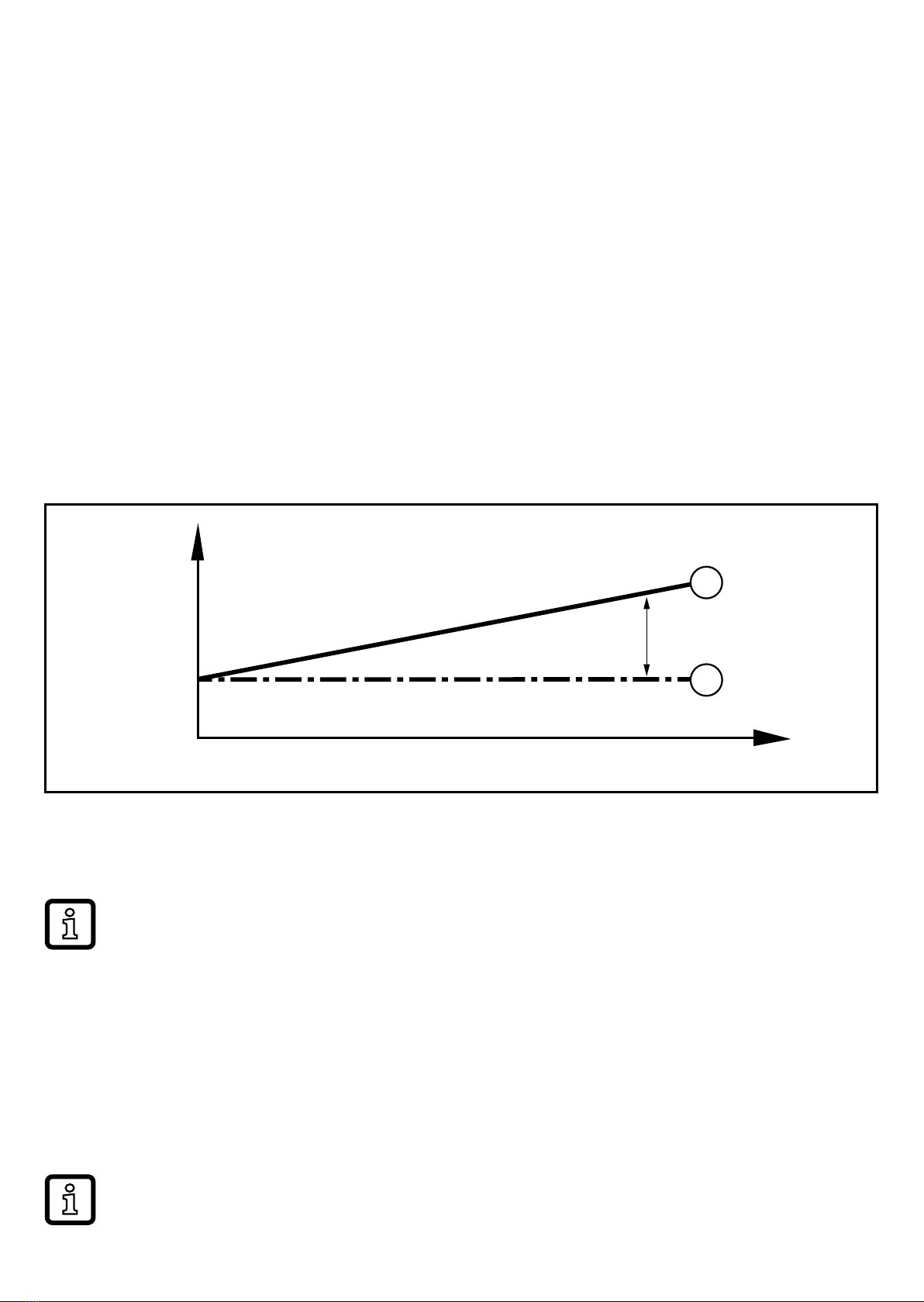
If the measured temperature value is outside the scaled measuring range, the
analogue signal is 20...20.5 mA or 3.8...4 mA (→ Fig.1). When the measured
temperature value continues to increase or decrease, the analogue signal goes to
the value 3�5 mA or 21�5 mA�
160
20
4
3�5
21�5
FOU2 = OFF
FOU2 = On
20�5
3�8
I [mA]
-25 -10 150
MEW
200
cr�OLMAW
-60
cr�UL ASP AEP
T [°C]
1
2
Figure 1: output characteristics analogue output with factory setting
1
Setting [OU2] = I
2
Setting [OU2] = Ineg
MAW = initial value of the measuring range, MEW = final value of the measuring range,
ASP = analogue start point, AEP = analogue end point
cr�UL = below the measuring range, cr�OL = above the measuring range
8
5.4 Diagnostic function
The unit continuously checks the temperature measurement (→ 5.4.1 Calibration
check function) and detects further events� In case of deviations from normal
operation, a diagnostic message is provided (→ 5.4.2)�
5.4.1 Calibration check function
By measuring with two different, thermically coupled sensor elements (measuring
element and reference element) the unit automatically detects temperature
differences during temperature measurement�
The process value is measured by the measuring element and provided via the
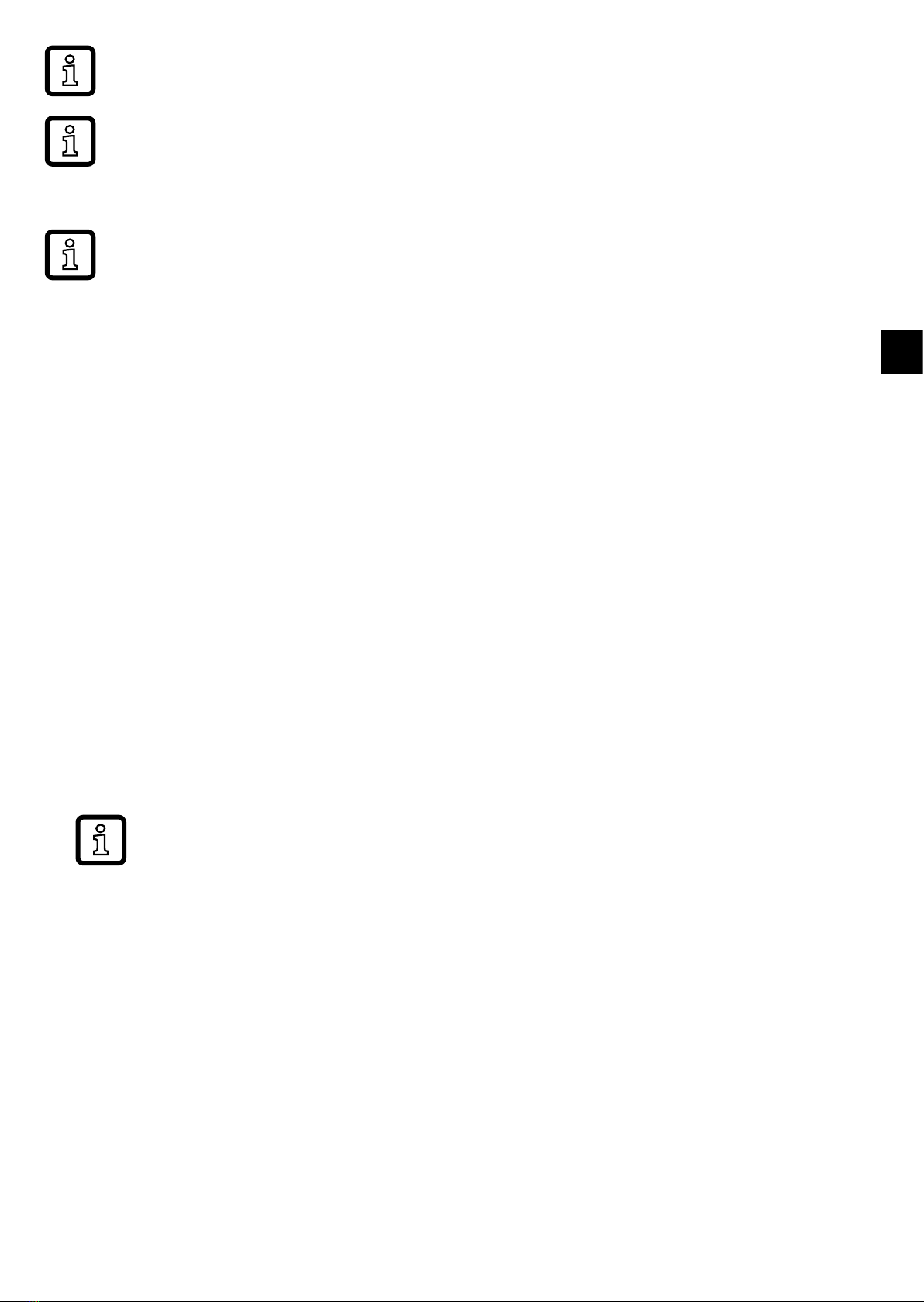
analogue output�The reference value is used for comparison purposes and to
verify the process value� If the temperature difference between the process value
and the reference value exceeds the value set as calibration check limit [ccL], a
warning is triggered: The LED changes to blue and the diagnostic output opens�
t
T [°K]
CCL
2
1
Figure 2: Calibration check function
Example: Measuring element (1) measures 61�05 °C, reference element (2) measures 60 °C�
Setting ccL = 1 K results in a warning�
If a warning is triggered, the LED remains blue, even if the temperature
difference drops below the ccL value again� Corrective measures:
Check whether the sensor is to remain in use in the process or to be
replaced or do as follows:
►Increase the ccL value so that the LED goes back to green�
> The diagnostic output closes�
> The ccL modification is written to the logbook (→ 5.6)�
If the reference element fails, the calibration check function fails as well and
the LED changes to blue�
9
UK
Setting range ccL →Technical data.
Due to the usual manufacturing tolerances a temperature difference of max�
0�1 K can also occur with new sensor elements� This does not affect the
calibration check function�
To ensure that the calibration check function detects no other influences
except the temperature difference between the sensor elements, an internal
delay time of 10 minutes has been set�
5.4.2 Diagnostic messages
Diagnostic messages are output as follows:
• LED signal:
The LED shows all warnings and alarms by means of a colour change
(blue = warning; red = alarm)�
• Diagnostic signal:The diagnostic output provides all warnings and alarms via a
switching signal�
• Analogue signal:The analogue output only provides alarms�In case of an alarm
the analogue signal goes to 3�5 mA or 21�5 mA�
• IO-Link:If the IO-Link interface is used, all diagnostic messages are displayed
via the connected software or provided to the higher-level controller� In
addition, a diagnostic bit is provided that corresponds to the behaviour of the
physical switching output�
List of all diagnostic messages readable via IO-Link → IO Device
Description (IODD) at www�ifm�com�

10
Diagnostics LED Diagnostic
output
Analogue
output
normal oper-
ation
• temperature deviation between
measuring element and
reference element ≤ calibration
check limit (ccL)
• no error
green 4���20 mA1)
warning
• temperature deviation between
measuring element and
reference element > calibration
check limit (ccL)
• failure reference element
blue 4���20 mA1)
alarm
• failure measuring element or
failure of both sensor elements
other errors → 12
red 21�5 mA2)
Table 1: diagnostic function
1) For [OU2] = Ineg: 20���4 mA
2) For [FOU2] = OFF: 3�5 mA
Warnings are provided with a delay time of 10 minutes� Alarms are provided
immediately�
5.5 Simulation mode
Normal operation and diagnostic function (warnings and alarms) can be simulated
based on freely selected parameters using this function�
►Set the requested duration of the simulation with [S�Tim]�
►Set a simulation value for the measuring element or select the simulation of a
fault of the measuring element with [TEMP]�
►Set a simulation value for the reference element or select the simulation of a
fault of the reference element with [REF_TEMP]�
►Write values to the unit�
►Click on [Start simulation]�
> The simulation runs for the duration set under [S�Tim]�
►Click on [Stop simulation] to abort the simulation�
Questo manuale è adatto per i seguenti modelli
2
Indice
Altri manuali IFM Trasmettitore


