
iHome iKN105 Manuale utente

K2
instruction manual
Model: iKN105
CHARGE
K-CELL
BEFORE
USE
Questions?
Contact Customer Service at 1-800-288-2792
dual charging stereo alarm clock with
speakerphone and removable battery

1
K2
Introduction
Thank you for purchasing the iHome K2. This product is designed to provide high quality
wireless sound for your iPad, iPhone, iPod, computer, tablet or other Bluetooth audio device
and mobile charging on the go with the included removable K-Cell rechargeable battery.
This unit features NFC (Near Field Communication) technology which allows you to wirelessly connect your
NFC–enabled device to instantly ‘pair and play’. See your device’s user manual for details on how to
interact with NFC devices. If your Bluetooth device does not support NFC, you can pair it manually with this
unit.
This instruction booklet explains the basic operation and care of the unit. Please read it carefully and keep
for future reference.
Maintenance
• Place the unit on a level surface away from sources of direct sunlight or excessive heat.
• Protect your furniture when placing your unit on a natural wood and lacquered finish. A cloth or other
protective material should be placed between it and the furniture.
• Oil or lotion on fingers can interfere with proper touch-sensitive button function. Wipe touch-sensitive
button panel with soft cloth to clean buttons and ensure proper operation.
• Clean your unit with a soft cloth moistened only with mild soap and water. Stronger cleaning agents,
such as thinner or similar materials can damage the surface of the unit.
Long-term Storage of Your Product
• Store in a cool, dry place.
• K-Cell should be charged before storing.
• If stored for a long period of time, K-Cell may be unresponsive until charged for a number of hours
(depending on discharge level)
• Do not store for more than a year without charging as this can permanently harm the battery.
• After long term storage, if unit is unresponsive after charging, RESET unit while connected to AC and
recharge K-Cell.

2
K2
GENERAL BATTERY PRECAUTIONS
• Never use or charge a battery if it appears to be leaking, discolored, deformed, or in any way
abnormal.
• Never disassemble the unit or attempt to remove battery as that could cause leakage of alkaline solution
or other electrolytic substance.
• Always confirm that the temperature is 5°C - 35° C (41° - 95° Fahrenheit) before you charge the
battery. Leakage or deterioration of the battery may occur if this warning is not heeded.
• Never expose a battery to any liquid.
• Never expose a battery to excessive heat such as direct sunlight or fire. Never use a battery pack in
an unventilated vehicle where excessive internal temperatures may be encountered.
• Always keep batteries out of the reach of infants and small children.

3
K2
Table of Contents
Included .........................................................................................................................................4
Meet Your K2 ..................................................................................................................................5
Display...........................................................................................................................................6
Setting Up the Unit............................................................................................................................6
Charging
Charging the K-Cell via AC Adaptor/Battery Level Meter....................................................................7
Charging the K-Cell via USB..........................................................................................................8
Charging Devices Using the K-Cell/Charging Devices Using the USB Charging Port................................9
Setting The Clock ...........................................................................................................................10
Setting and Using the Alarms ....................................................................................................... 10-11
Previewing the Alarm and Turning the Alarm On/Off ............................................................................11
Using the FM Radio/Setting and Using FM Presets ...............................................................................12
Using FM Radio in Other Countries....................................................................................................13
Snooze/Dimmer Button/Sleep Mode.................................................................................................13
Bluetooth
Using Bluetooth: Pairing Your Device Using NFC .............................................................................14
Using Bluetooth: Pairing Your Device Manually................................................................................15
Pairing with a Different Device
/
Playing Audio Via Bluetooth ............................................................16
Speakerphone Operation ...........................................................................................................17
Playing Audio via Aux In .................................................................................................................18
Replacing and Installing Clock Backup Battery.....................................................................................19
Consumer Product Safety Guide........................................................................................................20
FCC Information.............................................................................................................................21
Troubleshooting ..............................................................................................................................22
Warranty......................................................................................................................................23

4
K2
Included
• K2 Unit
• K-Cell
• AC adaptor
• USB charging cable
• FM antenna
K-Cell
K2 Unit
USB charging cable
AC adaptor FM antenna

5
Meet Your K2
Left Side Right Side
Top
NFC Antenna Area
Power/Alarm Reset Button
Mode Button
K-Cell Eject Button
K-Cell Battery
Level Meter
K-Cell Volume Down/
Volume Up Buttons
Bluetooth Pairing Button Talk/End Call Button
Alarm 1/Alarm 2 Buttons
Play/Pause and
Presets Button Snooze/Dimmer Button
Sleep Button
Plus/Minus Settings Buttons
USB Charging Port
Back
Backup Battery
Compartment
DC Jack
Aux-in Jack
FM Antenna jack
Time Set Button
K2
Bottom
K-Cell manual eject

6
RESET
RESET
TEST
TEST
The Display
Alarm Active Indicator
Sleep Mode Indicator
Radio Mode Indicator
Bluetooth Indicator
PM/AM Indicators
Mode/Wake to
Alarm Source Indicators:
Bluetooth device,
Radio frequency, Tone
Low Backup
Battery Indicator
Time Display
Setting Up the Unit
• Connect the included AC adaptor to the DC jack
located on the back of the unit and connect the other
end to a working wall outlet to power the unit and
charge K-Cell.
• Connect the included FM antenna to the FM Antenna
Jack located on the back of the unit and extend for best
FM radio reception.
• Remove the Battery Pull Tab before using the unit. 1
CR2450 battery is included for battery backup to
maintain clock settings in case of power failure. See
page 19 for more on installing and replacing backup
battery.
K2

7
K2
Charging K-Cell via AC Adaptor
Charge inserted K-Cell fully before use. For first time use, charge for at least 3 hours.
Use iHome K-Cell battery ONLY. Do NOT attempt to use with/insert other USB battery cells.
To insert K-Cell: Make sure the iHome name and the arrow on the
K-Cell faces the same direction as the iHome name and arrow on the
front of the unit (with the channel on the K-cell facing the back) before
inserting.
Press down gently on K-Cell until it locks into place.
Connect the included AC adaptor to the DC jack on the back of the
unit and connect the other end to a working wall outlet to power the
unit. While connected to AC, the unit will charge the docked external
K-Cell removable cell.
Once charged, press the
K-Cell Eject Button to release
the K-Cell and remove for use
as a portable USB charger.
Battery Level Meter
The unit has an external battery level meter on top of the unit
by the K-Cell Eject Button to show K-Cell charge status.
dead, needs charge
low, needs charge
75 - 100% charged
100% charged
50 - 75% charged
25 - 50% charged

Using the K2
8
Charging the K-Cell via USB
Charge K-Cell fully before use. For first time charge, charge for at least 3 hours.
Connect the included micro USB cable to the micro USB Charging Port on the top of the K-Cell and
connect the other standard USB plug to a computer, USB AC adaptor (not included) or other USB
power source. The LED on the K-Cell flashes while it is charging and becomes solid once fully charged.
Computer USB port
Top of K-Cell
USB AC adaptor
(not included) Charges K-Cell
Charge device from K-Cell
Charge device from K-Cell
Charges K-Cell
USB AC adaptor
connected to
working outlet
Computer
connected to
working outlet
9
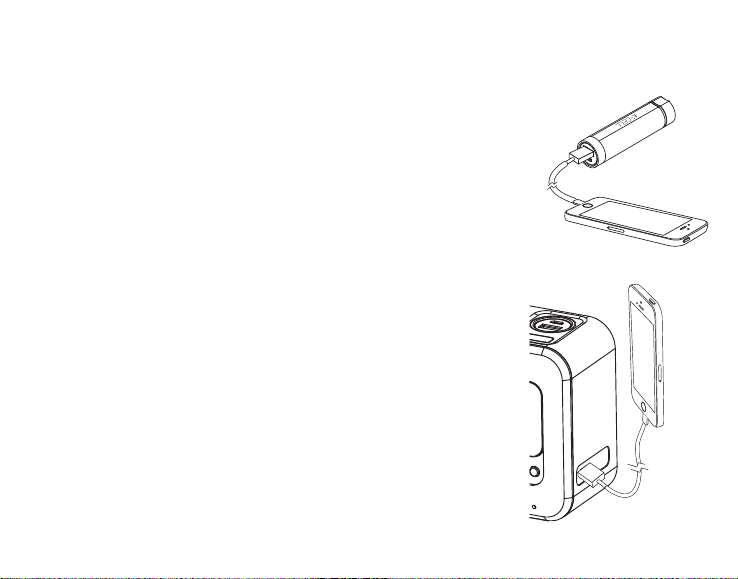
Charging Devices Using the K-Cell
Charge K-Cell fully before use. For first time charge, charge for at least 3
hours.
Connect the USB cable plug included with your device to the standard
Charging Port on the top of the K-Cell and connect the other end to the
device you wish to charge. To charge an Android or Windows phone
you may use the USB to micro USB cable supplied with this model. To
charge an Apple IOS iPhone or iPod, with either Lightning or 30-pin
connector, use the charging cable that was supplied with your Apple
device.
Charging Devices Using the USB Port
Connect the USB cable plug included with your device to the standard
USB Charging Port on the left of the unit and connect the other end to
the device you wish to charge. To charge an Android or Windows
phone you may use the USB to micro USB cable supplied with this
model. To charge an Apple IOS iPhone or iPod, with either Lightning
or 30-pin connector, use the charging cable that was supplied with
your Apple device. Monitor charging on your device. If device does
not charge, use the charging cable that came with the device.
Using the K2
Indice
Altri manuali iHome Sveglia

iHome
iHome iBT290 Manuale utente

iHome
iHome iBT18 Manuale utente

iHome
iHome iP40 Manuale utente

iHome
iHome iBTW450 Manuale utente

iHome
iHome IA63 Manuale utente

iHome
iHome iH18 Manuale del proprietario

iHome
iHome iP11 Manuale utente

iHome
iHome iH402 Manuale utente

iHome
iHome iBT210 Manuale utente

iHome
iHome iH11 Manuale utente

iHome
iHome IP38 Manuale utente

iHome
iHome iBT22A Manuale utente

iHome
iHome iH11 Manuale utente

iHome
iHome IP21 Manuale utente

iHome
iHome iBTW23 Manuale utente

iHome
iHome iBT21 Manuale utente

iHome
iHome iKT50 Manuale utente

iHome
iHome iPL10 Manuale utente

iHome
iHome iH41 Manuale utente

iHome
iHome iPL10 Manuale utente


