iMotion MP121 Manuale utente

MP121 / MP131
Mobile Barcode Printer
User’s Manual
Version A0 29/10/2020

iWaylink Inc.
iMotion MP121 / MP131 User’s Manual 2
About This Manual
Thank you for purchasing the iMotion MP121/MP131 Mobile Barcode Printer.
This manual explains how to install, operate and maintain our product. No part
of this publication may be reproduced or used in any form, or by any electrical
or mechanical means, such as photocopying, recording, or information
storage and retrieval systems, without permission in writing received from
iMotion. The material in this manual is subject to change without prior notice.
FCC Compliance Statement for American Users
Federal Communication Commission Interference Statement
This equipment has been tested and found to comply with the limits for a
Class B digital device, pursuant to Part 15 Subpart B of the FCC Rules. These
limits are designed to provide reasonable protection against harmful
interference in a residential installation. This equipment generates, uses and
can radiate radio frequency energy and, if not installed and used in
accordance with the instructions, may cause harmful interference to radio
communications. However, there is no guarantee that interference will not
occur in a particular installation. If this equipment does cause harmful
interference to radio or television reception, which can be determined by
turning the equipment off and on, the user is encouraged to try to correct the
interference by one of the following measures:
Reorient or relocate the receiving antenna.
Increase the separation between the equipment and receiver.
Connect the equipment into an outlet on a circuit different from that to which
the receiver is connected.
Consult the dealer or an experienced radio/TV technician for help.
This device complies with Part 15 of the FCC Rules. Operation is subject to
the following two conditions: (1) This device may not cause harmful
interference, and (2) this device must accept any interference received,
including interference that may cause undesired operation.
FCC Caution: Any changes or modifications not expressly approved by the
party responsible for compliance could void the user’s authority to operate this

iWaylink Inc.
iMotion MP121 / MP131 User’s Manual 3
equipment.
EMS and EMI Compliance Statement for
European Users
This equipment has been tested and passed with the requirements relating to
electromagnetic compatibility based on the standards EN 300 328
V2.1.1(2016-11).The equipment also tested and passed in accordance with
the European Standard EN55022 for the both Radiated and Conducted
emissions limits.
MP121/MP131 to Which This Declaration Relates
Is In Conformity With the Following Standards
IEC 60950-1(ed.2), IEC 60950-1(ed.2); am1, IEC 60950-1(ed.2);am2,
GB4943.1-2011, GB9254-2008 , GB17625.1-2012 ; EN 300 328
V2.1.1(2016-11), UL 60950-1, 2nd Edition, 2011-12-19, CSA C22.2 No.
60950-1-07, 2nd Edition, 2011-12, FCC part 15 subpart B, NCC LP002.z
Warranty Limits
Unless otherwise agreed in a contract, all the warranty period of the products
lasts for two years since the date of purchase while that of the accessories
(such as battery, USB cable etc.) lasts for six months since the date of
purchase.
For any faults happened to the products under normal use and ascribed to the
inherent problems of the products through identification within the warranty
period, we will provide free maintenance services. If the products within
warranty period are judged damaged by improper artificial use by our
maintenance representatives, we will provide maintenance quotation and
repair the product after the customer agrees on our quotation. The damage of
appearance, enclosure and decorative parts and components are beyond the
scope of warranty, for which, we do not provide free maintenance services.

iWaylink Inc.
iMotion MP121 / MP131 User’s Manual 4
Important Notices and Precautions
The manufacturer has made safety the first priority during the design stage.
To avoid potential mishaps, please obey the following notices:
Do not allow water, seawater or moisture to enter or leak into the battery. If
the safety mechanism within the battery becomes oxidized, oxidized the
battery may overcharge with abnormal electrical current and/or voltage so
that it may overheat, ignite and/or explode.
Do not place the battery near open flames or heating devices, such as
stoves. Exposure to excessive heat may cause damage to the resin case
and/or insulating materials, thus causing a short circuit within the battery
that may result in battery overheating, combustion, and/or explosion.
Charge the battery only with the exclusive 4-slot battery charger specified
(optionally provided) by iMotion. The use of an incorrect charger may result
in overheating, combustion and/or explosion of the battery.
Charging the battery with a modified charger may result in overheating,
combustion and/or explosion of the battery by abnormal chemical reaction
caused by incorrect polarity.
Do not directly connect the battery to an electrical power outlet not specified
by iMotion or an automobile’s cigarette lighter jack. Doing so may result in
overheating, combustion and/or explosion of the battery by over-current
and/or over-voltage.
Do not heat the battery or place it near a fire. Doing so may melt insulation
materials, damage the safety mechanism/equipment, and/or ignite the
electrolytic solution. There is a potential risk of battery overheating,
combustion, and/or explosion.
Do not reverse the connection of (+) and (-) electrodes of the battery.
Charging the battery in reverse polarity may produce an undesired chemical
reaction inside the battery cell, causing unexpected behavior during
discharging such as overheating, explosion, or fire.
Do not allow the battery’s (+) or (-) pole to come into contact with any metal.
In addition, do not carry or store the battery with metallic items, such as
necklaces and hairpins. Doing so may cause a short circuit of the battery
generating an over-current. There is the potential risk to overheat, ignite
and/or explode the battery or overheat the metallic items, such as

iWaylink Inc.
iMotion MP121 / MP131 User’s Manual 5
necklaces, hair pins etc.
Do not throw the battery or subject it to strong shock. If the safety
mechanism in the battery is damaged, the battery may be overcharged and,
consequently, an adverse chemical reaction may be generated in the
battery. There is a potential risk of battery overheating, combustion, and/or
explosion.
Do not pierce the battery with a pointed object, such as nail or awl, or strike
with a heavy object, such as a hammer, and take care not to step on the
battery. There is a potential risk of battery overheating, combustion, and/or
explosion caused by an internal short circuit.
Do not solder the battery directly. Doing so may melt the insulating materials
and/or damage the safety mechanism or safety equipment, resulting in
battery overheating, combustion, and/or explosion.
Do not disassemble and/or modify the battery. The battery contains safety
equipment and a safety mechanism to prevent danger. There is a potential
risk of overheating, combustion, and/or explosion caused by disassembly.
Do not charge the battery near open flames and/or under direct sunlight.
Charging the ambient temperature at 0°C ~ 40°C. Because exposure to high
temperatures triggers the operation of the safety mechanism, the battery
may not charge or may overcharge due to destruction of the safety
mechanism. There is a potential risk of overheating, combustion, and/or
explosion.
Do not expose the battery to high temperatures over 60°C, and do not use or
store it in a hot or humid place.
Danger of explosion if battery is incorrectly replaced. Replace only with the
equivalent type recommended by the manufacturer.
Dispose of used batteries according to the manufacturer’s instructions.
Only use with designated power supply adapter model.
Changes or modifications not expressly approved by the party responsible
for compliance could void the user's authority to operate the equipment.

iWaylink Inc.
iMotion MP121 / MP131 User’s Manual 6
Table of Contents
About This Manual ...................................................................................... 2
FCC Compliance Statement for American Users ........................................2
EMS and EMI Compliance Statement for European Users.........................3
MP121/MP131 to Which This Declaration Relates Is In Conformity With the
Following Standards....................................................................................3
Warranty Limits ...........................................................................................3
Important Notices and Precautions ............................................................. 4
Table of Contents....................................................................... 6
Chapter 1: Getting Started......................................................... 8
Introduction ................................................................................................. 8
Unpacking...................................................................................................8
Features...................................................................................................... 9
Chapter 2: Printer Setup...........................................................11
Battery Installation......................................................................................11
Paper Installation........................................................................................11
Battery Charging ....................................................................................... 12
Belt Strap & Shoulder Strap Usage........................................................... 13
Driver......................................................................................................... 14
Install iMotion Label Design Software ....................................................... 15
Chapter 3: Setting and Control for Operation Panel ............. 17
Operation Panel........................................................................................ 17
Label Calibration and Self Test..................................................................19
Active / Sleep / Shutdown / Charge Mode................................................. 20
Bluetooth Connection Terminal ................................................................. 21
Chapter 4: Accessories ........................................................... 22
4-Slot Battery Charger (Optional).............................................................. 22
Car Charger (Optional).............................................................................. 23
RS-232 Cable (Optional)........................................................................... 24
Protective Case......................................................................................... 25

iWaylink Inc.
iMotion MP121 / MP131 User’s Manual 7
Chapter 5: Maintenance and Adjustments............................. 26
Cleaning the Thermal Print Head.............................................................. 26
Troubleshooting......................................................................................... 27
Appendix A: Product Specifications....................................... 29
Specifications............................................................................................ 29
Appendix B: Interface.............................................................. 32
Pinout Description..................................................................................... 32
Appendix C: MP131 WiFi Setting............................................ 33
Check the Wireless Access Point Setting Value........................................33
Set up MP131 Wireless Network through iMotion WiFi tool...................... 34
Activate DHCP function for MP131 ........................................................... 36
Wi-Fi Printer Sever Module Installation (Quick Setting)............................. 37

iWaylink Inc.
iMotion MP121 / MP131 User’s Manual 8
Chapter 1: Getting Started
Introduction
MP121/MP131 is a thermal mobile printer designed for enterprises and
businesses. It can be used for a variety of printing needs such as barcodes,
labels and receipts. MP121/MP131 is an attractive, lightweight and portable
device that is ideal for retail, warehousing, logistics, field work and other
mobile printing applications. Being robust and durable, MP121/MP131 is
waterproof and dustproof with IP54 certification and can withstand a 1.5m
drop when wearing the protective case. The high durability feature allows
users to easily cope with accidental drops or unexpected environmental
changes on the job.Additionally, MP121/MP131 also comes with a proprietary
label design software to create labels or receipts for various workplaces. It
also supports image printing to help promote the corporate brand image for
customers wherever and whenever possible.
This User’s Manual provides information on how to use this device and its
accessories.
Unpacking
Carefully remove and unpack the MP121/MP131 and other package items
from the protective material. Save the containers for later storage and
shipping. Check that you have received the following items:
MP121/MP131 Mobile Barcode Printer
Quick Start Guide
Thermal Paper
Lithium Battery
Power Supply
USB Cable
Belt Strap (MP121)
Shoulder Strap (MP131)

iWaylink Inc.
iMotion MP121 / MP131 User’s Manual 9
Features
Front View
Window
Power Button
Top Cover
Open Button
Feed Button
Connector Cap
Bluetooth Button
Back View
MP121
MP131
Battery
Belt Strap Hole
Battery
Shoulder Strap Holes

iWaylink Inc.
iMotion MP121 / MP131 User’s Manual 10
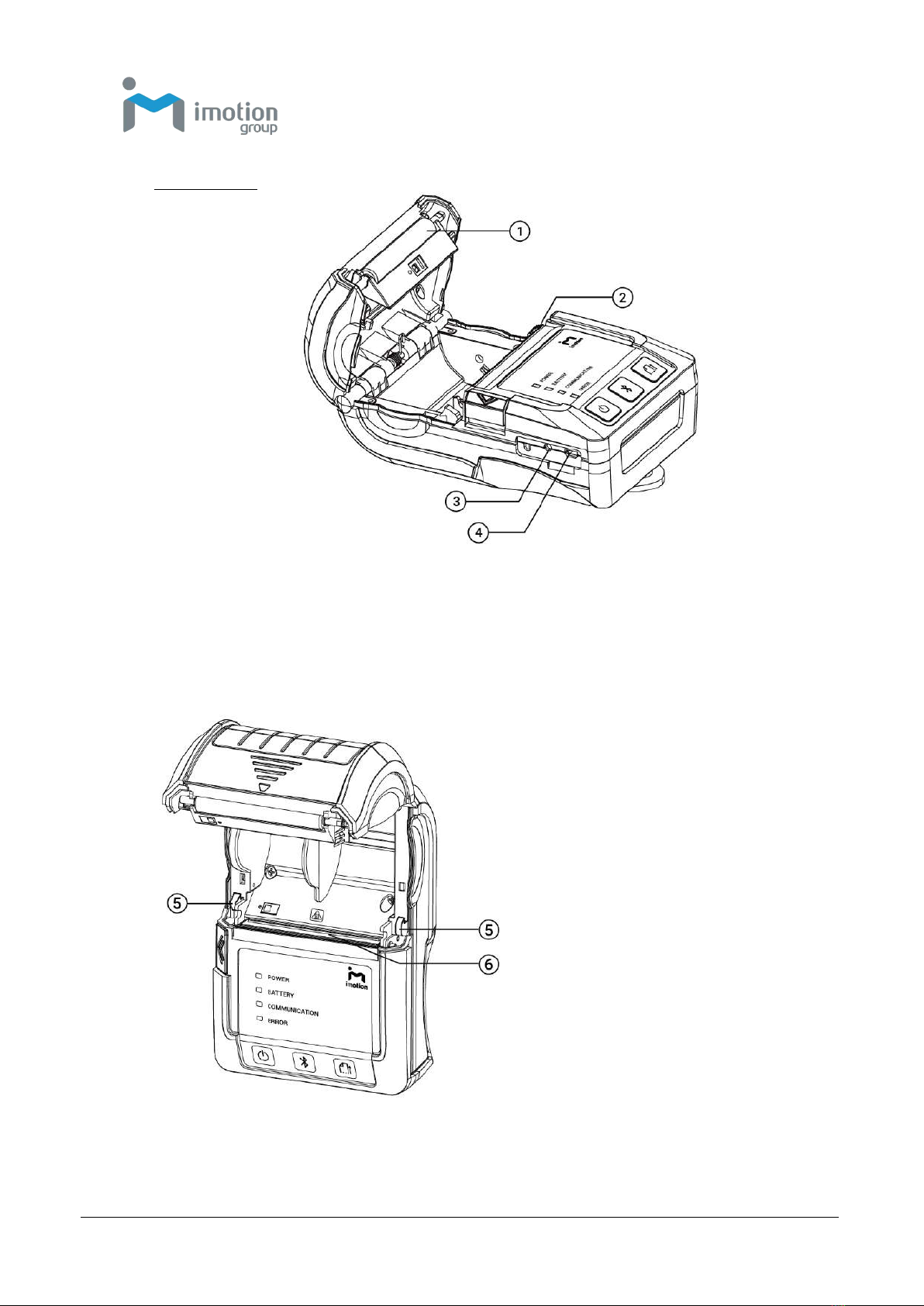
Internal View
Platen Roller
Power Jack
Tear Bar
RS232+USB Port
Top Cover Hooks
Thermal Print Head
Altri manuali per MP121
1
Questo manuale è adatto per i seguenti modelli
1
Indice
Altri manuali iMotion Lettore di codici a barre
Manuali Lettore di codici a barre popolari di altre marche

POSMicro
POSMicro Datalogic PowerScan D7100 Manuale utente

Marson
Marson MT780 Guida rapida alla configurazione

NCR
NCR RealPOS Manuale utente

Motorola
Motorola SE3300 Guida rapida alla configurazione

Element
Element P130BT Manuale utente

Motorola
Motorola Symbol LS3008 Manuale di installazione e funzionamento