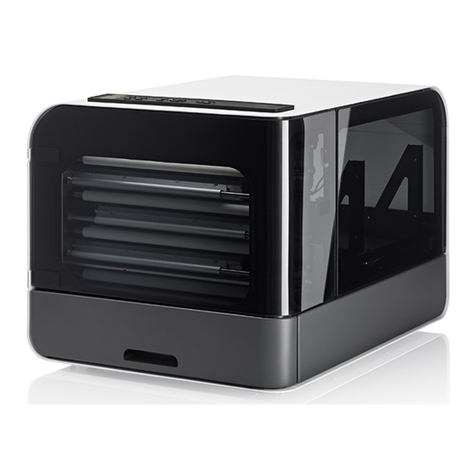
Index Braille Index V4 Manuale utente

© 2011 Enter your company name
V4 Service
manual
2011-03-29


IContents
© 2011 Enter your company name
Table of Contents
Model Disassembly instructions 1
................................................................................................................................... 11 Electronic modules Everest and Basic
................................................................................................................................... 12 Basic D
......................................................................................................................................................... 1Remove back plate
......................................................................................................................................................... 1Remove side covers
......................................................................................................................................................... 1Replace embossing head
......................................................................................................................................................... 1Replace Main Board
......................................................................................................................................................... 2Replace Paper Tractors
......................................................................................................................................................... 2Replace motor module
......................................................................................................................................................... 2Remove the fan
................................................................................................................................... 23 Everest D
......................................................................................................................................................... 3Clear major paper jam
......................................................................................................................................................... 3Remove front glass
......................................................................................................................................................... 3Remove back plate
......................................................................................................................................................... 3Remove side covers
......................................................................................................................................................... 3Replace sheet feeder
......................................................................................................................................................... 3Replace main board
......................................................................................................................................................... 4Replace embossing head
......................................................................................................................................................... 4Replace roller module
................................................................................................................................... 44 Braille Box
......................................................................................................................................................... 5Open the Service door
......................................................................................................................................................... 5Remove Braille tray
......................................................................................................................................................... 5Dismounting Braille Box
.................................................................................................................................................. 5Plates
........................................................................................................................................... 5Top plate
........................................................................................................................................... 5Mid plate back
........................................................................................................................................... 5Mid plate le t
........................................................................................................................................... 6Technical corner plate
........................................................................................................................................... 6Right lower cover plate
........................................................................................................................................... 6Inner ront plate
........................................................................................................................................... 6Braille tray cover plate
........................................................................................................................................... 6Braille tray guides
.................................................................................................................................................. 6Mechanical modules
........................................................................................................................................... 6Front glass door
........................................................................................................................................... 6Embossing tower
........................................................................................................................................... 7Replace embossing head
........................................................................................................................................... 7Replace roller module
........................................................................................................................................... 7Replace paper out lip lop
........................................................................................................................................... 7Replace ventilation module
......................................................................................................................................................... 8Sheet feeder
.................................................................................................................................................. 8Replace pick up roller
.................................................................................................................................................. 8Replace sheet eeder
......................................................................................................................................................... 8Electronic modules
.................................................................................................................................................. 8Replace CPU BCP V4
.................................................................................................................................................. 8Replace Driver PCB V4
.................................................................................................................................................. 8Replace Sheet eeder PCB V4
.................................................................................................................................................. 8Replace LED PCB V4
.................................................................................................................................................. 9Replace Power supply
.................................................................................................................................................. 9Replace an

V4 Service manualII
© 2011 Enter your company name
......................................................................................................................................................... 9
Sensors
.................................................................................................................................................. 9Re lectiv light Sensor All V4
General Service tasks 10
................................................................................................................................... 101 Embossing head
......................................................................................................................................................... 10Replace hammer
......................................................................................................................................................... 10Replace anvils
................................................................................................................................... 102 Power supply Specification
......................................................................................................................................................... 10Basic and Everest
......................................................................................................................................................... 11Braille Box
................................................................................................................................... 113 Electornic PCB, cables
......................................................................................................................................................... 11Main Board PCB V4
......................................................................................................................................................... 14Braille Box Electronics
.................................................................................................................................................. 16Braille Box CPU PCB V4
.................................................................................................................................................. 16Braille Box Driver PCB V4
.................................................................................................................................................. 17Braille Box Top Connection PCB
.................................................................................................................................................. 17Braille Box Sheet Feeder PCB V4
.................................................................................................................................................. 17Braille Box LED PCB V4
......................................................................................................................................................... 17ATC Braille & Print PCB
................................................................................................................................... 174 Fuse
LED feedback 18
................................................................................................................................... 181 Braille Box LED
Appendix 19
................................................................................................................................... 191 Esc sequences
Specifications 21
................................................................................................................................... 211 Basic D V4
................................................................................................................................... 222 Everest D V4
................................................................................................................................... 223 Braille Box V4
Service information sources 23

1Model Disassembly instructions
© 2011 Enter your company name
1 Model Disassembly instructions
1.1 Electronic modules Everest and Basic
Enter topic text here.
1.2 Basic D
Enter topic text here.
1.2.1 Remove back plate
•Open the 2 knurled thumb screws at the bottom holding the back plate
•Remove the back plate
1.2.2 Remove side covers
•Remove the 3 screws which holding the cover rom each side
•Place the Basic-D upside down and remove the 2 rubber eet holding each panel
•Remove the side cover
1.2.3 Replace embossing head
Remove embossing head
•Remove back plate, see instructions
•Remove the embossing head axle metallic locking ring with a lat screw driver
•Disconnect the embossing head cable
•Release the embossing head locking ring (motor side) rom the side panel and pull the axle
against you
•Remove the embossing head, locking ring and axle
Insert embossing head
•Place the embossing head with its locking ring on the axle, le t side.
•Place the right side o the axle in the holder on the speaker side cover
•Li t the plastic spring with your inger.
•Placed the embossing head on the print head motor gear wheel, at the same time click in axle
into the cover (speaker side)
•Place the locking ring in position
•Move the embossing head by hand to check the mechanical movement
•Connect the embossing head cable
•Close the back plate - see instruction
1.2.4 Replace Main Board
Remove Main Board
•Remove the back plate - see instruction.
•Remove embossing head - see instruction.
•Remove all cables rom the Main Board
Cables to: Embossing head cable, Embossing head motor, Paper movement motor, Paper
sensor 1, Paper sensor 2 and Front panel.
•Pull the main board top edge out, until it releases rom the 4 metallic clips
•Remove the Main board

2 V4 Service manual
© 2011 Enter your company name
•Remove the SD memory card rom the aulty main board.
The Index SD memory card includes embosser speci ic parameters like serial number, number
o embossed pages, page ormat, embosser settings, etc.
Insert Main Board
•Insert the original SD memory card rom the previous main board to the new main board
•Place the new main board in position and make sure it clips in OK
•Connect all cables (see picture)
•Insert embossing head - see instruction
•Connect main board cable
•Insert back plate - see instruction
1.2.5 Replace Paper Tractors
•Remove the back plate - see instruction
•Remove the embossing head - see instruction
•Remove motor side cover - see instruction
•Remove the 3 screws holding locking ring or the tractor eed square axle and remove the axle
•Remove the round axle ( lat screw driver) by turning it CCW Contra Clock Wise.
•Disconnect the two paper sensors
•Remove the ormula tractors
(PHOTO Position o square axle - dots on the tractor)
When inserting new ormula tractors, please note the position o the small dots near the hole or
the square axle. These marks has to be on the same side o the square axle.
1.2.6 Replace motor module
•Remove the back plate - see instructions
•Remove the embossing head - see instructions
•Remove the side cover - see instructions
•Disconnect 2 motor cables
•Unscrew the 6 screws holding the motor module
•Remove the motor module
1.2.7 Remove the fan
•Remove the back plate - see instruction.
•Remove the embossing head - see instruction
•Remove side cover - see instructions
•Disconnect the 4 screws holding the an rom the motor module
•Remove the an
1.3 Everest D
Enter topic text here.

3Model Disassembly instructions
© 2011 Enter your company name
1.3.1 Clear major paper jam
•Remove the ront glass - see instruction
•Cut the paper above and below the embossing head with a sharp thin kni e (switch blade kni e).
Avoid the rubber rollers.
•Remove and clear the the embossing head rom jammed paper
•Rotate the rollers or checking and removing jammed paper
•Remove embossing head - see instructions
•Clean the embossing head rom jammed paper
1.3.2 Remove front glass
•Remove the 2 knurled thumb screws rom the glass
•Press the glass down
•Remove the glass by li ting it up
1.3.3 Remove back plate
•Remove the our screws holding the back plate (picture with our screws)
•Li t up the back plate by twisting a lat screw driver between the lower center o the plate and
aluminum pro ile
•Li t up the back plate care ully
1.3.4 Remove side covers
•Remove the ront glass
•Remove the back plate
•Remove the side covers
- 8 screws on le t side cover (top ront = smaller 3.5x13)
- 7 screws on right side cover
1.3.5 Replace sheet feeder
•Remove the two screws on the top o the sheet eeder
•Li t up the sheet eeder
•Disconnect the sheet eeder cable
1.3.6 Replace main board
•Remove back plate - see instruction
•Release the main board rom the 4 upper click connectors
•Remove all cable rom the main board
•Tilt the main board to a 45 degrees angle
•Li t the main board towards you.
•Remove the SD memory card rom the aulty main board.
The Index SD memory card includes embosser speci ic parameters as or example: serial
number, number o embossed pages, page ormat, embosser settings.
When inserting a new main board please Insert the original SD memory card be ore powering on
the unit.

4 V4 Service manual
© 2011 Enter your company name
1.3.7 Replace embossing head
REMOVE EMBOSSING HEAD
•Remove ront glass - see instructions
•Remove the Embossing head locking ring (le t side)
•Release the embossing head axle by pulling le t side (locking ring side) towards you
•Remove the embossing head rom the embosser
•Disconnect the embossing head cable
REPLACE EMBOSSING HEAD
•Insert the embossing head axle in the embossing head
•Insert the embossing head locking ring on the embossing head axle with the larger diameter
side against the plate
•Connect the embossing head cable please note the direction (picture)
•Insert the right side o the embossing head axle in the holder
•Li t the plastic spring which holds down the embossing head with a screw driver, at the same
time push the print head+axle in position between the stepper motor gear wheel and plastic
spring.
•Insert the le t side o the embossing head axle in the holder by pressing it towards the embosser
until it click in position
•Press the embossing head locking ring to the le t against the holder
•Move the embossing head by hand to check the mechanical movement
•Insert the ront glass - see instructions
1.3.8 Replace roller module
•Remove the ront glass - see
•Remove the back plate - see
•Remove motor side cover - see
•Remove the paper movement driving belt rom gear belt wheel on the roller axle
•Remove the 4 screws holding the roller module bearing
•Take out the roller module by sliding it out
1.4 Braille Box
Open issues, this will be completed when tested on the prototypes.
Service tasks:
Clearing paper jam
Remove/insert embossing head
Replace paper sensor
Paper tray
Remove Braille
Check paper out lip lop mechanism
Check paper
Braille tray
Technical corner
Top plate

5Model Disassembly instructions
© 2011 Enter your company name
1.4.1 Open the Service door
1. Open the Braille out tray
2. Open the lock on the right side o the service door by rotating it by hand
3. Open the Service door
1.4.2 Remove Braille tray
1. Open the Braille tray
2. Release the plastic locks on the Braille tray guides, right = down, le t = up
3. Remove the Braille tray rom the guides
1.4.3 Dismounting Braille Box
Enter topic text here.
1.4.3.1 Plates
Noise sealing
The corners between the outside plate, inner ront plate and technical corner plate is sealed with
silicone.
A ter working with this plates it is necessary to re-seal them again. Please add silicon sealing in the
same way as originally shipped rom Index Braille.
1.4.3.1.1 Top plate
•Remove the Service door: see
•Remove the Braille tray: see
•Disconnect 1 cables the speaker
•Disconnect the ront panel lat cable
•Disconnect 2 cables to lip lop
•Disconnect 1 cable to the LED
•Remove the cables rom acoustic damping material
•Unscrew 9 black screws on the black inner ront plate
•Unscrew 3 screws on mid plate back
•Unscrew 5 screws on mid plate le t
•Li t up the top plate.
1.4.3.1.2 Mid plate back
•Remove the Top plate: see instructions
•Unscrew 4 screws connected Inner ront plate
•Unscrew 4 screws connected to Technica corner
•Unscrew 3 screws connected to Bottom plate
•Li t up the Mid plate back
1.4.3.1.3 Mid plate le t
•Remove the Top plate: see
•Unscrew 4 screws connected Inner ront plate
•Unscrew 4 screws connected to Technica corner
•Unscrew 5 screws connected to Bottom plate

6 V4 Service manual
© 2011 Enter your company name
•Li t up the Mid plate le t
1.4.3.1.4 Technical corner plate
•Remove the CPU Board: see
•Remove the Top plate: see
•Remove the Mid plates: see
•Remove the power plug cables
•Disconnect the cable to LED PCB
•Li t up the Technical corner plate.
1.4.3.1.5 Right lower cover plate
Unscrew 4 screws behind the Inner ront plate (x mm nyckel?)
Remove the Right lower cover plate
1.4.3.1.6 Inner ront plate
Remove the Top plate: see
Remove the Mid plates: see
Remove the Braille tray: see
Remove the Right lower cover plate
Unscrew xx? screws at the lower edge o the Inner ront plate
Li t up the Inner ront plate. It may be connected with silicon sealing. Care ully remove the silicon
mechanically
1.4.3.1.7 Braille tray cover plate
Enter topic text here.
1.4.3.1.8 Braille tray guides
•Remove the Braille tray: see
•Unscrew the 8 screws holding the Braille tray guides against the sheet eeder
•Remove the Braille tray guides
1.4.3.2 Mechanical modules
Enter topic text here.
1.4.3.2.1 Front glass door
Release the hinges with a lat screw driver (Picture?)
1.4.3.2.2 Embossing tower
•Remove the Top plate: see
•Remove the Mid plates: see
•Remove the Braille tray: see
•Disconnect all cables to the Embossing tower
•Unscrew the 4 rubber connections with (xx mm ast nyckel)
•Li t up the Embossing tower
Altri manuali per Index V4
2
Indice
Altri manuali Index Braille Stampante

Index Braille
Index Braille Everest-D Manuale utente

Index Braille
Index Braille Everest-D V5 Manuale utente

Index Braille
Index Braille Index V4 Manuale utente

Index Braille
Index Braille Everest-D V5 Manuale utente

Index Braille
Index Braille Basic-D V5 Manuale utente

Index Braille
Index Braille BASIC Manuale utente

Index Braille
Index Braille EVEREST Series Manuale utente

Index Braille
Index Braille BASIC Manuale utente