
InfiRay FD2-T Manuale utente

Dual-spectrum Turret Network Camera
Quick Start Guide
V1.0.3

Dual-spectrum Turret Network Camera Quick Start Guide
I
Preface
The following is about the correct use of the camera. In order to prevent
danger and loss of property, please read this manual carefully before
using the camera and strictly follow it during use. Please keep the
manual properly after reading.
Symbol Description
For the symbols that appear in the document, the description is as
follows.
Note
The instructions are an emphasis and supplement to the main text.
Caution
Cautions indicates potential risks. If ignored, it may lead to
product damage, data loss, product performance degradation, or
unpredictable results.
Warning
Warnings indicates that low or medium potential risk is existing.
The ignorance of the warnings may lead to light or medium
damage for people.
Danger
Dangerous text indicates that there is a high potential risk. If it is
not avoided, a major risk of personal injury or even death may be
caused.
Important Safety Notice
Warnings
The local electrical safety standards should be rigorously followed in
the process of installation and usage.
Please use power adapter which is produced by regular companies.
Please check whether the power is normal or not before starting the
camera. (Power supply requirements should comply with that on the
product labels.)

Dual-spectrum Turret Network Camera Quick Start Guide
II
In order to make emergency power off when necessary, please install
power-off equipment which is easy to use when installing the wires.
Please protect power lines from being treaded or pressed, especially
the connecting points which are led from the plug, power socket or
other unit.
Please make sure the camera is fixed firmly in case of being installed
on walls or ceilings.
If the camera does not work normally, please contact the purchased
shops or factories. Do not disassemble or revise the camera in any
way (The manufacturing company is not responsible for problems
that are caused by unauthorized modification or maintenance.)
Cautions
Please do not put the camera in damp, dusty, extremely hot or cold
places, or places with corrosive gas or unstable light.
Please transport, use and store the camera within the allowable
humidity and temperature range.
Avoid making the lens aiming at strong light (e.g. sun or laser),
otherwise the imaging sensor would be damaged.
Please do not block the vents near the camera in case of heat
accumulated.
Please use the factory packaging or materials of the same quality
when shipping the device.
Please do not press, vibrate violently or soak the camera during
transportation, storage or installation.
It is advised to use the camera with lighting protector.
Soft dry cloth can be used to clean the camera. For the dirt difficult

Dual-spectrum Turret Network Camera Quick Start Guide
III
to clean, please use soft cloth with little neutral detergent and then
wipe dry. Do not use volatile detergent like alcohol, benzene or
diluent, or strong and abrasive detergent, otherwise the camera
coating would be damaged and also the camera performance could be
degraded.
The lens cover is optical device, so please do not touch directly or
wipe the cover. Soft brush or hairdryer can be used to blow the dust
away. For the grease or fingerprint, soft cloth can be used to wipe it
away. Cotton cloth or lens cleaning paper with cleaning solution can
be used to wipe repeatedly until it’s clean.
Please revise the password promptly after logging in.
Instruction
Please use the accessories or parts specified by the manufacturer and
have them installed and repaired by professional service personnel.
Quality requirements for installation and maintenance personnel:
Personnel should have the qualification certificate or experience to
engage in the installation and maintenance of video surveillance
systems, and have the qualification to engage in related jobs (such
as high-altitude operations, etc.), in addition to the following
knowledge and operating skills.
Equipped with basic knowledge and installation skills of video
surveillance system and its components.
Equipped with basic knowledge and operating skills of low-voltage
wiring and low-voltage electronic circuit wiring.
Equipped with basic network security knowledge and skills, and
have good acknowledge of this manual.
Requirements for lifting equipment:

Dual-spectrum Turret Network Camera Quick Start Guide
IV
Safe lifting equipment suitable for site and method of camera
installation.
The lifting equipment is able to reach enough height of installation
position.
The lifting equipment has good safety performance.

Dual-spectrum Turret Network Camera Quick Start Guide
V
Table of Contents
1. Camera Introduction...................................................................- 1 -
1.1 Camera Description ................................................................. - 1 -
1.2 Camera Features ..............................................错误!未定义书签。
1.3 Camera Appearance .................................................................- 1 -
1.4 Cable Instructions .................................................................... - 2 -
1.5 Alarm Interface Connection .................................................... - 3 -
2. Camera Installation.....................................................................- 3 -
2.1 Instructions before Installation ................................................- 3 -
2.2 Recommended Monitoring Distance .......................................- 4 -
2.3 Installation Guide .................................................................... - 6 -
2.4 Install Network Port Protective Cover .................................. - 11 -
3. Operation Guide ........................................................................ - 12 -
3.1 Preparations........................................................................... - 12 -
3.2 Login System.........................................................................- 12 -
3.3 Main Interface Description....................................................- 14 -
Appendix A Camera Maintenance.............................................. - 15 -
Appendix B Emissivity of Common Materials ...........................- 16 -

Dual-spectrum Turret Network Camera Quick Start Guide
-1-
1. Camera Introduction
1.1 Camera Description
Dual-spectrum turret network camera is a new-type thermal imaging net
camera integrated with the functions of infrared imaging and high definition
visible light. Equipped with advanced passive infrared imaging detectors,
industrial thermographic analysis tools, smoke & fire detecting algorithm,
dual spectrum behavior analysis algorithm and multi linkage alarm function,
it can realize 24H safety surveillance monitoring and fire warning. It can
also be widely used in gas station, charge station, substation, warehouse
perimeter prevention, electricity monitoring, warehouse and five small
industries.
1.2 Camera Appearance
Figure 1.1 Appearance and Interface of Dual-spectrum Turret Network
Thermal Camera
Dual-spectrum Turret Network Camera Quick Start Guide
-2-
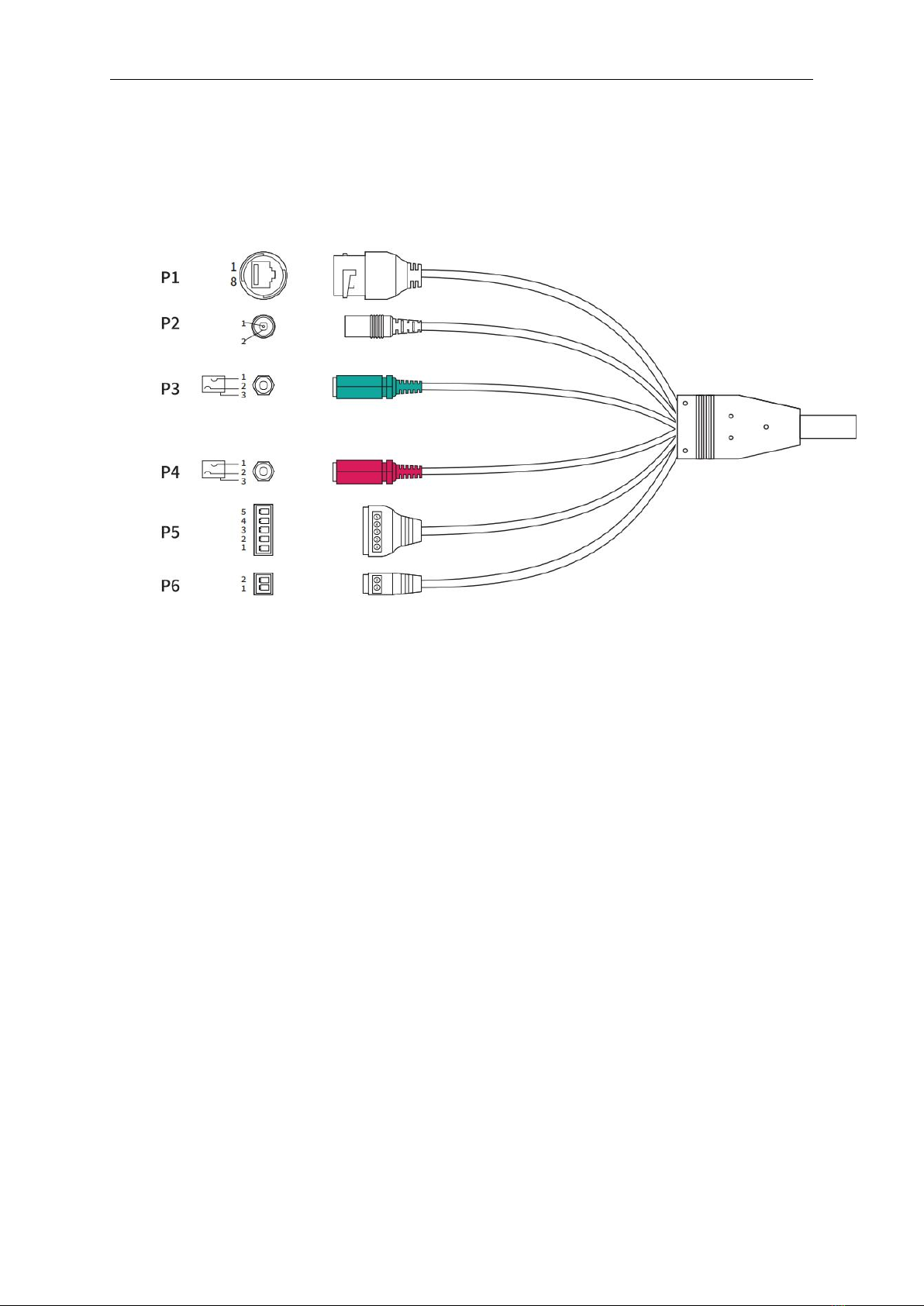
1.3 Cable Introductions
The cable includes interfaces for power, alarm, audio, RS-485, and network,
etc. Please see the following figure for interface instructions.
Figure 1.2 Cable Introductions
P1 network interface (LAN): Output network signal and connect to
standard Ethernet cable.
P2 power interface (DC12V): Support DC 12V power supply and
please connect the positive and negative poles of the power supply
correctly.
P3 audio output (AUDIO OUT): Output audio signal to speakers and
other equipment for sound output.
P4 audio input (AUDIO IN): Input audio signal and connect Mike for
receiving linear analog audio signal to collect sounds.
P5 alarm input (ALARM IN)/ alarm output (ALARM OUT): Receive
the switch signal from the external alarm source and output the alarm
switch signal to the alarm device, among which pin_1 is alarm input,
pin_2 is GND, pin_3 is NC, pin_4 and pin_5 are alarm output.
P6 RS-485 interface (RS485):RS485 interface for peripherals.
Dual-spectrum Turret Network Camera Quick Start Guide
-3-
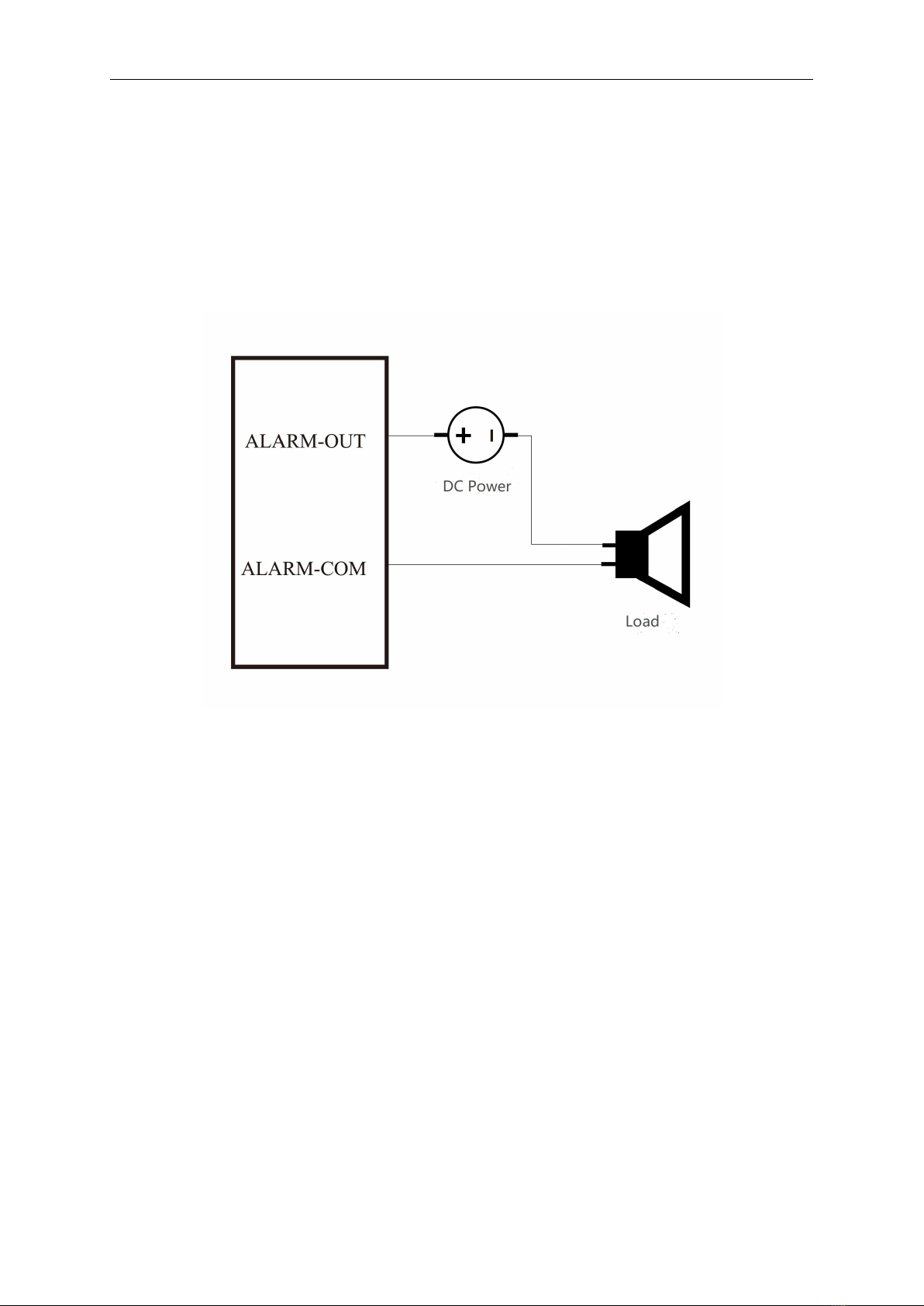
1.4 Alarm Interface Connection
The camera can be connected with alarm switch signal (0~DC 5V) input
and switch output (no voltage). An external power supply is required when
connecting the alarm. The specific wiring method is shown in the figure
below.
Figure 1.3 Alarm Output Wiring Method
2. Camera Installation
2.1 Instructions before Installation
Before installation, please confirm that the camera in the package is in
good condition and all parts are complete.
The installation wall should have a certain thickness, and can bear at
least 4 times the weight of the camera and installation accessories.
If it is a concrete wall or ceiling, first install the expansion screws (the
installation holes of the expansion screws need to be the same with the
bracket), and then install the bracket.
If it is a wooden wall, use self-tapping screws to install the bracket

Dual-spectrum Turret Network Camera Quick Start Guide
-4-
directly.
When transporting the camera, do not directly pull the cable at the end of
the camera, otherwise it may affect the waterproof performance of the
camera or cause wiring problems, as shown in the figure below.
Figure 2.1 Incorrect Handling of the Camera
2.2 Recommended Monitoring Distance
Since the thermal imaging channel of the camera adopts a fixed-focus
athermalized lens, remote electric focusing can not be realized. Therefore,
before installing the camera, please select the corresponding installation
position and lens focal length according to the monitoring requirements to
achieve the purpose of monitoring.
Altri manuali per FD2-T
1
Questo manuale è adatto per i seguenti modelli
1
Indice
Altri manuali InfiRay Telecamera di sicurezza


