
iScooter i9MAX Manuale utente


1. Package Contents 01
2. Product Overview 02
3. Charging 04
4. First Riding 04
5. Riding Basics 05
6. Riding Notice 06
7. Folding and Carrying 06
8. Disc Brake Adjustment 07
9. Daily Care and Maintenance 08
10. Specifications 09
Contents
11. Question & Answer 10
12. Contact Us 10
UK

1 x Allen Wrench4 x Screws
1 x Charger
When unboxing your i9MAX electric scooter, please verify that
the below items are included in the package. If anything is missing
or damaged, please contact iscooter customer service for support.
Package Contents
01
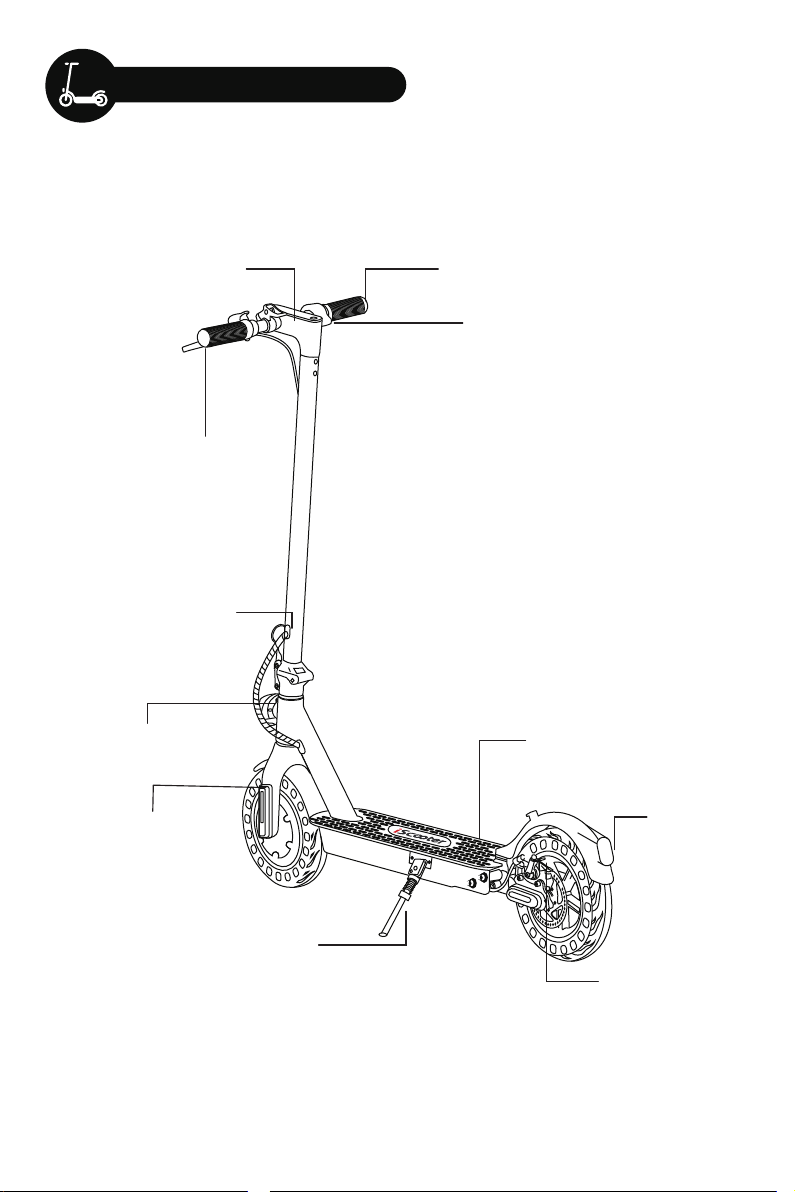
Product Overview
Handlebar
Brake
Folding Clip
Display
Folding Latch
Kickstand
Platform
Taillight
Disc Brake
Headlight
Honeycomb tire
02
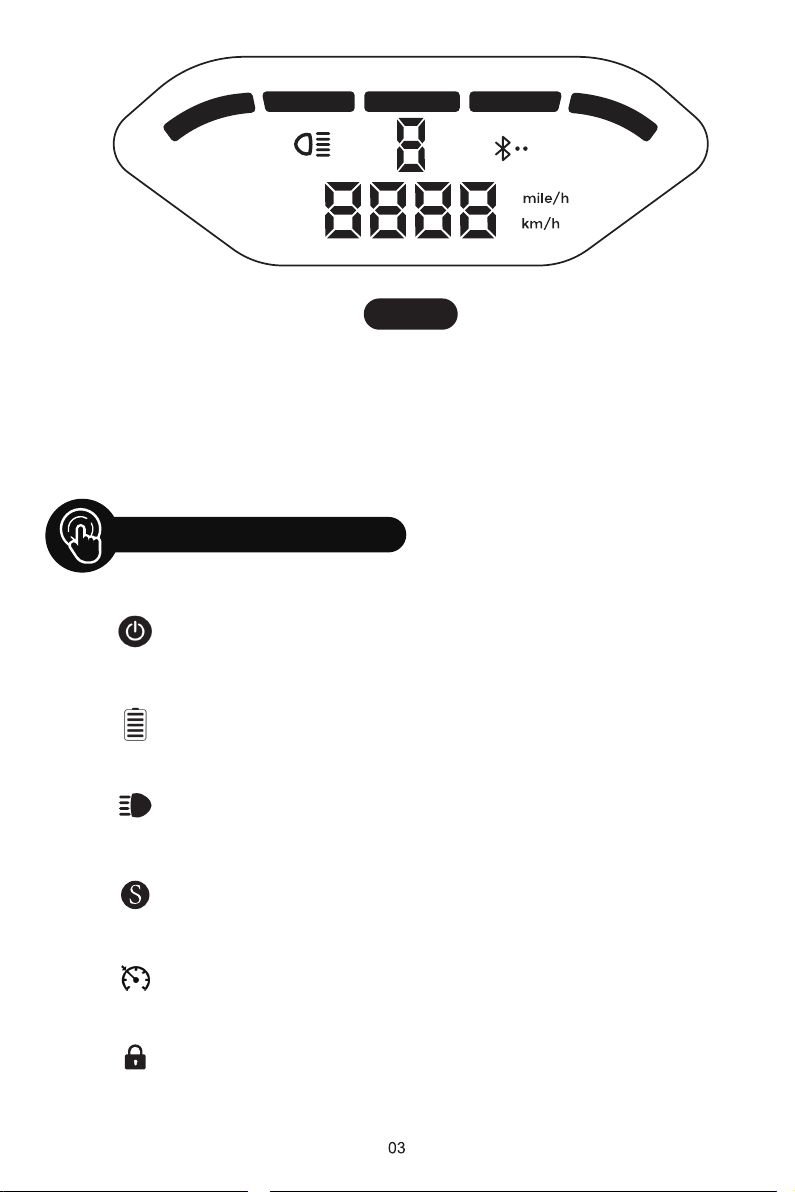
Click to turn on. Long press to turn off.
The power level is indicated by five battery bar on the
control panel.
Turn on your scooter, one-click to turn on/off the
front light.
Double-click to switch power mode.
Keep same speed for 3 seconds, and it will beep and
active the cruise control
The scooter can be locked and unlocked by
MiniRobot app.
Power Button
Battery Indicator
Light
Mode
Cruise Control
Lock Indicator
When the scooter starts to coast, put both feet on the deck and press the
accelerator (the accelerator initiates once the coasting speed
exceeds 3 mph). Or you can connect the "MiniRobot" APP, then, turn on the
zero start.
Tips
Control Panel

When the scooter starts to coast, put both feet on the deck and press
the accelerator (the accelerator initiates once the coasting speed
exceeds 3 mph). Or you can connect the "MiniRobot" APP, then, turn on the
zero start.
Download the "MiniRobot" app from the App Store(iPhone)
or Google Play (Android phone) for more information and
functions.
Charging
First Ride
Your scooter will be fully charged when the LED light on the charger
changes to green from red.
The scooter has charging protection and charging will cut off
automatically after fully charge.
Even so, we still don't recommend charging your scooter for a long
time more than 24 hours at one time.
Do not connect the charger if the charging port is wet.
Keep the charging port closed when not charging.
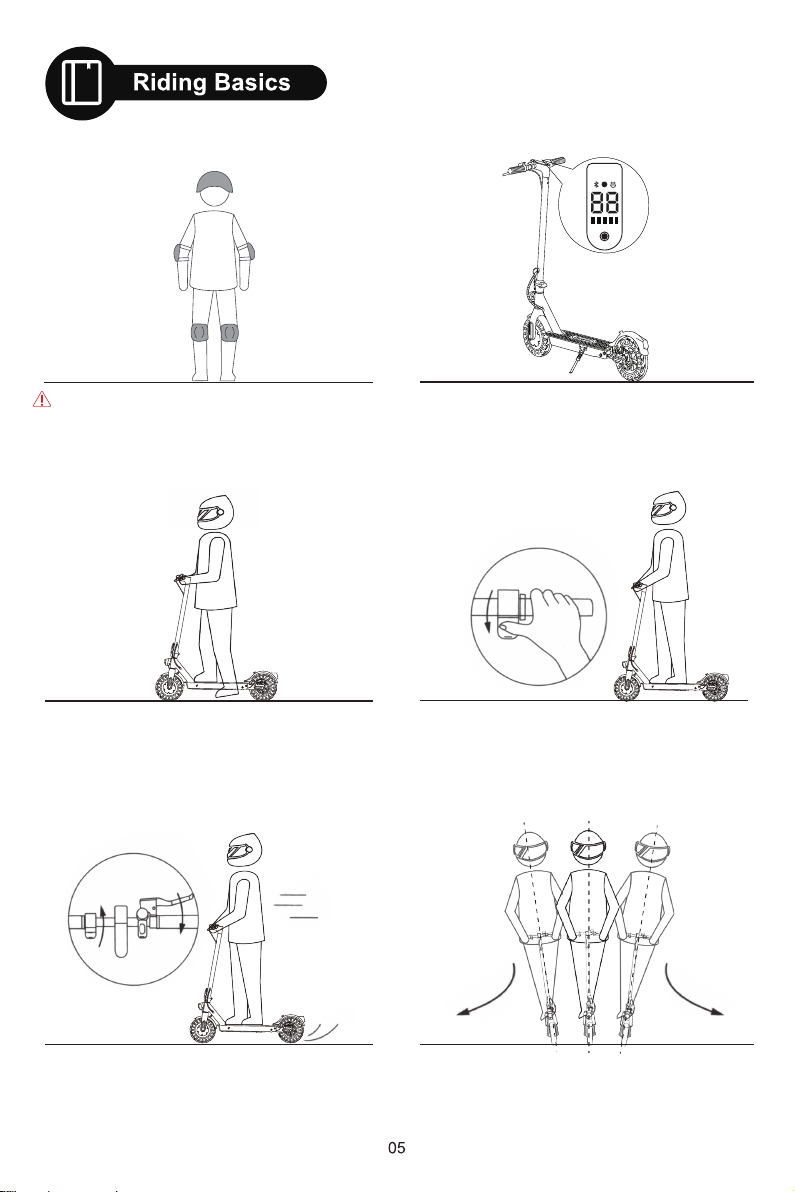
S
1. Turn the power on, and check the electricity
indicator.
2. Stand on the base with one foot and propel
yourself with the other foot.
3. When the scooter starts to coast, put both
feet on the deck and press the accelerator
(the accelerator initiates once the coasting
speed exceeds 3mph)
4. Release the accelerator and the kinetic energy
recovery system (KERS) initiates automatically to
brake slowly; And squeeze the brake lever for a
sudden brake.
Wear helmets and knee pads in case of falls
and injuries when you learn to ride the scooter,
as shown in the figure.
5. Tilt your body to the steering direction as you
turn, and slowly turn the handlebar.
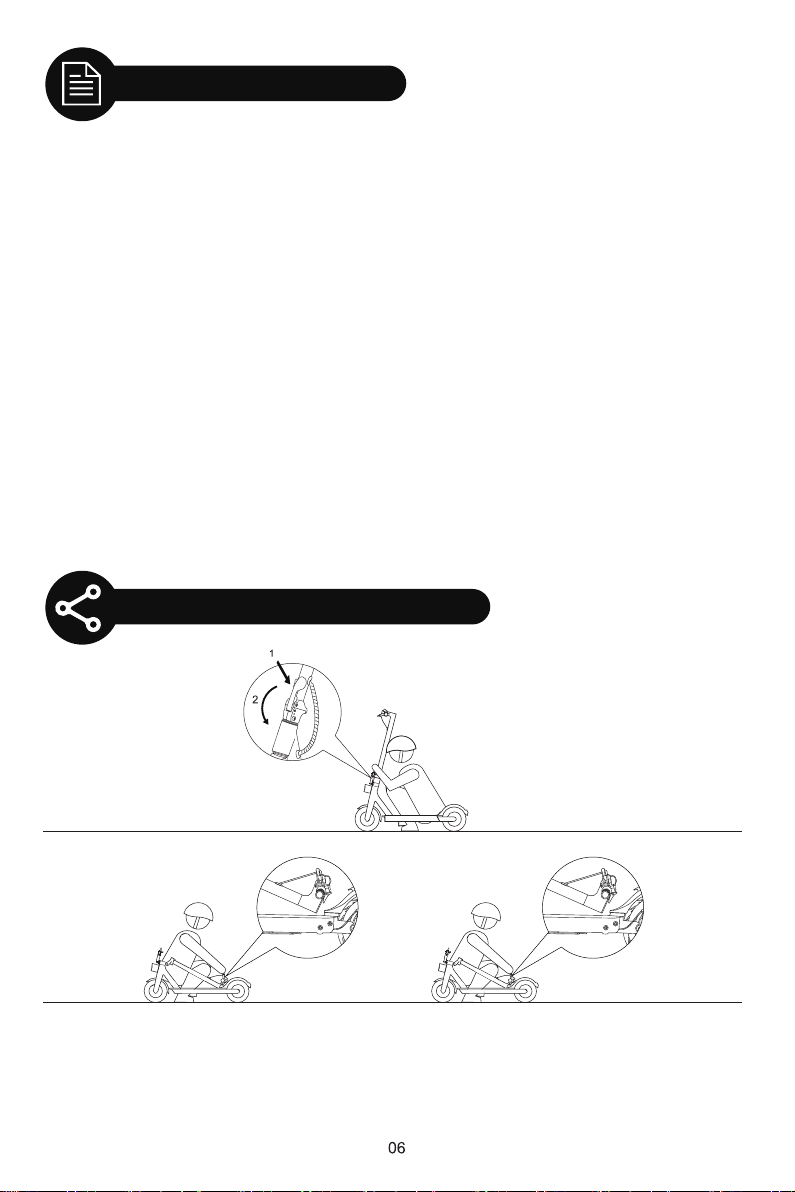
Make sure that the scooter's turned off. To fold, unlock the folding mechanism, and bend the handlebar
stem to hook the buckle on the rear fender. To open, press the bell trigger to remove from the buckle,
erect the handlebar and lock the folding structure.
Folding and Carrying
Riding Notice
The iscooter i9MAX electric scooter is a leisure device. But once they're in a public area, they'll be
seen as vehicles, subject ing to any risks faced by vehicles. For your safety, please follow
instructions in the manual and traffic laws and regulations set forth by government and regulatory
agencies.
●Respect pedestrians' Right of Way. Try not to startle them while driving, especially children. When
you ride from behind pedestrians, ring your bell to give them a heads-up and slow your scooter to
pass from their left (applicable to countries where vehicles drive on the right). When you ride
across pedestrians, keep to the right at a low speed. When you drive across pedestrians, keep the
lowest speed or getting off the vehicle.
●Closely follow the safety instructions in the manual. iscooter shall not be liable for any financial
losses, physical injuries, accidents, legal disputes and other interest conflicts resulted from
actions that violate user instructions.
●Check the scooter before every use. When you note loosen parts, low battery alerts, excessive
wear, strange sounds, malfunctions and other abnormal conditions, stop riding.
●WARNING – Risk of Fire – No User Serviceable Parts.
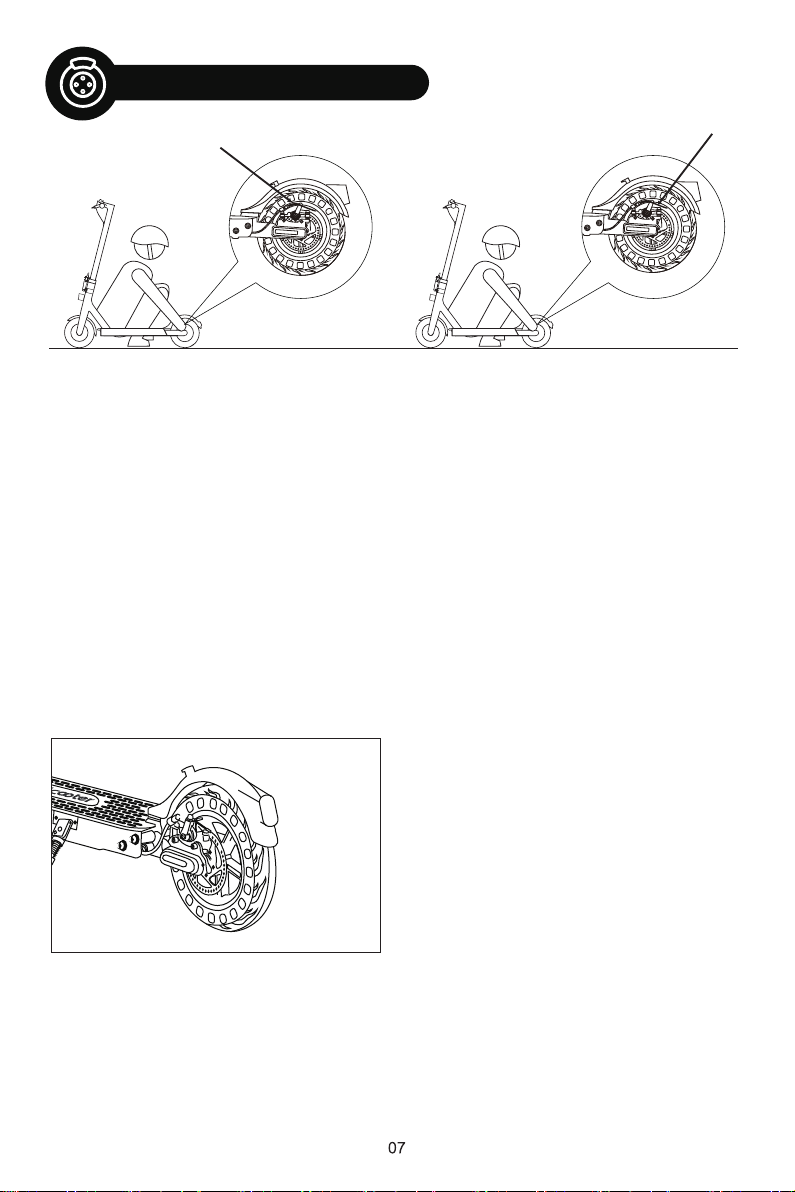
To adjust the disc brake sensitivity:
You need the Allen wrench to loosen the screw on the rocker.
• When the disc brake is too sensitive, rotate the disc brake rocker down a bit. Then, reinstall
the screw back to the brake cable core to tighten.
• When the disc brake cannot stop, rotate the disc brake rocker up a bit. Then, reinstall the
screw back to the brake cable core to tighten.
Notice: The disc brake may squeak when in use until it is broken in. This is normal and does
not affect the brake's function or performance.
To remove the disc brake noise,
First make sure the scooter is turned off. For easier operating, we suggest
you put the scooter on the desk.
• Loosen two screws on the pump (not the screw on the rocker).
• Adjust the position of the disc brake pump to ensure that the brake disc is in the middle of
the two brake pads.
• Keep the brake disc and brake pad not touching each other.
• Hold the disk brake pump in the desired position, then retighten the screws to the pump.
Disc Brake Adjustment

Cleaning and storage
Battery maintenance
Storage and Disposal
If you see stains on the scooter's body, wipe them off with a damp cloth. If the stains won't scrub off,
put on some toothpaste, and brush them with a toothbrush, then wipe them off with a damp cloth.
Notes:
• Do not clean the scooter with alcohol, gasoline, kerosene or other corrosive and volatile
chemical solvents to prevent dire damage.
• Do not wash the board with a high-pressure water spray. During cleaning, make sure that the
scooter's turned off, the charging cable is unplugged, and the rubber flap is closed as water
leakage may result in electric shock or other major problems. When the scooter not in use,
keep it indoors where it is dry and cool.
• Do not put it outdoors for a long time. Excessive sunlight, overheating and overcooling
accelerate the battery pack's lifespan.
1. Use original battery packs, use of other models or brands may bring about safety issues;
2. Do not touch the contacts. Do not dismantle or puncture the casing. Keep the contacts
away from metal objects to prevent short circuit which may result in battery damage or
even injuries and deaths;
3. Use original power adapter to avoid potential damage or fire;
4. Mishandling of used batteries may do tremendous harm to the environment. To protect
natural environment, please follow local regulations to properly dispose used batteries.
5. After every use, fully charge the battery to prolong its lifespan.
1. Please try to store the scooter in a cool and dry place between 14℉ and 104℉. In
extremely humid environments the interior of the scooter may suffer condensation or
even water accumulation, which may damage the battery rapidly.Devices are not
intended for use at elevations greater than 2000 m above sea level Prolonged Exposure
to UV Rays, Rain and the Elements May Damage the Enclosure Materials, Store
Indoors When Not in Use.
2. In daily use, try to avoid recharging the scooter after completely exhausting the battery.
If the battery is low, charge it as soon as possible.
3. Please charge the scooter every other month to preserve the battery.
Daily Care and Maintenance
Indice
Lingue:
Altri manuali iScooter Scooter

iScooter
iScooter iK2 Manuale utente

iScooter
iScooter i9 Manuale utente

iScooter
iScooter iX5 Manuale utente

iScooter
iScooter iX6 Manuale utente

iScooter
iScooter i9 Manuale utente

iScooter
iScooter iX4 Manuale utente

iScooter
iScooter iX5 Manuale utente

iScooter
iScooter i8 Manuale utente

iScooter
iScooter 1S Manuale utente

iScooter
iScooter iX4 Manuale utente


