JMA BT SLIM Manuale utente

MANUAL DE INSTRUCCIONES
USER MANUAL
MANUEL D’UTILISATION
BENUTZERHANDBUCH
MANUAL DO UTILIZADOR
PODRĘCZNIK UŻYTKOWNIKA
BT SLIM

2

ESPAÑOL
3
MODO BLUETOOTH
LED VERDE
Para realizar la copia, lectura generación del
mando. Este modo se emplea también para la
apertura de garajes con teléfono móvil, así como
para el disparador remoto de cámara.
Para CAMBIAR DE MODO Bluetooh a modo
mando y viceversa, se deben realizar 3 ó 4
pulsaciones consecutivas. El led cambiará
de color, si antes se encendía en verde con
cada pulsación pasará a encenderse en rojo y
viceversa.
El mando BT SLIM ofrece al usuario 3 funciones:
1) Telemando de garaje accionado a través del teléfono móvil, gracias a la aplicación JMARemoteSlim. *
2) Telemando de garaje tradicional, apretando simplemente el botón del mando. *
3) Disparador remoto de la cámara de fotos del teléfono móvil.
(*) Para que BT SLIM funcione como telemando para puertas de garaje es preciso grabar el código de uno o más mandos originales
(hasta 4 mandos), tarea que se aconseja la realice un duplicador profesional.
MODO MANDO
LED ROJO
Emplee este modo para ejecutar la función de
apertura de garajes de forma tradicional,
pulsando el botón del dispositivo BT-SLIM.
1. MODOS DE USO

ESPAÑOL
4
2. INSTRUCCIONES PARA EL USUARIO
2.1. DISPARADOR REMOTO CÁMARA DE FOTOS
1. Vincular el mando al teléfono móvil. Consulte el apartado
VINCULACIÓN (pág. 6)
2. Pulsar el botón del BT SLIM para conectarlo al teléfono
móvil.
3. Abrir la aplicación de cámara de fotos en el teléfono y
pulsar el botón del BT SLIM, para capturar una foto.
*Nota: En los dispositivos Android, si al pulsar el botón no se captura
la foto, puede ser debido a que la opción por defecto de la tecla
volumen no sea capturar foto. Basta con entrar en los ajustes de la
cámara y cambiar la opción del botón Volumen por “Sacar Foto”.
2.2. FUNCIÓN APERTURA DE GARAJE
Para utilizar BT SLIM como mando de garaje previamente
se debe grabar en el dispositivo el código de uno o varios
mandos originales. Ésta grabación debe hacerse a través de
la aplicación JMARemotesPRO. Consulte en su punto de
venta JMA para más información.
2.2.1. APERTURA GARAJE CON TELÉFONO MÓVIL
Una vez realizadas las copias del mando original en el dispositivo
BT SLIM, se deben realizar los siguientes pasos:
1. Poner el mando en Modo Bluetooth (Ver Pag.3)
2. Vincular el mando al teléfono móvil. Consulte el apartado
VINCULACIÓN (pág. 6)
3. Descargar la aplicación JMARemoteSLIM. Ésta dispone de
4 botones que podremos vincular con los códigos de los man-
dos originales guardados en nuestro BT SLIM. Los botones se
pueden editar con un icono y un texto que nos ayuden a identi-
ficar el lugar donde se ubica la puerta o puertas que queremos
abrir. Ver Imágenes en la página siguiente (pág. 5).
5. Pulsar el botón del BT SLIM. Como el mando está vinculado
se conectará automáticamente al terminal móvil.
6. Abrir la aplicación JMARemotesSlim
7. Pulsar el botón virtual de la pantalla deseado para enviar el
código de apertura de garaje.
8. El mando se desconectará tras 60 segundos de inactividad.

ESPAÑOL
5
2.2.2. APERTURA GARAJE SISTEMA TRADICIONAL
Una vez realizadas las copias del mando original en el dispositivo
BT SLIM, se pueden realizar las siguientes acciones (con el
dispositivo en Modo Mando):
A) Pulsar el botón del BT SLIM una vez durante un segundo
para enviar el código grabado en el botón 1.
B) Pulsar el botón del BT SLIM dos veces
para enviar el código grabado en el botón 2.
Nota: La apertura como mando de garaje tradicional sólo permite emplear
2 de los hasta 4 mandos originales que se pueden grabar en el mando BT
SLIM. En el modo con apertura mediante móvil se puede realizar la apertura
con todos los mandos originales registrados en el dispositivo.

ESPAÑOL
6
2. INSTRUCCIONES PARA EL DUPLICADOR
3. VINCULACIÓN DE DISPOSITIVOS
COPIA DEL MANDO:
Para realizar la copia de mandos originales en el BT SLIM,
se necesita la aplicación JMARemotesPRO.
Proceso:
1. El dispositivo BT SLIM debe estar en Modo Bluetooth,
sin vincularlo con el teléfono móvil.
2. Mantenga pulsado el botón del BT SLIM durante 7
segundos hasta que el LED verde empiece a parpadear. En
ese momento, suelte el botón.
3. Abra la aplicación JMARemotesPRO y comience el
proceso “Copia de Mando”. Recomendamos a los usuarios
que dejen este proceso en mandos de duplicadores
profesionales del punto de venta donde adquirieron su
BT SLIM.
Auto Altas:
En Modo Mando, se realiza pulsando el botón del BT SLIM
durante 14 segundos, ya sea manteniendo la primera
pulsación para enviar el altas del primer botón o
Vincular el dispositivo
1. En su teléfono móvil abra Ajustes-> Conexiones-
>Bluetooth y encienda el Bluetooth.
Si el Bluetooth se encontraba encendido es conveniente
apagarlo y volverlo a encender para borrar conexiones
pendientes.
2. Pulse el botón en su dispositivo BT SLIM y compruebe que
el led se enciende en verde. En caso de que se encienda en
rojo, cambie de modo (ver pág. 3)
3. En la lista de dispositivos encontrados deberá aparecer
“SLIM”
4. Selecciónelo y vincúlelo a su teléfono móvil.
Cuando el dispositivo está vinculado, cada vez que pulse
manteniendo la segunda pulsación para enviar el altas del
segundo botón grabado.
En Modo Bluetooth se puede lanzar el proceso activando el
switch de Auto-Altas en la aplicación JMARemoteSLIM y
pulsando el código que se desea dar de alta.

ESPAÑOL
7
el botón de su BT SLIM, el dispositivo se conectará
automáticamente al teléfono móvil. La conexión tiene una
duración de 30 segundos.
Desvincular el dispositivo
Para desvincular el emparejamiento del teléfono móvil y
el BT SLIM, debe volver a Ajustes-Conexiones->Bluetooth,
seleccionar el dispositivo SLIM de la lista de dispositivos
vinculados y escoger Desvincular.
Una vez desvinculado el dispositivo, para poder volver a
vincularlo al mismo teléfono móvil, se deben borrar los datos
de vinculación en el BT SLIM
Borrado de datos en BT SLIM
Para borrar los datos de BT SLIM siga los siguientes pasos,
mantenga pulsado el botón del dispositivo durante 14
segundos. (Tras 7 segundos, el led verde parpadeará. Es
importante mantener el botón pulsado hasta ver que ambos
LEDs parpadean).
Este procedimiento borra todos los datos de vinculación con
todos los teléfonos a los que se haya podido asociados, así
como las copias de mandos originales realizadas. Por ello,
se tendrá que volver a vincular con los terminales móviles si
desea restablecer una conexión automática.
ELIMINAR SONIDO DE NOTIFICACIÓN DE TECLADO
FÍSICO
1. En “Ajustes” del teléfono móvil escoja la opción
“Aplicaciones”
2. En la pantalla de Aplicaciones, en lugar de buscar una
aplicación de la lista, pulse el botón “Menú” y seleccione
“Mostrar aplicaciones del sistema”
3. En la lista de “Aplicaciones del Sistema”, seleccione
“Sistema Android”
4. Dentro de “Sistema Android” , seleccione
“Notificaciones”
5. En esta pantalla, seleccione “Teclado físico”
6. Cambie el sonido de la notificación por “Silencio”
4. OTRAS OPERACIONES

ENGLISH
8
BLUETOOTH MODE
GREEN LED
For copying, reading and creating
the remote control. This mode is also used for
opening garage doors via a smartphone, as well
as for the remote camera shutter button function.
To SWITCH BETWEEN BLUETOOTH MODE
AND CONVENTIONAL REMOTE CONTROL
MODE or vice-versa, press the button three or
four times in a row. The LED will change colour.
It will switch from green to red or from red to
green each time you do this.
The BT SLIM remote control has three functions:
1) A garage door remote control activated via a smartphone and the JMARemoteSlim app. *
2) A conventional garage door remote control activated by simply pressing the button on the remote. *
3) A remote camera shutter button for smartphones.
(*) For the BT SLIM to work as a garage door remote control, the code from one or more original remote controls (maximum
of four) must be saved onto the device. We recommend that this be done by a duplication professional.
REMOTE CONTROL MODE
RED LED
This mode is for use as a conventional garage
door remote control by pressing the button
on the BT SLIM device.
1. MODES OF USE

ENGLISH
9
2. INSTRUCTIONS FOR THE USER
2.1.USAGE IN TRIGGER MODE
To use the trigger mode:
1. Link the remote control to the mobile phone. See the
section LINKING (pg. 11).
2. Press the BT SLIM button to connect it to the mobile
phone.
3. Open the photo camera app on the phone and press the
BT SLIM button to capture a photo.
*Note: If the photo is not captured upon pressing the button when
using an Android device, it may be because the volume button is
not the default option for taking a photo. Go to camera settings and
switch the Volume button option to “Take a Photo”.
2.2. OPENING GARAGE DOORS
The code for one or several original garage door openers
must be recorded on the device in order to use BT SLIM as
a remote garage door opener. This recording must be done
using the JMARemotesPRO app. Check with your JMA
distributor for more information.
2.2.1. OPEN A GARAGE DOOR VIA A SMARTPHONE
Once the original garage door opener codes are copied on the
BT SLIM device, follow these steps:
1. Set the remote in “Bluetooth Mode” (See pg. 8).
2. Link the remote control to the mobile phone. See the
section LINKING (pg. 11).
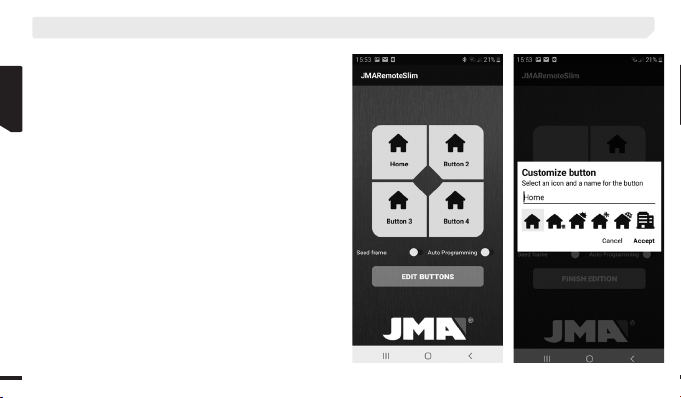
3. Download the JMARemoteSlim app. It has 4 buttons that
can be linked with the original garage door opener codes
saved in BT SLIM. The buttons can be edited with an icon
and text to help identify the place where the door(s) to be
opened is/are located. See Images on the next page (pg. 10).
4. Press the BT SLIM button. Since the garage door opener is
linked, it will automatically connect to the mobile device.
5. Open the JMARemoteSlim app.
6. Press the desired virtual button the screen to send the
garage door opener code.
7. The remote garage door opener will disconnect after 60
seconds of inactivity.

ENGLISH
10
2.2.2. OPEN A GARAGE DOOR VIA THE CONVENTIONAL
SYSTEM
The following actions may be performed once an original remote
control has been copied onto the BT SLIM device (with the
device in Remote Control mode):
A) Hold the BT SLIM button for one second
to send the code saved on Button 1.
B) Press the BT SLIM button twice
to send the code saved on Button 2.
Note: Only two of the maximum four original remote controls that can be
saved onto the BT SLIM remote control can be used when the device is
in Conventional Remote Control Mode. When the device is set to Mobile
Mode, garage doors can be opened using all the original remote controls
saved to the device.
2. INSTRUCTIONS FOR THE USER
Altri manuali per BT SLIM
1
Indice
Lingue:
Altri manuali JMA Telecomando

JMA
JMA M-Q MAX Manuale utente

JMA
JMA M-BT Guida di riferimento

JMA
JMA BT MULTIUSER Manuale utente

JMA
JMA BT MULTI USER PRO Manuale utente

JMA
JMA M-BT Manuale utente

JMA
JMA M-SP2 Manuale utente

JMA
JMA BT MULTIUSER Manuale utente

JMA
JMA BT SLIM Manuale utente

JMA
JMA SR-4V Manuale utente

JMA
JMA M Series Manuale utente