JUKI HZL-NX7 Manuale utente

SERVICE MANUAL
HZL-NX7
COMPUTER SEWING MACHINE

Be sure to observe the following to protect against a re, electrical shock, injury or damaged components.
* Be sure to unplug the machine before disassembly, assembly or adjustment of the machine.
* Be sure to carefully prevent electric cords from being caught, coated surfaces from being damaged
as well as wrong wiring during assembly.
* Be sure to use the proper genuine parts when changing any of the machine parts.
CAUTION:
CONTENTS
[1] Specications of HZL-NX7 ...................................................................................1
[2] Search by trouble (related to mechanical components) ...................................3
[3] Principal parts .......................................................................................................4
[4] Disassembling the machine covers ....................................................................5
[5] PCB connection diagram ...................................................................................10
[6] Adjustment ..........................................................................................................14
6-1 Adjusting the needle bar height ................................................................14
6-2 Adjusting the needle entry point ...............................................................15
6-3 Feed dog height ..........................................................................................16
6-4 Timing belt ...................................................................................................17
6-5 Feed timing ..................................................................................................17
6-6 Adjusting the shield ....................................................................................18
6-7 Hook driving shaft coupling and the lateral timing of the hook driving
shaft .............................................................................................................19
6-8 Timing between the needle and the hook .................................................20
6-9 Clearance between the needle and the blade point of hook ...................21
6-10 Position of the hook rotation stopper plate ...........................................22
6-11 Adjusting the bobbin thread tension .......................................................22
6-12 Adjusting the needle thread tension .......................................................23
6-13 Vertical position of the needle threading hook ......................................24
6-14 Adjusting the auxiliary hook height ........................................................25
6-15 Adjusting the opening amount of auxiliary hook ...................................26
6-16 Adjusting the presser bar height .............................................................26
6-17 Motor belt ...................................................................................................27
6-18 Longitudinal feed ......................................................................................28
6-19 Presser foot lifting ....................................................................................29
6-19-1 Position of the presser foot lifting motor .......................................29
6-19-2 Adjusting the height of the auto-lifter .............................................30
6-20 Thread trimming ........................................................................................31
6-20-1 Attaching/removing the thread trimmer unit ..................................31
6-20-2 Adjusting the thread trimming switch .............................................32
6-21 Attaching/removing the top feed dog .....................................................33
6-22 Position of the automatic DF motor ........................................................34
6-23 Service mode .............................................................................................35
6-23-1 Service mode screen ........................................................................35
6-23-2 Service-mode items and descriptions ............................................35


– 1 –
(1) Power switch
• 220-240V AC common to 50/60 Hz
• 120V AC common to 60 Hz
(2) Power consumption
• 85 W
(3) Dimensions and weight
• Dimensions Main unit: 575 (width) × 240 (depth) × 310 (height) (mm)
• Weight Main unit: 14.8 kg
(4) Revolution control
• Slide style speed control
Straight stitch 80 to 1,050 sti/min (SPM)
Pattern stitch 80 to 750 sti/min (SPM)
Reverse stitch 80 to 1,050 sti/min (SPM)
(Sewingspeedotherthanthespeciedrangecanbesetoptionally.)
80 to 1,050 sti/min (SPM) (when the speed controller is used.)
Bobbinwinding 1,500to3,000sti/min(SPM)
Low-speed start 80 to 110 sti/min (SPM) (approx. 1 second only when the power switch is turned ON.)
• Foot controller
Evenwhenthefootcontrollerisused,thespeedcontrolfunctionbymeansoftheslideriseffective.
Tostopthemachine,eitherreleasethefootcontrollerorpressstart/stopbutton.
Thenumberofrevolutionsiscontrolledinthewaysamewiththecaseoftheslidespeedcontrol.
Toe-uppedalingfunctioncanbesetoptionally.
• Safety control
When the motor shaft of the sewing machine is accidentally constrained, the power supply to the motor is
stopped within two seconds.
Whenthemotorisoverheated,thebuiltinthermalswitchstopsthepowertothemotor.
Notethatthemachinecanberestartedoncethemotorspontaneouslycoolsdown.
(5) Stop position
•Uponnishingsewing,themachinestopsaccordingtothepresetneedlestopposition(withitsneedleupor
down).
•Uponnishingreversestitching,themachinestopswithitsneedledown.
• Needle moves down when the machine has preset so that the needle stops at its up position and needle up/
downbuttonispressed.
• Needle moves up when the machine has preset so that the needle stops at its down position and needle up/
downbuttonispressed.
• In the case of fault, the machine stops immediately (stop position varies).
(6) Zigzag width
• Max. 7 mm depending on the pattern selected
(7) Amount of feed
•Theamountoffeedischangedinincrementsof0.2mmbythestitchlengthadjustingdial(orbutton).
(Fortheparallelpartsofabuttonholeandsatinstitches,theamountfeedischangedinincrementsof0.1mm.)
Default setting: 2.4 mm (for straight stitching)
[1] Specications of HZL-NX7

– 2 –
(8) Pattern selection
• Selection is made on the touch panel
(9) Number of patterns that can be selected
• Max. 70 patterns
(10) Number of patterns
• 351
(11) Automatic threading device
•Thehooksectionmakesaturnbyloweringthethreadinglever,andautomaticallyreturnstoitsoriginalposition
after completion of threading.
(12) Automatic lock stitch
WhenthebacktackingswitchisturnedON:
• Straight stitch: Three stitches are sewn in normal direction and three stitches are sewn in reverse direction at
thebeginningandend(thereverseswitchisturnedON)ofsewing.
Amount of feed: Same with the preset amount of feed
• Other patterns: Zero-feed is inserted and one each stitch is sewn in the normal and reverse directions at the
beginningandend(thereverseswitchisturnedON)ofsewing.
Amount of feed: Fixed at 0.4 mm
(13) Buttonholing
Auto-returntypefullautomaticbuttonholing
Buttonholing size detection
(14) Save and call patterns
Selectedpatternsandpatternsettingscanbestoredinmemory.
Inaddition,thepatterncanbecalledupfrommemoryforsewing.
Numberofpatternsthatcanbestoredinmemory:10(folders)
(15) Helpful messages
• Presser foot lifting lever
• Buttonholing foot
• Display of pattern storage limitation
• Pattern clear prompt
• Memory storage
• Acceptance of setting change
• 2-needle setting
• Motor lock
• Straight stitch selection
• Throat plate has come off
• Top feed

– 3 –
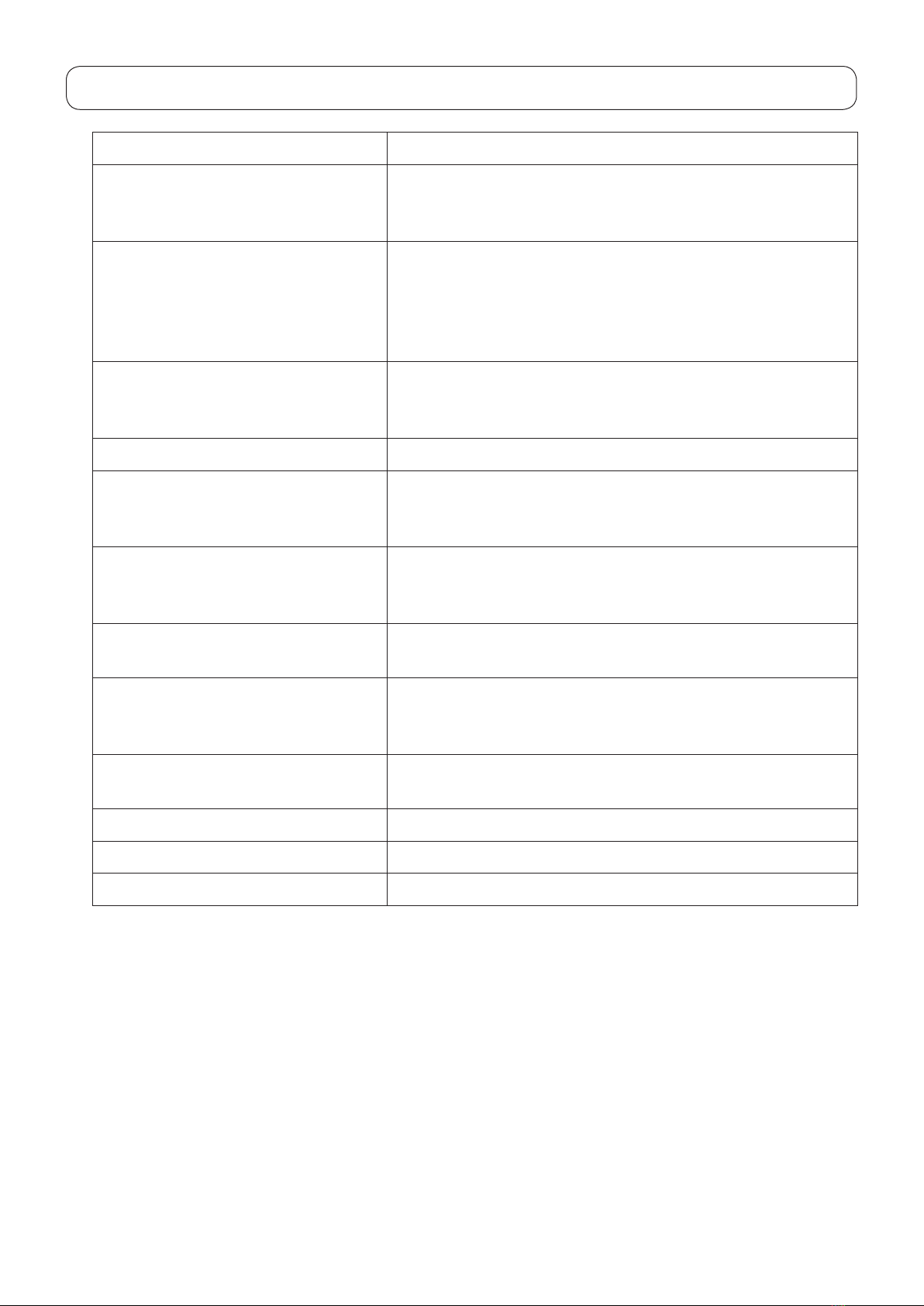
[2] Search by trouble (related to mechanical components)
Phenomenon Itemtobechecked
Faulty thread tension 6-10: Position of the hook rotation stopper plate
6-11:Adjustingthebobbinthreadtension
6-12:Adjustingtheneedlethreadtension
Stitch skipping 6-1:Adjustingtheneedlebarheight
6-2:Adjustingtheneedleentrypoint
6-5: Feed timing
6-8:Timingbetweentheneedleandthehook
6-9:Clearancebetweentheneedleandthebladepointofhook
Threadbreakage 6-1:Adjustingtheneedlebarheight
6-8:Timingbetweentheneedleandthehook
6-10: Position of the hook rotation stopper plate
Hitch stitch 6-2:Adjustingtheneedleentrypoint
Faulty material feed 6-3: Feed dog height
6-16:Adjustingthepresserbarheight
6-22: Position of the automatic DF motor
Contactbetweenneedleandthroatplate
or hook
6-2:Adjustingtheneedleentrypoint
6-5: Feed timing
6-8:Timingbetweentheneedleandthehook
Faulty pattern shape 6-3: Feed dog height
6-18: Longitudinal feed
Faulty automatic thread trimming 6-6:Adjustingtheshield
6-20-1: Attaching/removing the thread trimmer unit
6-20-2:Adjustingthethreadtrimmingswitch
Faulty operating noise 6-4:Timingbelt
6-17:Motorbelt
Needle threader 6-13: Vertical position of the needle threading hook
Fails to start sewing 6-19-2:Adjustingtheheightoftheauto-lifter
Faulty automatic presser foot lifting height 6-19-2:Adjustingtheheightoftheauto-lifter

– 4 –
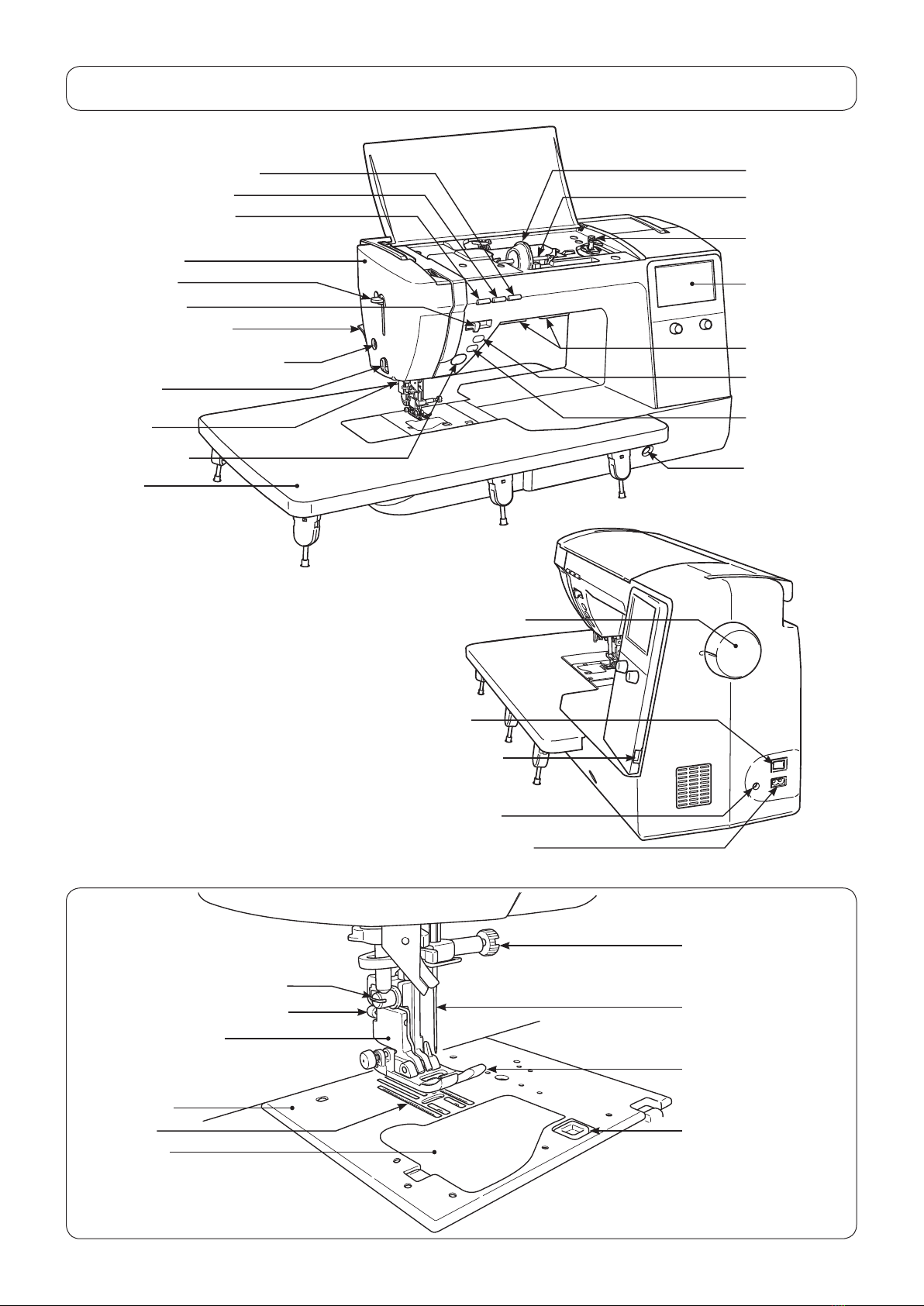
[3] Principal parts
Spool cap (large)
Spool pin
LCD Screen
Face plate cover
Threading lever
Start/stopbutton
Presser foot lifting lever
Needle setscrew
Needle
Presser foot
Sensorpinholeforbuttonholing
Presserfootreleasingbutton
Feed dog
Throat plate
Hook cover
Bobbinwinding
shaft
Hook cover release
button
Presser foot holder
Threadtrimmingbutton
Widetable
Thread cutter Lockstitchbut-
ton
Speed controller
Needleup/downbutton
Knee lifting lever
hole
Light under arm
Reverse stitch
button
Presserfootautoliftbutton
Hand wheel (pulley)
Power switch
Machine-socket-inlet
Foot-controller-jack
USB insertion slot
Cloth puller top
feed device
Presser foot holder setscrew

– 5 –
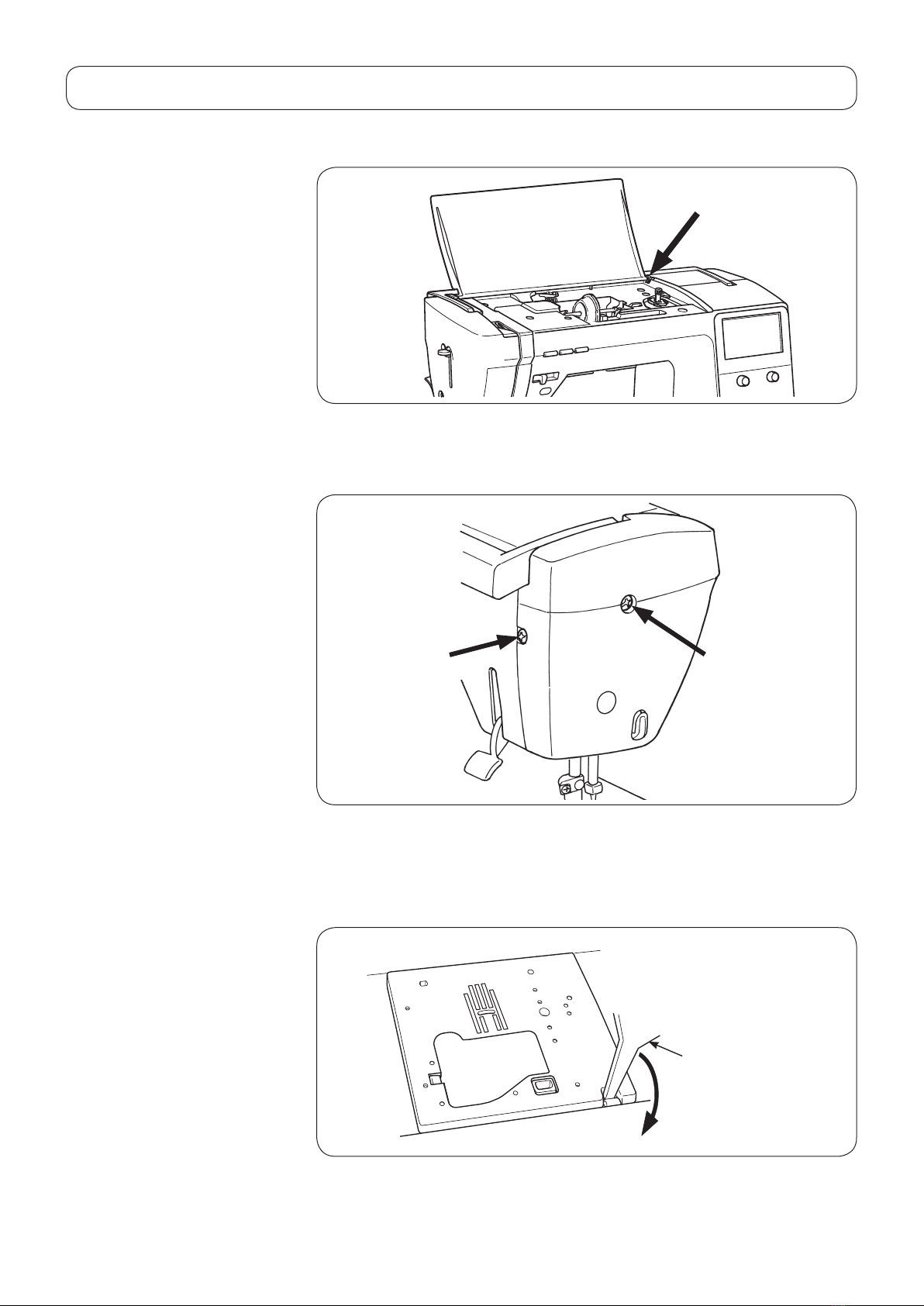
○Toremovethetopcover,bowthehingesectionoftherightsideofthecover.
○Remove setscrews 1and 2from the face cover.
Then, remove the face cover.
○Fittingaat-bladescrewdriver(T-shape)inthenearestslotinthethroatplate,
push up the throat plate with the screwdriver until it comes off.
Then remove the throat plate.
[4] Disassembling the machine covers
1) Top cover
2) Face cover
3) Throat plate
T-shape
❶❷

– 6 –
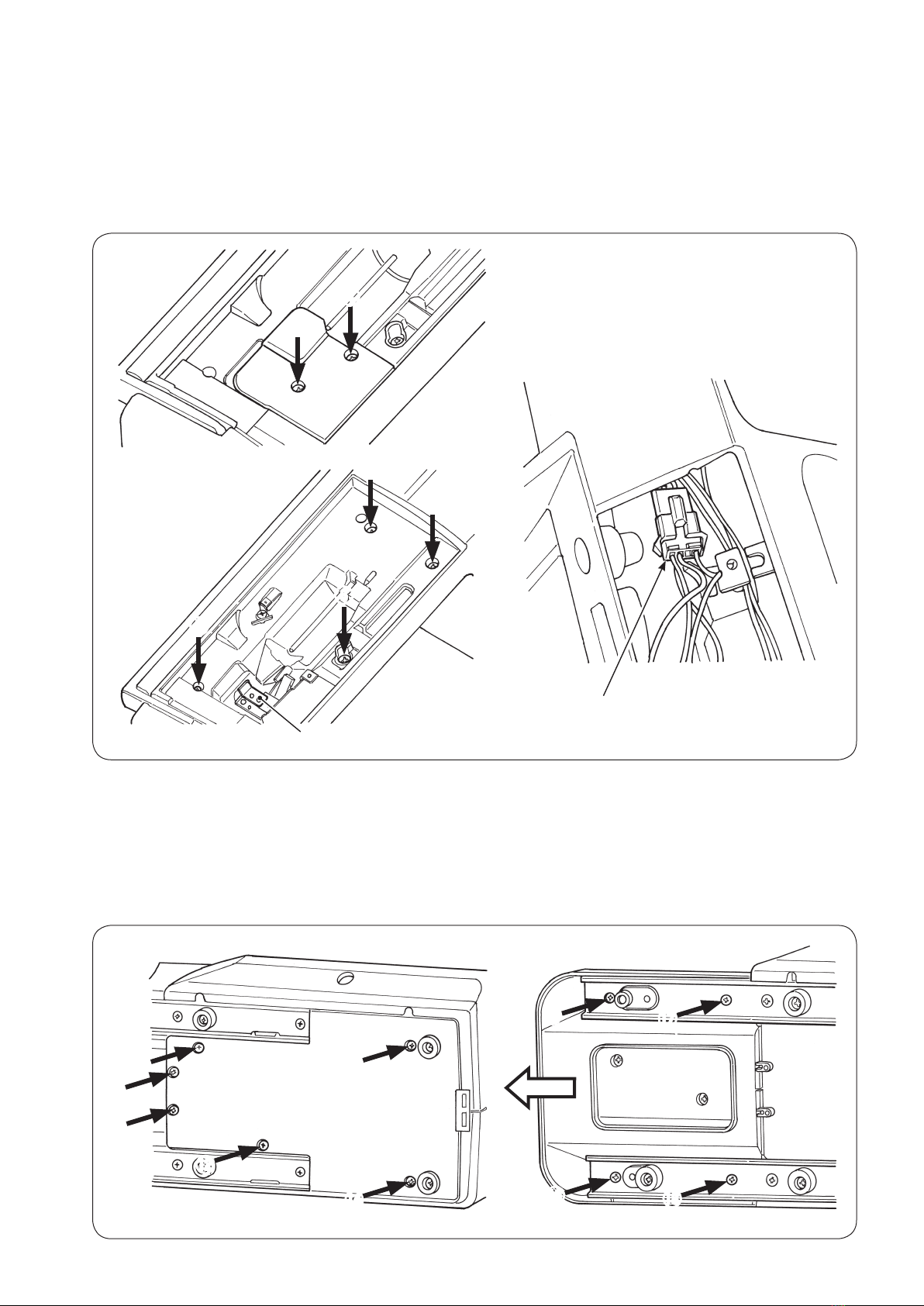
❺
❻
❼
❽
❸
❹
○Remove setscrews 4and 5from the thread tension cover.
Remove the thread tension cover.
○Remove setscrews 6to !0 from the spool cover.
○Removethebobbinwindingmotorjunctioncablefromthejunctionconnector.
○Remove the spool cover from the main unit of the machine, paying attention to
thebasetension.
4) Spool cover
Base tension
○Remove setscrews ❾to ofthebottomcoverB(onthehandwheelside)to
detachthebottomcoverB.
○Remove setscrews to ofthebottomcoverA(ontheframeside).Draw
outthebottomcoverAinthedirectionofthearrowwhilepushingupthetipof
the cover.
5) Bottom cover
Junction connector
❾

– 7 –
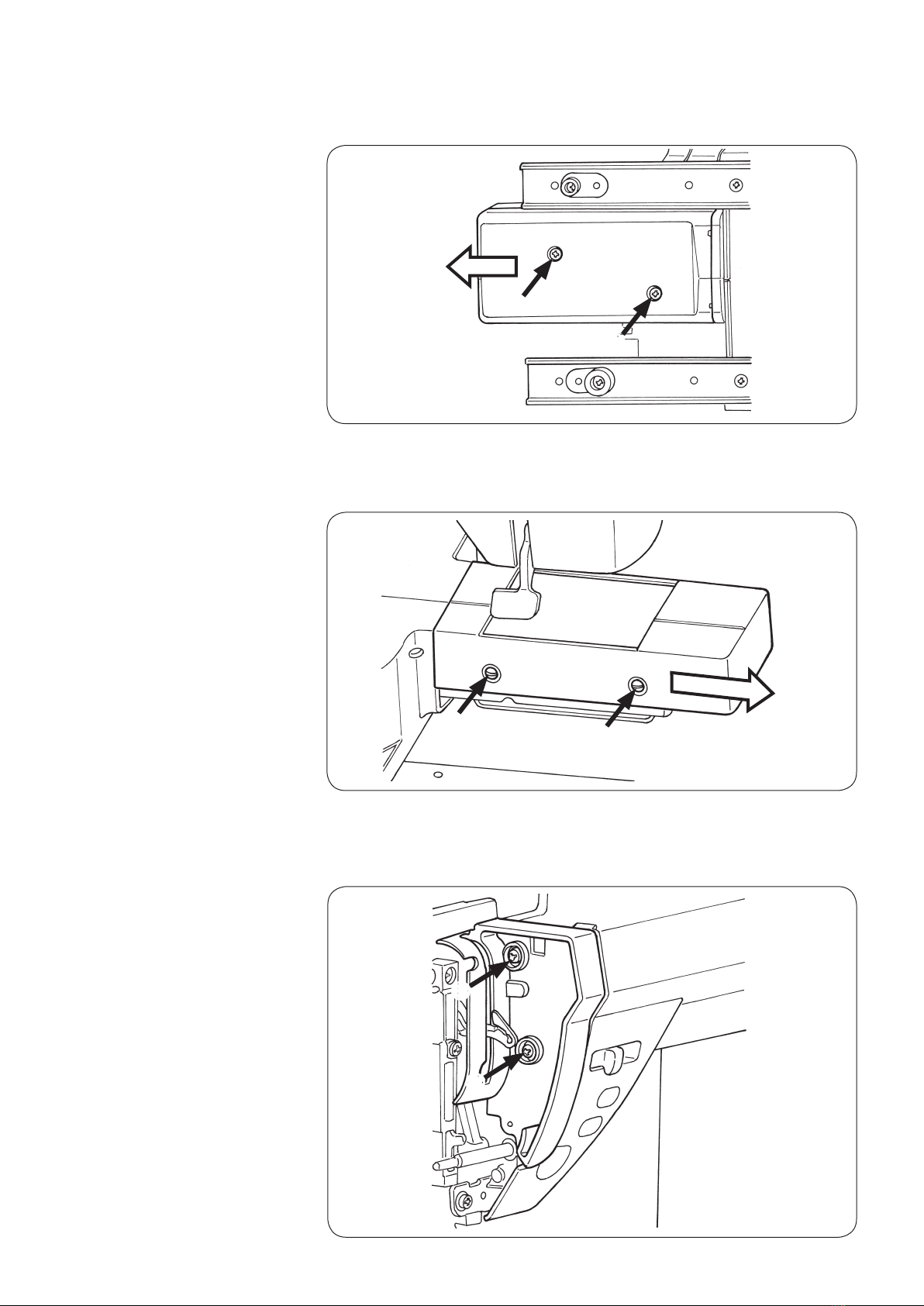
○Removefree-armlowerbottomcoversetscrewsand .Pulloutthebot-
tom cover of the free arm in the direction of the arrow.
6) Bottom cover of the
free arm
○Remove free-arm upper cover setscrews and . Pull out the upper cover
of the free arm in the direction of the arrow.
7) Upper cover of the
free arm
○Remove setscrews and from the face plate cover.
Remove the face plate cover.
8) Face plate cover

– 8 –
AB
F
D
C
EG
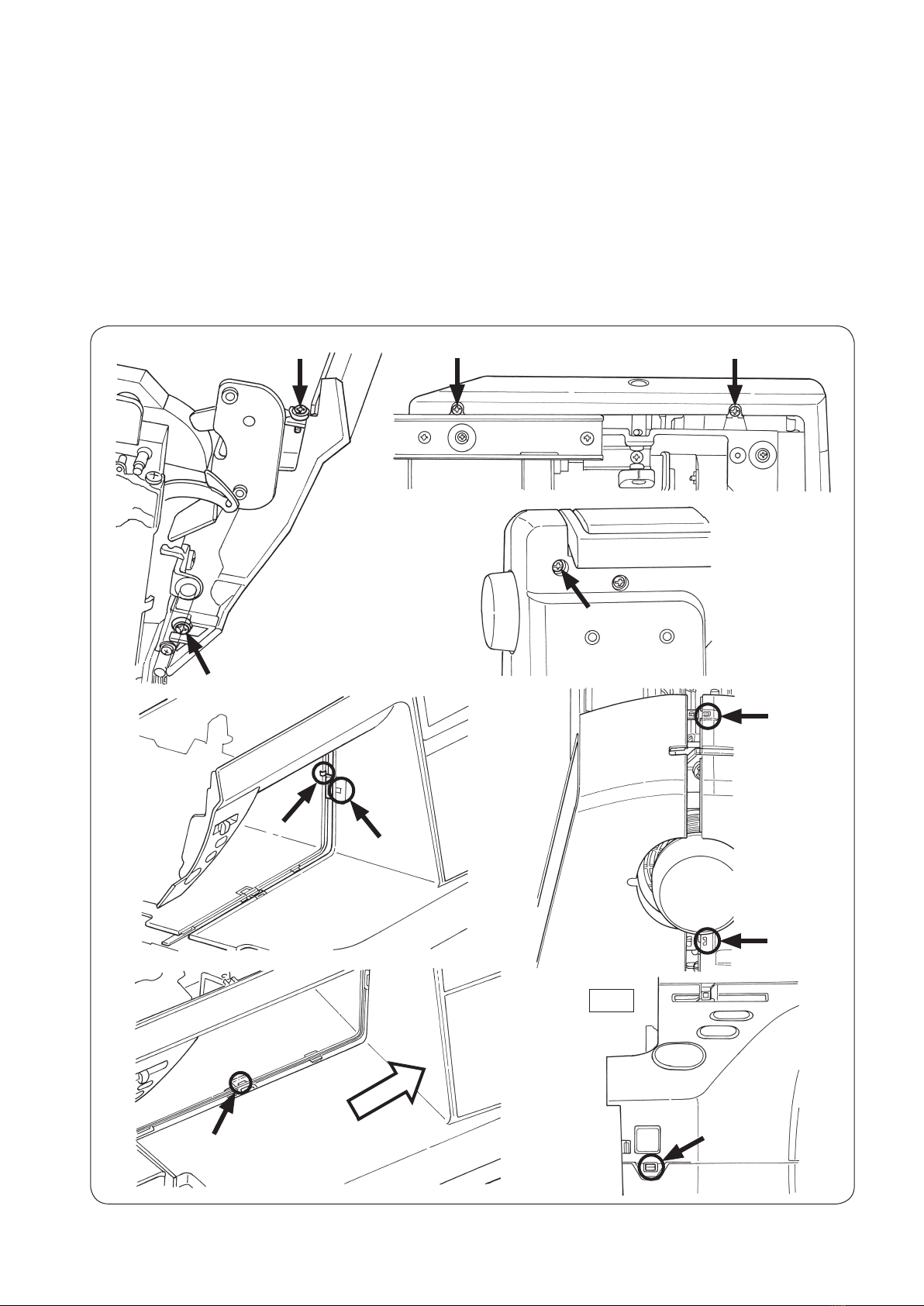
9) Front panel ○Remove setscrews to from the front panel.
○Put a thin screwdriver in the notch Ain the rising section under the arm and
pry off the front panel and hook Bof the rear panel. (Fig 1)
○Detach clinch nails (Cand D) of the front panel and rear panel, while pushing
down the front panel.
○Opening the right side of the front panel in the direction of the arrow, tap E
section with your hand to remove hook Flocatedatthebedsurface.
○Lastly, remove hook Glocatedatthelowersideofthemachinejaw.
○If needed, remove the switch/slide VR connector (CN17) and panel I/F con-
nector (CN19) from the main PCB. Then, remove the LED1 connector (CN208).
Fig.1
Altri manuali per HZL-NX7
1
Indice
Altri manuali JUKI Macchina da cucire

JUKI
JUKI APW-895 Guida rapida

JUKI
JUKI CP-160 Manuale utente

JUKI
JUKI DDL-555-4 Manuale utente

JUKI
JUKI HZL-27Z Manuale utente

JUKI
JUKI NA-35UT Guida

JUKI
JUKI DDL-8700B-7 Manuale utente

JUKI
JUKI DNU-1541-7 Manuale utente

JUKI
JUKI MB-373N/BR10 Manuale utente

JUKI
JUKI MO-2800 Manuale utente

JUKI
JUKI DDL-8700B-7 Manuale utente

JUKI
JUKI DDL-5550 Manuale utente

JUKI
JUKI HZL-G Series Manuale utente

JUKI
JUKI LZ-2290A-SS-7 Guida rapida

JUKI
JUKI LU-2810-6 Manuale utente

JUKI
JUKI MO-613V Manuale utente

JUKI
JUKI MF-7900-E22 Manuale utente

JUKI
JUKI MEB-3200 Series Guida rapida

JUKI
JUKI MF-7900-E11 Manuale utente

JUKI
JUKI SC-910N Guida rapida

JUKI
JUKI MH-486-5 Manuale utente