
Kinetik Wellbeing ET-100A Manuale utente

ET-100A
Inner Ear Thermometer

Introduction
Specification
Parts
Warning and safety notices
How to use (°C displays for example)
Changing from Celsius to Fahrenheit
Explanation of symbols on unit
Product disposal
Cleaning and Storage
Replacing the batteries
Guarantee
EMC Table
2
3 - 4
5
6 - 7
8 - 9
9
10
11
11
12
12
13 - 16
Content

Please read the instructions carefully before using.
The ear thermometer is a device capable of achieving infra-red temperature measurement when
placed in the auditory canal of a subject. It is a safe means of measuring human body temperature
through the ear.
2
Introduction

The standard we adopted is EN12470-5:2003 Clinical thermometers -- Part 5: Performance of infrared
ear thermometers (with maximum device).
This device complies with the requirements of IEC 60601-1,IEC 60601-1-11 and IEC 60601-1-2.
Range of displayed temperature : 34°C - 44°C (93.2°F - 111.2F)
Display L°C (L°F) when the temperature is under 34°C (93.2°F)
Display H°C (H°F) when the temperature is over 44°C (111.2°F)
Operating ambient:
Temperature: 16°C - 35°C (60.8°F - 95.0°F)
Humidity: ≤80%rh
Storage and transport condition:
Temperature: -10°C to 55°C (14°F to 131°F)
Humidity: 30%rh to 90%rh
Display resolution temperature range: 0.1°C (0.1°F)
Accuracy: ±0.2°C (from 35.5°C to 42.0°C)
±0.4°F (from 96.0°F to 107.6°F)
Display: liquid crystal display, 4 digits
temperature value: display the maximum temperature in measuring process
3
Specification

4
Specification
temperature unit: centigrade or fahrenheit
display of memory: last ten memories
low battery warning: the LCD display and then a beep sound is heard
Power consumption: ≤30 mW
Battery: two 1.5V alkalescence batteries (AAA)
Battery life: 4000 takes or 6 months with 3-min. usege per day
Dimension: 134mm by 37mm by 67mm
Net weight: 74g
Beeper sign: on/off, measuring finish and low voltage warning, etc.
Self-testing sequence: Press the 'on/recall' button to turn on the thermometer and all of symbol
(See Fig A) should be displayed on the LCD in one second.
Calibration: This thermometer is calibrated at the time of manufacture. If the thermometer is used
according to the instructions, periodic re-calibration is not required.
Manufacturing Batch code: see the label within the battery compartment.

Probe membrane
Disposable probe cover
Probe cap
LCD
On/recall button
Battery cover
Scan button
5

Cautions
Condition the thermometer at room temperature for 30 minutes before taking a reading.
Use a new probe cover with each and every measurement to avoid inaccurate readings. Without a
probe cover, results will be at least 1°C higher.
This thermometer MUST be used with a probe cover. Using the product without a probe cover could
result in inaccurate readings.
The ' ' symbol on the display indicates the device is ready for use.
Do not scratch the probe membrane as this will affect the accuracy of measurements.
If the LCD does not change or respond when you press any of the buttons, remove the batteries and
then replace to reset.
Please don't use the thermometer if your ear canal has become inflamed. Do not force the
thermometer into the ear canal. If pain occurs, stop using immediately.
Do not expose this thermometer to electric shock.
Do not expose the thermometer to sunlight or to water.
Do not use near strong electromagnetic fields, i.e. Keep it away from any radio systems and mobile
phones.
Do not modify this device without authorization of the manufacturer.
This device must always be kept in a clean, dry area.
: Degree of protection against electric shock is Type BF applied part.
: Battery disposal should be completed in accordance with local regulations.
1.
2.
3.
4.
5.
6.
7.
8.
9.
10.
11.
12.
13.
14.
6
Warning and safety notices

Note:
• In order to avoid the spreading of germs, use a new probe cover for each measurement.
• Check to ensure probe cover is fitted on firmly before use (please see the diagrams below).
If the probe cover is broken, discard and apply a new one immediately.
7
Warning and safety notices
Incorrect Correct

Fig A
Newborn-1 year 1 year - adult
Fig B
Measuring human body temperature in the Ear Canal
1. Press the 'on/recall' button to turn on the thermometer. After the
beep the thermometer will be ready to read when the LCD display
matches Fig B.
2. Straighten the ear canal by pulling the outer ear up and back to
give a clear view of the eardrum.
• For children under 1 year, Pull the ear straight back.
• For children ages 1 year to adult, Pull the ear up and back.
(Caution: Many pediatricians suggest use of ear thermometers for children older than 6 months.)
3. While pulling the outer ear, insert the probe snugly into the ear canal (insert as deep as is comfortable,
do not force, the probe into the ear canal). Press and immediately release the 'SCAN' button. Do not
remove the thermometer from the ear until you hear the beep sound — this beep means that the
measurement is complete. Remove the thermometer from the ear. The display shows the measured
temperature.
4. Repeat measurements: wait at least 1 minute between measurements. Ensure the Ear symbol is visible
in the LCD.
8
How to use (°C displays for example)
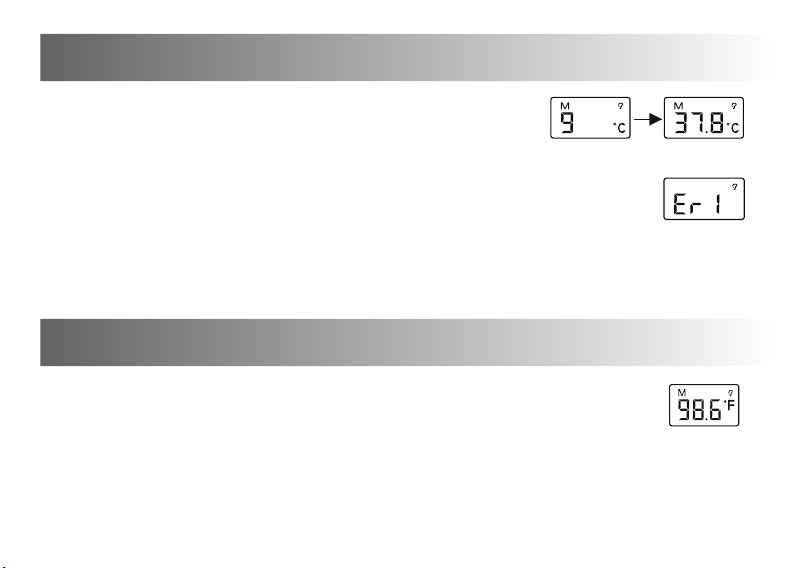
Fig C Fig D
Fig E
Fig F
9
5. Memory search: Press the 'on/recall' button, the last ten memories
(N0.9-N0.0) will take turns to display on the LCD as Fig C and Fig D.
6. The LCD will displays 'Er 1' as Fig E and cannot displays temperature
when the ambient temperature is out of the range of 16°C to 35°C.
Note: Before measuring, the thermometer shall be stabilized at the operating
ambient condition for a minimum of 30 min.
7. Shut off: The thermometer shall automatically shut off without manipulating in one minute.
How to use (°C displays for example)
Changing from Celsius to Fahrenheit
To switch the display between °C and °F, turn the unit on. Press and hold the on/recall
button for 3 seconds, the display will show as Fig. F , the unit will prepare for a
measurement.
Indice
Altri manuali Kinetik Wellbeing Termometro


