
Koldwave 6CC10BEA2AA00 Manuale utente
1
Owner’s Manual
WMC-2500
Owner’s Manual
WPC-15000
Please read and save these instructions. Read carefully before attempting to assemble, install, oper-
ate or maintain the product described.
Protect yourself and others by observing all safety information. Failure to comply with instructions
could result in personal injury and property damage! Retain instructions for future reference.
Koldwave Modular Mul Air condi oner feature mul -func on spot cooler providing various ac-
cessories available to t customer needs. This Unit is used to spot cooling for large areas where
cooling of the en re area is not prac cal or possible. A dedicated spot cooling thermostat controls
the unit in this applica on. This Unit can also be used in smaller areas for room cooling.
A control panel provides ease of use and contains a self-diagnos c func on and display, showing
opera ng modes, room and set temperatures, and faults, If an abnormal opera on occurs, a visual
display of the fault is shown.
Suitable applica ons include :
a factory or work place, computer rooms, emergency cooling, etc..
A er unpacking the unit, carefully inspect unit for any damage that may have occurred during
transit. Check for any loose, missing or damaged parts.
Descrip on
Unpacking
6CC10BEA2AA00
Figure 1
Owner’s Manual
6CC10BEA2AA00
Modular Multi Air Conditioner

Owner’s Manual
6CC10BEA2AA00
2 3
Table of Contents
SPECIFICATION.............................................................................................4
GENERAL SAFETY INFORMATION..................................................................
4APPLICATIONS..............................................................................................6
Portable
Server Rack
Mounted, Hang
Stack
ASSEMBLY (STANDARD)................................................................................7
Component Parts
Power Cord Holder
ASSEMBLY (PORTABLE).................................................................................8
Component Parts
Handle
Cool air duct assembly
Caster
ASSEMBLY (SERVER RACK)............................................................................9
Component Parts
Universal adjust
Rack Assembly
Rack Diuser
ASSEMBLY (MOUNTED, HANG)...................................................................10
Condenser Intake Air Duct Flange
Eva Intake Air Duct Flange
Hanging Kit
ASSEMBLY (STACK)......................................................................................12
Universal Adjust
Stacking Bracket
INSTALLATION GUIDE..................................................................................13
Moving the Unit
Plugging the Unit
OPERATION................................................................................................14
Control Panel
MAINTENANCE...........................................................................................16
Filter Cleaning
WIRING DIAGRAM......................................................................................20
TROUBLESHOOTING...................................................................................21
OBTAINING SERVICE.....................................................................................22

Owner’s Manual
6CC10BEA2AA00
3
* The 6CC10BEA2AA00 is used in conjuncon with various accessories to adapt to your
environmental needs. These accessories (Portable Kit, Server Rack Kit, Hanging Kit, Stack
Kit) are sold separately to allow you to customize the 6CC10BEA2AA00 to your specic
needs
Shipping list
Modular air condioner 1 unit
Owner’s Manual 1 pcs
Power Cord Holder 1 pcs
Drain hose (20 length) 1 pcs

Owner’s Manual
6CC10BEA2AA00
4 5
Model No. Power Supply Ph-V-Hz Cooling Capaci-
ty Btu/h
Power Consump-
on Was
Rated Cur-
rent Amps
EER Btu/
Wh
6CC10BEA2AA00
Single Phase, 115V, 60Hz 10,000 1000 10 10.0
Model No. Nema Plug Power Cord
Gauge AWG
Power Cord Length
Dimensions
W x D x H - in. (mm)
6CC10BEA2AA00
5-15P 14 10 17.25 x 24 x 20
(438 x 610 x 508)
Model No. Weight (Net / Gross) Lbs(kg) No. of Cool Air
Outlets Pcs
Condensate tank
Gallons(Liters)
Ambient temperature
range °F( °C)
6CC10BEA2AA00
121 / 128 (54 / 58) 1Auto Pump
Included 64~113 (18~45)
Model No. Seng temperature
(Room cool mode) °F( °C)
Seng temperature
(Spot cool mode) °F( °C)
6CC10BEA2AA00
64~86 (18~30) 32~86 (0~30)
Model No. Applicaon Area
(Room cool mode) ²(m²)
Refrigerant
Type / oz(g)
Design Pressure - Hi/
Low Psig
6CC10BEA2AA00
258 (24) R410A /
21.9 (620) 465 / 250
Model No. Indoor Air Flow
(High/Low)CFM(CMM)
Wheels
pcs / diameter
Hot Air Duct Diame-
ter In.(mm)
Maximum Duct Length
(m)
6CC10BEA2AA00
320 / 220 (9.1 / 6.2) 4 / 76.2mm 6 (150) 10 (3)
Safety Devices
Compressor overload protector, An-freezing thermister,
Automac restart (Power interrupon), Compressor me
delay program, High pressure switch
Features
Temperature control, Self-diagnosc funcon, Two speed
fan, Washable lters, °F( °C) display, O-mer, Drain pump
is included, Humidity control.
General Safety Informaon
Please read this manual carefully for instrucons on correct installaon and usage. Please read
all safeguards,
1. Transport and store the unit in and upright posion only. Leave unit in an upright posion for
at least 3 hours before rst use.
2. Always place the unit on an even, level surface.
3. Ensure the unit is connected to a grounded power supply of the correct rang / capacity.
4. The unit will cool when the room temperature is between 18˚C (64.4˚F) ~ 45˚C (113˚F) de-
pending on the thermostat seng.
5. DO NOT use this unit for funcons other than those described in this instrucon manual.
6. DO NOT lt the unit.
Specicaons

Owner’s Manual
6CC10BEA2AA00
5
7. DO NOT cover or obstruct the unit’s inlet and outlet grilles.
8. DO NOT use the unit in areas where it will be exposed to rain or water.
9. NEVER unplug the while it is operang.
DO NOT use the unit in wet environments, such as a laundry room, to avoid
the risk of electrical shock.
DO NOT operated the unit in explosive or ammable environments.
DO NOT operate a unit with a damaged power cord.
10. DO NOT place any foreign objects on the unit.
11. DO NOT operate the unit with wet or damp hands.
12. DO NOT allow chemical substances to come into contact with the unit.
13. DO NOT operate the unit in the presence of ammable substances or vapors such as alcohols,
pescides, gasoline, etc.
14. DO NOT use the plug to start and to stop the unit. Always use the control panel to start and
to stop the unit.
15. Always turn o the unit when it is not in use and unplug the power plug from the electrical
outlet.
16. Always turn the unit o and unplug the main power plug from the electrical outlet before
cleaning, moving or performing maintenance,
17. AVOID the use of adapter plugs or extension cords. If it is necessary to use an extension cord
or an adapter plug to operate the unit, ensure that they are correctly rated for the applica-
on. Consult a local qualied electrician and all local electrical codes to ensure proper setup.
Any extension cord used with this device must be rated for a minimum of 15A.
18. DO NOT unplug the unit by pulling on the electrical cord. Keep electrical cord away from heat
sources and always completely unroll the cord to avoid overheang. If the power cord be-
comes damaged, a qualied service agent, qualied electrician, or similarly qualied person
must replace it, in order to avoid a hazard or shock.
19. The lters must be used with the product at all mes. When the lters are removed for clean-
ing, always ensure that the unit has been turned o and unplugged from the electrical outlet.
20. Regularly clean the lters to maintain eciency. If the lters are not cleaned regularly, the unit
output performance and eciency will decline and energy consumpon will increase.
21. DO NOT operate the unit with a damaged power cord or plug, aer it malfuncons, has been
dropped or damaged.
22. Only use in the upright posion on an even, at surface. Unit must be posioned at least 24
inches (60cm) from the nearest object in any direcon.
23. Stop operaon immediately if abnormal noise or odor is noced. Contact a local service center.
24. Appliance is not used by children or persons with reduced physical, sensory or mental capabili-
es, or lack of experience and knowledge, unless they have been given supervision or instruc-
on.
25. Children being supervised not to play with appliance.
26. That the appliance shall be installed in accordance with naonal wiring regulaons.
27. If the supply cord is damaged, it must be replaced by the manufacturer, its service agent or
similarly qualied persons in order to avoid a hazard.
SAVE THESE INSTRUCTIONS.

Owner’s Manual
6CC10BEA2AA00
6 7
Applicaons
With various accessories, Modular mul air condioner provides best applicaon to suit custom-
er’s individual needs.
PORTABLE
- This unit has ability to move easily from room to room using portable kit. It is available spot
cooling for large areas where cooling of the enre area in not praccal. This air condioner can
also be used in smaller areas for room cooling.
Portable kit includes casters, cool air duct assy and handle.
SERVER RACK
- It can be rack-mounted inside 19" computer server rack for cooling small computer and server
rooms. This unit occupies just 12U of valuable rack space.
Server Rack kit includes server rack assy (shelf), universal adjust (mount feet) and rack diuser.
MOUNTED, HANG
- It can be used to mounted type where your needs and hung type using ceiling mounted kit.
Hanging kit includes a eva intake air ange, a condenser lter/ intake air ange and hanging kit
(support).
All hanging installaons must be completed by a qualied electrical technician to permanently
connect the unit to a xed locaon (hardwared).
STACK
- This unit can be stacked on top of each other to produce a capacity of 20,000BTU or 30,000 BTU
in same area. It allows you to stack 6CC10BEA2AA00 up to 3 high. You can enjoy space ecien-
cy and bigger cooling capacity.
Stack kit includes universal adjust (mount feet) and stacking bracket.

Owner’s Manual
6CC10BEA2AA00
7
ASSEMBLY (Standard)
COMPONENT PARTS
POWER CORD HOLDER
1. Take out the cord holder from the accessory box.
2. Place the cord holder on the back side of unit.
3. Use screws (enclosed inside of accessory box with
cord holder) to install the cord holder in the unit as
shown in Figure 4.
Display /Control Panel
Cool Air Outlet
Evaporator / Filter
Condenser / Filter
Power cord Holder
Power cord
Electrical Access
Panel
Drain Pump Hose
Connector
Exhaust Air Outlet
Figure 2 - front and
Right Side View
Figure 3 - rear and
Le Side View
Figure 4 - power cord
holder aachment
Owner’s Manual
6CC10BEA2AA00
8 9
Figure 7 - cool air duct
assy aachment
Figure 8 -
caster aachment
COOL AIR DUCT ASSEMBLY
CASTER
HANDLE
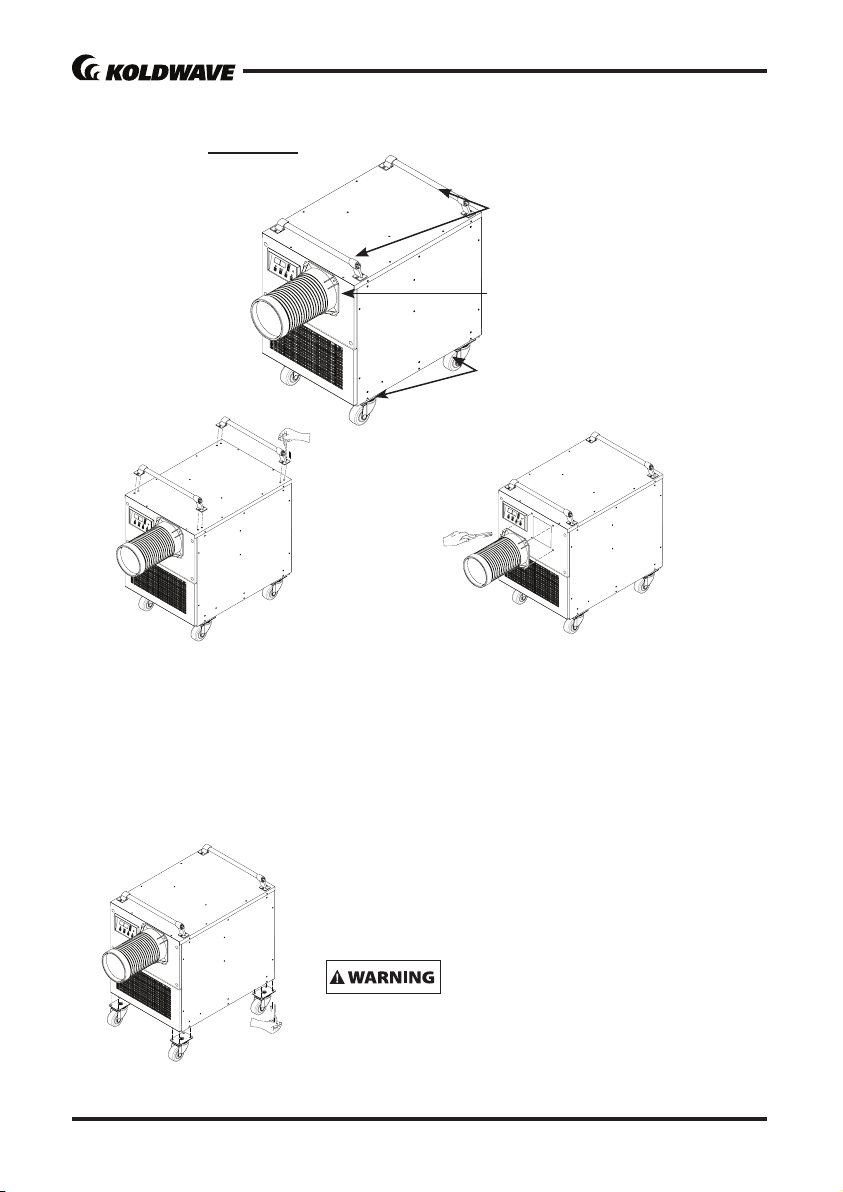
1. Remove cool air duct assembly 1 pcs from
carton.
2. Replace air cover with air duct assembly on
the top front of unit.
3. Use screws (enclosed inside of box with cool
air duct assembly) on the unit as shown in
Figure 7.
1. Take out the caster 4 pcs from the accessory box.
2. Place the casters on the base panel of unit.
3. Use screws (enclosed inside of accessory box with
caster) to install in the unit as shown in Figure 8.
The unit is upright posion only. Leave unit in an up-
right posion for at least 3 hours before rst use.
1. Take out the handle 2 pcs from the accesso-
ry box.
2. Place the handle on the top of unit.
3. Use screws (enclosed inside of accessory
box with handle) to install the handle on the
unit as shown in Figure 6.
Figure 6 - handle
aachment
DO NOT lt the unit on it’s side.
ASSEMBLY (Portable)
COMPONENT PARTS
Figure 5 - portable kit aachment
Cool air duct
Caster
Handle
Owner’s Manual
6CC10BEA2AA00
9
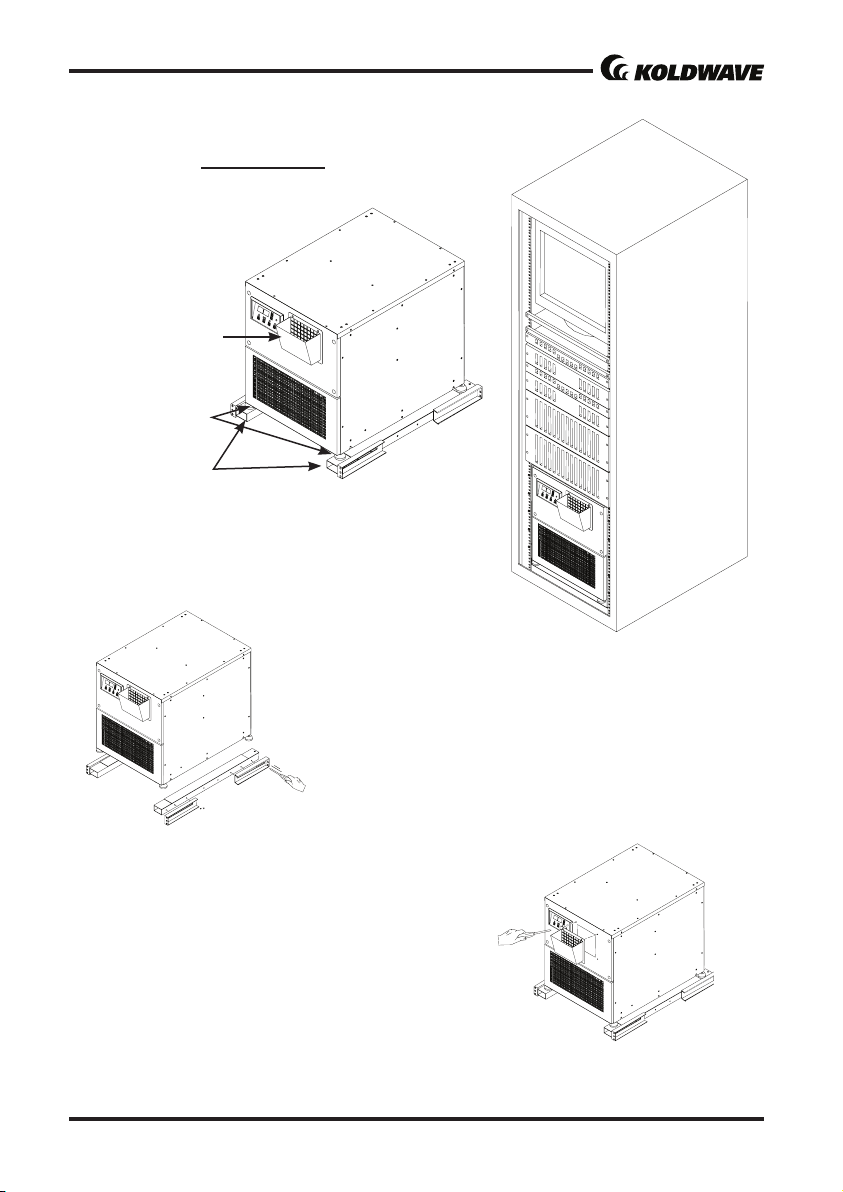
Figure 9 - server rack kit
aachment
ASSEMBLY (Server Rack)
COMPONENT PARTS
Rack diuser
* See Figure 19 on page 12.
Universal adjust
Rack assembly
Figure 10 - installaon
in 19” server rack
Figure 11- rack assembly
aachment
1. Assemble the rack assembly parts 1set (6ea) to
t in server rack.
2. Use screws to install the rack assembly in server
rack as shown in Figure 11.
3. Place the unit on the rack assembly.
RACK ASSEMBLY
Figure 12 - rack diuser
aachment
1. Remove rack diuser 1 pcs from carton.
2. Replace air cover with rack diuser on the top
front of unit.
3. Use screws (enclosed inside of box with rack dif-
fuser) on the unit as shown in Figure 12.
RACK DIFFUSER

Owner’s Manual
6CC10BEA2AA00
10 11
Figure 14 - Rear and
Le Side View
Figure 13 - Front and
Right Side View
Figure 15 - condenser
ange aachment
Figure 16 - eva ange
aachment
1. Remove condenser intake air duct ange (includ-
ed lter) 1 pcs from carton.
2. Take out condenser lter of unit and U Panel of
rear boom.
3. Place the condenser ange on the rear of air
condioner.
4. Use screw (enclosed inside of box with condenser
ange) to install the ange as shown in Figure 15.
1. Remove Eva intake air duct ange 1 pcs from
carton.
2. Slide up lter on the front of the unit and take out
front grill.
3. Put the lter in the eva ange and place the air
duct on the front of air condioner.
4. Use screw (enclosed inside of box with air duct
ange) to install the ange as shown in Figure 16.
ASSEMBLY (Mounted, Hang)
COMPONENT PARTS
CONDENSER INTAKE AIR DUCT FLANGE
Condenser intake
air outlet
EVA INTAKE AIR DUCT FLANGE
Eva intake
air outlet
Indice
Altri manuali Koldwave Condizionatore d'aria

Koldwave
Koldwave KWV-20 Manuale di istruzioni

Koldwave
Koldwave 5KK14BEA2AA00 Manuale utente

Koldwave
Koldwave K6CC10BEA2AA00 Manuale utente

Koldwave
Koldwave 5AK39BFA Manuale di istruzioni

Koldwave
Koldwave K6HK144BBA2ACA0 Manuale utente

Koldwave
Koldwave 5WK Series Manuale utente

Koldwave
Koldwave 6SS12BEA2ACA0 Manuale utente

Koldwave
Koldwave AIRMASTER 3AK Manuale utente

Koldwave
Koldwave AIRMASTER 2AK1011 Manuale utente

Koldwave
Koldwave Kompac 4WK07 Manuale utente


