
KVM Discovery AS-7100 Series Manuale utente

1
Dual
Rail AS-7100 & AS-9100 series
LCD
KVM
User
Manual
INTRODUCTION............................................................................................................................................ 2
FEATURES.......................................................................................................................................................3
PRODUCT TYPE............................................................................................................................................. 4
VIEW OF PRODUCT...................................................................................................................................... 5
FRONT VIEW.......................................................................................................................................... 5
REAR VIEW.............................................................................................................................................6
DIMENSION............................................................................................................................................ 8
KVM SWITCHES PACKING LIST.............................................................................................................. 10
KVM CONTROL PLATFORM CONNECTING WIRE.......................................................................11
KVM CONTROL PLATFORM POWER WIRE................................................................................... 11
OPERATION.................................................................................................................................................. 12
CONNECTION OF KVM SIGNAL WIRE........................................................................................... 12
Before Use...............................................................................................................................................12
During Use.............................................................................................................................................. 12
After Use................................................................................................................................................. 13
Hot Plug.................................................................................................................................................. 13
Power On/Off and Reboot...................................................................................................................... 13
Structure&Usage.....................................................................................................................................14
Assembling & Disassembling.................................................................................................................16
STANDARD RACK INSTALLATION................................................................................................. 18
SINGLE STAGE INSTALLATION....................................................................................................... 20
CASCADE INSTALLATION................................................................................................................ 21
OSD OPERATION......................................................................................................................................... 22
OSD OVERVIEW.................................................................................................................................. 22
OSD NAVIGATION............................................................................................................................... 22
OSD MAIN SCREEN HEADINGS.......................................................................................................23
OSD FUNCTIONS................................................................................................................................. 23
SAFE GUIDE................................................................................................................................................. 26
KVM Discovery powered by
Haitwin-Delphin Technologie GmbH,
Kieselstraße 15, 41472 Neuss / Germany
phone: 0049(0)2131/7421652 email: [email protected]

2
INTRODUCTION
KVM control platform is one with integrate a multiple ports KVM switch into 1U height. It
controls multiple computers with one platform (keyboard, mouse and monitor).
A KVM switch can control 4/8/16 PC by direct connection and it can control 256 PC at most
by 2 level cascade connection.
It is easy and quick to install. Just connect the wire to the correct port without software
configuration. So there is no difficulty in installation and incompatibility.
KVM switch provides two methods to control the computers connected to it:
1. By keyboard combine key.
2. By OSD operation.
In addition, it provides powerful automatic scanning function to scan and monitor all
computers connected to it.
Using KVM control platform is a best choice to save time and money. By using one KVM
platform to manage all the computers connected to it, user can save money for keyboard,
mouse and monitor for each computer and their space.

3
FEATURES
Control Platform
Control platform with LCD, keyboard, mouse and multiple ports KVM switch.
1U height, suitable for 19’’ standard cabinet installation and metal structure.
17/19’’ LCD screen with high brightness, high clear and high resolution.
With dual rail structure, LCD screen and keyboard can be pulled out separately.
Control platform can be totally pulled out from the cabinet and the LCD screen can be
turned on to 120 degrees.
Ultra thin keyboard with keypad.
Mouse touch board with two function button.
Front panel with lock to prevent damage by accident.
Extra Power adapter.
Automatic power on/off.
An easy to use OSD menu.
Switch
One control platform can control 4/ 8/16 computers by direct connection.
One control platform can control 256 computers by 2 level cascade connection.
Be compatible with PS/2, USB standard interface.
Support VGA, SVGA, XGA video input.
Accord with DDC, DDC2, DDC2B standard and VESA standard.
Support maximum resolution of 1920 * 1080
Support multiple operating systems: WIN95/98/98SE/ME/200/XP、WIN 7,WIN NT、
UNIX、LINUX.

4
PRODUCT TYPE
Type
OSD
Function
Note
AS-7100ULD
No
17 inches LCD screen, keyboard and mouse.
AS-7104/08/16ULD;
Yes
17 inches LCD screen, keyboard, mouse and 4/8/16
ports USB KVM.
AS-9100ULD
No
19 inches LCD screen, keyboard and mouse.
AS-9104/ 08/16ULD;
Yes
19 inches LCD screen, keyboard, mouse and 4/8/16
ports USB KVM .

5
VIEW OF PRODUCT
FRONT VIEW
1. Handle
2. Lock
3. Front panel
4. LCD screen
5. Rear hang ear channel
6. LCD OSD control key
7. Front hang ear
8. Mouse touch board
9. Guide
10. Lock hole

6
REAR VIEW
AS-7100ULD/AS-9100ULD (with IP module KI-4101)
AS-7104ULD/AS-9104ULD (with IP module KI-4101)
AS-7108ULD/AS-9108ULD (with IP module KI-4101)
AS-7116ULD/AS-9116ULD (with IP module KI-4101)
1 2 3 4 5 6
1. IP Module Restore to Default
Plug needle or ballpoint pen into the hole to restore the IP module to default setting.
2. RJ45 Port
CAT UTP can be plugged into it to be connected to the LAN including the controlling
computer.
3. IP Module Reset

7
If the IP module has no responding, plug needle or ballpoint pen into the hole to reset it.
4. Power Jack
The DC 9V~12V power supply cable plugs into this jack.
5. USB Port
Ports to plug in your USB keyboard and mouse are found here.
6. Computer Port
Port to connect computer.
Note: For operation of IP Module, please refer to the related user
manuals (KI-4101).

8
DIMENSION

9
KVM SWITCHES PACKING LIST
Type
Name
Num/Unit
Note
AS-71**Series
Products
KVM Control Platform
1
17 inches LCD screen, keyboard
and mouse control platform
integrated KVM switch with
multiple ports (4/8/16ports).
AS-91**Series
Products
KVM Control Platform
1
19 inches LCD screen/LCD
widescreen, keyboard and mouse
control platform integrated
KVM switch with multiple ports
(4/8/16ports).
Cable
KVM Connecting Cable
1/4/8/16
PS/2 Connecting and USB
Connecting
AC Power
Power Cable
1
AC power connecting cable
KVM Control
User Manual
User Manual
1/2
LCD KVM Manual + QIG
Please check the lists carefully and contact with your dealer if you have some problems.
Please read the manual carefully before installation.
10
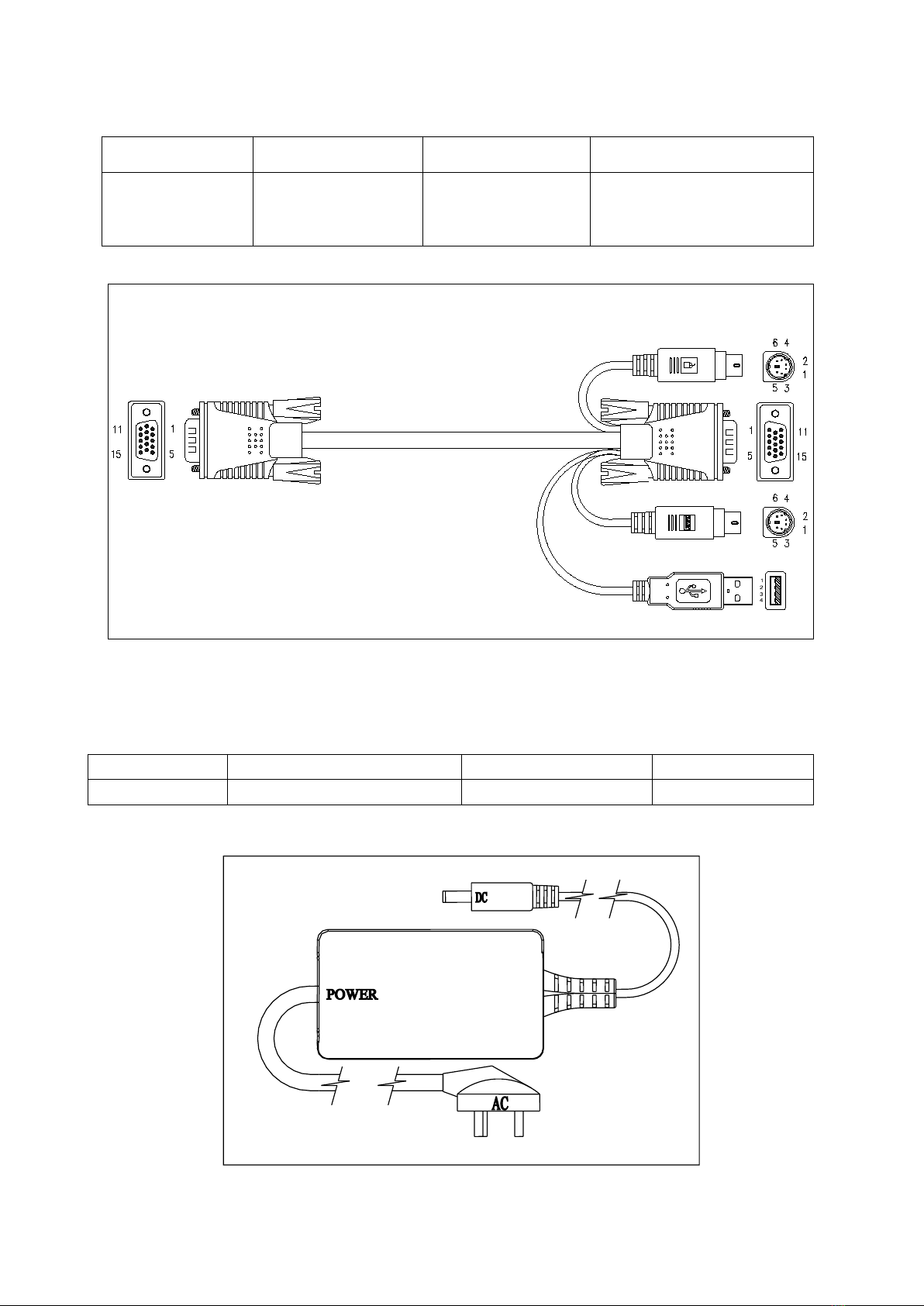
KVM CONTROL PLATFORM CONNECTING WIRE
Cable Type
Applicable Type
KVM Port
PC or Server Port
USB and PS/2
Connecting Cable
All types
VGA port
(Keyboard, mouse
and monitor)
VGA、Keyboard、Mouse
(Standard USB & PS/2
Interface)
USB and PS/2 Connecting Cable
KVM CONTROL PLATFORM POWER WIRE
Wire Type
Note
Voltage Range
Machine Type
AC Power Wire
3 Plugs of National Standard
100~240V
All
AC Power Wire
Questo manuale è adatto per i seguenti modelli
9
Indice
Altri manuali KVM Discovery Interruttore


