
Laser SPK-TT810 Manuale utente

SPK-TT810 Portable Turntable QUICK START GUIDE
IMPORTANT SAFETY INSTRUCTIONS AND PRECAUTIONS
- Read all instructions carefully before use.
- Retain manuals for future reference.
- Use this product only in the manner described.
-Onlyuse awater-dampened soft-cloth to clean the surface of this product.
- The following willdamage this product: any liquid such as wateror moisture, extreme heat; cold; humidity,
dusty or sandy environments.
- Only place this device on stable surfaces and ensure that any attached cables are secure and will not cause the
device to fall.
- There are no user serviceable parts in this product.
- Un-authorized attempts to dismantle or repair this product will void product warranty
- Using this device near other electronic devices may cause interference.
Operation - Front panel
Accessories included
Power adaptor, User manual
1
Dust cover latch
2
Dust cover
3
Adapter
(not supplied
with
this model)
4
Tone armlift
5
Auto stop control
6
Speed selection
-
Three speed for
choice: 33.3, 45, 78 rpm.
7
LED power indicator
8
Power
S
witch / Volume control
9
Headphone jack
10
Tone arm
11
Speaker
12
Cartridge / Stylus
13
Carry handle
14
Aux in
15
Line out R channel
16
Line out L channel
17
DC power jack
Operation
–
Rear Panel
Playing a record
1) Place your record on the turntable.
2) Select the correct playing speed (33.3, 45 or 78 rpm)
(Note: this speed needs to match the speed rating of your record)
3) Turn the power on
4) Release the arm lock.
5) Engage the arm raising lever, position the needle overthe record and using the arm lever, lower the
needle onto the record.
MAINTENANCE
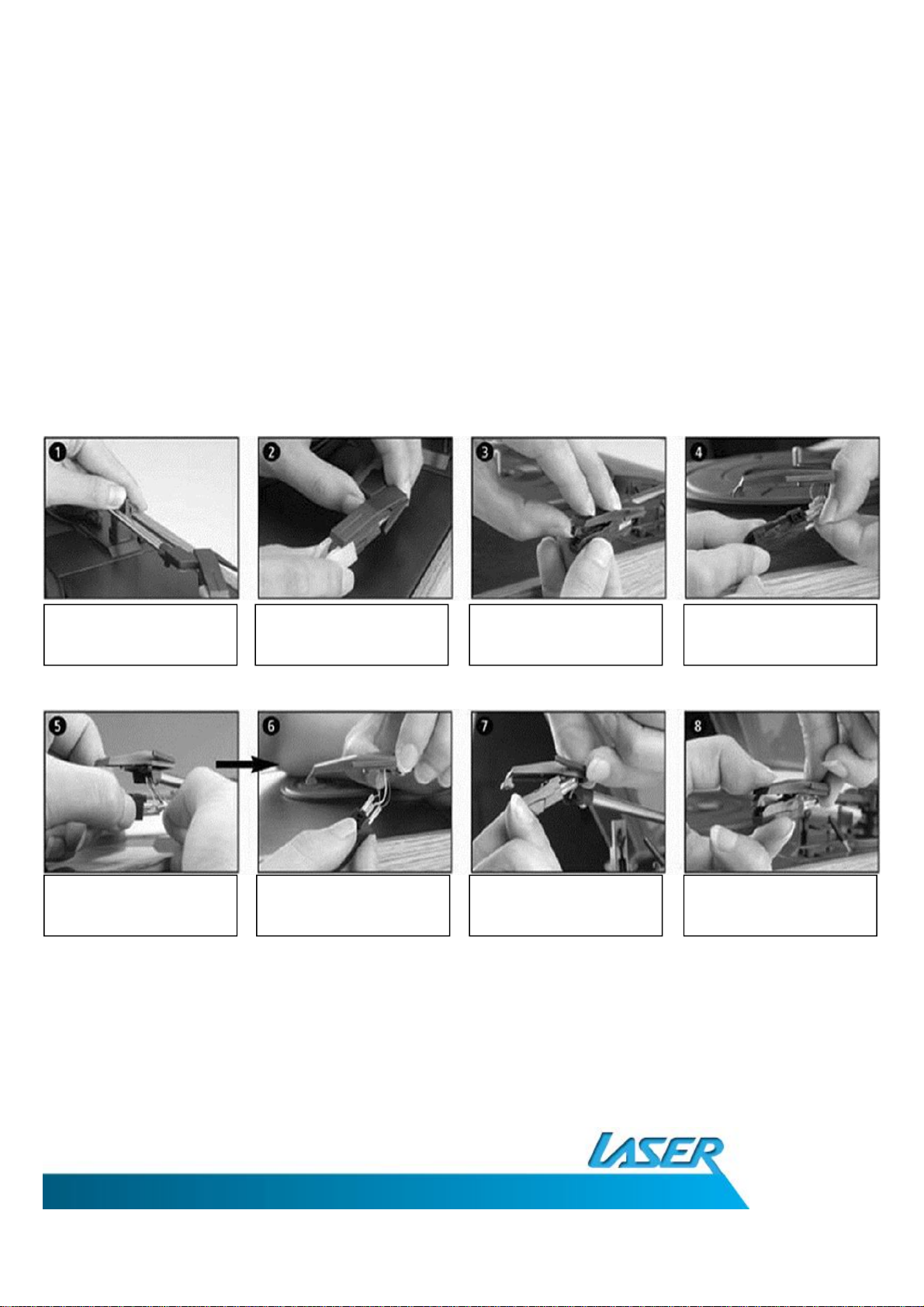
REPLACING THE STYLUS
HINTS AND TIPS
-Keep your records clean by occasionally wiping them with an anti-static cloth
-Pick off any dust which may occasionally accumulate on thestylus.
-A very soft brush dipped in alcohol can beused to clean the stylus by wiping in from back to the front.
- When transporting your record player do not forget to replace the protective cap on the stylus and
engage the tone-armclip.
Unlock the tone
-
arm
Unlock the tone
-
arm
Lift the front tab to
removeStylus Carefully remove
cables
Connect the cables for
the new Stylus Position the stylus
correctly to insert Position the Stylus
from the back first Then push the front to
click into place

Warranty Against Defects
LaserCorporation PtyLtd (“Laser”) warrants your newproduct to be free fromdefects in materials and
workmanship for 12 months, from the date of purchase,provided thatthe product is used in accordance with
accompanying recommendations or instructions where provided. The benefitof this warranty is in addition to
your rights under the Australian ConsumerLaw and tootherrights and remedies ofthe consumer under alaw in
relation to the goods or services to which the warranty relates.
Through a networkof retailers and resellers,Laserwill provide you with your choice of arepair,exchange (where
possible) orrefund (within Dead on Arrival period) for this product if it becomes defective within the warranty
period.This warrantywillno longer apply where the defect is a resultof alteration, accident, misuse,abuse,
normal wear and tear, neglector improper storage. Please retain your receipt as proof of purchase
How to make a product warranty claim:
Step 1: Find your receiptwhich proves the date of purchase. Where the date of purchase cannot be verified,
your place of purchase or Laserwill make an assessmentbased on thedate of manufacture,the condition of the
Laser Product and the type of defect.
Step 2a): Contactyour place of purchase. They willassess the nature of the fault and repair, replace orfund the
productas per their store refund or warranty policy. Step 2b): If your place of purchase cannot be contacted,
then you can contact Laser. Customer Service with details of your defective Laser Product: Phone: (02) 9870 3388;
or Email: support@laserco.com.au or online www.laserco.com.au/warranty (click on “Consumers (End Users)”).
Our business address isat 1/6-8 Byfield Street, North Ryde, NSW 2113.Step3: Laserwill issue you with aReturn
Authorisation (RA) numberwithin 48 hours.Whenrequested,send us the defective Product and a copy of your
receipt.Laser willcover the cost of the return delivery. Step 4: Wait for us to contact you. Once we have
received your defective Laser Product forinspection, we will inform you of our assessment of your claimwithin 7
days. When we contact you, we will firstly let you know whether you have a valid claim under this Warranty, and
if so, we will inform you whether your defective Laser Productwill be replaced or repaired, together with the
numberof days you can expect to wait to receive your replaced or repaired Laser Product. Step 5: For
further details on warranty cover and returns, please check Terms and Conditions for Warranty Returns section
on http://www.laserco.com.au/warranty
Our goods come with guarantees thatcannot be excluded under the Australian Consumer Law. You are entitled
to a replacementor refund for a major failure and compensation for any other reasonably foreseeable loss or
damage. You are also entitled to have the goods repaired or replaced if the goods fail to be of acceptable quality
and the failure does not amount to a major failure.
Indice
Altri manuali Laser Giradischi


