
LENCO DVD-433K Manuale utente
DVD-433K

1
Introduction Important Safety Instructions .......................................................................................................... 2
Caution .....................................................................................................................................................................3
Features.................................................................................................................................................................... 3
Front Panel and Rear Panel Illustration.................................................................................................................... 4
Remote Control........................................................................................................................................................ 5
Connections.............................................................................................................................................................. 6
Advanced Features System setup.................................................................................................................... 7
MP3/WMA/JPEG/MPEG4 playback........................................................................................................................ 10
Picture CD playback ............................................................................................................................................... 11
USB, Karaoke ........................................................................................................................................................ 11
Others Troubleshooting ....................................................................................................................................... 12
Specifications.......................................................................................................................................................... 13

2
Important Safety Instructions
1) Read these instructions.
2) Keep these instructions.
3) Heed all warnings.
4) Follow all instructions.
5) Do not use this apparatus near water.
6) Clean only with dry cloth.
7) Do not block any ventilation openings, install in accordance with the instructions.
8) Do not install near any heat sources such as radiations, heat registers, stoves or other apparatus (including
amplifiers) that produce heat.
9) Do not defeat the safety purpose of the polarized plug. If the provided plug does not fit into your outlet, consult an
electrician for replacement of the obsolete outlet.
10) Protect the power cord from being walked on or pinched particularly at plugs, convenience receptacles and the
point where they exit from the apparatus.
11) Only use attachments/accessories specified by the manufacturer.
12) Unplug this apparatus during lightning storms or when not used for long periods of time.
13) Refer all servicing to qualified service personnel. Servicing is required when the apparatus has been damaged
in any way, such as power supply cord or plug is damaged, liquid has been spilled or objects have fallen into the
apparatus, the apparatus has been exposed to rain or moisture, when it does not operate normally or has been
dropped.
14) Main plug is used as the disconnect device, the disconnect device shall remain readily operable.
15) The ventilation should not be impeded by covering the ventilation openings with items, such as newspapers,
table-cloth, curtains, etc.
16) No naked flame sources, such as lighted candles, should be placed on the apparatus.
17) Attention should be drawn to the environmental aspects of battery disposal.
18) The use of apparatus in moderate climate is advised.
19) Do not expose the apparatus to dripping or splashing by objects filled with liquids. Vases etc. must not be
placed on the apparatus.
WARNING: To reduce the risk of fire or electric shock, do not expose this apparatus to rain or moisture.
WARNING: The batteries shall not be exposed to excessive heat such as sunshine, fire or otherwise.
The symbol indicates that dangerous voltages constituting a risk of electric shock are present within this unit.
The symbol indicates that there are important operating and maintenance instructions in the literature
accompanying this unit. This symbol indicates that this product incorporates double insulation between
hazardous main voltage and user accessible parts. When servicing use only identical replacement parts.

3
•Please use the original box and packing materials for safe transportation of this product.
•It is normal for the cover and rear panel to become warm after the player has been active for an
extended period of time.
•Do not move this product during playback. Doing so may cause damage to the pickup and the disc.
•Press OPEN/CLOSE on the front panel or remote control to open or close the disc tray. Do not push or
touch the tray while it is opening or closing.
Features
Disc formats and features supported by this player:
You can help protect the environment! Please remember to respect the local regulations: hand over the
non-working electrical equipments to an appropriate waste disposal center.
This product incorporates copyright protection technology that is protected by U.S. patents and other intellectual
property rights. Use of this copyright protection technology must be authorized by Rovi Corporation, and is intended
for home and other limited viewing uses only unless otherwise authorized by Rovi Corporation. Reverse
engineering or disassembly is prohibited.
The product complies with the Picture CD format and will display Picture CDs.
Manufactured under license from Dolby Laboratories. Dolby and the double-D symbol are trademarks of Dolby
Laboratories.
4
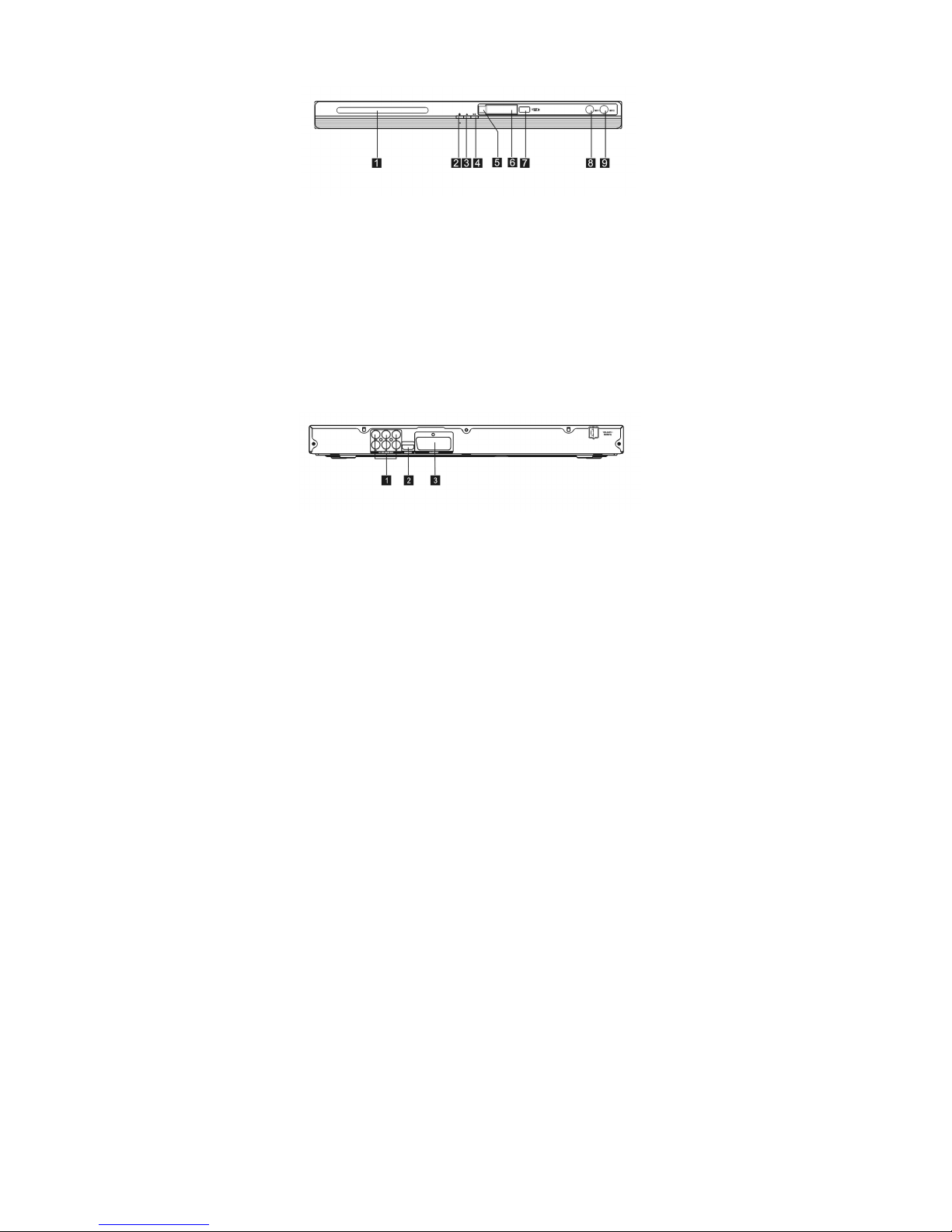
Front Panel
1. Tray Door
2. Power
3. Open/Close button
4. Play/Pause Button
5. Sensor
6. LED
7. USB Port
8 MIC 1
9 MIC 2
Back Panel
1. 5.1CH Audio output(FL,FR,SL,SR,CEN,SW)
2. HDMI Output
3. SCART Output

5
Remote Control
1. OPEN/CLOSE
2. POWER
3. 0-9 NUMBER KEY
4. ZOOM/MENU
5. SUBTITLE/TITLE
6. SETUP
7. UP
8. LEFT
9. DOWN
10. REVERSE
11. FORWARD
12. PREVIOUS
13. NEXT
14 MUTE
15 USB
16 GO TO
17 AUDIO/ANGLE
18 REPEAT/ PROGRAM
19 PLAY/PAUSE
20 STOP
21 RIGHT
22 OK
23 VOLUME INCREASE
24 VOLUME DECREASE
25 DISPLAY
26 KARAOKE
•Press 4, 5, 17, 18 for more than 1.5s, there will be functions
marked on these buttons(MENU, TITLE, ANGLE, PROG).
•Press 4, 5, 17, 18 for less than 1s, there will be functions marked
above these buttons(ZOOM, SUBTITLE, AUDIO, REPEAT).
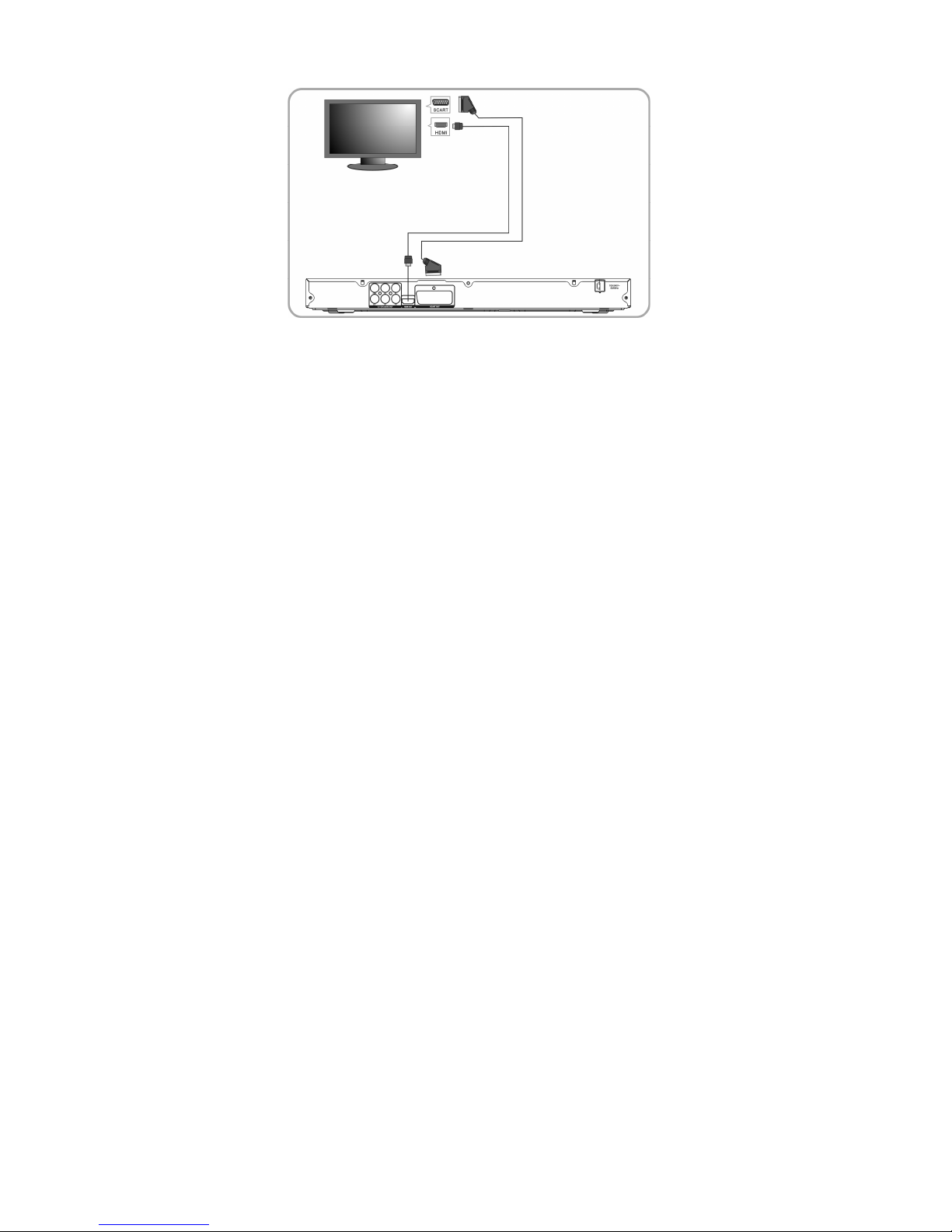
•CONNECT DVD PLAYER TO TV SET WITH SCART SOCKET
6
Connections
•Connect DVD player to TV set with scart socket
Use the SCART cable to connect DVD player and your TV. Set the [Video Out] to [Composite] or [ RGB].
•CONNECT DVD PLAYER TO TV SET WITH HDMI CABLE
Use the HDMI cable to connect DVD player and your TV. Set the [Video Out] to [HDMI].

7
System operation MENU OPERATION
Press the SETUP button on the remote control, the SETUP MENU will be displayed. Use the up/down
buttons for up and down movement through the menu. Press RIGHT direction button to enter the submenu
and press left direction button to go back to the previous menu. Confirm the adjusted settings by pressing
the OK button
LANGUAGE SETUP
Select Language in the setup menu and the Language submenu will be displayed:
OSD Language
Use this item to select the language of the setup menu and screen display.
Subtitle
Use this option to select the default subtitle language.
Note: Not all dvd-players support this option.
MPEG4 Subtitle
Select different MPEG4 subtitle encoding option.
Note: Not all dvd-players support this option.
Audio
Use this option to select the default disc language.
Note: Not al dvd-players support this option.
DVD Menu
Use this option to select the default menu language.
Note: Not all dvd-players support this option
VIDEO SETUP
Select Video in the setup menu and the Video submenu will be displayed:

8
Aspect Ratio
Use this option to select the aspect ratio.
Notes:
The image display ratio is related to the recorded disc format. Some disc can not display images in the aspect ratio
you choose. If you play a disc recorded in 4:3 format on a wide screen-TV, black bars will appear on the left and
right side of the screen. Adjust the screen setting depending on the type of your television..
TV System
Select the desired TV system.
Note: The DVD player setting should be matched to your TV set.
For more information of output format, refer to the instructions of your television.
Video Out
Select the desired video output format.
HD Resolution
After you set the video output to HD output, you can choose the resolution of HDMI output.
Note: the resolution must match with the supported resolution of your television
AUDIO SETUP
Select Audio in the setup menu, and the Audio submenu will be displayed
Analog output
Analog out select 5.1CH or 2.0 CH(select down mix) audio output.
Note: This item is only for 5.1ch player.
Digital output
Adjust the audio output on Coaxial ports to work in perfect harmony with the audio equipment (e.g.receiver,
amplifier) that is connected to the player.
Off Digital audio output is disabled. PCM Transfer stereo 2 channels
signals

9
System Setup Down sampling
Select down sampling function on or off. (Down sampling is the process of reducing the sampling rate of a signal)
Press ON: down sampling rate will change into a higher level sampling rate audio (more than 96K). OFF: Disable
this function.
RATING SETUP
Select Rating in the setup menu and the rating menu will be displayed:
Parental Control
Personalize the parental control feature of the dvd-player
Note: Password is needed before setting Parental Control.
Set Password Input four digits (password), then press OK to confirm.
Note: To reset forgotten password, please use the universal password 6666 to unlock.
MISC SETUP
Select MISC in the setup menu and the MISC will be displayed
Use Default Settings
Reset setup data to factory default settings.
Screen Saver
Enable/disable the screen saver function.
Indice
Altri manuali LENCO Lettore DVD

LENCO
LENCO DVD-51 Manuale utente

LENCO
LENCO DVD-431 Manuale utente

LENCO
LENCO DVD-321 Manuale utente

LENCO
LENCO DVD-225 Manuale utente

LENCO
LENCO DVD-431 Manuale utente

LENCO
LENCO DVD-517 H Manuale utente

LENCO
LENCO KDV-310 Manuale utente

LENCO
LENCO DVP-713 Manuale utente

LENCO
LENCO DVD-120BK Manuale utente

LENCO
LENCO DVP-854 Manuale utente

LENCO
LENCO DVD-07 Manuale utente

LENCO
LENCO DVD-30K Manuale utente

LENCO
LENCO DVD-322 Manuale utente

LENCO
LENCO dvd player Manuale utente

LENCO
LENCO DVP-740 X2 Manuale utente

LENCO
LENCO MES-210 Manuale utente

LENCO
LENCO DVD-51 Manuale utente

LENCO
LENCO DVD-320 Manuale utente

LENCO
LENCO DVD-432 Manuale utente

LENCO
LENCO DVD-30K Manuale utente


