Leuze electronic CRT448 Manuale utente

Leuze electronic GmbH + Co. KG In der Braike 1 D-73277 Owen Tel. +49 (0) 7021 573-0
We reserve the right to make changes • DS_CRT448_en_50121262.fm
Scanner for color detection
Simultaneous selection of up to 3 colors
Detection independent of distance
Teach-in via buttons or control line
Temperature compensation
Other special functions
12mm … 32mm
10 - 30 V
DC
500 Hz
Accessories:
(available separately)
Cable with M12 connector,
8-pin
Reflectors
IEC 60947...
IEC 60947...
IP 67
Dimensioned drawing
ADisplay
BConfiguration
CTurning connector
DTransmitter
EReceiver
Electrical connection
CRT448.S3/444-M12
CRT448.L3/444-M12
CRT448.S3/222-M12
CRT448.L3/222-M12
CRT448 Color sensors
CRT448… - 02
en 02-2013/01 50121262 068-14515

CRT448… - 02 2013/01
Specifications
Optical data S light spot L light spot
Scanning range (see remarks) 12mm … 32mm 18mm … 22mm
Light spot dimensions (in scanning range) round=4.0mm 1mm x 5mm
Operating range with reflector 1)
1) With reflector TKS 100x100
50 … 200mm
Light spot orientation vertical
Light source2)
2) Average life expectancy 100,000h at an ambient temperature of 25°C
LED, white
Timing
Switching frequency 3)
3) With light-dark ratio 1:1
500Hz
Response time 3) 1ms
Delay before start-up 500ms
Storage time for teach values 50ms, non-volatile storage
Electrical data
Operating voltage UB12 … 28VDC
Residual ripple4)
4) Must lie within UB±tolerance
10% of UB
Switching output 3x PNP or 3x NPN
Function characteristics light switching for all outputs
Signal voltage high/low PNP: (UB-3 V/V)
NPN: UB/3V
Output current max. 100mA per output
Open-circuit current 40mA
Indicators
LED green ON: ready
OFF: teach event active
Ch.-LED(s) yellow Ch. 1 … Ch. 3: object 1 … 3 detected
Tol.-LED(s) red tolerance level 1 … 5
Mechanical data
Housing ABS plastic
Optics cover PMMA
Weight 40g
Connection type M12 connector, 8-pin
Environmental data
Ambient temp. (operation/storage) -10°C … +55°C / -20°C … +70°C
Protection class IP 67
Eye safety in acc. with EN 62471: exempt group
VDE safety class 5)
5) Rating voltage 50 VDC
II, all-insulated
Protective circuit 6)
6) 2=polarity reversal protection, 3=short circuit protection for all outputs
2, 3
Standards applied IEC 60947-5-2
Certifications UL 508 7)
7) For UL applications: for use in class 2 circuits according to NEC only
Options
Synchronous input
PNP: Stop/Start measurement > 12V … 28V/0V or not connected
NPN: Stop/Start measurement > 12V … 28V/0V or not connected
Synchronization delay < 2ms
Key lock input
PNP: lock / unlock > 12V … 28V/0V or not connected
NPN: lock / unlock > 12V … 28V/0V or not connected
Delay < 2ms
Order guide
See section Preferred types
Diagrams
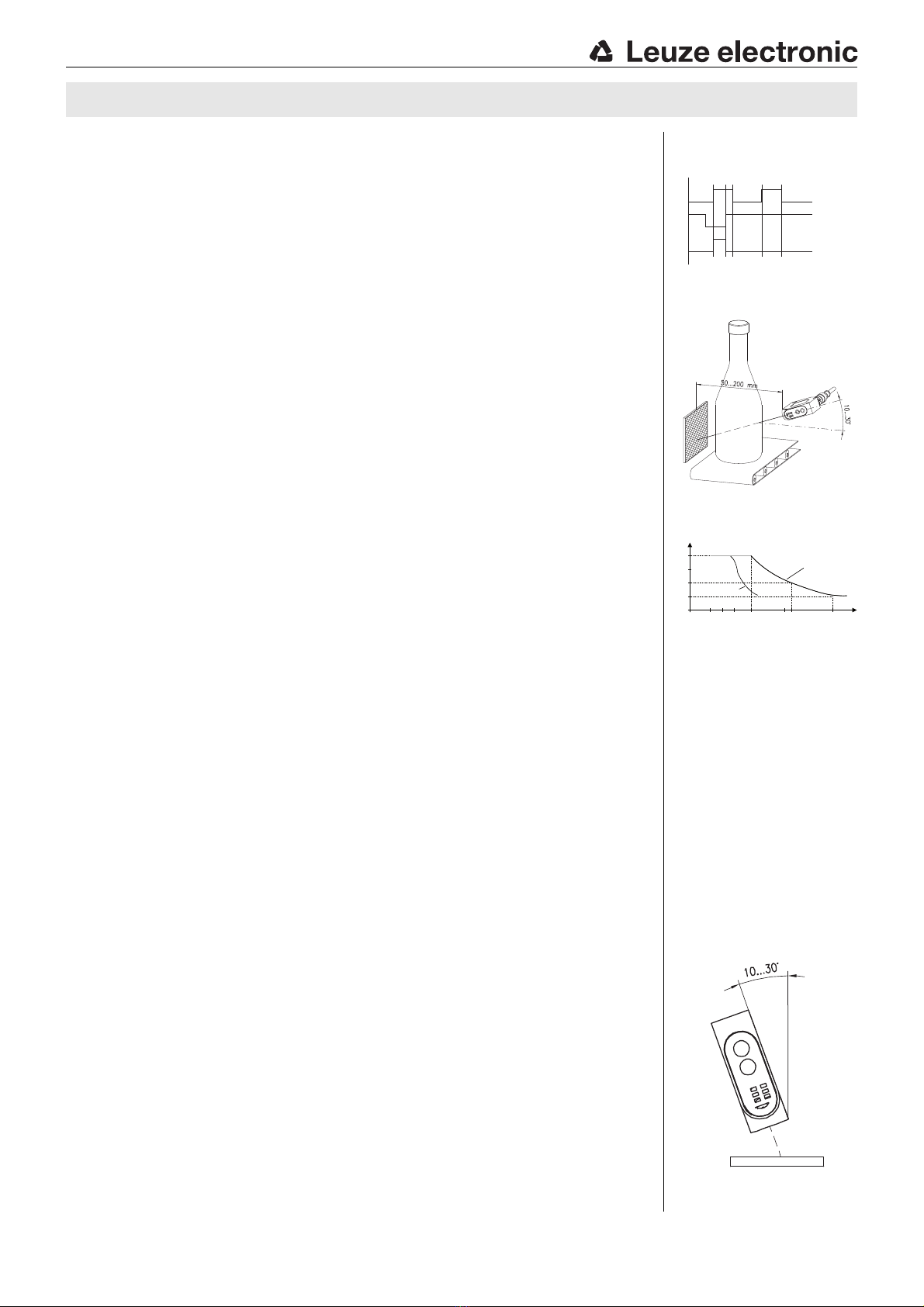
Synchronous input
Reflector operation for
transparent objects
Typ. color resolution for
remissions > 20 %
H
L
H
L
H
L
Object
Synchr.
Ch. 1…3
CRT448.S3
CRT448.L3
15 30
18 mm
25
50
75
100
12 22 32 42
%
Scanning range
Remarks
Approved purpose:
The CRT448 color sen-
sors are optoelectronic
sensors and are used for
optical, contactless
detection of colored
objects with incident light
(scanner operation) and
transmitted light (reflector
operation). A reflector is
necessary for operation in
transmitted light.
With shiny objects, the
sensor is to be mounted at
an angle of approx.
10 … 30° to the object
surface.
CRT448

Leuze electronic GmbH + Co. KG In der Braike 1 D-73277 Owen Tel. +49 (0) 7021 573-0 CRT448… - 02
Function principle of the color sensor
Many sensors are capable of differentiating between light and dark or matt and shiny. As soon as color is to serve as a
distinguishing criterion, however, normal sensors are quickly pushed to their limits.
As a result, color sensors are of increasing importance in industrial automation.
The applications range from sorting colored objects to the detection or inspection of colored surfaces. Materials such as
powders, granulates, fluids as well as metals, glasses, papers, plastics and textiles can be reliably detected in this way.
Simple operation makes it possible to teach-in individual reference colors and reference color gradients as well as adjust the
tolerance bands.
During operation, the color sensor compares the taught-in color with the measured color. If the values lie within the set tolerance
range, the sensor passes on the match to the controller via a switching output.
Controls and indicators
Operation
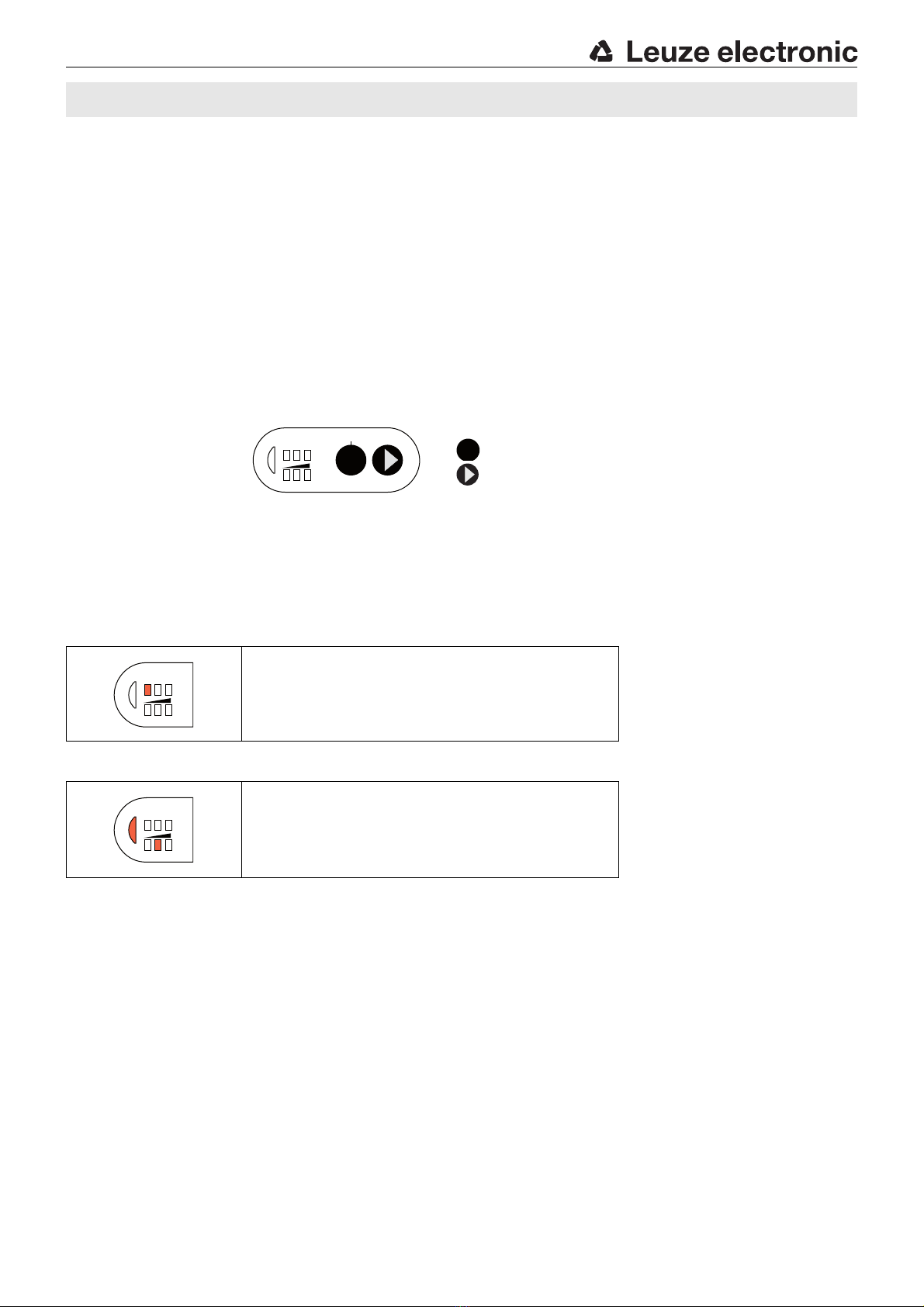
During operation, the assignment of the detected color to the switching output is shown via the 123ch. display. In normal mode,
only one of these LEDs should be illuminated, otherwise the tolerance bands of the individual colors should be changed.
Channel/switching output assignment
Tolerance band assignment
123Ch.
channel display
Operation indicator Teach-in
Selection
Tol.
tolerance band display
The detected color is assigned to switching output 1.
The assignment of the tolerance band is only displayed in
teach-in mode.
123
Tol.
Ch.
SET
Conf.
SET
123
Tol.
Ch.
123
Tol.
Ch.
CRT448 Color sensors

CRT448… - 02 2013/01
Teach-in of the switching outputs and tolerance band
Notice on determining tolerance level:
After an object has been taught, e.g. with Tol. 2, move this object manually within the different distances or positions occurring
in the application, and test for error-free function by checking if the yellow LED of the corresponding output channel is illuminated.
If an object is not reliably detected, select the next-highest tolerance level. By repeating this process, the optimal tolerance level
can be determined.
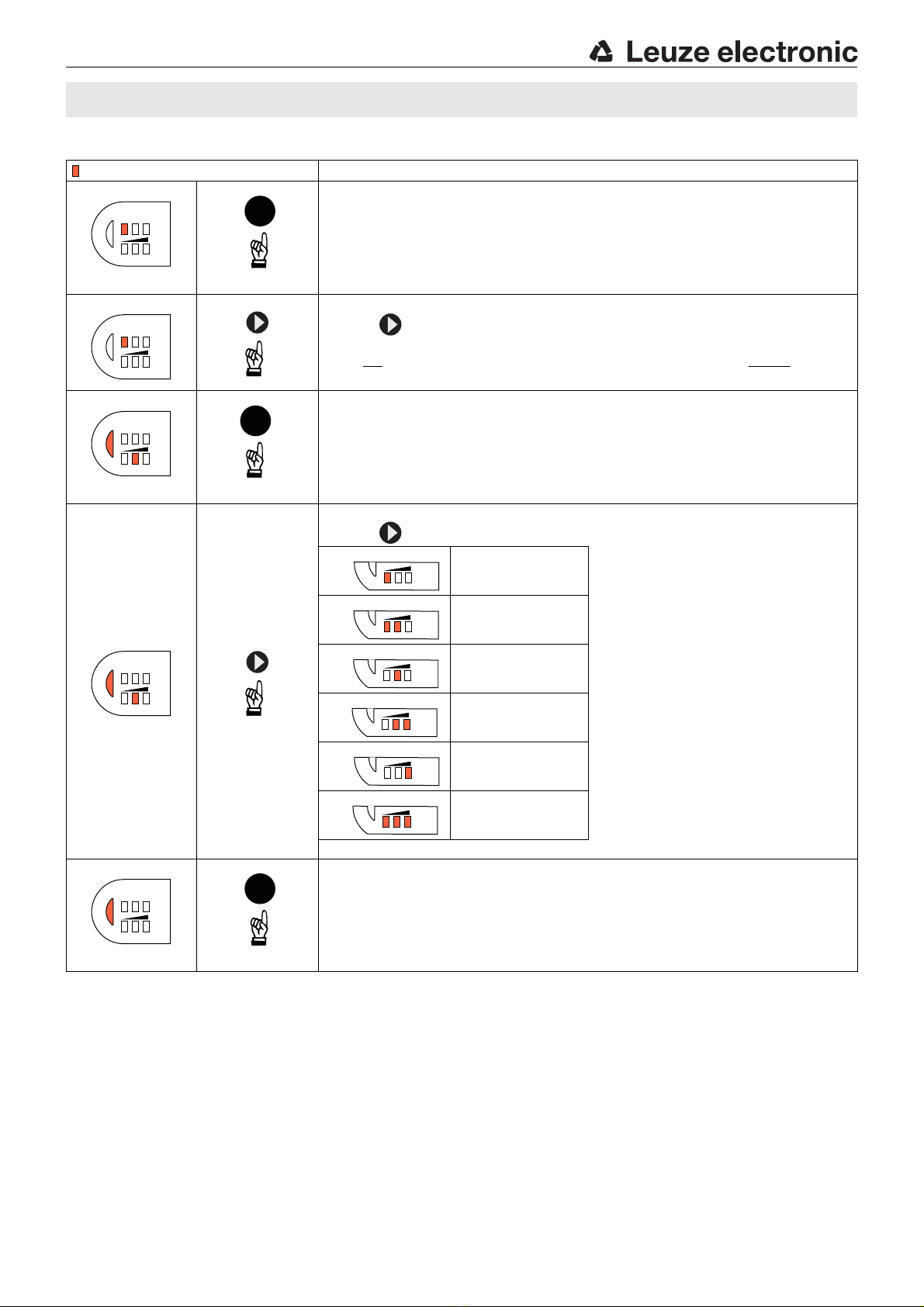
= LED ON Teaching in multiple colors (normal mode)
1. Start setting mode + teach in color
Position object to be detected within the scanning range
(make sure it is tipped 10-30°).
Press SET BUTTON for 3s >> green LED goes out and Ch. 1 illuminates yellow
(locking input open or 0 volt).
2. Select channel
With , select one of the color channels (Ch. 1, Ch. 2 or Ch. 3).
The selected channel is indicated with a corresponding yellow LED.
Do not select position Ch. 1+Ch. 2+Ch. 3 (i.e. all three yellow LEDs cannot illuminate
at the same time).
3. Confirm channel
Confirm the selected color channel with the SET BUTTON (press for 3s) >>
green LED and middle red LED illuminate.
Factory setting = Tol. 3 graphic shows the factory setting. If the color differences
are large, a high tolerance level should be chosen; for small color differences, a low
tolerance level makes sense.
4. Select tolerance level
With , select one of the five tolerance levels.
Tolerance 1 (small)
The green LED is an orientation aid. If the
green LED does not illuminate, the
tolerance level is too small; it must be
increased until the green LED illuminates.
Renewed programming results in
reactivation.
Tolerance 2
Tolerance 3 (medium)
Tolerance 4
Tolerance 5 (large)
Color channel is
switched off
5. Exit setting mode
Press SET BUTTON for 3s to confirm tolerance selection.
>> The sensor is ready (green LED illuminates; taught Ch. X may also illuminate).
Set all three channels one after another in this way.
123
Tol.
Ch.
SET
(3s)
123
Tol.
Ch.
123
Tol.
Ch.
SET
(3s)
123
Tol.
Ch.
To l .
To l .
To l .
To l .
To l .
To l .
123
Tol.
Ch.
SET
(3s)
CRT448

Leuze electronic GmbH + Co. KG In der Braike 1 D-73277 Owen Tel. +49 (0) 7021 573-0 CRT448… - 02
Teach-in of color gradients
Notice on color scan:
The color scan serves to teach in entire color gradients or to teach in objects with strongly fluctuating scanning ranges which
cannot be detected with a tolerance level. To scan in color gradients of different objects, one object can be scanned in per
channel. By connecting the output channels via an OR function in the downstream control, color gradients of up to three different
objects can be represented as a color scan.
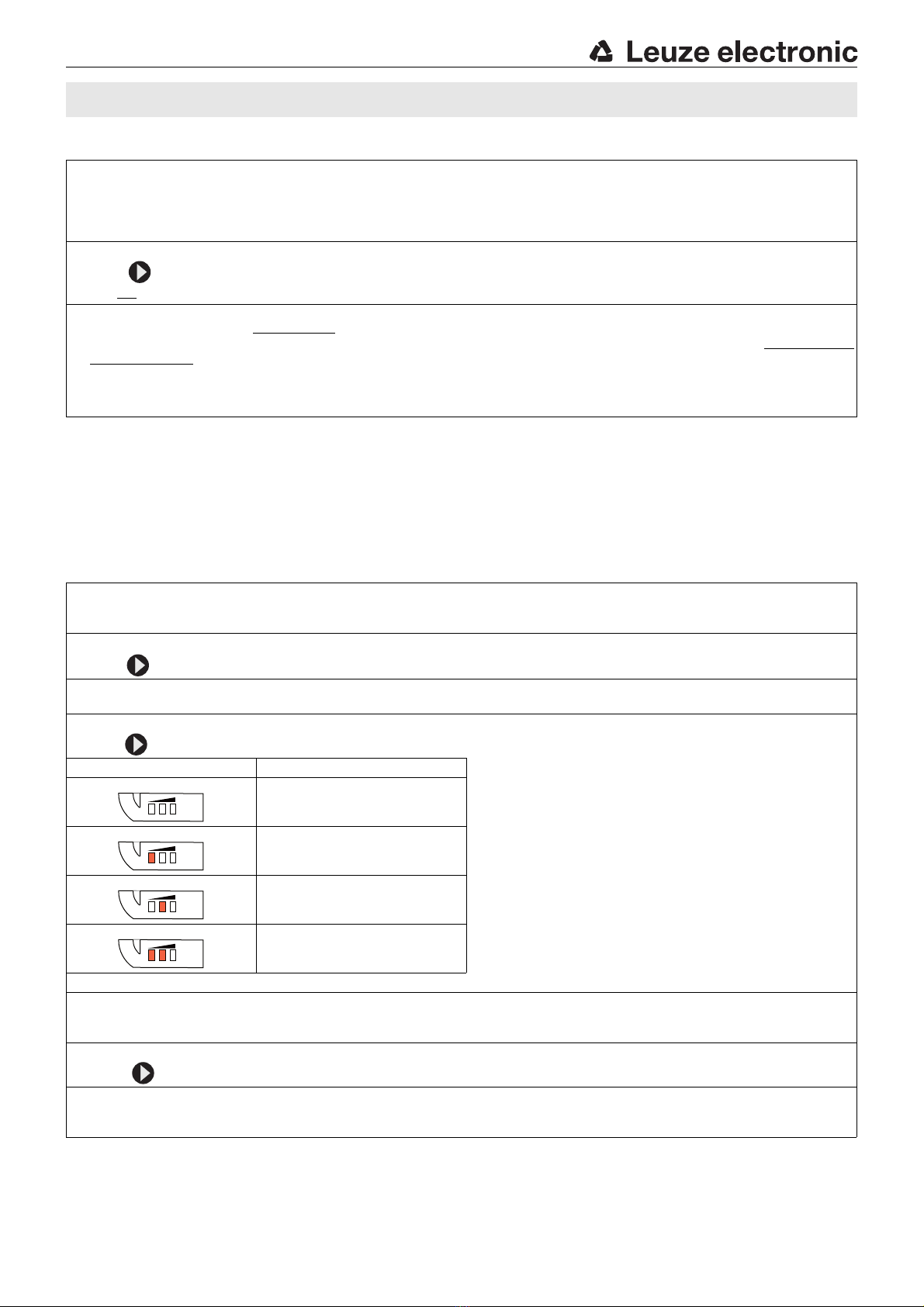
Special function
1. Start setting mode
Position object to be detected within the scanning range
(make sure it is tipped 10-30°).
Press SET BUTTON for 3s >> green LED goes out and Ch. 1 illuminates yellow
(locking input open or 0 volt).
2. Select color scan function
With , select one of the color channels (Ch. 1, Ch. 2 or Ch. 3).
(Do not select position Ch. 1+Ch. 2+Ch. 3).
3. Scan color range + exit setting mode
Press SET BUTTON and hold it down, green LED blinks after 10s.
The color scan function is active. The sensor now permanently learns the colors which it "sees", provided the SET BUTTON
remains pressed. By moving the detected object, all colors are scanned which occur on the white light spot of the sensor.
Release SET BUTTON to end the scanning process.
The sensor is immediately ready to use again.
Function test by checking if yellow LED of the assigned output channel illuminates.
1. Start setting mode
Press SET BUTTON for 3s >> green LED goes out and Ch. 1 illuminates yellow.
(Locking input open or < 3 volt).
2. Select special function
With , select position Ch. 1+Ch. 2+Ch. 3. (all three LEDs illuminate).
3. Confirm selection
With SET BUTTON (press for 3s), confirm setting >> first red LED (Tol. 1) illuminates.
4. Select special function
With , select the desired special function.
Notices on special functions
Tol. display Function characteristics a. Pulse stretching 50ms
Extension of the switching signals to 50ms. Acts on all
three outputs.
b. External teach-in *
Output Q3 becomes a teach-in input. When the HIGH
signal is present, a new color with tolerance 3 is taught on
channel 1. An acknowledgement signal (50ms) is output at
output Q2 after a successful external teach-in.
c. Factory settings
Resetting to factory settings. All special functions are
deactivated.
* only available for PNP types
Output menu
50ms pulse stretching
External teach-in *
Factory settings
5. Confirm selection
Press SET BUTTON (for 3s) to confirm the selected special functions. (For testing purposes: the selected special function
is indicated by the illuminated green LED).
6. Delete display
Press until all red LEDs go out.
7. Exit setting mode
Press SET BUTTON (for 3s) >> green LED illuminates.
The sensor is ready in the new operating mode.
To l .
To l .
To l .
To l .
CRT448 Color sensors

CRT448… - 02 2013/01
Preferred types
Additional types on request
Selection table
Order code
Equipment
CRT448.S3/444-M12
Part no. 50121294
CRT448.L3/444-M12
Part no. 50121292
CRT448.S3/222-M12
Part no. 50121293
CRT448.L3/222-M12
Part no. 50121291
Scanning range 12mm … 32mm
18mm … 22mm
Light-spot profile S-profile (round, D=4mm)
L-profile (1mm x 5mm)
Switching output 3x PNP
3x NPN
Configuration Teach-in via control buttons
Options Synchronization
50ms pulse stretching
Teach-in via cable
CRT448
Indice
Altri manuali Leuze electronic Sensore di sicurezza

Leuze electronic
Leuze electronic MLC 510 AS-i Host/Guest Manuale utente

Leuze electronic
Leuze electronic MLC 300 Series Manuale utente

Leuze electronic
Leuze electronic OPSL 775 Manuale utente

Leuze electronic
Leuze electronic MLC 500 Series Manuale utente

Leuze electronic
Leuze electronic SD4T 14 Guida rapida

Leuze electronic
Leuze electronic RSL 430 Manuale utente

Leuze electronic
Leuze electronic OPSL 775 Manuale utente

Leuze electronic
Leuze electronic SOLID-2 Series Guida rapida

Leuze electronic
Leuze electronic MLC 520 Manuale utente

Leuze electronic
Leuze electronic CML 720i Ex Manuale utente