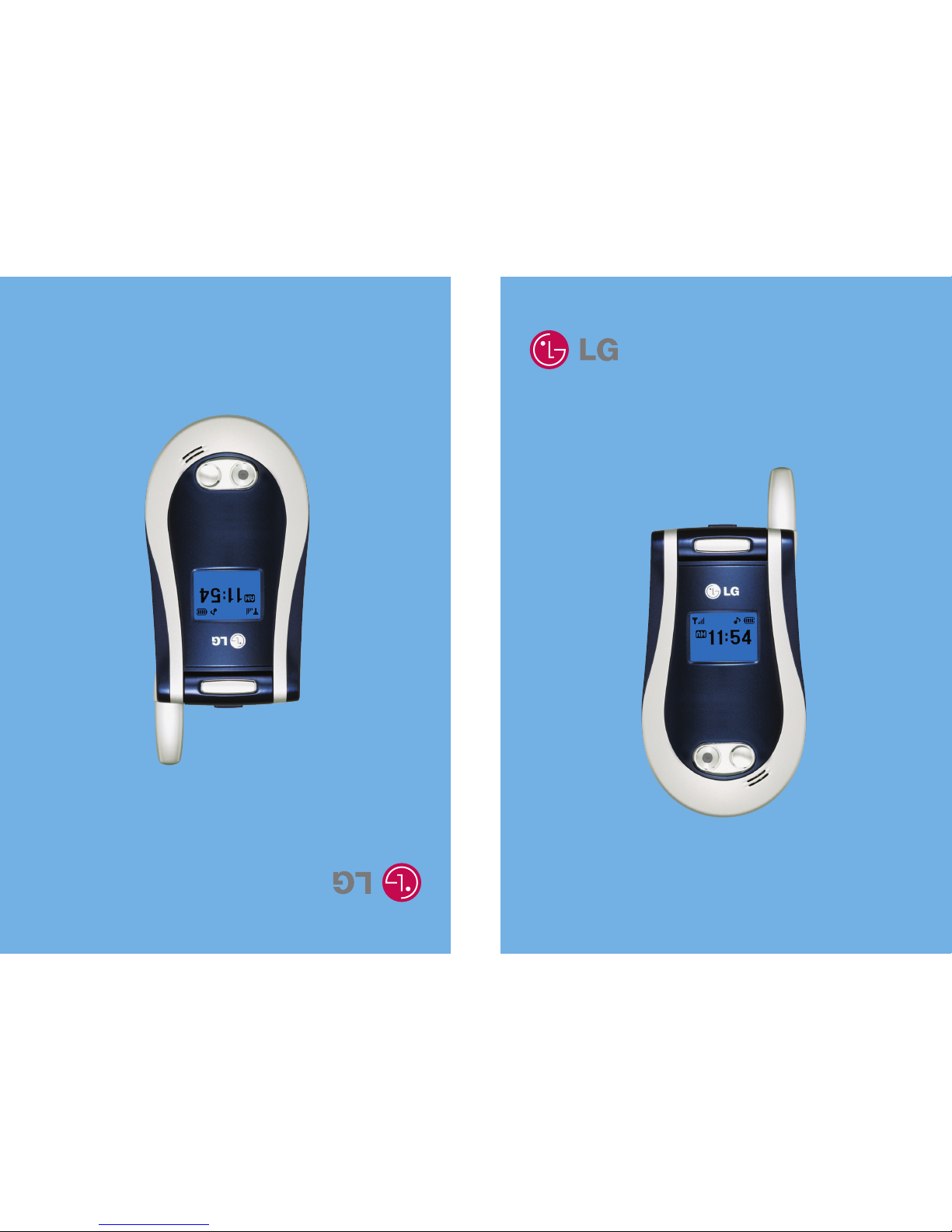
LG L1150 Manuale utente

L1150
User Guide
L1150
User Guide
MMBB0120901 (1.1)
Some of contents in this manual may differ from your phone depending on the
software of the phone or your service provider.
L1150
Guía del usuario
lguna de los contenidos de este manual puede tener variaciones con el telefono
dependiendo del software o de proveedor de servicio.

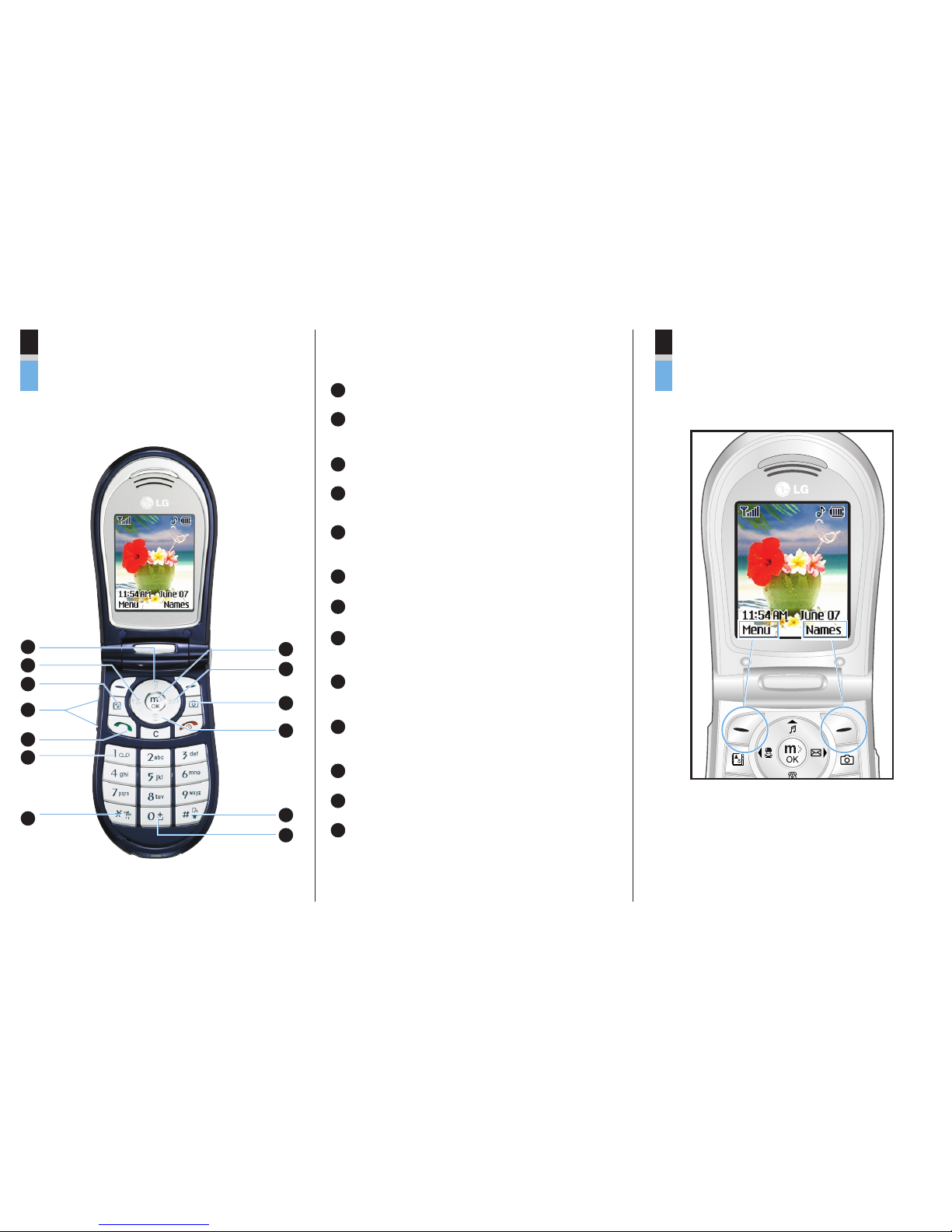
Getting to know your handset Selecting Functions and Options
1
1
2
8
9
10
11
12
13
2
3
4
5
6
7
(Short press) Sounds Menu
(Short press) Instant Message
(Long press) Sign On
3(Short press) Gallery Menu
5(Short press) All recent calls
(Long press) Dial to 1st entry
6(Long press) Connect to voice mail ox
7(Long press) Vi rate Mode
8(Long press) We access
(Connect to mMode)
9(Short press) Write new SMS
(Long press) Message ox
10 (Short press) Camera mode
(Long press) Camera Menu
11 (Short press) Contact List
12 (Long press) Voice Dial
13 (Long press) + (For international call)
4When the flip is opened (Short press) for Ring
volume adjust.
Press the left soft key
to access the
availa le Menu.
Press the right soft
key to access the
availa le Names.

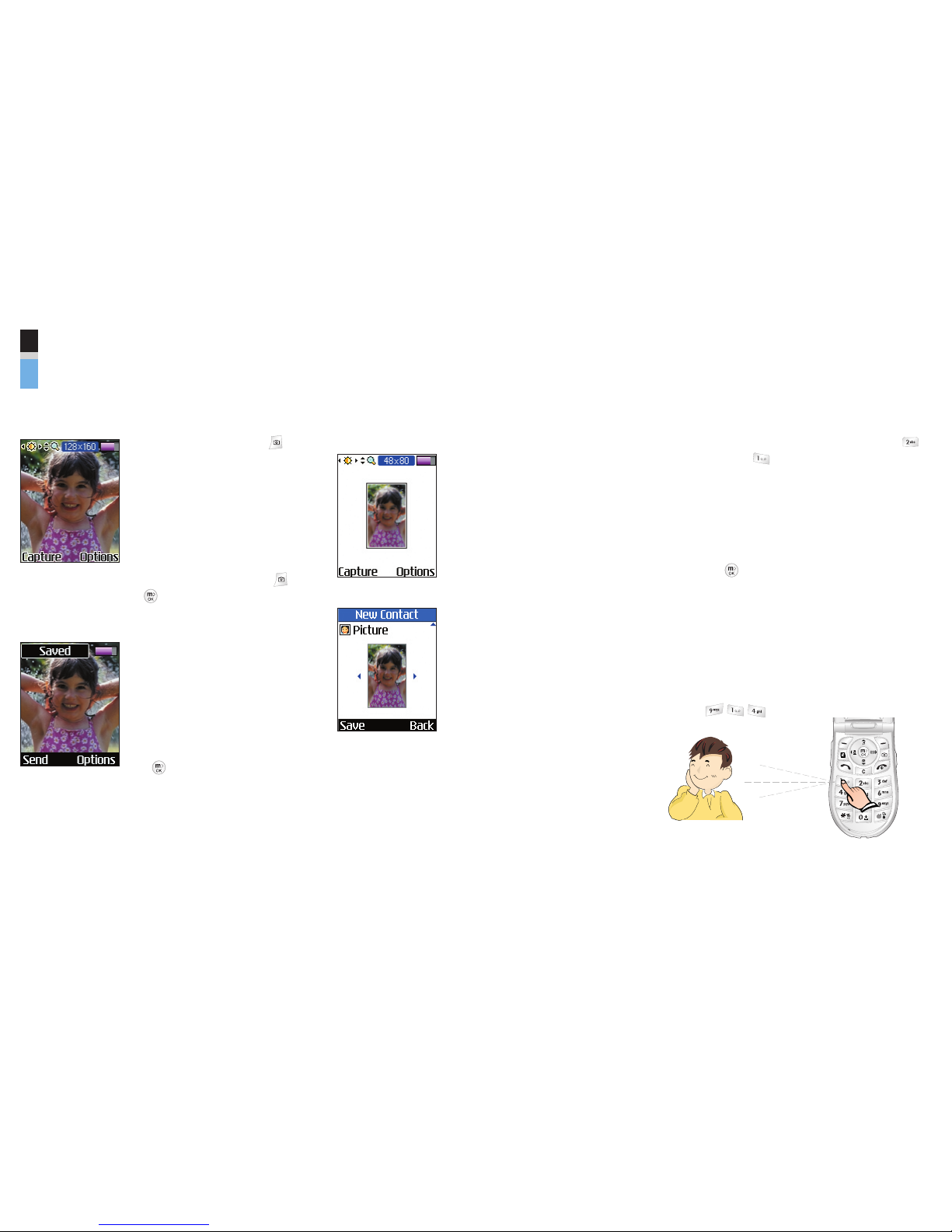
Quick Reference Guide - Using Camera
Take and Send hoto
1. Press the Camera key ( ).
2. In the preview screen, press
the left and right navigation
keys to adjust brightness,
and press the up and down
navigation keys to adjust
oom.
3. Press the Camera Key ( ),
or left soft key [Capture].
4. After capture, the photo
saved automatically.
To send it via MMS
(Multimedia Message), press
the left soft key [Send].
To go to preview screen, press
the key.
Take Address Book photo( hoto ID) and add
to Address Book
1. To take Address Book
photo (Photo ID), adjust
image si e to “48x80”.
(In the preview screen, go
to options, select “Image
Si e” menu and select
“48x80” si e.)
2. In the “New Contact” or
“Edit” of the Address
Book, you can find
“Picture” field. Press the
left and right navigation
keys to select Address
Book photo (Photo ID).
(Photos are displayed just
when the Address Book
photo is saved to the
phone.)
3. Press the left soft key
[Save] and finish add
contact.
Choose the Alert Type
1. In standby mode, press up navigation key,
(Volume) and (Ringtone).
2. Select an option:
Silent All,Vibration All,Volume 1~5,
Vol5&Vib.
3. Press the left and right navigation keys.
4. Press the key.
Key tones
This menu option allows you to select a tone that
the phone sounds when you press a key. You can
select an option from Beep and Voice.
1. Press the left soft key [Menu].
2. Press .
oneoneone
MCDD0001801 (1.0)

1. WHAT THIS WARRANTY COVERS
LG offers you a limited warranty that the enclosed subscriber unit and its
enclosed accessories will be free from defects in material and
workmanship, according to the following terms and conditions:
1. The limited warranty for the product extends for ONE (1) year
beginning on the date of purchase of the product.
2. The limited warranty extends only to the original purchaser of the
product and is not assignable or transferable to any subsequent
purchaser/end user.
3. This warranty is good only to the original purchaser of the product
during the warranty period, but limited to certain countries if specified.
4. The external housing and cosmetic parts shall be free of defects at the
time of shipment and, therefore, shall not be covered under these
limited warranty terms.
5. Upon request from LG, the consumer must provide acceptable
information to prove the date of purchase.
6. The customer shall bear the cost of shipping the product to the
Customer Service Department of LG. LG shall bear the cost of
shipping the product back to the consumer after the completion of
service under this limited warranty.
2. WHAT THIS WARRANTY DOES NOT COVER
1. Defects or damages resulting from use of the product in other than its
normal and customary manner.
2. Defects or damages from abnormal use, abnormal conditions,
improper storage, exposure to moisture or dampness, unauthorized
modifications, unauthorized connections, unauthorized repair, misuse,
neglect, abuse, accident, alteration, improper installation, or other acts
which are not the fault of LG, including damage caused by shipping,
blown fuses, and spills of food or liquid.
3. Breakage or damage to antennas unless caused directly by defects in
material or workmanship.
4. The Customer Service Department at LG must be notified by
consumer of the alleged defect or malfunction of the product during
the applicable limited warranty period for the warranty to apply.
5. Products which have had the serial number removed or made
illegible.
LIMITED WARRANTY STATEMENT

6. This limited warranty is in lieu of all other warranties, express or
implied either in fact or by operations of law, statutory or otherwise,
including, but not limited to any implied warranty of marketability or
fitness for a particular use.
7. Damage resulting from use of any non-LG approved accessory. Use
of any non-LG approved accessory immediately voids this warranty
and LG shall not be responsible for any incidental, consequential,
special, or any other damage resulting from the use of any non-LG
approved accessory.
8. All plastic surfaces and all other externally exposed parts that are
scratched or damaged due to normal customer use.
9. Products operated outside published maximum ratings.
10. Products used or obtained in a rental program.
11. Consumables (such as fuses).
3. STATE LAW RIGHTS:
No other express warranty is applicable to this product. THE DURATION
OF ANY IMPLIED WARRANTIES, INCLUDING THE IMPLIED
WARRANTY OF MARKETABILITY, IS LIMITED TO THE DURATION OF
THE EXPRESS WARRANTY HEREIN. LG INFOCOMM INC. SHALL NOT
BE LIABLE FOR THE LOSS OF THE USE OF THE PRODUCT,
INCONVENIENCE, LOSS OR ANY OTHER DAMAGES, DIRECT OR
CONSEQUENTIAL, ARISING OUT OF THE USE OF, OR INABILITY TO
USE, THIS PRODUCT OR FOR ANY BREACH OF ANY EXPRESS OR
IMPLIED WARRANTY, INCLUDING THE IMPLIED WARRANTY OF
MARKETABILITY APPLICABLE TO THIS PRODUCT.
Some countries do not allow the exclusive of limitation of incidental or
consequential damages or limitations on how long an implied warranty
lasts; so these limitations or exclusions may not apply to you. This
warranty gives you specific legal rights and you may also have other
rights, which vary from state to state.
4. HOW TO GET WARRANTY SERVICE:
To obtain warranty service, please call the following telephone number
from anywhere in the continental United States:
Tel. 1-800-793-8896 Fax. 1-800-448-4026
www.LGmobilephones.com

L1150
User Guide

Unpacking 8
For Your Safety 9
Your Phone 14
Phone Components 14
Your Phone’s Features 15
Disp ay Information 17
Getting Started 19
Insta ing the SIM Card 19
Charging the Battery 22
Turning Your
Phone On and Off 24
Access Codes 25
Security code 25
Genera Functions 26
Making a Ca 26
Making a Call by Send Key 26
Making International Calls 26
Ending a Call 26
Making a Call From the
Contact List 27
Adjusting the Vo ume 27
Answering a Ca 27
ibrate Mode (Quick) 28
Signal Strength 28
Entering Text 28
Se ecting
Functions and Options 33
Address Book 34
In-Ca Menu 35
During a Ca 35
Making a Second Call 35
Swapping
Between Two Calls 35
Answering an Incoming Call 35
Rejecting an Incoming Call 36
Muting the Microphone 36
Mu tiparty or
Conference Ca s 37
Making a Second Call 37
Setting Up a Conference Call 37
Activate the
Conference Call on Hold 37
Adding Calls to the
Conference Call 37
Private Call in a
Conference Call 38
Ending a Conference Call 38
Menu Tree 39
Camera 42
Take Picture 42
Ga ery 43
All Pictures 43
General Pictures 43
4
Tab e of Contents

5
Phonebook Pictures 43
Memory Status 44
Messaging 45
Text Messages 45
Write Message 45
Inbox 46
Outbox 47
Drafts 47
Settings 47
Delete All 48
Instant Messaging 48
Login(Sign On/Connect) 49
Saved Conversations 49
Settings 49
IM Provider 49
Mu timedia Messages 56
Write Message 56
Inbox 57
Outbox 58
Drafts 59
Settings 60
Voice Mai 61
Listen To oice Mail 61
oice Mailbox Number 61
Down oad Messages 62
Inbox 62
Receive 62
Info Service 63
Receive 63
Inbox 63
Topics 63
Alert 63
Auto Display 63
Languages 64
Temp ates 64
Text 64
Multimedia 64
Business Card 65
Memory Status 65
Web Access 66
mMode 67
Bookmarks 67
Go To URL 68
Access Point 68
Cache Settings 69
Clear Cache 69
Cache Check 69
Security Certificates 69
WAP Information 69
Games & Apps 70

6
Games & Apps 70
Bookmarks 71
View Information 72
Memory Status 72
Java ersion 72
My Fo der 73
Bookmarks 73
Games & Apps 73
Ringtone/Audio 73
Graphics 74
Mu timedia Contents 74
Recent Ca s 75
Missed Ca s 75
Dia ed Ca s 75
Received Ca s 76
De ete Recent Ca s 76
Ca Durations 76
Last Call 76
Received Calls 76
Dialed Calls 76
All Calls 77
Data Information 77
WAP Information 77
External Device 77
Total Data 77
Too s 78
A arm C ock 78
Ca endar 79
Voice Recording 81
Ca cu ator 82
Memo 82
Wor d Time 83
Unit Converter 84
Infrared 84
Address Book 86
Contact List 86
New Contact 87
Speed Dia s 87
Voice Tag List 88
Ca er Groups 89
Copy A 90
De ete A 90
Settings 90
Information 91
Settings 92
Sounds 92
Ringtones 92
olume 92
Message Alert Tones 92
Key Tones 92
oice Recording 93
Disp ay 93
My Wallpaper 93
Backlight 93
Languages 94

7
Menu Style 94
Date & Time 95
Set Date 95
Date Format 95
Set Time 95
Time Format 95
Auto Update 95
Ca Settings 96
Call Forwarding 96
Answer Mode 96
Send My Number 97
Call Waiting 97
Minute Minder 97
oice Dial 98
Auto Redial 99
Send DTMF 99
Security 100
PIN Code Request 100
Fixed Dial Number (FDN) 100
Change Codes 101
Connection 101
Network Selection 101
World Phone 102
GPRS Attach 102
Access Point 102
Reset Access Point 103
Reset Settings 103
Q&A 104
Accessories 107
Safety Guide ines 109
G ossary 123
Index 126
Altri manuali per L1150
2
Questo manuale è adatto per i seguenti modelli
1
Indice
Altri manuali LG Telefono cellulare
Manuali Telefono cellulare popolari di altre marche

Blackbe;rry
Blackbe;rry Q10 Manuale utente

Blackbe;rry
Blackbe;rry Bold 9900 Manuale utente

Blackbe;rry
Blackbe;rry STORM 9500 - VERSION 5.0 Manuale utente

ISAFE MOBILE
ISAFE MOBILE IS655.2 Manuale utente

Blackbe;rry
Blackbe;rry CURVE 8300 - SMARTPHONE Manuale utente

Blackbe;rry
Blackbe;rry 8707 - VERSION 4.1 Manuale utente