
LG HBS-500 Manuale utente

English
Español
Rev 1.0 US
All rights reserved.
LG Electronics Inc., 2015
Note: Please read all information carefully prior to
using the HBS-500 in order to prevent damages to
the product and to enjoy the best performance.
WARNING :
This product contains chemicals known to the State
of California to cause cancer and birth defects or
reproductive harm.
Wash hands after handling.
HBS-500 User Manual
BLUETOOTH®Stereo Headset

2
ENG
Introduction 3
- Included in the Package 3
Description of Parts 4
How to Use 5
- Power On / Power Off 5
- Charging 5
- Low Battery 5
- Battery Status Alert 5
- Pairing 5
- Multi-connection 6
- Auto Reconnect 7
- Calling 7
• Answering a Call 7
• Transferring a Call 7
• Voice Dialing 8
• Last number Redial 8
• Ending a Call 8
• Call Waiting 8
• Rejecting a Call 8
• Mic Mute 8
- Volume Control 8
- Vibrate Control 8
- Audio Streaming 9
- Equalizer 9
- Tone & Talk
TM
9
Summary of HBS-500 Functions 10
LED (or Vibrate) Indicator 11
Troubleshooting 11
Specifications 12
Precautions 12
Declaration of Confirmation 13
Additional Information 13
Limited Warranty 16
Important Safety Information 16
Table of Contents

3
ENG
The LG TONE+ (HBS-500) is a lightweight wireless headset that uses Bluetooth
technology.
This product can be used as an audio accessory for devices supporting either the
A2DP or Hands-Free Bluetooth Prole.
Included in the Package
Ear Gels (2 Sets) *USB Charging Cable
User Manual Warranty Card
* Actual product design may differ from images shown in manual.
HBS-500
Introduction
4
Description of Parts
ENG
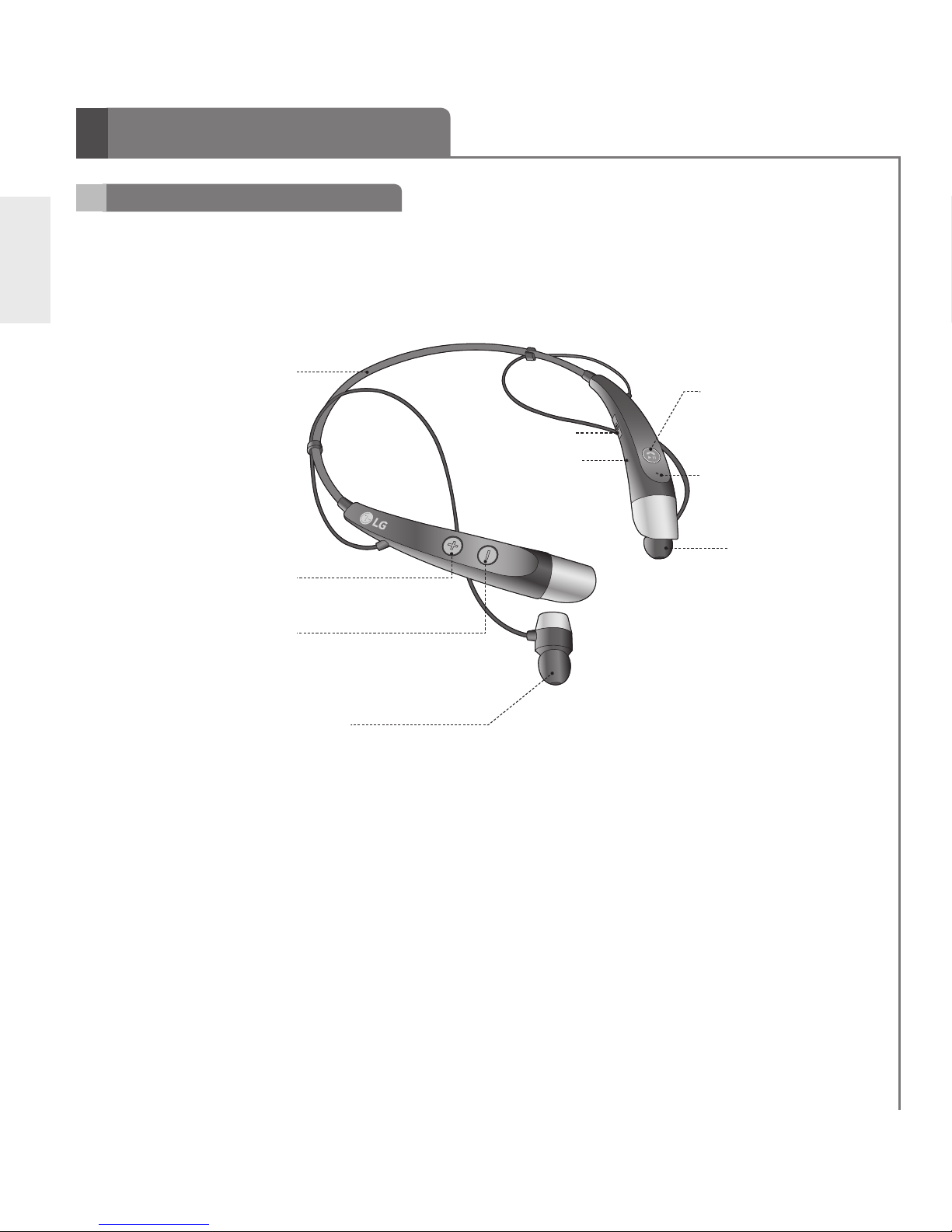
Headset
Memory Flex Neck Strap
LED Indicator
VOLUME UP Button
(FF, Next Song)
VOLUME DOWN Button
(REW, Previous Song)
Earbud (R)
Charging Port
MFB (Multi-Function Button) :
Power/Call/Play Button
Microphone
Earbud (L)
5
ENG
Charging
- When the charger is connected (with the power on or off) the headset will turn off.
-
While charging, the LED indicator will show a solid red light and then
change to violet when charged 80% and above.
- When charging is completed, the LED indicator will show a solid blue light.
Low Battery
- A low battery alert will play once every 2 minutes.
- If the battery is not charged, the headset will turn off.
Power On / Power Off
- Power On : Press and hold the MFB for 2 seconds.
- Power Off : Press and hold the MFB for 3 seconds.
Pairing
- Before using, HBS-500 must be paired/connected with a Bluetooth-enabled device.
1) Easy Pairing
a) Press and hold the MFB for 2 seconds to turn on the HBS-500.
b) If it is your rst time pairing the device it will automatically enter pairing mode. If
it has been paired but no paired device is in range it will enter pairing mode.
• The LED indicator will be solid blue.
Battery Status Alert
- By pressing and holding the VOLUME DOWN button for 1 second, you can check
the battery status of the HBS-500.
Battery Status High Medium Low
Voice Prompt Battery High Battery Medium Battery Low
LED Indicator Blinking
Blue
Blinking
Violet
Blinking
Red
How to Use

6
ENG
c) On the device you wish to pair, nd the Bluetooth menu and search for or add
new devices.
d) Select LG HBS500 from the list of devices.
e) If asked for a Pass/Pin Code enter 0000 (4 Zeros).
f) Once the devices are paired, you will hear “Your headset paired.”
• The HBS-500 will automatically turn off if not paired within 3 minutes.
2) Manual Pairing (pairing with another phone or re-pairing)
a) With the power off, press the VOLUME DOWN button and press and hold the
MFB for 2 seconds to enter Manual Pairing mode.
b) When the headset enters Pairing Mode, the LED indicator will show a solid
blue light. After the procedure repeat Easy Pairing steps c through f.
How to Use
Multi-connection
Advanced Multipoint
The HBS-500 is capable of having two devices connected to the headset at the
same time. This will give you the freedom of using call waiting between calls on
both of your connected phones.
Connection
- Pair the headset with one of your Bluetooth-enabled handsets (see the pairing
instructions on pages 5 and 6).
- Turn off the headset.
- Power up as manual pairing mode. (With the power off, press the VOLUME
DOWN button and press and hold the MFB for 2 seconds.)
- Pair and connect the headset with your other Bluetooth-enabled handset. This
will be your primary headset.
- Once the handset is paired and connected, connect the originally paired handset
to the headset. This will now be your secondary handset.
* NOTE: When the HBS-500 is connected to two handsets at the same time
(Multipoint), the headset calling functions will work with the primary handset.
* NOTE: In case of failure to connect to the primary phone through Easy Pairing,
HBS-500 will enter Pairing Mode.

7
ENG
Auto Reconnect
- The headset and handset will automatically reconnect when the HBS-500 is turned
back on while in range.
- The secondary handset will need to be connected manually. Select LG HBS500 from
the list of devices in the Bluetooth menu and pair.
Out of Range
- If the paired devices are separated by a range of 33 feet (10 meters) or more, the
headset and handset will disconnect and the HBS-500 will vibrate to alert you*.
* HBS-500 will not vibrate if vibration function is on ‘off’.
- If the headset and handset do not automatically reconnect when they are back within the
required range, briey press the MFB on the HBS-500 to reconnect manually.
- While in multi-connection and streaming, the inactive paired device will be disconnected
when out of range. The HBS-500 will alert you once with no attempt to reconnect.
Calling Function
- Voice Dialing and Last Number Redial features work with the primary handset (or
handset which made the last outgoing call).
Call Waiting
- While on a call, press the MFB for 1 second to switch to an incoming call.
- To switch between 2 active calls, press the MFB for 1 second.
- To end both calls briey press the MFB.
- If both handsets are receiving an incoming call, the headset will default to the primary device.
Calling
Answering a Call
- When there is an incoming call, the headset will ring and vibrate.
- Briey press the VOLUME DOWN button to stop vibration*.
* The HBS-500 will not vibrate if the vibration function has been turned off.
- Briey press the MFB to answer the incoming call.
Transferring a Call
- You can manually transfer the call to or from the headset by pressing and holding
the VOLUME UP button for 2 seconds on the HBS-500 (handset and headset must
be paired).
How to Use

8
ENG
How to Use
Volume Control
- Press the VOLUME button to adjust the speaker volume.
- To prevent hearing loss, which is caused by listening to music for long periods of
time, the HBS-500 will emit a long beep tone or two beeps when you use the upper
6 volume levels.
Vibrate Control
- To activate or deactivate device vibration, press and hold the VOLUME UP button for 2
seconds. You will hear “Vibrate on” or “Vibrate off” when it is activated or deactivated.
- When vibration is turned off, the headset will not vibrate when receiving an
incoming call or when it is out of range.
- Vibration will automatically be activated when the device is powered on.
Voice Dialing
- Briey press the MFB to activate Voice Command. For best results, record the voice
dialing tag through your headset.
NOTE: If your handset does not support voice dialing, this action may activate Last
Number Redial.
Last Number Redial
- Press and hold the MFB for 1 second to activate Last Number Redial.
The headset will beep and then call the last number dialed.
Ending a Call
- Briey press the MFB.
Call Waiting
- Answer a second call without hanging up the rst call by pressing the MFB for 1
second. Press the MFB for 1 second to return to the original call.
- Briey press the MFB to terminate both calls at once.
Rejecting a Call
- Activate call reject by pressing the MFB for 1 second when the handset rings.
* These functions may only be used if your handset supports them. For further
information about using these features, please consult your handset’s user manual.
Mic Mute
- Press and hold the VOLUME UP and VOLUME DOWN buttons at the same time for
1 second to mute/unmute the Mic during conversation.

9
ENG
Tone & TalkTM
Equalizer
- While playing music, press and hold the VOLUME UP and VOLUME DOWN
buttons at the same time for 1 second to switch between Bass Boost (default),
Normal, and Treble Boost.
- The size of the ear gel can affect the amount of bass you hear.
Audio Streaming
Play
- Double press MFB.
Pause
- While playing music, double press MFB.
Next song
- Double press VOLUME UP button.
Previous song
- Double press VOLUME DOWN button.
Fast Forward
- Press and hold VOLUME UP button.
Rewind
- Press and hold VOLUME DOWN button.
How to Use
The HBS-500 Bluetooth headset supports SMS reading on
AndroidTM based devices.
To download the application, search for Tone & Talk in Google
PlayTM * or scan the QR code. Follow the installation instructions.
* Google Play is a trademark of Google, Inc.

10
ENG
Function
HBS-500 Status
Action
Power on Power off Press and hold the MFB for 2 seconds.
Power off Power on Press and hold the MFB for 3 seconds.
Volume up Briey press the VOLUME UP button.
Volume down Briey press the VOLUME DOWN button.
Transferring a call Talking Press and hold VOLUME UP button for 2
seconds.
Answering a call Ringing Briey press the MFB.
Stop incoming call
vibration alerting Ringing Briey press the VOLUME DOWN button.
Vibration on/off Power on Press and hold VOLUME UP button for 2
seconds.
Ending a call Talking Briey press the MFB.
Call waiting Talking Press the MFB for 1 second.
Last number redial Idle Press the MFB for 1 second.
Voice dialing
(handset must
support)
Idle Briey press the MFB.
Call reject Ringing Press the MFB for 1 second.
Mic mute on/off Talking Press and hold the VOLUME UP and VOLUME
DOWN buttons at the same time for 1 second.
Pairing mode
(Manual) Power off
Press the VOLUME DOWN button and press and
hold the MFB for 2 seconds.
Battery status check
Power on Press the VOLUME DOWN button for 1 second.
Play Power on Double press MFB.
Pause Music on Double press MFB.
Next song Music on Double press VOLUME UP button.
Previous song Music on Double press VOLUME DOWN button.
Fast forward Music on Press and hold VOLUME UP button.
Rewind Music on Press and hold VOLUME DOWN button.
Equalizer settings Music on Press and hold the VOLUME UP and VOLUME
DOWN buttons at the same time for 1 second.
Summary of HBS-500 Functions
Power on
Power on
Altri manuali per HBS-500
3
Indice
Altri manuali LG Cuffia

LG
LG HBM-750 Manuale utente

LG
LG Tone PRO Manuale utente

LG
LG TONE Active HBS-850 Manuale utente

LG
LG HBS-835 Manuale utente

LG
LG HBM-W600 Manuale utente

LG
LG HBM-760 Manuale utente

LG
LG TONE-FP5 Manuale utente

LG
LG HBM-530 Manuale utente

LG
LG FORCE HBS-S80 Manuale utente

LG
LG TONE Free HBS-FN6 Manuale utente

LG
LG TONE Studio HBS-W120 Manuale utente

LG
LG TONE FREE Manuale utente

LG
LG TONE ULTRA HBS-820 Manuale utente

LG
LG TONE-DT90Q Manuale utente

LG
LG LG TONE PRO HBS-780 Manuale utente

LG
LG Tone Free TONE-T60Q.AUSACBK Manuale utente

LG
LG TONE Free HBS-FN6 Manuale utente

LG
LG TONE Free HBS-FN6 Manuale utente

LG
LG TONE FREE Manuale utente

LG
LG HBS-800 Manuale utente


