LG 32LN52 Series Manuale utente

P/NO : MFL67688553(1306-REV00)
Printed in Korea
LN52**
OWNER’S MANUAL
LED TV*
*LG LED TV applies LCD screen with LED backlights.
Please read this manual carefully before operating
your set and retain it for future reference.
www.lg.com

A-2 TABLE OF CONTENTS
TABLE OF CONTENTS
A-3 SETTING UP THE TV
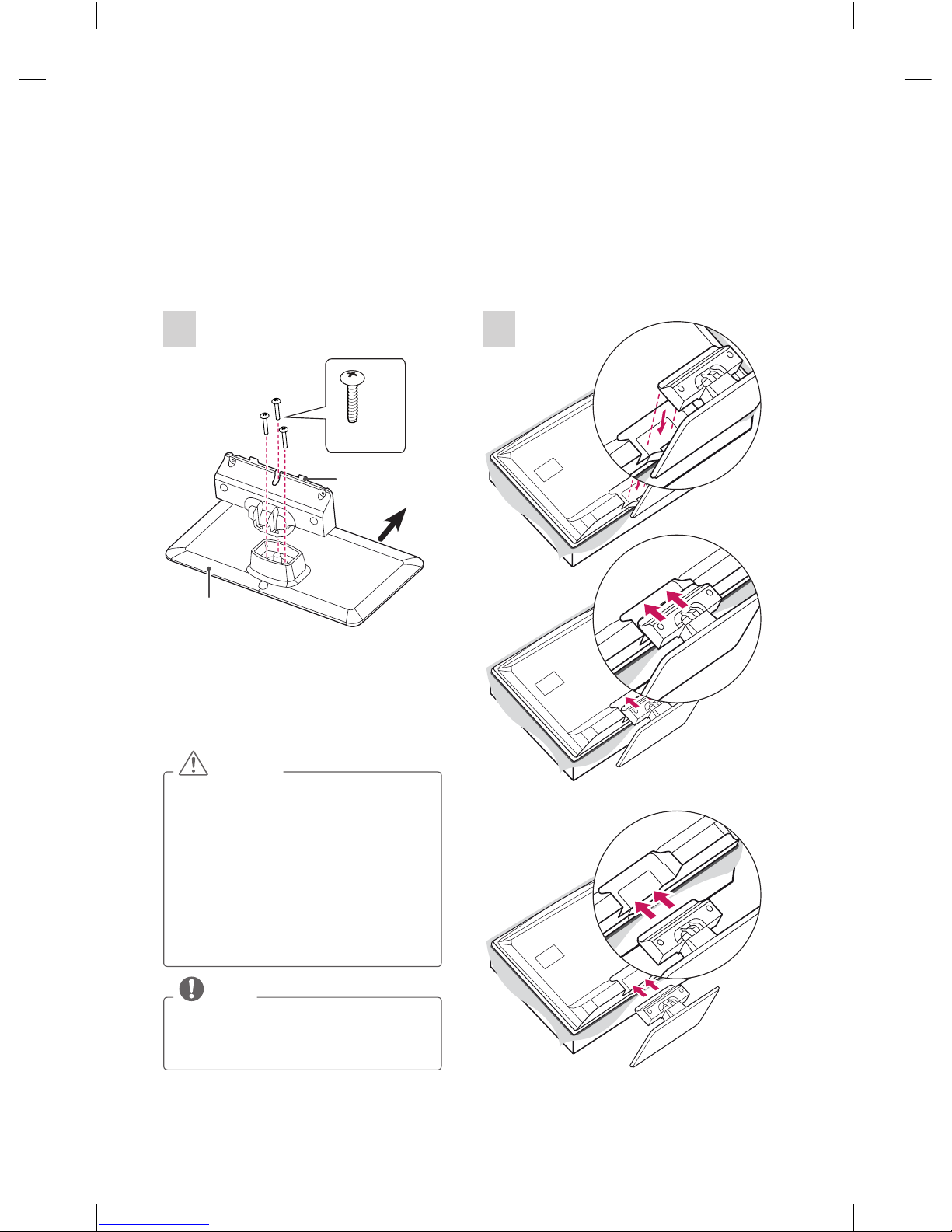
A-3 Attaching the stand
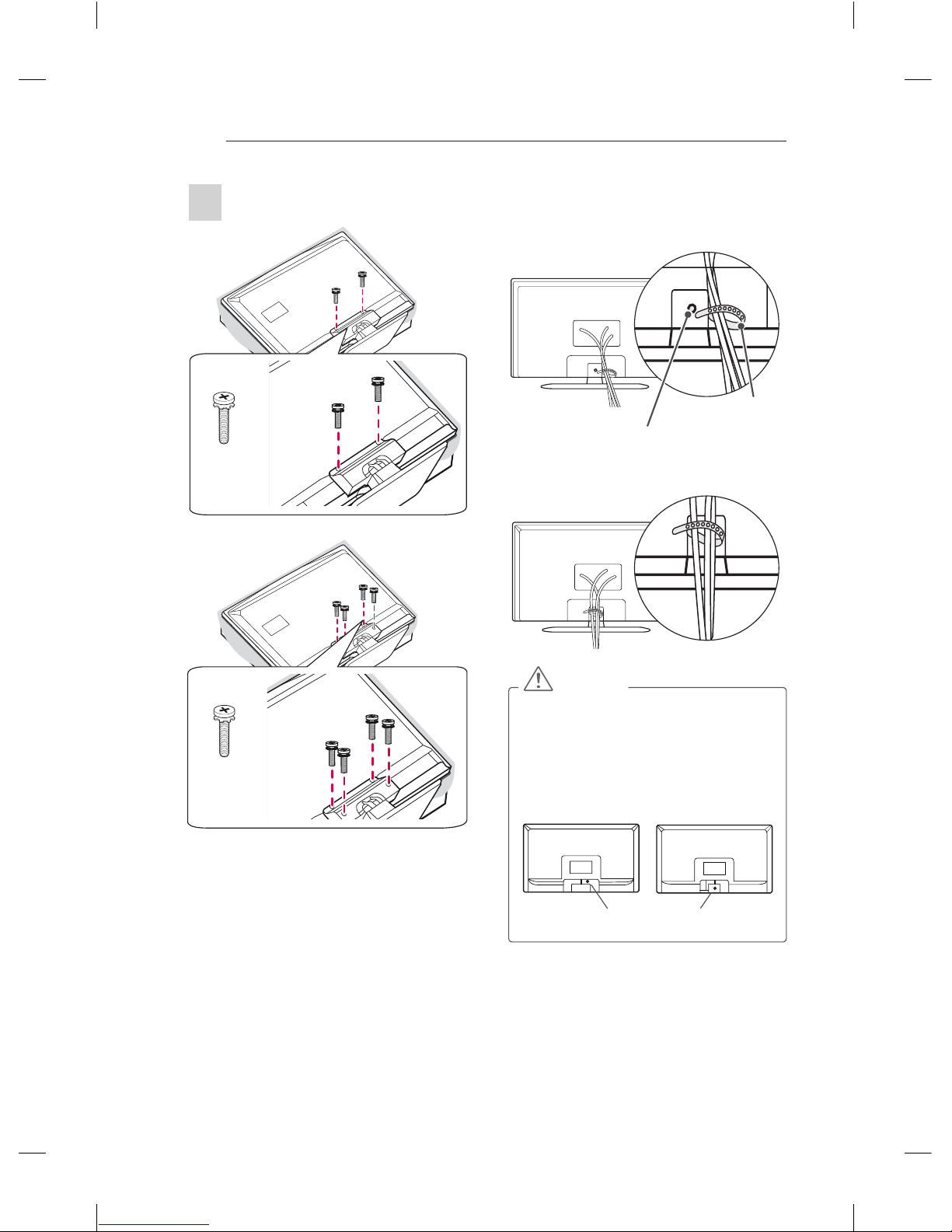
A-4 Tidying cables
A-5 MAKING CONNECTIONS
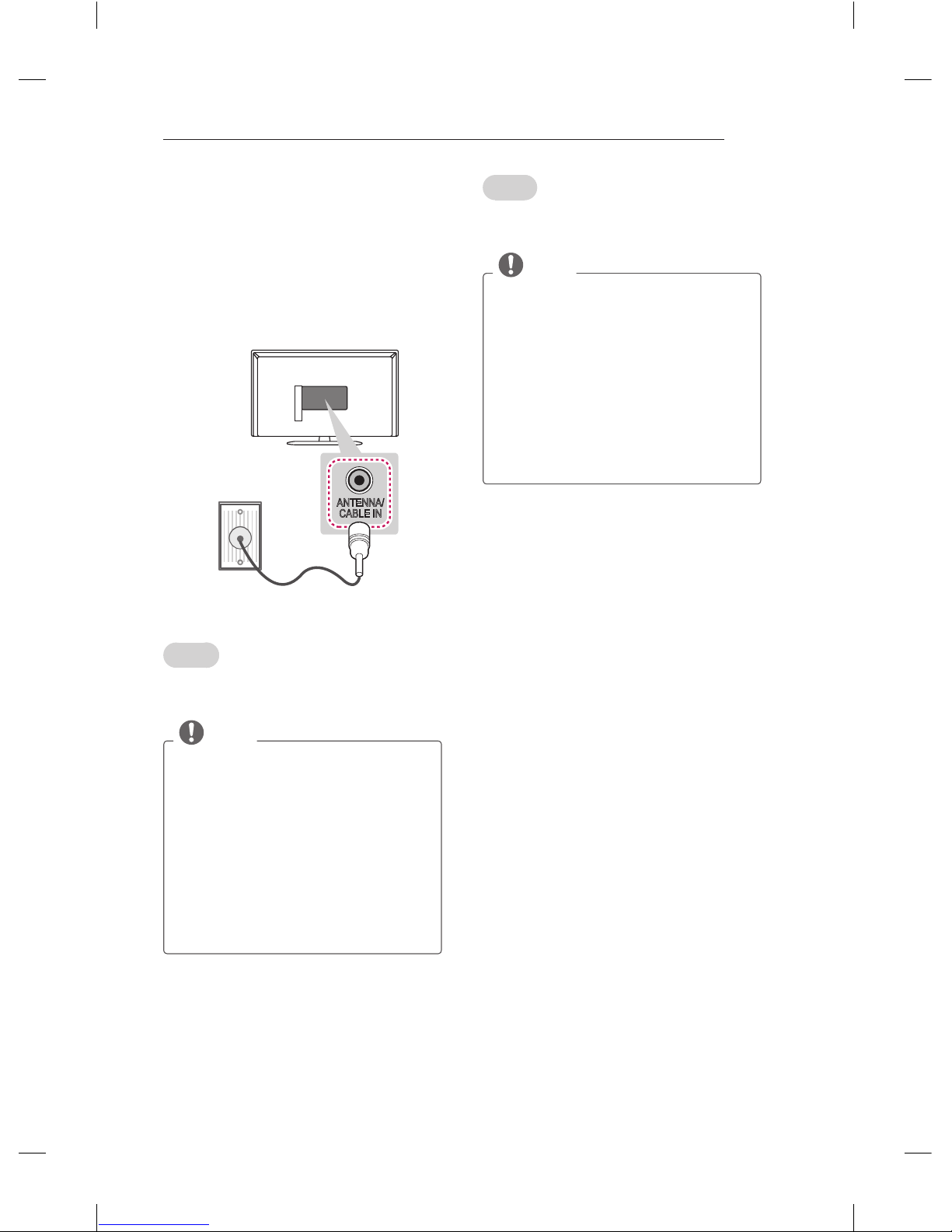
A-5 Antenna Connection
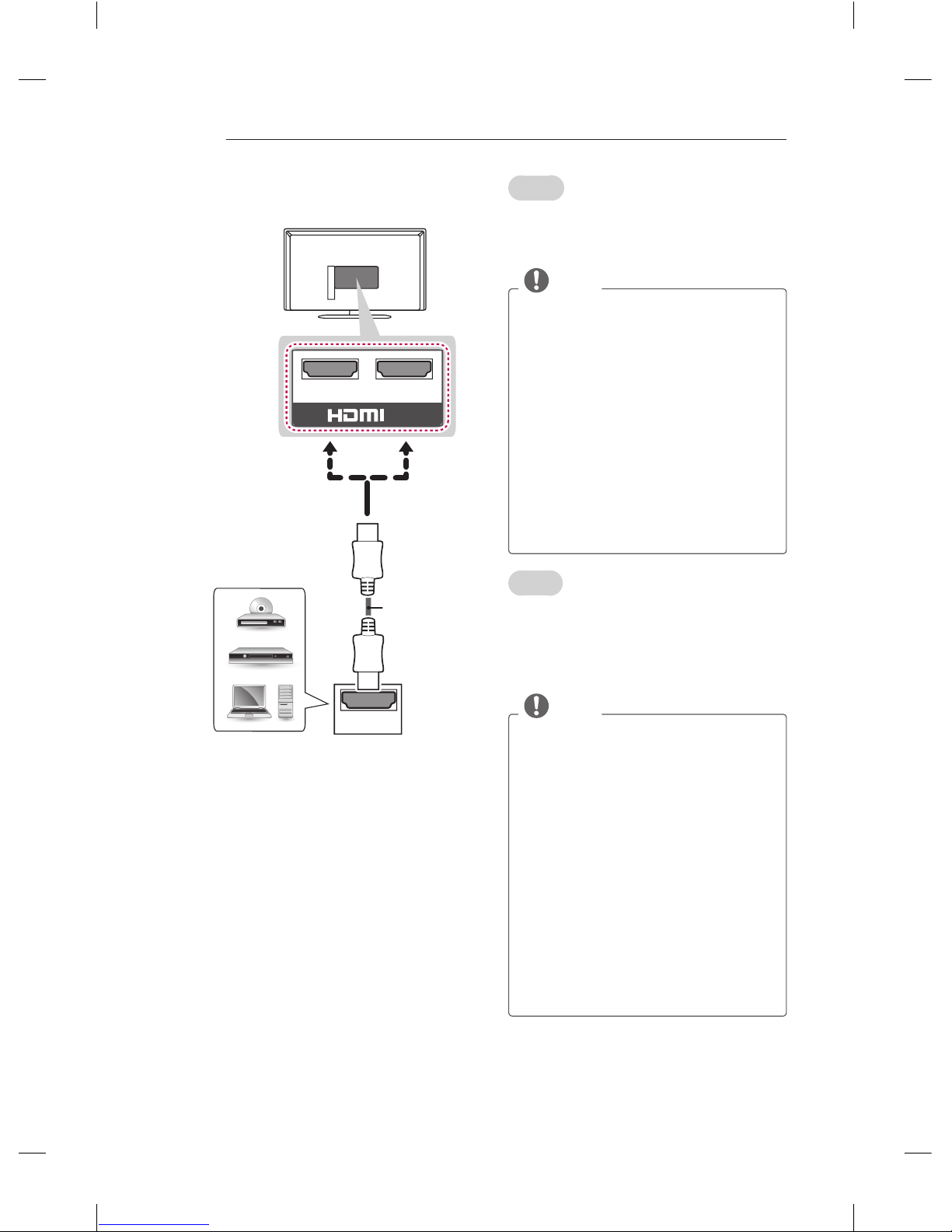
A-6 HDMI Connection
A-7 Adapter Connection
A-7 USB Connection
A-8 CI module Connection
A-9 Euro Scart Connection
LANGUAGE LIST
English
Italiano
B-1 SPECIFICATIONS
COMMON
COMMON
LANGUAGE

A-3
SETTING UP THE TV
SETTING UP THE TV
Image shown may differ from your TV.
Attaching the stand
1
P5 x 25
3EA
Front
Stand Body
Stand Base
CAUTION
When attaching the stand to the TV
set, place the screen facing down on a
cushioned table or flat surface to protect
the screen from scratches.
Make sure that the screws are inserted
correctly and fastened securely. (If they
are not fastened securely enough, the TV
may tilt forward after being installed.)
Do not use too much force and over
tighten the screws; otherwise screw may
be damaged and not tighten correctly.
NOTE
Remove the stand before installing the
TV on a wall mount by performing the
stand attachment in reverse.
2
(Only 32LN52**)
(Only 42LN52**)

A-4 SETTING UP THE TV
Tidying cables
1 Gather and bind the cables with the Cable
holder.
Cable holder
Cable holder hole
2 Fix the Cable holder rmly to the Cable holder
hole.
CAUTION
Do not move the TV by holding the cable
holder, as the cable holders may break,
and injuries and damage to the TV may
occur.
When attaching a wall mount bracket to
the TV, the Cable holder hole is located
on the TV back cover.
Cable holder hole
or
(Only 42LN52**)
M4 x 14
4EA
M4 x 14
2EA
3
(Only 32LN52**)

A-5
MAKING CONNECTIONS
MAKING CONNECTIONS
This section on MAKING CONNECTIONS mainly
uses diagrams for the 32LN520B models.
Antenna Connection
English
Connect the TV to a wall antenna socket with an
RF cable (75 Ω).
NOTE
Use a signal splitter to use more than 2
TVs.
If the image quality is poor, install a signal
amplifier properly to improve the image
quality.
If the image quality is poor with an
antenna connected, try to realign the
antenna in the correct direction.
An antenna cable and converter are not
supplied.
Supported DTV Audio: MPEG, Dolby
Digital, Dolby Digital Plus, HE-AAC
ANTENNA/
CABLE IN
Wall Antenna
Socket
Italiano
Collegare il televisore all’antenna centralizzata
con un cavo RF (75 Ω).
NOTA
Utilizzare uno sdoppiatore del segnale
per usare più di 2 televisori.
Se la qualità dell’immagine è scarsa,
installare correttamente un amplificatore
del segnale per migliorarla.
Se la qualità dell’immagine è scarsa con
un’antenna collegata, provare a riallineare
l’antenna nella direzione corretta.
Il cavo e il convertitore dell’antenna non
sono in dotazione.
Audio DTV supportato: MPEG, Dolby
Digital, Dolby Digital Plus, HE-AAC

A-6 MAKING CONNECTIONS
HDMI Connection
HDMI
IN
21
(*Not Provided)
DVD / Blu-Ray /
HD Cable Box /
HD STB / PC
English
Transmits the digital video and audio signals from
an external device to the TV. Connect the external
device and the TV with the HDMI cable as shown.
NOTE
It is recommended to use the TV with
the HDMI connection for the best image
quality.
Use the latest High Speed HDMI™ Cable
with CEC (Customer Electronics Control)
function.
High Speed HDMI™ Cables are tested to
carry an HD signal up to 1080p and higher.
Supported HDMI Audio format : Dolby
Digital, PCM (Up to 192 KHz, 32 KHz /
44.1 KHz / 48 KHz / 88 KHz / 96 KHz /
176 KHz / 192 KHz)
- DTS Not supported.
If you use DVI to HDMI cable for PC,
you have to use external speaker for PC
audio sound.
Italiano
Il segnale digitale audio e video viene trasmesso
da un dispositivo esterno al televisore. Collegare
il dispositivo esterno e il televisore mediante il
cavo HDMI come mostrato nell’illustrazione di
seguito.
NOTA
Si consiglia di utilizzare il televisore con
il collegamento HDMI per ottenere la
migliore qualità delle immagini.
Utilizzare un cavo HDMI™ ad alta
velocità dotato dei requisiti più recenti
con funzione CEC (Customer Electronics
Control).
I cavi HDMI™ ad alta velocità sono testati
per trasmettere un segnale HD fino a
1080p e superiore.
Formato audio HDMI supportato:
Dolby Digital, PCM (fino a 192 KHz,
32 KHz/44,1 KHz/48 KHz/88 KHz/96
KHz/176 KHz/192 KHz)
- DTS non supportato.
Se si utilizza un cavo da DVI a HDMI
per PC, è necessario utilizzare un
altoparlante esterno per audio PC.

A-7
MAKING CONNECTIONS
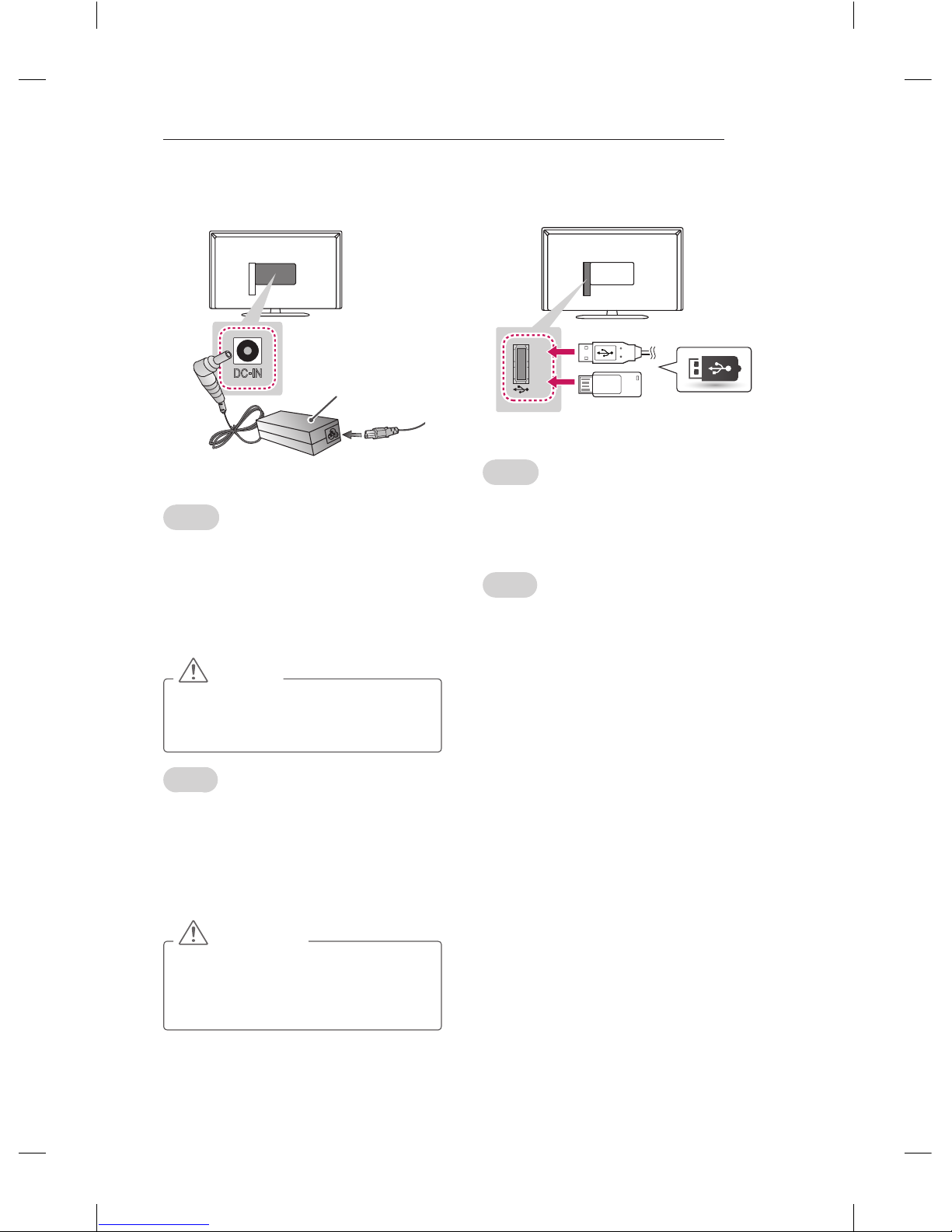
Adapter Connection
English
1 Connect the antenna cable to the antenna
input port on the TV.
2 Connect the DC adapter plug to the power
input jack on the TV.
3 Connect the power cord to the DC adapter rst,
then plug the power cord into the wall power
outlet.
CAUTION
Please be sure to connect the TV to the
DC power adapter before connecting the
TV’s power plug to a wall power outlet.
Italiano
1 Collegare il cavo dell’antenna alla porta di
ingresso dell’antenna sulla TV.
2 Collegare la presa dell’adattatore CC al jack di
ingresso di alimentazione sulla TV.
3 Collegare il cavo di alimentazione all’adattatore
CC, quindi inserire il cavo di alimentazione
nella presa a muro.
ATTENZIONE
Assicurarsi di collegare la TV
all’adattatore di alimentazione CC prima
di collegare la presa di corrente della TV
alla presa a muro.
DC IN
-
DC Adapter
USB Connection
English
Connect a USB storage device such as a USB
flash memory, external hard drive, or a USB
memory card reader to the TV and access the MY
MEDIA menu to use various multimedia files.
Italiano
Collegare una periferica di archiviazione USB, ad
esempio una memoria ash USB, un hard disk
esterno, o un lettore di schede di memoria USB
al televisore e accedere al menu SUPPORTI per
utilizzare diversi le multimediali.
USB IN
(*Not Provided)
USB

A-8 MAKING CONNECTIONS
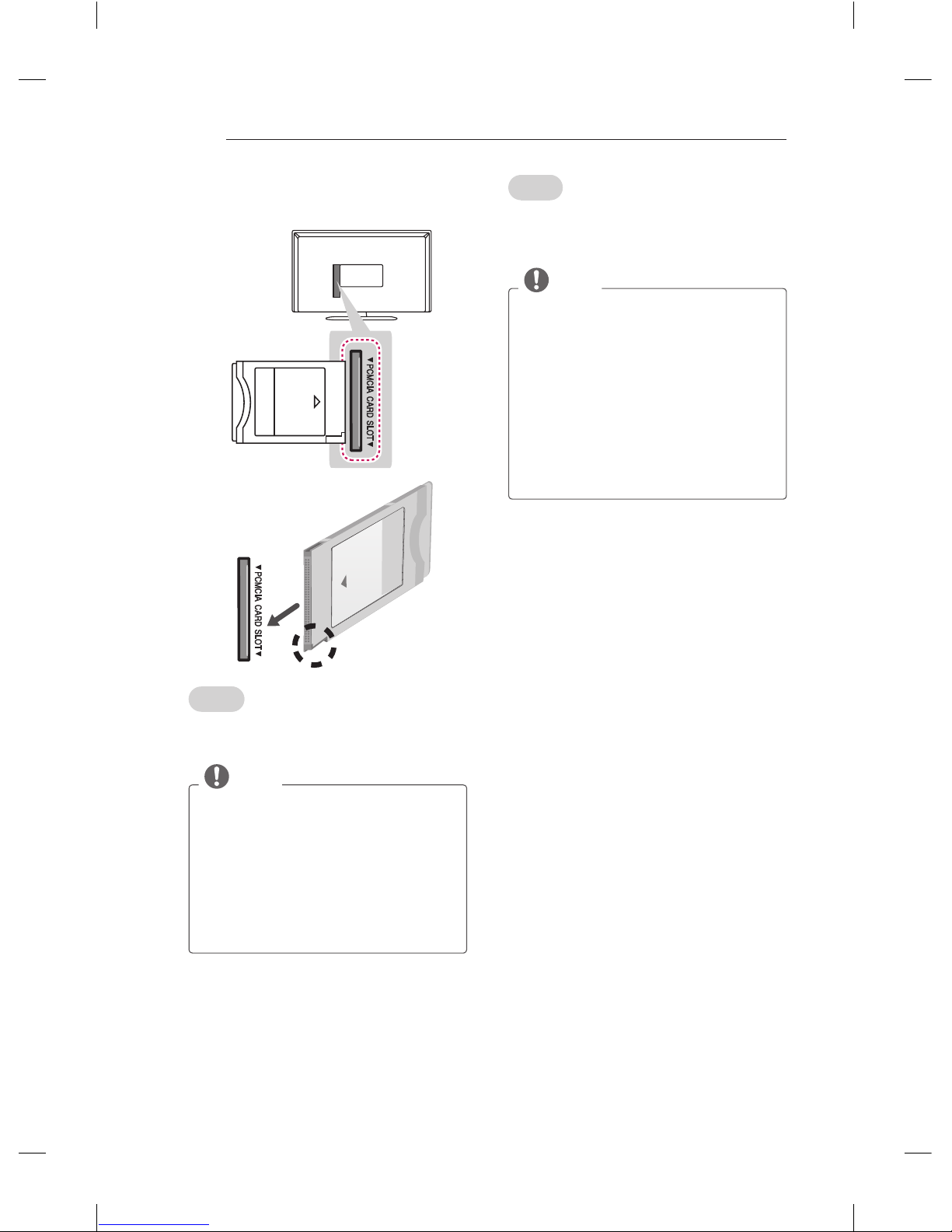
CI module Connection
English
View the encrypted (pay) services in digital TV
mode. This feature is not available in all countries.
NOTE
Check if the CI module is inserted into the
PCMCIA card slot in the right direction. If
the module is not inserted properly, this
can cause damage to the TV and the
PCMCIA card slot.
If the TV does not display any video
and audio when CI+ CAM is connected,
please contact to the Terrestrial/Cable/
Satellite Service Operator.
(*Not Provided)
Italiano
Consente la visione dei servizi codicati (a
pagamento) in modalità TV digitale. Questa
funzione non è disponibile in tutti i paesi.
NOTA
Verificare che il modulo CI sia inserito
nello slot della scheda PCMCIA nel verso
corretto. Se il modulo non è inserito nel
modo corretto, possono verificarsi danni
alla TV e allo slot stesso.
Se il TV non visualizza o riproduce
alcun contenuto video e audio quando
è collegata la funzione CAM (modulo
di accesso condizionale) con CI+
(Interfaccia comune plus), contattare
l’operatore del servizio terrestre/via cavo/
satellitare.

A-9
MAKING CONNECTIONS
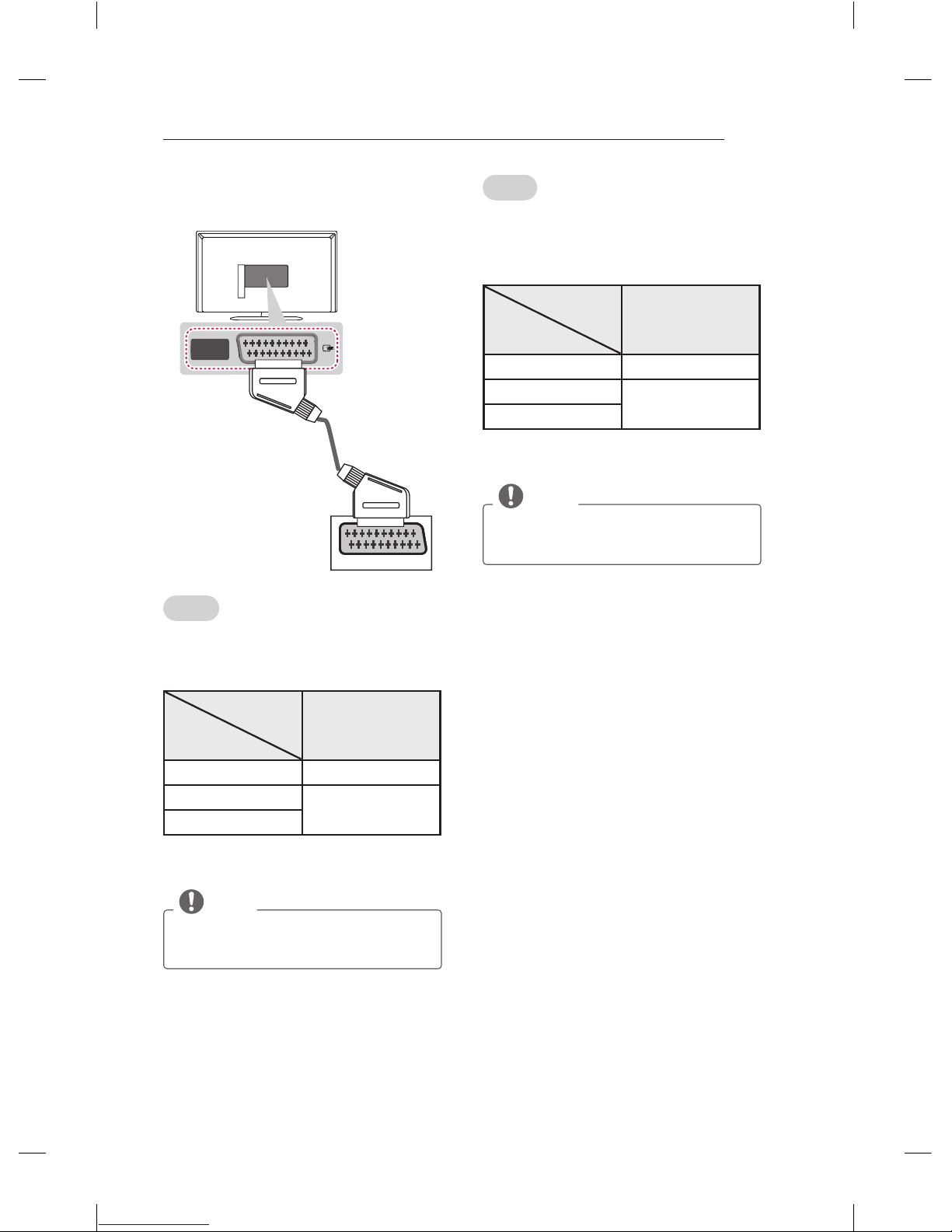
Euro Scart Connection
English
Transmits the video and audio signals from
an external device to the TV set. Connect the
external device and the TV set with the euro scart
cable as shown.
Output
Type
Current
input mode
AV
(TV Out1)
Digital TV Digital TV
Analogue TV, AV Analogue TV
HDMI
1 TV Out : Outputs Analogue TV or Digital TV
signals.
NOTE
Any Euro scart cable used must be signal
shielded.
AV
IN / OUT
AUDIO / VIDEO
(*Not Provided)
Italiano
Consente la trasmissione dei segnali audio e
video da un dispositivo esterno al televisore.
Collegare il dispositivo esterno e il televisore con
il cavo Euro Scart come mostrato nell’illustrazione
di seguito.
Tipo di uscita
Modalità di
ingresso corrente
AV
(Uscita TV1)
TV digitale TV digitale
TV analogica, AV TV analogica
HDMI
1 Uscita TV : uscite segnali TV analogica o TV
digitale.
NOTA
I cavi Euro Scart devono essere
schermati.

A-10 MAKING CONNECTIONS
English
Connect various external devices to the TV
and switch input modes to select an external
device. For more information of external device’s
connection, refer to the manual provided with
each device.
Available external devices are: HD receivers,
DVD players, VCRs, audio systems, USB storage
devices, PC, gaming devices, and other external
devices.
NOTE
The external device connection may differ
from the model.
Connect external devices to the TV
regardless of the order of the TV port.
If you record a TV program on a DVD
recorder or VCR, make sure to connect
the TV signal input cable to the TV
through a DVD recorder or VCR. For
more information of recording, refer to
the manual provided with the connected
device.
Refer to the external equipment’s manual
for operating instructions.
If you connect a gaming device to the TV,
use the cable supplied with the gaming
device.
In PC mode, there may be noise
associated with the resolution, vertical
pattern, contrast or brightness. If noise is
present, change the PC output to another
resolution, change the refresh rate to
another rate or adjust the brightness and
contrast on the PICTURE menu until the
picture is clear.
In PC mode, some resolution settings
may not work properly depending on the
graphics card.
Italiano
Collegare diversi dispositivi esterni al televisore e
modificare la modalità di ingresso per selezionare
un dispositivo esterno. Per ulteriori informazioni
sul collegamento di un dispositivo esterno,
consultare il manuale fornito in dotazione con
ciascun dispositivo.
È possibile collegare i seguenti dispositivi esterni:
ricevitori HD, lettori DVD, VCR, sistemi audio,
periferiche di archiviazione USB, PC, console per
videogiochi e altri dispositivi esterni.
NOTA
Il collegamento del dispositivo esterno
può variare in base al modello.
Collegare i dispositivi esterni al televisore
a prescindere dall’ordine della porta del
televisore.
Se si registra un programma TV su un
registratore DVD o VCR, accertarsi di
collegare il cavo di ingresso del segnale
al televisore attraverso un registratore
DVD o VCR. Per ulteriori informazioni
sulla registrazione, consultare il manuale
fornito in dotazione con il dispositivo
collegato.
Consultare il manuale
dell’apparecchiatura esterna per le
istruzioni operative.
Se si collega una console per videogiochi
alla TV, utilizzare il cavo fornito con il
dispositivo.
In modalità PC, possono essere
presenti interferenze relative alla
risoluzione, schemi verticali, contrasto
o luminosità. In caso di interferenze,
modificare la modalità PC impostando
un’altra risoluzione o modificando la
frequenza di aggiornamento oppure
regolare luminosità e contrasto sul
menu IMMAGINE finché non si ottiene
un’immagine nitida.
A seconda della scheda grafica utilizzata,
alcune impostazioni di risoluzione
potrebbero non essere adatte alla
modalità PC.
Altri manuali per 32LN52 Series
1
Questo manuale è adatto per i seguenti modelli
10
Indice
Lingue:
Altri manuali LG TV LED

LG
LG 65UJ651V Manuale utente

LG
LG 49UH8500 Manuale utente

LG
LG 43UN72 Series Manuale utente

LG
LG 32LV355C Manuale utente

LG
LG 32LQ631CBSA Manuale utente

LG
LG 75US340C0UD Guida rapida

LG
LG LB63 Series Manuale utente

LG
LG 32LW300C-ZA Manuale utente

LG
LG LA62 Series Manuale utente

LG
LG LN406 Series Manuale utente